
第八篇: 服务链路追踪(Spring Cloud Sleuth)
一、简介
1.1、ZipKin简介
1、Zipkin是一个致力于收集分布式服务的时间数据的分布式跟踪系统。
2、Zipkin 主要涉及四个组件:collector(数据采集),storage(数据存储),search(数据查询),UI(数据展示)。
3、github源码地址:https://github.com/openzipkin/zipkin。
4、Zipkin提供了可插拔数据存储方式:In-Memory,MySql, Cassandra, Elasticsearch;本文为了测试方便以In-Memory方式进行存储,个人推荐Elasticsearch,关于更多的存储方式可以参考github。
5、ZipKin运行环境需要Jdk8支持。
微服务架构上通过业务来划分服务的,通过REST调用,对外暴露的一个接口,可能需要很多个服务协同才能完成这个接口功能,如果链路上任何一个服务出现问题或者网络超时,都会形成导致接口调用失败。随着业务的不断扩张,服务之间互相调用会越来越复杂。
随着服务的越来越多,对调用链的分析会越来越复杂。所以有了zipkin,对服务调用链的追踪。
二、构建工程
本文的案例主要有三个工程组成:一个eureka-server-zipkin,它的主要作用使用ZipkinServer 的功能,收集调用数据,并展示;
一个service-hi,对外暴露hi接口;
一个eureka-service-miya,对外暴露miya接口;
这两个service可以相互调用,并且只有调用了,eureka-server-zipkin才会收集数据的,这就是为什么叫服务追踪了。
2.1构建server-zipkin
在spring Cloud为F版本的时候,已经不需要自己构建Zipkin Server了,只需要下载jar即可,下载地址:
https://dl.bintray.com/openzipkin/maven/io/zipkin/java/zipkin-server/
也可以在这里下载:
链接: https://pan.baidu.com/s/1w614Z8gJXHtqLUB6dKWOpQ 密码: 26pf
下载完成jar 包之后,需要运行jar,如下:
java -jar zipkin-server-2.10.1-exec.jar
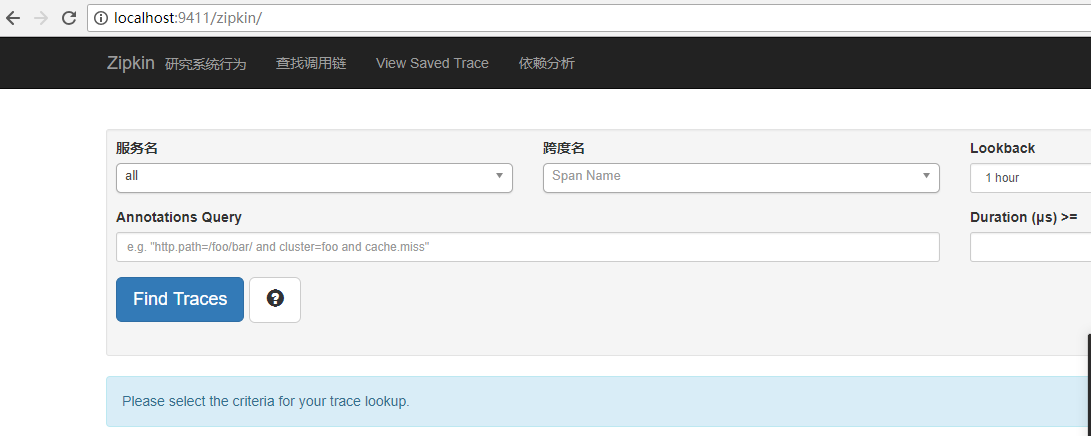
访问浏览器localhost:9411
2.2 创建eureka-service-hi
在其pom引入起步依赖spring-cloud-starter-zipkin,代码如下:
      <dependency>

            <groupId>org.springframework.cloud</groupId>

            <artifactId>spring-cloud-starter-zipkin</artifactId>

        </dependency>
pom.xml如下:
<project xmlns="http://maven.apache.org/POM/4.0.0" xmlns:xsi="http://www.w3.org/2001/XMLSchema-instance" xsi:schemaLocation="http://maven.apache.org/POM/4.0.0 http://maven.apache.org/xsd/maven-4.0.0.xsd">

  <modelVersion>4.0.0</modelVersion>

  <groupId>com.sun</groupId>

  <artifactId>eureka-service-hi</artifactId>

  <version>0.0.1-SNAPSHOT</version>

    <packaging>jar</packaging>

    <name>service-hi</name>

    <description>Demo project for Spring Boot</description>

    <parent>

        <groupId>com.sun</groupId>

        <artifactId>springcloud-parent</artifactId>

        <version>0.0.1-SNAPSHOT</version>

    </parent>

    <dependencies>

        <dependency>

            <groupId>org.springframework.boot</groupId>

            <artifactId>spring-boot-starter-web</artifactId>

        </dependency>

        <dependency>

            <groupId>org.springframework.cloud</groupId>

            <artifactId>spring-cloud-starter-zipkin</artifactId>

        </dependency>

    </dependencies>

</project>
在resources下建application.yml:
server:

  port: 8988

spring:

  zipkin:

    base-url: http://localhost:9411 #设置zipkin服务器地址

  application:

    name: service-hi
可以看到,上面最主要的是设置了zipkin的服务器地址。
下面我们看看启动类怎么写:
package com.sun;

import org.slf4j.Logger;

import org.slf4j.LoggerFactory;

import org.springframework.beans.factory.annotation.Autowired;

import org.springframework.boot.SpringApplication;

import org.springframework.boot.autoconfigure.SpringBootApplication;

import org.springframework.context.annotation.Bean;

import org.springframework.web.bind.annotation.RequestMapping;

import org.springframework.web.bind.annotation.RestController;

import org.springframework.web.client.RestTemplate;

import brave.sampler.Sampler;

@SpringBootApplication

@RestController

public class ServiceHiApplication {

    private static final Logger logger = LoggerFactory.getLogger(ServiceHiApplication.class);

    public static void main(String[] args) {

        SpringApplication.run(ServiceHiApplication.class, args);

    }

    @Autowired

    private RestTemplate restTemplate;

    @Bean

    public RestTemplate getRestTemplate(){

        return new RestTemplate();

    }

    @RequestMapping("/hi")

    public String callHome(){

        logger.info("calling trace service-miya");

        return restTemplate.getForObject("http://localhost:8989/miya", String.class);

    }

    @RequestMapping("/info")

    public String info(){

        logger.info("calling trace service-hi");

        return "i'm service-hi";

    }

    //Brave是一个用于捕捉和报告分布式操作的延迟信息给Zipkin的工具库。

    //Sampler.ALWAYS_SAMPLE返回一个sampler,设置需要采样

    @Bean

    public Sampler defaultSampler() {

        return Sampler.ALWAYS_SAMPLE;

    }

}
启动类里有几个重要方法:
@RequestMapping("/hi")

    public String callHome(){

        logger.info("calling trace service-miya");

        return restTemplate.getForObject("http://localhost:8989/miya", String.class);

    }
这个方法通过RestTemplate调用了http://localhost:8989/miya服务,就此产生了对miya的依赖。
而:
//Brave是一个用于捕捉和报告分布式操作的延迟信息给Zipkin的工具库。

    //Sampler.ALWAYS_SAMPLE返回一个sampler,设置需要采样

    @Bean

    public Sampler defaultSampler() {

        return Sampler.ALWAYS_SAMPLE;

    }
该方法返回一个Sampler对象,可以看下源码,意思是这个类需要进行zipkin的依赖采样。当没有这个方法时,zipkin不进行依赖监控。
2.3 创建eureka-service-miya
和eureka-service-hi服务一样的依赖,这里pom.xml就省略了。
application.yml也基本相同,代码如下:
server:

  port: 8989

spring:

  zipkin:

    base-url: http://localhost:9411

  application:

    name: service-miya
启动类ServiceMiyaApplication代码如下:
package com.sun;

import org.slf4j.Logger;

import org.slf4j.LoggerFactory;

import org.springframework.beans.factory.annotation.Autowired;

import org.springframework.boot.SpringApplication;

import org.springframework.boot.autoconfigure.SpringBootApplication;

import org.springframework.context.annotation.Bean;

import org.springframework.web.bind.annotation.RequestMapping;

import org.springframework.web.bind.annotation.RestController;

import org.springframework.web.client.RestTemplate;

import brave.sampler.Sampler;

@SpringBootApplication

@RestController

public class ServiceMiyaApplication {

    private static final Logger logger = LoggerFactory.getLogger(ServiceMiyaApplication.class);

    public static void main(String[] args) {

        SpringApplication.run(ServiceMiyaApplication.class, args);

    }

    @RequestMapping("/hi")

    public String home(){

        logger.info("hi is being called");

        return "hi i'm miya!";

    }

    @RequestMapping("/miya")

    public String info(){

        logger.info("miya is being called");

        return restTemplate.getForObject("http://localhost:8988/info",String.class);

    }

    @Autowired

    private RestTemplate restTemplate;

    @Bean

    public RestTemplate getRestTemplate(){

        return new RestTemplate();

    }

    @Bean

    public Sampler defaultSampler() {

        return Sampler.ALWAYS_SAMPLE;

    }

}
和eureka-service-hi很相似。
三、启动工程,演示追踪
依次启动上面的工程,打开浏览器访问:http://localhost:9411/,会出现以下界面:
访问:http://localhost:8989/miya,浏览器出现:
i'm service-hi
再打开http://localhost:9411/的界面,点击Dependencies,可以发现服务的依赖关系:
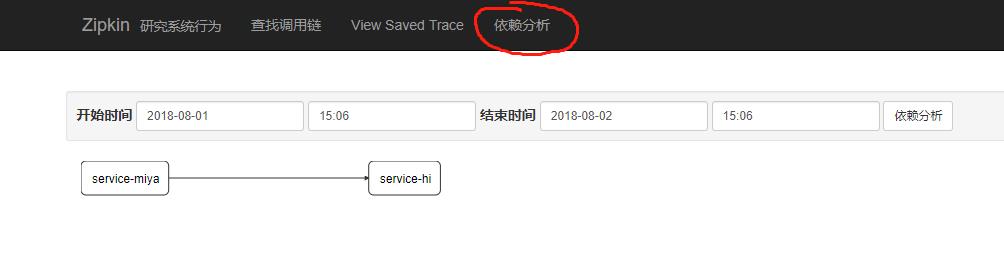
这里可以看到service-miya依赖于service-hi。
i'm service-hi
这时看zipkin http://localhost:9411/的界面,看到:
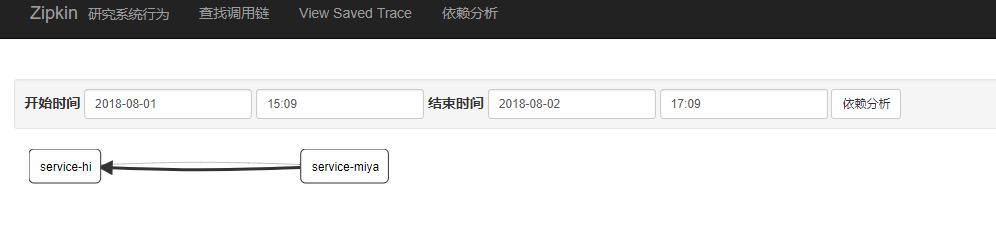
这时service-hi调用了service-miya,service-miya继续调用service-hi,所以产生了一个回路。
本篇文章感谢https://www.jianshu.com/p/7cedbbc3d0fa
还有https://blog.csdn.net/forezp/article/details/81041078
第八篇: 服务链路追踪(Spring Cloud Sleuth)的更多相关文章
- 史上最简单的SpringCloud教程 | 第九篇: 服务链路追踪(Spring Cloud Sleuth)
这篇文章主要讲述服务追踪组件zipkin,Spring Cloud Sleuth集成了zipkin组件. 注意情况: 该案例使用的spring-boot版本1.5.x,没使用2.0.x, 另外本文图3 ...
- 史上最简单的SpringCloud教程 | 第九篇: 服务链路追踪(Spring Cloud Sleuth)(Finchley版本)
转载请标明出处: 原文首发于:>https://www.fangzhipeng.com/springcloud/2018/08/30/sc-f9-sleuth/ 本文出自方志朋的博客 这篇文章主 ...
- SpringCloud教程 | 第九篇: 服务链路追踪(Spring Cloud Sleuth)
版权声明:本文为博主原创文章,欢迎转载,转载请注明作者.原文超链接 ,博主地址:http://blog.csdn.net/forezp. http://blog.csdn.net/forezp/art ...
- 【SpringCloud】 第九篇: 服务链路追踪(Spring Cloud Sleuth)
前言: 必需学会SpringBoot基础知识 简介: spring cloud 为开发人员提供了快速构建分布式系统的一些工具,包括配置管理.服务发现.断路器.路由.微代理.事件总线.全局锁.决策竞选. ...
- 服务链路追踪(Spring Cloud Sleuth)
sleuth:英 [slu:θ] 美 [sluθ] n.足迹,警犬,侦探vi.做侦探 微服务架构是一个分布式架构,它按业务划分服务单元,一个分布式系统往往有很多个服务单元.由于服务单元数量众多,业务的 ...
- spring boot 2.0.3+spring cloud (Finchley)7、服务链路追踪Spring Cloud Sleuth
参考:Spring Cloud(十二):分布式链路跟踪 Sleuth 与 Zipkin[Finchley 版] Spring Cloud Sleuth 是Spring Cloud的一个组件,主要功能是 ...
- SpringCloud(7)服务链路追踪Spring Cloud Sleuth
1.简介 Spring Cloud Sleuth 主要功能就是在分布式系统中提供追踪解决方案,并且兼容支持了 zipkin,你只需要在pom文件中引入相应的依赖即可.本文主要讲述服务追踪组件zipki ...
- springCloud学习-服务链路追踪(Spring Cloud Sleuth)
1.简介 Spring Cloud Sleuth 是 Spring Cloud 的一个组件,它的主要功能是在分布式系统中提供服务链路追踪的解决方案. 常见的链路追踪组件有 Google 的 Dappe ...
- SpringCloud 教程 (二) 服务链路追踪(Spring Cloud Sleuth)
一.简介 Add sleuth to the classpath of a Spring Boot application (see below for Maven and Gradle exampl ...
随机推荐
- 探索未知种族之osg类生物---渲染遍历之Renderer::draw()简介
我们今天进入上一节的遗留问题Renderer::draw()的探究. 1.从_drawQueue中取出其中一个sceneView对象.SceneView是对scene和view类的封装,通过他可以方便 ...
- Chapter_3_JAVA作业
第三章 一 .课前预习 1.1 简述概念,什么是类?什么是对象? 类:在Java中是一种重要的复合数据类型,是组成类的基本要素.(把众多的事物规划,划分成一类是人类在认识个观世界时采用的思维方法). ...
- 31. pt-variable-advisor
pt-variable-advisor h=192.168.100.101,P=3306,u=admin,p=admin mysqladmin var>/root/test/pt-variabl ...
- Python学习心得--变量类型篇
1.Python允许同时为多个变量赋值.例如:a = b = c = 1 2.Python允许多个对象指定多个变量.例如:a1, b1, c1 = 1, 2, "john" 3.使 ...
- PowerDesigner code、name显示设置 及 同时显示办法
菜单->Tool->Model Options->Name Convention->右侧display中选择显示name还是code. 不支持同时显示,但可以选择显示code, ...
- Unity - Photon PUN 本地与网络同步的逻辑分离 (二)
上篇实现了事件系统的设计,这篇就来结合发送RPC消息 并且不用标记 [PunRPC] 先来看下上编的代码 GameEnvent.cs private static Dictionary<Comm ...
- Golang之路【目录】
我正在写一套使用Golang全栈开发的教程,名字暂叫“Golang之路”,希望大家多提建议. 目录如下: Golang之路[第一篇]:Golang简介和入门Golang之路[第二篇]:Golang基础 ...
- java中如何使用break跳出多重循环
java 中已知的三种跳出多重循环的方式: System.out.println("---------java中跳出多重循环的三种方式:---------"); System.ou ...
- SAS 函数
SAS 函数 SAS函数是编程语言的一个组件,可接受参数.执行计算或进行其他操作并返回值.返回值是字符型或数值型的结果,可用于赋值语句或 表达式中.SAS包含很多函数,也可以自定义函数.在BASE S ...
- 组件内守卫beforeRouteEnter和beforeRouteLeave
beforeRouteEnter用法和其他守卫差不多. 有个注意的地方就是beforeRouteEnter不能用this获取组件内收据. 在next()方法内存入vm这个参数,获取组件内数据. bef ...