
Asp.net Web Api开发Help Page配置和扩展
为了方面APP开发人员,服务端的接口都应当提供详尽的API说明。但每次有修改,既要维护代码,又要维护文档,一旦开发进度紧张,很容易导致代码与文档不一致。
Web API有一个Help Page插件,可以很方便的根据代码及注释自动生成相关API说明页面。
Help Page安装步骤及扩展(以VS2015为例):
右键点击WebAPI项目的引用,选择"管理NuGet程序包"
在搜索框中输入 helppage进行搜索,结果如下图:
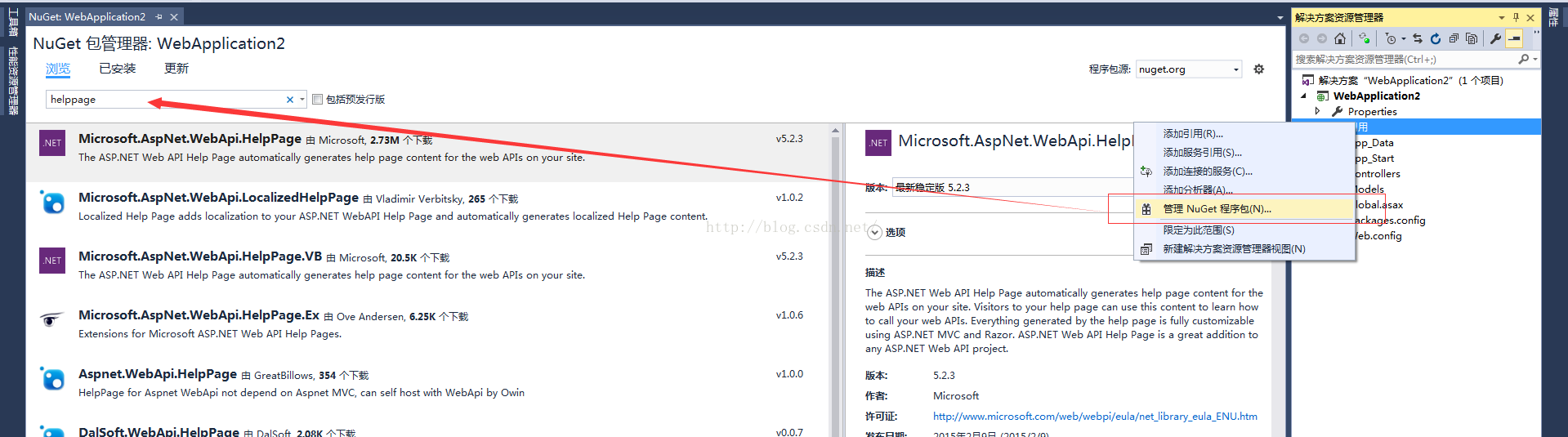
然后在右侧边栏点击安装按钮即可进行插件安装了。
安装完成后,你会发现项目下多了不少文件:
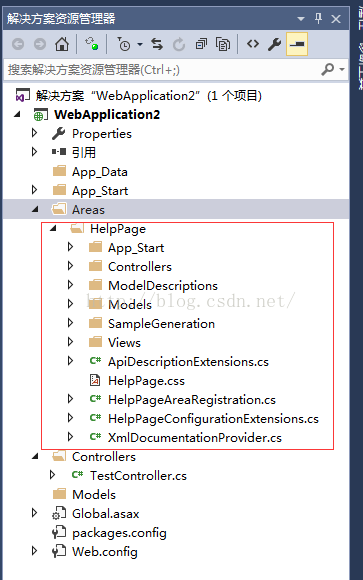
接下来,我们对Areas/HelpPage/App_Start/HelpPageConfig.cs进行改造。
改造前,我们需要先了解下HelpPageConfig.cs,其中的Register方法是用于注册Help Page页面需要展示的API的文档的。默认情况下,该方法只支持单个文档导入,所以我们需要扩展下。
我们创建一个可多文件注册的类:
using System;
using System.Web.Http.Controllers;
using System.Web.Http.Description;
using WebApplication2.Areas.HelpPage.ModelDescriptions;
namespace WebApplication2.Areas.HelpPage.App_Start
{
public class MultiXmlDocumentationProvider : IDocumentationProvider, IModelDocumentationProvider
{
private readonly XmlDocumentationProvider[] Providers;
public MultiXmlDocumentationProvider(params string[] paths)
{
this.Providers = paths.Select(p => new XmlDocumentationProvider(p)).ToArray();
}
public string GetDocumentation(MemberInfo subject)
{
return this.GetFirstMatch(p => p.GetDocumentation(subject));
}
public string GetDocumentation(Type subject)
{
return this.GetFirstMatch(p => p.GetDocumentation(subject));
}
public string GetDocumentation(HttpControllerDescriptor subject)
{
return this.GetFirstMatch(p => p.GetDocumentation(subject));
}
public string GetDocumentation(HttpActionDescriptor subject)
{
return this.GetFirstMatch(p => p.GetDocumentation(subject));
}
public string GetDocumentation(HttpParameterDescriptor subject)
{
return this.GetFirstMatch(p => p.GetDocumentation(subject));
}
public string GetResponseDocumentation(HttpActionDescriptor subject)
{
return this.GetFirstMatch(p => p.GetDocumentation(subject));
}
private string GetFirstMatch(Func<XmlDocumentationProvider, string> expr)
{
return this.Providers
.Select(expr)
.FirstOrDefault(p => !String.IsNullOrWhiteSpace(p));
}
}
}
然后重写HelpPageConfig.cs文件中的代码如下:
using System.Diagnostics.CodeAnalysis;
using WebApplication2.Areas.HelpPage.App_Start;
namespace WebApplication2.Areas.HelpPage
{
public static class HelpPageConfig
{
[SuppressMessage("Microsoft.Globalization", "CA1303:Do not pass literals as localized parameters",
MessageId = "WebApplication2.Areas.HelpPage.TextSample.#ctor(System.String)",
Justification = "End users may choose to merge this string with existing localized resources.")]
[SuppressMessage("Microsoft.Naming", "CA2204:Literals should be spelled correctly",
MessageId = "bsonspec",
Justification = "Part of a URI.")]
public static void Register(HttpConfiguration config)
{
config.SetDocumentationProvider(new MultiXmlDocumentationProvider(
HttpContext.Current.Server.MapPath("~/bin/WebApplication2.XML")));
}
}
}
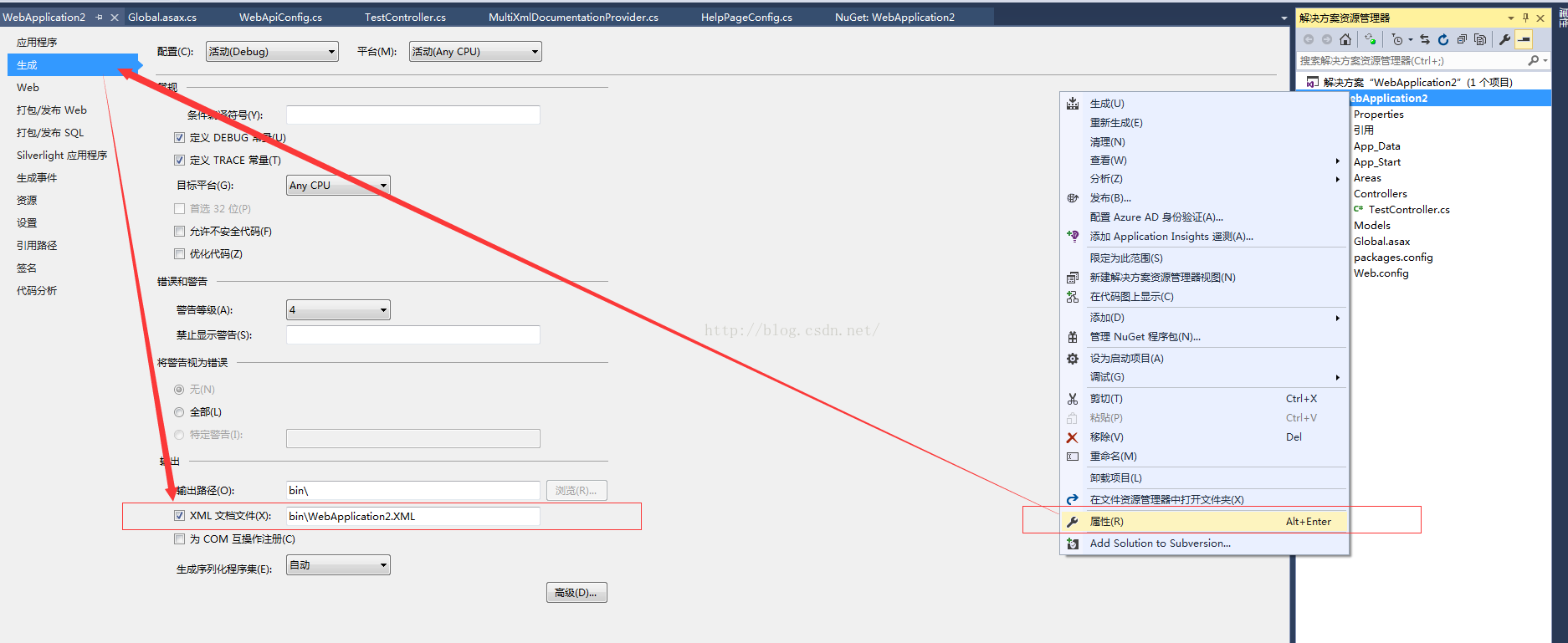
这里要注意下WebApplication2.XML,这个文件是需要我们对相关项目属性进行设置下的,让其生成相关xml文件。
然后我们来创建一个Controller用于测试。
using System.Web.Http;
因为创建的是Web API项目,所以这里还要修改下Global.asax,注册Area。
using System.Web.Http;
{
public class WebApiApplication : System.Web.HttpApplication
{
protected void Application_Start()
{
AreaRegistration.RegisterAllAreas();
GlobalConfiguration.Configure(WebApiConfig.Register);
}
}
}
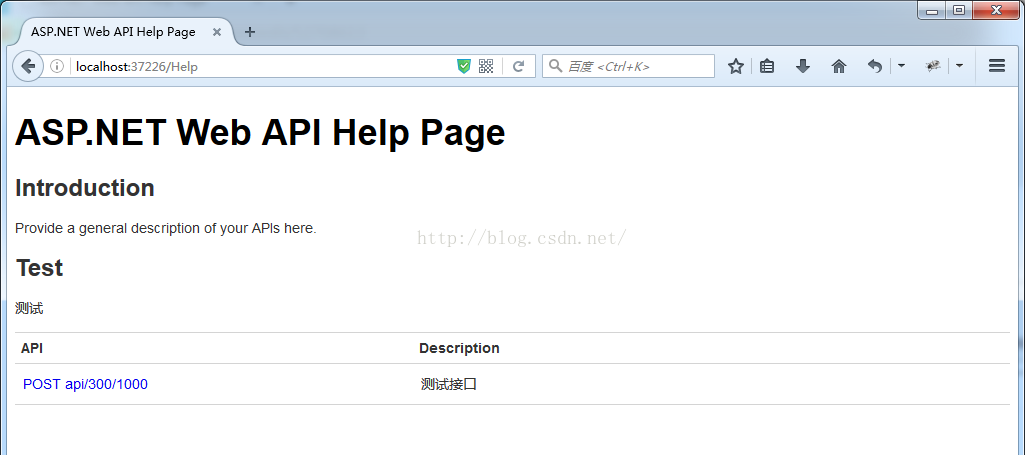
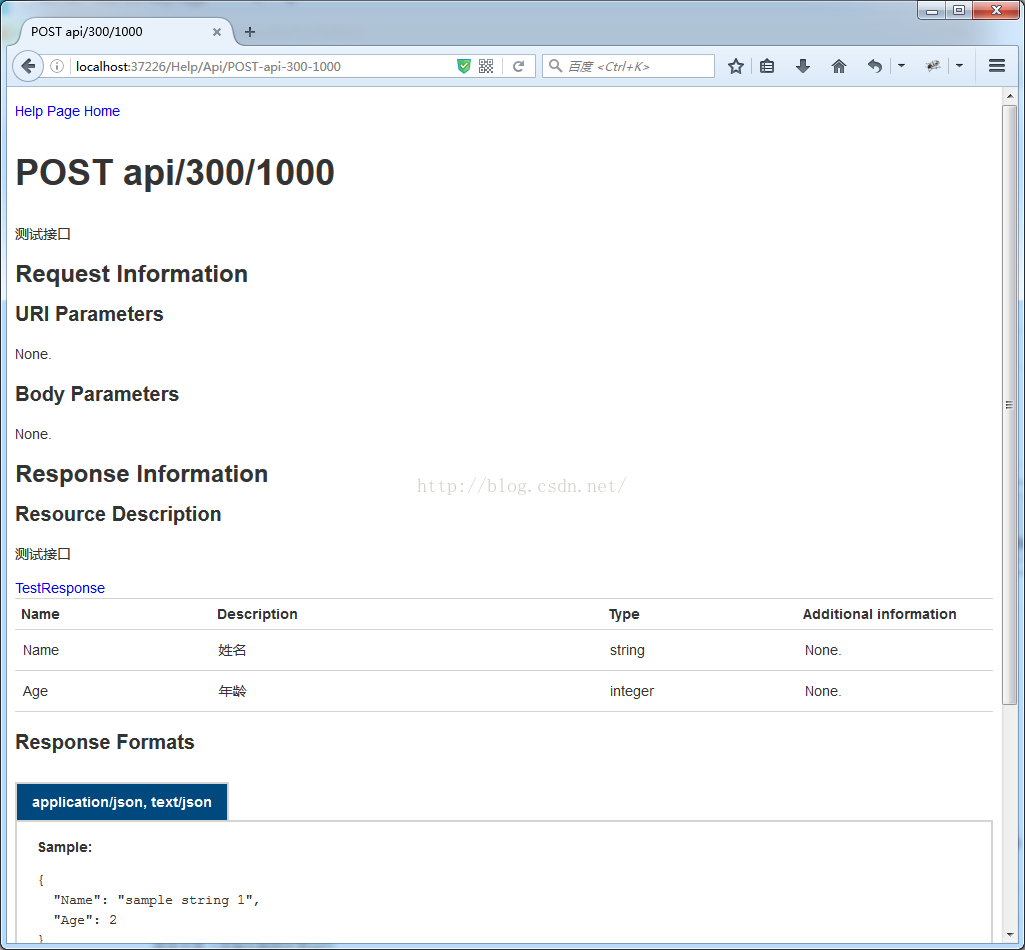
接下来,编译运行调试起来,效果如下图。
Asp.net Web Api开发Help Page配置和扩展的更多相关文章
- Asp.net Web Api开发Help Page 添加对数据模型生成注释的配置和扩展
在使用webapi框架进行接口开发的时候,编写文档会需要与接口同步更新,如果采用手动式的更新的话效率会非常低.webapi框架下提供了一种自动生成文档的help Page页的功能. 但是原始版本的效果 ...
- Asp.Net Web API开发微信后台
如果说用Asp.Net开发微信后台是非主流,那么Asp.Net Web API的微信后台绝对是不走寻常路. 需要说明的是,本人认为Asp.Net Web API在开发很多不同的请求方法的Restful ...
- 水果项目第3集-asp.net web api开发入门
app后台开发,可以用asp.net webservice技术. 也有一种重量级一点的叫WCF,也可以用来做app后台开发. 现在可以用asp.net web api来开发app后台. Asp.net ...
- ASP.NET Web API 2 之路由配置
Ø 简介 ASP.NET Web API 路由配置也是必须掌握的技术点之一,要真正的完全掌握和理解它也是需要一定的过程的.不过,在平常的开发过程中,对它有基本的了解就足够了.因为我们主要关注点并不在 ...
- [目录]ASP.NET web api开发实战
第一章:Restful web service v.s. RPC style web service 第二章:ASP.NET web api v.s. WCF v.s. ASP.NET web ser ...
- 创建 ASP.NET Web API的Help Page
转:创建WEBAPI项目 转:添加测试API中的ASP.NET Web API帮助页面
- Asp.net Web Api开发(第四篇)Help Page配置和扩展
https://blog.csdn.net/sqqyq/article/details/52708613
- asp.net web api 开发时应当注意的事项
Self referencing when returning chain of objects. This can be solved using a design pattern called t ...
- Creating Help Pages for ASP.NET Web API -摘自网络
When you create a web API, it is often useful to create a help page, so that other developers will k ...
随机推荐
- ql语句中left join和inner join中的on与where的区别分析
sql语句中left join和inner join中的on与where的区别分析 关于SQL SERVER的表联接查询INNER JOIN .LEFT JOIN和RIGHT JOIN,经常会用到 ...
- ASPxGridView 选中主表一行数据,从表自动选中(勾选)对应的行
一.图解 下图为效果图,点击 [A表]种的某一行,[B表]会有与之相对于一行会被自动选中并且勾选上: 二.Html 代码 <html xmlns="http://www.w3.org/ ...
- select2 插件编辑时设置默认值
function htDate(selectCustomerId, val) { var customerId = selectCustomerId; var values = val; ajaxJs ...
- 小tips:JS之break,continue和return这三个语句的用法
break语句 break语句会使运行的程序立刻退出包含在最内层的循环或者退出一个switch语句.由于它是用来退出循环或者switch语句,所以只有当它出现在这些语句时,这种形式的break语句才是 ...
- ionic APP二维码插件 地址
二维码插件地址第一个 https://github.com/kyocn/BarcodeScanner git网址 下载网址 https://github.com/kyocn/BarcodeSc ...
- Linux网络编程--socket
1.socket的核心思想是,作为服务器间的进程间通信的最底层的实现,常用的大部分网络协议都是基于socket实现. 2.socket 是如何与最终的低层收发包建立联系的? 3.socket 是如何与 ...
- Vue的href动态拼接绑定
<div id="appp"> <table> <tr v-for="item in sites"> <td> ...
- 填坑:Windows下使用OpenSSL生成自签证书(很简单,一个晚上搞明白的,让后来者少走弯路)
最近在学习中发现openssl 中有个坑,所有的教程都是openssl genrsa -des3 -out private.key 1024,但是产生的证书,npm start 之后就报错如下: er ...
- Jmeter-测试计划,线程组,取样器,逻辑控制器,断言和监听器
一 测试计划: 是使用jmeter测试的起点,是其他测试元件的容器,一个完整的测试计划包括多个线程组,逻辑控制器,取样器,监听器,配置元件 用户定义的变量: 测试计划上可以添加用户定义的变量.一般添加 ...
- 服务端如何获取客户端请求IP地址
服务端获取客户端请求IP地址,常见的包括:x-forwarded-for.client-ip等请求头,以及remote_addr参数. 一.remote_addr.x-forwarded-for.cl ...