
Asp.net Web Api开发Help Page配置和扩展
为了方面APP开发人员,服务端的接口都应当提供详尽的API说明。但每次有修改,既要维护代码,又要维护文档,一旦开发进度紧张,很容易导致代码与文档不一致。
Web API有一个Help Page插件,可以很方便的根据代码及注释自动生成相关API说明页面。
Help Page安装步骤及扩展(以VS2015为例):
右键点击WebAPI项目的引用,选择"管理NuGet程序包"
在搜索框中输入 helppage进行搜索,结果如下图:
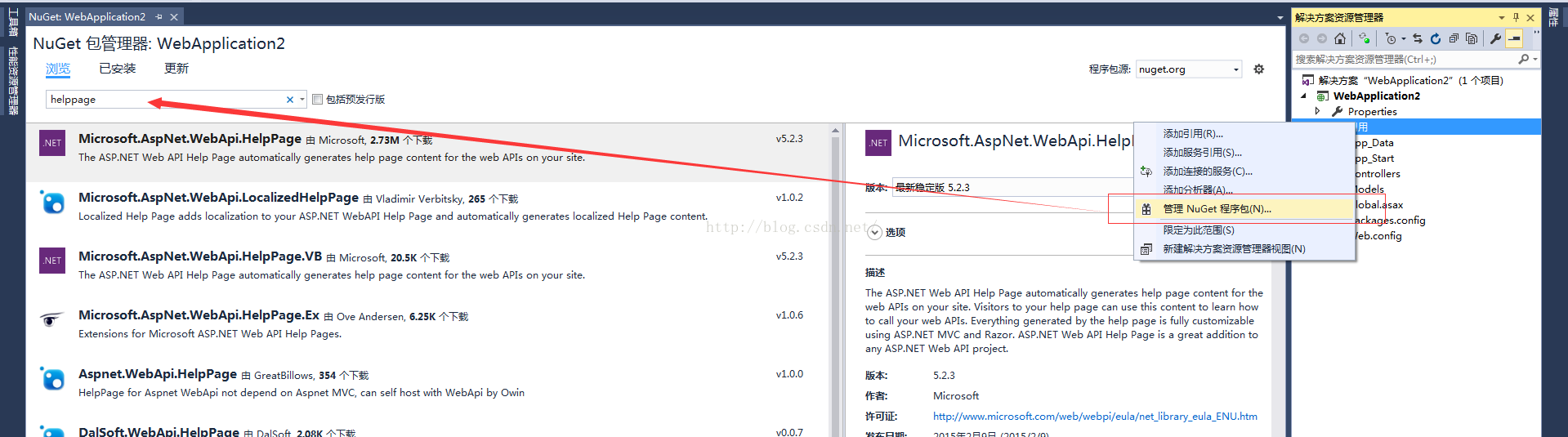
然后在右侧边栏点击安装按钮即可进行插件安装了。
安装完成后,你会发现项目下多了不少文件:
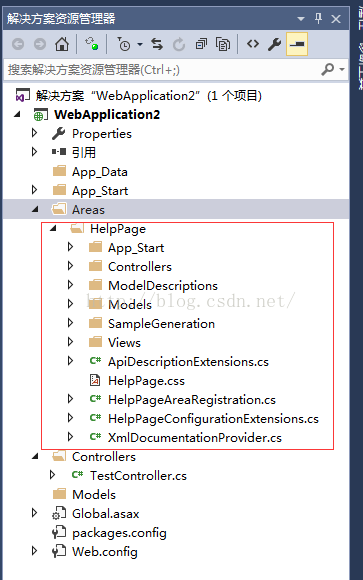
接下来,我们对Areas/HelpPage/App_Start/HelpPageConfig.cs进行改造。
改造前,我们需要先了解下HelpPageConfig.cs,其中的Register方法是用于注册Help Page页面需要展示的API的文档的。默认情况下,该方法只支持单个文档导入,所以我们需要扩展下。
我们创建一个可多文件注册的类:
using System;
using System.Web.Http.Controllers;
using System.Web.Http.Description;
using WebApplication2.Areas.HelpPage.ModelDescriptions;
namespace WebApplication2.Areas.HelpPage.App_Start
{
public class MultiXmlDocumentationProvider : IDocumentationProvider, IModelDocumentationProvider
{
private readonly XmlDocumentationProvider[] Providers;
public MultiXmlDocumentationProvider(params string[] paths)
{
this.Providers = paths.Select(p => new XmlDocumentationProvider(p)).ToArray();
}
public string GetDocumentation(MemberInfo subject)
{
return this.GetFirstMatch(p => p.GetDocumentation(subject));
}
public string GetDocumentation(Type subject)
{
return this.GetFirstMatch(p => p.GetDocumentation(subject));
}
public string GetDocumentation(HttpControllerDescriptor subject)
{
return this.GetFirstMatch(p => p.GetDocumentation(subject));
}
public string GetDocumentation(HttpActionDescriptor subject)
{
return this.GetFirstMatch(p => p.GetDocumentation(subject));
}
public string GetDocumentation(HttpParameterDescriptor subject)
{
return this.GetFirstMatch(p => p.GetDocumentation(subject));
}
public string GetResponseDocumentation(HttpActionDescriptor subject)
{
return this.GetFirstMatch(p => p.GetDocumentation(subject));
}
private string GetFirstMatch(Func<XmlDocumentationProvider, string> expr)
{
return this.Providers
.Select(expr)
.FirstOrDefault(p => !String.IsNullOrWhiteSpace(p));
}
}
}
然后重写HelpPageConfig.cs文件中的代码如下:
using System.Diagnostics.CodeAnalysis;
using WebApplication2.Areas.HelpPage.App_Start;
namespace WebApplication2.Areas.HelpPage
{
public static class HelpPageConfig
{
[SuppressMessage("Microsoft.Globalization", "CA1303:Do not pass literals as localized parameters",
MessageId = "WebApplication2.Areas.HelpPage.TextSample.#ctor(System.String)",
Justification = "End users may choose to merge this string with existing localized resources.")]
[SuppressMessage("Microsoft.Naming", "CA2204:Literals should be spelled correctly",
MessageId = "bsonspec",
Justification = "Part of a URI.")]
public static void Register(HttpConfiguration config)
{
config.SetDocumentationProvider(new MultiXmlDocumentationProvider(
HttpContext.Current.Server.MapPath("~/bin/WebApplication2.XML")));
}
}
}
这里要注意下WebApplication2.XML,这个文件是需要我们对相关项目属性进行设置下的,让其生成相关xml文件。
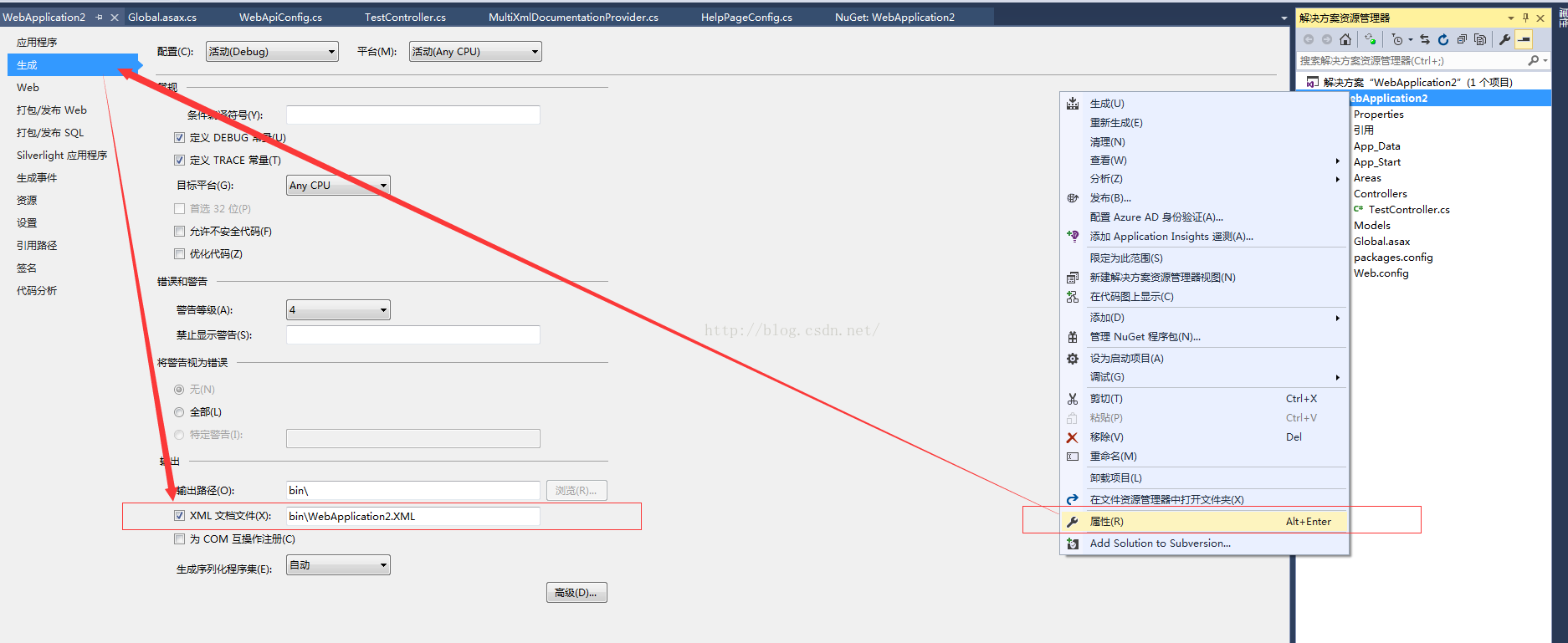
然后我们来创建一个Controller用于测试。
using System.Web.Http;
因为创建的是Web API项目,所以这里还要修改下Global.asax,注册Area。
using System.Web.Http;
{
public class WebApiApplication : System.Web.HttpApplication
{
protected void Application_Start()
{
AreaRegistration.RegisterAllAreas();
GlobalConfiguration.Configure(WebApiConfig.Register);
}
}
}
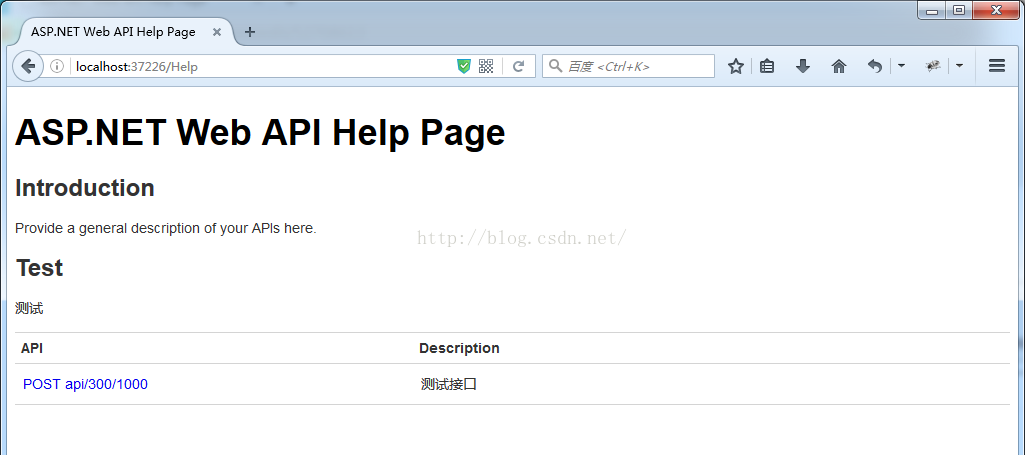
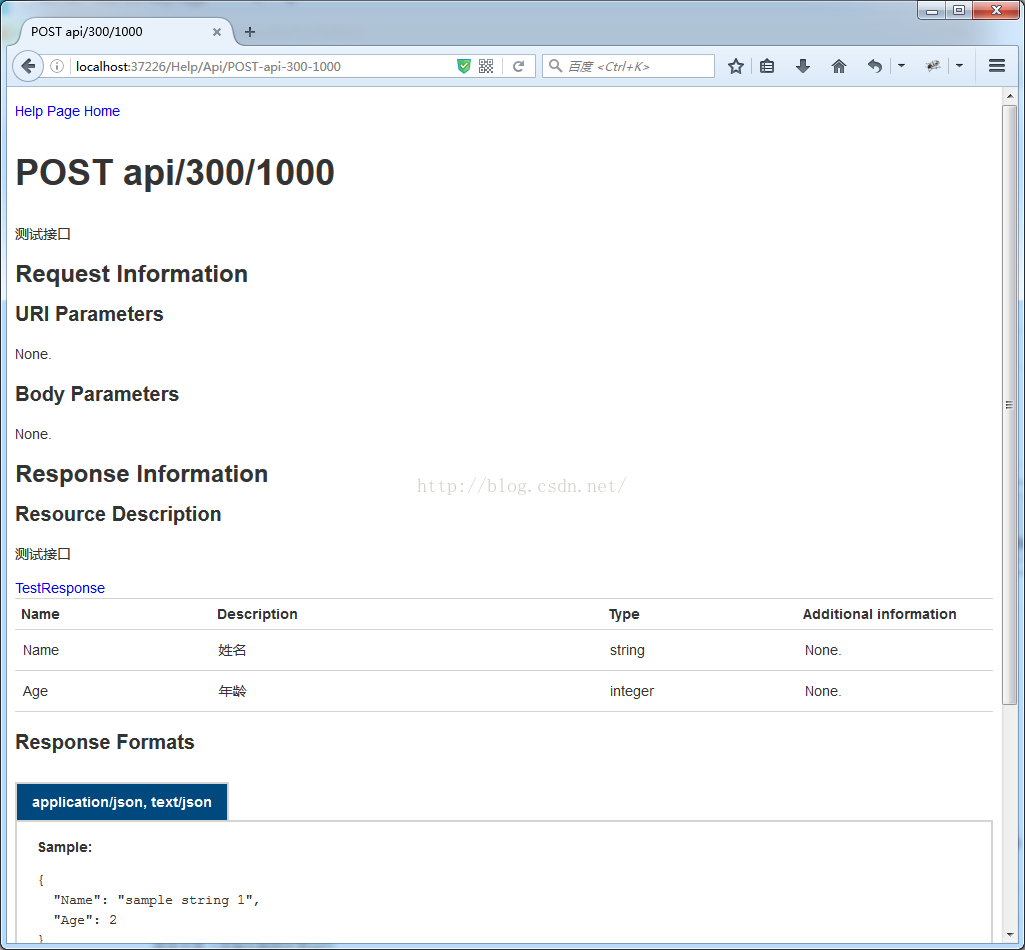
接下来,编译运行调试起来,效果如下图。
Asp.net Web Api开发Help Page配置和扩展的更多相关文章
- Asp.net Web Api开发Help Page 添加对数据模型生成注释的配置和扩展
在使用webapi框架进行接口开发的时候,编写文档会需要与接口同步更新,如果采用手动式的更新的话效率会非常低.webapi框架下提供了一种自动生成文档的help Page页的功能. 但是原始版本的效果 ...
- Asp.Net Web API开发微信后台
如果说用Asp.Net开发微信后台是非主流,那么Asp.Net Web API的微信后台绝对是不走寻常路. 需要说明的是,本人认为Asp.Net Web API在开发很多不同的请求方法的Restful ...
- 水果项目第3集-asp.net web api开发入门
app后台开发,可以用asp.net webservice技术. 也有一种重量级一点的叫WCF,也可以用来做app后台开发. 现在可以用asp.net web api来开发app后台. Asp.net ...
- ASP.NET Web API 2 之路由配置
Ø 简介 ASP.NET Web API 路由配置也是必须掌握的技术点之一,要真正的完全掌握和理解它也是需要一定的过程的.不过,在平常的开发过程中,对它有基本的了解就足够了.因为我们主要关注点并不在 ...
- [目录]ASP.NET web api开发实战
第一章:Restful web service v.s. RPC style web service 第二章:ASP.NET web api v.s. WCF v.s. ASP.NET web ser ...
- 创建 ASP.NET Web API的Help Page
转:创建WEBAPI项目 转:添加测试API中的ASP.NET Web API帮助页面
- Asp.net Web Api开发(第四篇)Help Page配置和扩展
https://blog.csdn.net/sqqyq/article/details/52708613
- asp.net web api 开发时应当注意的事项
Self referencing when returning chain of objects. This can be solved using a design pattern called t ...
- Creating Help Pages for ASP.NET Web API -摘自网络
When you create a web API, it is often useful to create a help page, so that other developers will k ...
随机推荐
- 数据结构——基于java的链表实现(真正理解链表这种数据结构)
原创不易,如需转载,请注明出处https://www.cnblogs.com/baixianlong/p/10759599.html,否则将追究法律责任!!! 一.链表介绍 1.什么是链表? 链表是一 ...
- Hibernate入门(五)---------事务管理
在Hibernate中,可以通过代码来操作管理事务,如通过“Transaction tx = session.beginTransaction()”,开启一个事务,持久化操作后,通过"tx. ...
- mysql基础整理01
在终端或命令行中和数据库软件建立连接 mysql -uroot -p 数据库相关SQL 查看所有数据库 show databases; 创建数据库 create database 数据库名; crea ...
- elementUI vue 页面加载的时候页面出现了黑字 页面优化处理 按钮弹出框文字
elementUI 页面如果需要加载很多东西的时候, 自己定义的按钮或者弹出框dialog的文字就会显示在页面上, 一闪而过, 因此需要优化一下, elementUI 提供的loading有遮罩层, ...
- CSS效果:CSS改变下拉列表select框的默认样式
原理 原理是将浏览器默认的下拉框样式清除,然后应用上自己的,再附一张向右对齐小箭头的图片即可.当然右侧的小箭头可以用伪元素before或者after来实现. select { /*Chrome和Fir ...
- 【代码笔记】Web-JavaScript-JavaScript正则表达式
一,效果图. 二,代码. <!DOCTYPE html> <html> <head> <meta charset="utf-8"> ...
- 关系数据库标准语言SQL——概述
SQL是一种介于关系代数与关系演算之间的结构化查询语言,其功能并不仅仅是查询.SQL是一个通用的.功能极强的关系数据库语言.SQL(Structured Query Language)结构化查询语 ...
- JMeter Dubbo请求插件jmeter-plugin-dubbo.jar
JMeter Dubbo请求插件jmeter-plugin-dubbo.jar by:授客 QQ:1033553122 测试环境 apache-jmeter-3.2 Dubbo 2.6.2 声明 ...
- Android IPC机制(五)用Socket实现跨进程聊天程序
1.Socket简介 Socket也称作“套接字“,是在应用层和传输层之间的一个抽象层,它把TCP/IP层复杂的操作抽象为几个简单的接口供应用层调用以实现进程在网络中通信.它分为流式套接字和数据包套接 ...
- Android ScrollView内部组件设置android:layout_height="fill_parent"无效的解决办法
问题:scrollview内部组件都设置了android:layout_height="fill_parent"却没有效果. 解决办法:设置scrollview的fillViewp ...