
linux下nginx日常操作
一、检查配置文件语法
[root@node2 /]# nginx -tc /usr/local/nginx/conf/nginx.conf

nginx: the configuration file /usr/local/nginx/conf/nginx.conf syntax is ok

nginx: configuration file /usr/local/nginx/conf/nginx.conf test is successful
二、重载配置
[root@node2 /]# nginx -s reload
三、加载连接状态统计模块
编辑nginx.conf文件,加入一个location,加载stub_status模块
创建配置文件目录,将默认配置文件复制到此目录
[root@node2 /]# mkdir /etc/nginx

[root@node2 /]# cp /usr/local/nginx/conf/nginx.conf /etc/nginx
vim /etc/nginx/nginx.conf
在server里加入一个location
        location /stats{

           stub_status;

        }
保存、退出,检查语法
[root@node2 sbin]# nginx -tc /etc/nginx/nginx.conf

nginx: [emerg] open() "/etc/nginx/mime.types" failed (: No such file or directory) in /etc/nginx/nginx.conf:

nginx: configuration file /etc/nginx/nginx.conf test failed
报错,将mime.types文件以及html目录复制到/etc/nginx/下
cp /usr/local/nginx/conf/mime.types /etc/nginx

cp -r /usr/local/nginx/html/ /etc/nginx/
再检查语法
[root@node2 nginx]# nginx -tc /etc/nginx/nginx.conf

nginx: the configuration file /etc/nginx/nginx.conf syntax is ok

nginx: configuration file /etc/nginx/nginx.conf test is successful
重载配置
[root@node2 nginx]# nginx -s reload
浏览器打开http://ip/stats
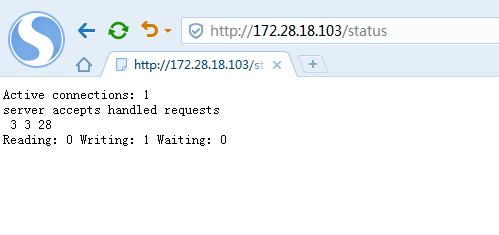
显示以上信息:
Active connections: 1
当前活动连接数:1
server accepts handled requests
3 3 28
分别表示:握手次数、连接次数、请求次数
正常情况下,握手次数和连接次数是相等的,表明没有丢失的连接
Reading: 0 Writing: 1 Waiting: 2
Reading:表示当前状态正在读的连接个数、
Writing:表示当前状态正在写的连接个数
Waiting:表示当前状态空闲的连接个数,当nginx开启了长连接keepalive后,会出现空闲连接
在nginx.conf配置文件中有一个keepalive_timeout参数,用于设置长连接超时时间
keepalive_timeout 65;
四、加载请求限制模块
vim /etc/nginx/nginx.conf
在server之前加上
limit_req_zone $binary_remote_addr zone=req_zone:1m rate=1r/s;
location里加上
        location / {

            root   html;

            index  index.html index.htm;

            limit_req zone=req_zone;

        }
保存,检查语法并重载
[root@node2 nginx]# nginx -tc /etc/nginx/nginx.conf

nginx: the configuration file /etc/nginx/nginx.conf syntax is ok

nginx: configuration file /etc/nginx/nginx.conf test is successful

[root@node2 nginx]# nginx -s reload

[root@node2 nginx]#
压测
[root@node2 logs]# ab -n  -c  http://127.0.0.1/

This is ApacheBench, Version 2.3 <$Revision:  $>

Copyright  Adam Twiss, Zeus Technology Ltd, http://www.zeustech.net/

Licensed to The Apache Software Foundation, http://www.apache.org/

Benchmarking 127.0.0.1 (be patient).....done

Server Software:        nginx/1.14.

Server Hostname:        127.0.0.1

Server Port:

Document Path:          /

Document Length:         bytes

Concurrency Level:

Time taken for tests:   0.002 seconds

Complete requests:

Failed requests:

   (Connect: , Receive: , Length: , Exceptions: )

Write errors:

Non-2xx responses:

Total transferred:       bytes

HTML transferred:        bytes

Requests per second:    4854.37 [#/sec] (mean)

Time per request:       0.206 [ms] (mean)

Time per request:       0.206 [ms] (mean, across all concurrent requests)

Transfer rate:          3519.42 [Kbytes/sec] received
显示只有1次请求正常,其他9次被限制了
添加延迟响应参数
        location / {

            root   html;

            index  index.html index.htm;

            limit_req zone=req_zone burst=;

        }
保存,重载,再次压测
[root@node2 logs]# ab -n  -c  http://127.0.0.1/

This is ApacheBench, Version 2.3 <$Revision:  $>

Copyright  Adam Twiss, Zeus Technology Ltd, http://www.zeustech.net/

Licensed to The Apache Software Foundation, http://www.apache.org/

Benchmarking 127.0.0.1 (be patient).....done

Server Software:        nginx/1.14.

Server Hostname:        127.0.0.1

Server Port:

Document Path:          /

Document Length:         bytes

Concurrency Level:

Time taken for tests:   9.002 seconds

Complete requests:

Failed requests:

Write errors:

Total transferred:       bytes

HTML transferred:        bytes

Requests per second:    1.11 [#/sec] (mean)

Time per request:       900.161 [ms] (mean)

Time per request:       900.161 [ms] (mean, across all concurrent requests)

Transfer rate:          0.92 [Kbytes/sec] received
结果显示,请求全部成功,但是耗时变成了9秒,请求被延迟响应。
linux下nginx日常操作的更多相关文章
- 【转】linux下nginx相关操作
参考文章 <nginx启动,重启,关闭命令> 停止操作 停止操作是通过向nginx进程发送信号(什么是信号请参阅linux文 章)来进行的 步骤1:查询nginx主进程号 ps -ef | ...
- Linux下nginx编译安装教程和编译参数详解
这篇文章主要介绍了Linux下nginx编译安装教程和编译参数详解,需要的朋友可以参考下 一.必要软件准备1.安装pcre 为了支持rewrite功能,我们需要安装pcre 复制代码代码如下: # y ...
- 【转】Linux下nginx配置https协议访问的方法
一.配置nginx支持https协议访问,需要在编译安装nginx的时候添加相应的模块--with-http_ssl_module 查看nginx编译参数:/usr/local/nginx/sbin/ ...
- VMware Linux 下 Nginx
负载 VMware Linux 下 Nginx 安装配置 - nginx.conf 配置 [负载两个 Tomcat] (三) Weiseditor 2014-11-26 23:42 阅读:1 评论 ...
- VMware Linux 下 Nginx 安装配置 - nginx.conf 配置 [负载两个 Tomcat] (三)
首先启动Nginx 1. 相关浏览 两个 Tomcat 配置: VMware Linux 下 Nginx 安装配置 - Tomcat 配置 (二) Nginx 安装配置启动: VMware Linu ...
- VMware Linux 下 Nginx 安装配置 - Tomcat 配置 (二)
准备工作 相关浏览: VMware Linux 下 Nginx 安装配置 (一) 1. 选在 /usr/local/ 下创建 softs 文件夹,通过 ftp 命令 把 apache-tomcat-7 ...
- linux下的shell操作mysql
(1)MySQL的启动 重启了一次服务器后,使用> mysql -u root -p登陆是出现下面的错误: ERROR 2002 (HY000): Can't connect to local ...
- linux下的文本操作之 文本查找——grep
摘要:你有没有这样的应用场景:调试一个程序,出现debug的提示信息,现在你需要定位是哪个文件包含了这个debug信息,也就是说,你需要在一个目录下的多个文件(可能包含子目录)中查找某个字符串的位置: ...
- linux下通过sysfs操作GPIO
linux下通过sysfs操作GPIO 在嵌入式设备中对GPIO的操作是最基本的操作.一般的做法是写一个单独驱动程序,网上大多数的例子都是这样的.其实linux下面有一个通用的GPIO操作接口,那就是 ...
随机推荐
- Javascript神器之webstorm
推荐个编辑器主题下载的一个网站. Color Themes 网址:http://color-themes.com [点这里直接跳转] 但是,只支持几个编辑器. 各种颜色搭配的主题,随你选择!我个 ...
- 批处理for中字符串截取必须先把循环变量代替出来才行!!!
@echo off & setlocal enabledelayedexpansion set ifo=abc,def,ghi,jkl,mnopqrstuvwxyz0123456789 ech ...
- (引用)!Unicode,GBK以及UTF8的联系和区别
在实现单片机显示汉字的操作时,了解到有关汉字编码的相关概念. Unicode是一种字符集,该字符集可以涵盖世界上所有的语言.最常见的字符集是ASC II-0~127(0x00~0x7f).Unicod ...
- PAT 甲级 1035 Password (20 分)
1035 Password (20 分) To prepare for PAT, the judge sometimes has to generate random passwords for th ...
- docker项目ssl 安全证书的种种
一,证书挂着宿主的nginx上 这个很简单,只需要修改宿主nginx的配置文件即可 server { ssl default; server_name www.abc.com; #项目域名 ssl_c ...
- CSS3之动画模块实现云朵漂浮效果
<!DOCTYPE html> <html lang="en"> <head> <meta charset="UTF-8&quo ...
- 2016蓝桥杯"取球博弈"问题
较难,网上有能得出正确结果的代码,但是读了一下,像是拼凑出的结果,逻辑不通,代码和注释不符 参考网上代码写了一版,结构相对清晰,注释比较详细 题目很长: 两个人玩取球的游戏.一共有N个球,每人轮流取球 ...
- 第十二章 Java内存模型与线程
Java内存模型(Java Memory Model,JMM): 主内存与工作内存:Java内存模型主要是定义程序中各个变量的访问规则.Java内存模型规定了所有的变量都存储在主内存(Main Mem ...
- websocket client code html
<!doctype html> <html lang="en"> <head> <meta charset="UTF-8&quo ...
- echarts统计图Y轴(或X轴)文字过长问题解决
echarts 统计图Y轴文字过长 在使用echarts时,出现数值非常大,Y轴又显示不下的情况就需要压缩Y轴数值刻度. 解决方法: yAxis: { type: 'value', axisLabel ...