
Appium之uiautomator定位元素
元素定位方式有多种,Android也有自身独有的定位方式。下面就单独介绍其基于uiautomator定位元素的方法:
基本语法:
driver.find_element_by_android_uiautomator(xx)
1).通过text文本定位语法
new UiSelector().text("text文本")
#text

loc_text = 'new UiSelector().text("图书")'

driver.find_element_by_android_uiautomator(loc_text).click()
2).如果文本比较长,可以用textContains模糊匹配
new UiSelector().textContains("包含text文本")
# textContains

loc_textContains = 'new UiSelector().textContains("图")'

driver.find_element_by_android_uiautomator(loc_textContains).click()
3).同样可以用textStartsWith是以某个文本开头来匹配
new UiSelector().textStartsWith("以text文本开头")
#textStartsWith

loc_textStart = 'new UiSelector().textStartsWith("图")'

driver.find_element_by_android_uiautomator(loc_textStart).click()
4).也可以用正则表达式textMatches匹配
new UiSelector().textMatches("正则表达式")
2.resourceId
与by_id一样
new UiSelector().resourceId("id")

#resourceId

loc_id = 'new UiSelector().resourceId("com.baidu.yuedu:id/webbooktitle")'

driver.find_element_by_android_uiautomator(loc_id).click()
3.className
页面上的class属性一般不唯一,多半用在复数定位时候。此时定位相应下标
new UiSelector().className("className")
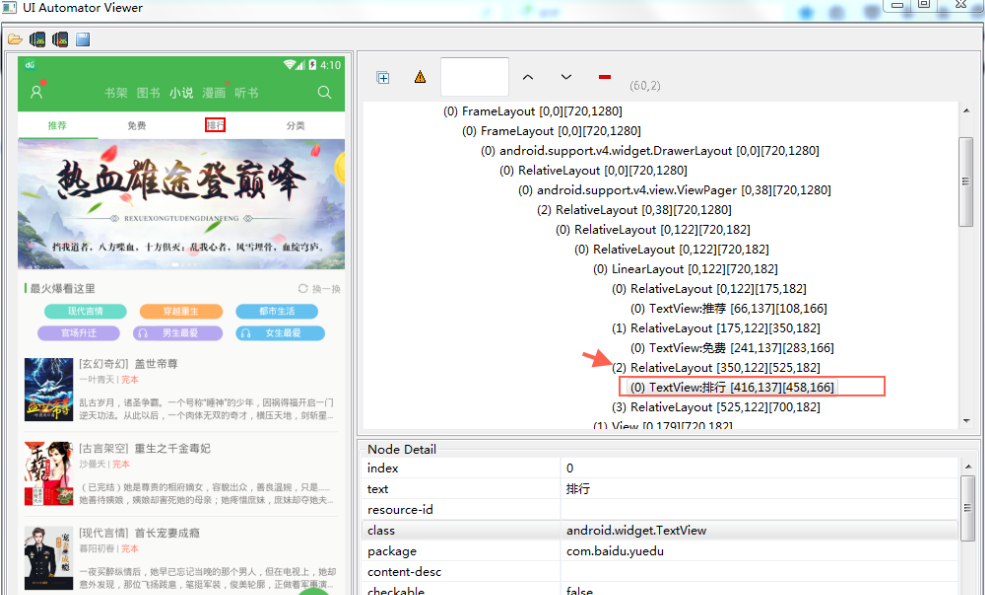
#className复数定位

loc_class = 'new UiSelector().className("android.widget.TextView")'

driver.find_elements_by_android_uiautomator(loc_class)[2].click()
4.description
也是用contenet-des属性定位
new UiSelector().description("contenet-des属性")
5.组合定位
1).id与text属性组合
#id+text

id_text = 'resourceId("com.baidu.yuedu:id/webbooktitle").text("小说")'

driver.find_element_by_android_uiautomator(id_text).click()
2).class与text属性组合
#class+text

class_text = 'className("android.widget.TextView").text("图书")'

driver.find_element_by_android_uiautomator(class_text).click()
6.关系定位
1).父子定位childSelector
有时候不能直接定位某个元素,但是它的父元素很好定位,这时候就先定位父元素,通过父元素找儿子
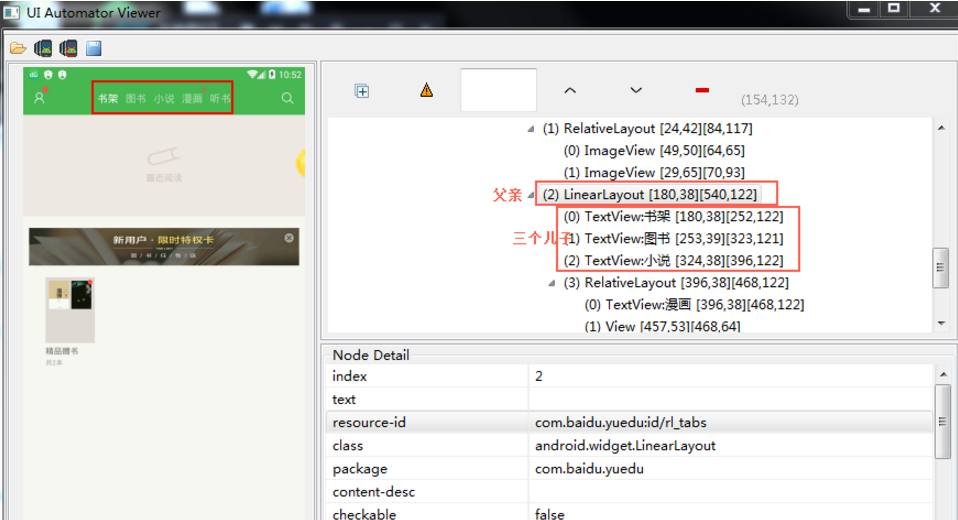
如上定位书架:
#父子关系childSelector

son = 'resourceId("com.baidu.yuedu:id/rl_tabs").childSelector(text("小说"))'

driver.find_element_by_android_uiautomator(son).click()
2).兄弟定位fromParent
有时候父元素不好定位,但是跟他相邻的兄弟元素很好定位,这时候就可以通过兄弟元素,找到同一父级元素下的子元素
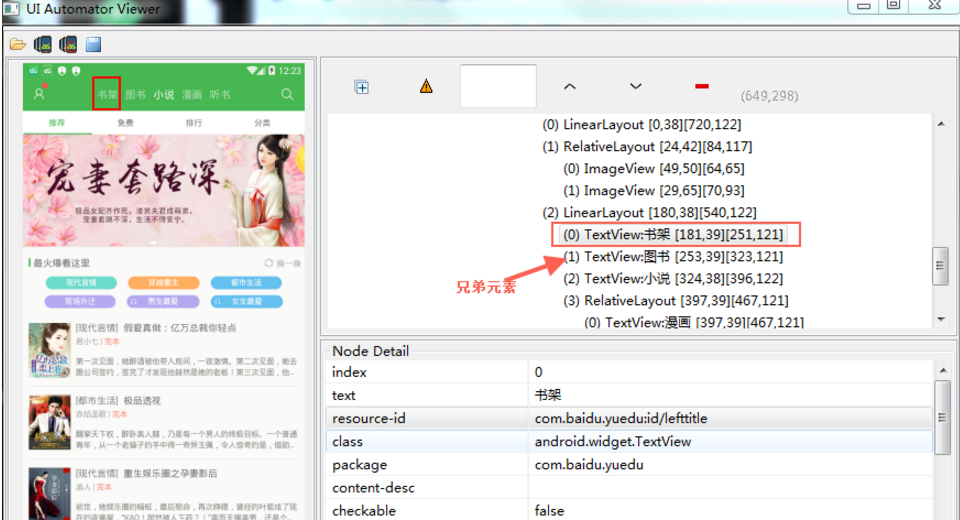
如上定位书架:
#兄弟关系fromParent

brother = 'resourceId("com.baidu.yuedu:id/lefttitle").fromParent(text("图书"))'

driver.find_element_by_android_uiautomator(brother).click()
Appium之uiautomator定位元素的更多相关文章
- appium 使用findElementByAndroidUIAutomator 定位元素示例
appium 使用findElementByAndroidUIAutomator 定位元素示例 import io.appium.java_client.remote.MobileCapability ...
- Appium+Python3+iOS定位元素
前言: 最近在做IOS自动化测试,IOS的Appium环境都配置OK,执行起来真的慢,慢到怀疑人生,那么今天就来总结一下IOS定位方式和各个定位方式的速度排序. 据我观察,按查找元素的顺序速度,从快到 ...
- Appium 使用android_uiautomator定位元素时报错: The requested resource could not be found, or a request was received using an HTTP method that is not supported by the mapped resource
使用 android_uiautomator 定位元素时(现在用的还不太熟,对于这个方法还需要加深了解)报错: 报错信息:The requested resource could not be fou ...
- 【appium】根据UIAutomator定位元素
text属性的方法 driver.find_element_by_android_uiautomator('new UiSelector().text("Custom View") ...
- 【appium】根据UIAutomator定位元素等等资料
https://www.cnblogs.com/paulwinflo/p/4742529.html http://www.cnblogs.com/meitian/p/6103391.html http ...
- Appium之xpath定位元素
原文:http://www.cnblogs.com/cnkemi/p/9180525.html appium也是以webdriver为基的,对于元素的定位也基本一致,只是增加一些更适合移动平台的独特方 ...
- uiautomator定位元素
- Python+Appium自动化测试(9)-自动选择USB用于传输文件(不依赖appium对手机页面元素进行定位)
一,问题 app自动化测试使用Android真机连接电脑时,通常会遇到两种情况: 1.测试机连接电脑会弹窗提示USB选项,选择USB用于"传输文件",有些手机不支持设置默认USB选 ...
- Appium脚本(4) 使用uiautomator方法定位元素
from app.find_element.capability import driver from time import sleep # 使用uiautomator方法定位元素 accunt_i ...
随机推荐
- 中兴 F412 超级帐号telecomadmin破解(适用2015版h啊RowCount="0") TEWA-300AI EPON TEWA-500AI EPON破解
1.telnet 192.168.1.1 root/Zte521 有些密码也是root 2.输入sendcmd 1 DB p UserInfo 老本大多数教程会返回超级管理员帐号密码: < ...
- emacs配置emacs-clang-complete-async
debian下需要安装apt安装下clang和llvm sudo apt-get install llvm-dev sudo apt-get install libclang-dev 网上抄来一个大神 ...
- 彻底解密C++宽字符(一)
彻底解密C++宽字符(一) 转:http://club.topsage.com/thread-2227977-1-1.html 1.从char到wchar_t “这个问题比你想象中复杂” 从字符到整数 ...
- python re示例
#!/usr/bin/env python # encoding: utf-8 # Date: 2018/5/25import re s = '124311200111155214'ss = re.s ...
- django2.0设置默认访问路由
搭建完毕后,打开域名,直接来个报错,如果没有访问的地址,是不合适的 在urls.py中定义,默认访问的路由 from django.contrib import admin from django.u ...
- 好记性不如烂笔头-linux学习笔记6keepalived实现主备操作
Keepalived的作用是检测服务器的状态,如果有一台web服务器宕机,或工作出现故障,Keepalived将检测到,并将有故障的服务器从系统中剔除,同时使用其他服务器代替该服务器的工作,当服务器工 ...
- 单片机(TTL)与电脑RS232接口
2010年11月28日 21:38 1.先介绍电脑上与单片机进行通讯的接口的名称 (1)一般是用电脑串口来进行通讯的,平常大家说的电脑的串口是指台式电脑主机后面的九针接口,如下图 这个接口有个专业的 ...
- 2.ehcache.xml简介
转自:https://www.cnblogs.com/crazylqy/p/4238148.html ehcache.xml文件是用来定义Ehcache的配置信息的,更准确的来说它是定义CacheMa ...
- 2 数据库开发--MySQL下载(windows)
Windows:(mysql) 操作: 0.下载安装mysql www.mysql.org downloads->进入社区community community 5.7.21 下载5.6 Mic ...
- javascript常用验证大全
1. 长度限制 <script> function test() { if(document.a.b.value.length>50) { alert("不能超过50个字符 ...