
Javascript调试利器console的使用
一、Console API
Console.assert()
判断第一个参数是否为真,false的话抛出异常并且在console输出相应信息。
Console.count()
以参数为标识记录调用的次数,调用时在console打印标识以及调用次数。
Console.debug()
console.log方法的别称,使用方法可以参考Console.log()
Console.dir()
打印一条以三角形符号开头的语句,可以点击三角展开查看对象的属性。
Console.error()
打印一条错误信息,使用方法可以参考 string substitution。
Console._exception()
error方法的别称,使用方法参考Console.error()
Console.group()
打印树状结构,配合groupCollapsed以及groupEnd方法;
Console.groupCollapsed()
使用方法和group相同,不同的是groupCollapsed打印出来的内容默认是折叠的。
Console.groupEnd()
结束当前Tree
Console.info()
打印以感叹号字符开始的信息,使用方法和log相同
Console.log()
打印字符串,使用方法比较类似C的printf格式输出
Console.profile()
可以以第一个参数为标识,开始javascript执行过程的数据收集。和chrome控制台选项开Profiles比较类似,具体可参考chrome profiles
Console.profileEnd()
配合profile方法,作为数据收集的结束。
Console.table()
将数据打印成表格。Console.table [en-US]
Console.time()
计时器,接受一个参数作为标识。
Console.timeEnd()
接受一个参数作为标识,结束特定的计时器。
Console.trace()
打印stack trace.
Console.warn()
打印一个警告信息,使用方法可以参考 string substitution。
二、用法
1、Console.log
旧版兼容
if(!window.console){ window.console = {log: function(){} }; }
输出对象
var someObject = { str: "Some text", id: 5 };

console.log(someObject);

//Object {str: "Some text", id: 5}
格式化
%s 格式string

%d or %i	格式int

%f	格式float

%o	格式Object对象

%O	格式object对象

%c	格式css
输出对象
console.log("%o",document.body);

console.log("%O",document.body);

console.log("%c",'padding:77px 219px; background:url(http://www.erongtu.com/application/uploads/ask/2015-10-20/5625a690f0ddd.jpg) no-repeat;line-height:166px;height:166px;');

console.log("%d",5+5);

console.log("%f",Math.PI);

console.log("%s","This is a good idea");

console.log("%cCss Style","text-shadow:1px 1px 1px rgba(0,0,0,2);font-size:40px");
Google chrome 46.0.2490.71 m 上图片出不来

Firefox 41.0.2 下测试
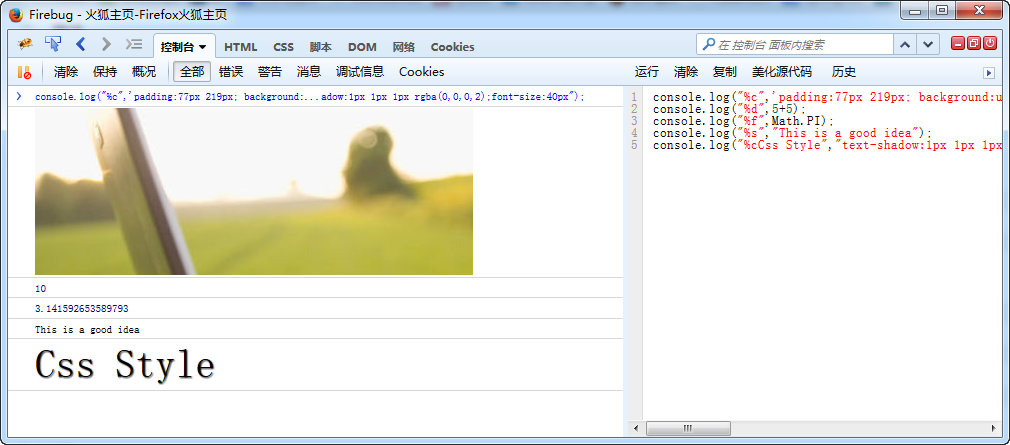
不过网上有一个有趣的东西 console.image,chrome自带的有扩展 https://github.com/jffry/console.image-chrome-extension
console.image("http://i.imgur.com/hv6pwkb.png");

console.image("http://i.imgur.com/hv6pwkb.png");

console.image("http://i.imgur.com/hv6pwkb.png");

console.image("http://i.imgur.com/hv6pwkb.png");
源代码地址:https://github.com/adriancooney/console.image
2、console.info/console.log
var car = "Dodge Charger";

var someObject = {str:"Some text", id:5};

console.info("My first car was a", car, ". The object is: ", someObject);

for (var i=0; i<5; i++) {

  console.log("Hello, %s. You've called me %d times.", "Bob", i+1);

}

console.log("I want to print a number:%d","string")

3、console.group/console.warn/console.time/console.debug
console.log("This is the outer level");

console.group();

console.log("Level 2");

console.group();

console.log("Level 3");

console.warn("More of level 3");

console.groupEnd();

console.log("Back to level 2");

console.groupEnd();

console.debug("Back to the outer level");

console.time("answer time");

alert("Click to continue");

console.timeEnd("answer time");

4、console.trace 在页面console文档中查看堆栈跟踪的详细介绍和示例.这个比较好用
foo();

function foo() {

  function bar() {

    console.trace();

  }

  bar();

}

5、console.assert/console.count/console.dirxml/console.dir/console.error
var list = document.querySelectorAll('div.rtmarg');

console.assert(list[0].childNodes.length > 10 , "Oops,this is small");

function login(user) {

	console.count("Login called for user '" +  user + "'");

}

login("join");

login("join");

login("join");

login("chen");

console.dir(document.body);

function connectToServer() {

	var errorCode = 1;

	if (errorCode) {

		console.error("Error: %s (%i)", "Server is  not responding", 500);

	}

}

connectToServer();

var list = document.querySelectorAll("div.rtmarg");

console.dirxml(list[0]);

6、Other Command Line API
inspect(document.body.firstChild);

getEventListeners(document);

var player1 = {    "name": "Ted",    "level": 42}

keys(player1);

function sum(x, y) {    return x + y;}

monitor(sum);

monitorEvents(window, "resize");

7、debugger 非常好用的一个工具
brightness  = function() {

	debugger;

	var r = Math.floor(this.red*255);

	var g = Math.floor(this.green*255);

	var b = Math.floor(this.blue*255);

	return (r * 77 + g * 150 + b * 29) >> 8;

}

brightness();

调试的时候还可以加断点什么的……
8、jquery相关 firequery
$.fn.log = function() {

    if (window.console && console.log) {

        console.log(this);

    }

    return this;

}

$('foo.bar').find(':baz').log().hide();
这样就可以 easily check inside jQuery chains.

四、相关资源
Firefox
(you can also now use Firefox's built in developer tools Ctrl+Shift+J (Tools > Web Developer > Error Console), but Firebug is much better; use Firebug)
Safari and Chrome
Basically the same.
https://developer.chrome.com/devtools/index
https://developer.apple.com/technologies/safari/developer-tools.html
Internet Explorer
Don't forget you can use compatibility modes to debug IE7 and IE8 in IE9 or IE10
http://msdn.microsoft.com/en-us/library/ie/gg589507(v=vs.85).aspx
http://msdn.microsoft.com/en-us/library/dd565628(v=vs.85).aspx
If you must access the console in IE6 for IE7 use the Firebug Lite bookmarklet
http://getfirebug.com/firebuglite/ look for stable bookmarklet
http://en.wikipedia.org/wiki/Bookmarklet
Opera
http://www.opera.com/dragonfly/
iOS
Works for all iPhones, iPod touch and iPads.
Now with iOS 6 you can view the console through Safari in OS X if you plug in your device. Or you can do so with the emulator, simply open a Safari browser window and go to the "Develop" tab. There you will find options to get the Safari inspector to communicate with your device.
Windows Phone, Android
Both of these have no console built in and no bookmarklet ability. So we use http://jsconsole.com/type :listen and it will give you a script tag to place in your HTML. From then on you can view your console inside the jsconsole website.
iOS and Android
You can also use http://html.adobe.com/edge/inspect/ to access web inspector tools and the console on any device using their convenient browser plugin.
Older browser problems
Lastly older browsers (thanks again Microsoft) will crash if you use console.log in your code and not have the developer tools open at the same time. Luckily its an easy fix. Simple use the below code snippet at the top of your code and good old IE should leave you alone:
if(!window.console){ window.console = {log: function(){} }; }This checks to see if the console is present, and if not it sets it to an object with a blank function calledlog. This way window.console and window.console.log is never truly undefined.
http://stackoverflow.com/questions/4539253/what-is-console-log
https://developer.chrome.com/devtools/docs/console-api#consolelogobject-object
https://developers.google.com/chrome-developer-tools/docs/console-api
http://getfirebug.com/wiki/index.php/Console_API
https://developer.chrome.com/devtools/docs/console-api
https://developer.apple.com/library/safari/documentation/AppleApplications/Conceptual/Safari_Developer_Guide/Console/Console.html
https://developer.mozilla.org/zh-CN/docs/Web/API/Console
Javascript调试利器console的使用的更多相关文章
- Javascript 调试利器 Firebug使用详解
Javascript 调试利器 Firebug使用详解 有时候,为了更清楚方便的查看输出信息,我们可能需要将一些调试信息进行分组输出,那么可以使用console.group来对信息进行分组,在组信息输 ...
- javascript 调试 使用console.table()
或许你已经习惯了console.log()来调试js,非常使用,但是今天微博看到console.table()调试javascript,和console.log()类似,主要区别在于: 主要用来输出对 ...
- JavaScript调试中Console命令
JS调试中,用console.log 感觉比 alert 好用,不用弹出窗口,还要关闭.除了console.log()其他命令没怎么用过,先在这里记一下,用到时在看看 一.显示信息的命令 consol ...
- Javascript的调试利器:Firebug使用详解
转载自:http://blog.csdn.net/tianxiaode/archive/2007/09/02/1769152.aspx 一直在用firebug,可是没有这么精通,今天看到本文章觉得 ...
- JavaScript调试技巧之console.log()详解
JavaScript调试技巧之console.log()详解 对于JavaScript程序的调试,相比于alert(),使用console.log()是一种更好的方式,原因在于:alert()函数会阻 ...
- 9 个让 JavaScript 调试更简单的 Console 命令
一.显示信息的命令 <!DOCTYPE html> <html> <head> <title>常用console命令</title> < ...
- js_调试_01_14 个你可能不知道的 JavaScript 调试技巧
更快更高效地调试你的 JavaScript 了解你的工具在完成任务时有很重要的意义. 尽管 JavaScript 是出了名的难以调试,但是如果你掌握了一些小技巧,错误和 bug 解决起来就会快多了. ...
- 手机网页调试利器: Chrome
新开发的网页需要在手机或是模拟机上运行测试, 可以借助 Chrome提供的手机网页预览程序进行简单调试.查看 制作的网页是否能够适合各种手机型号使用. 下面所以下如何使用Chrome调试多类型手机网页 ...
- 火狐的调试利器-----Firebug
什么是Firebug 从事了数年的Web开发工作,越来越觉得现在对WEB开发有了更高的要求.要写出漂亮的HTML代码:要编写精致的CSS样式表展示每个页面模块:要调试javascript给页面增加一些 ...
随机推荐
- Linux中如何查看文件夹的大小
直接查看当前文件夹的大小: du –sh 只看文件夹的名字里包含某字符串的子文件夹的大小: du –h –d 1 | grep "BACKEND" 我的linux系统被阉割的比较厉 ...
- \r\n 如何转换成utf-8格式的,在jsp页面中正常显示换行
数据库中存的换行是\r\n,读取到UTF-8编码的JSP 页面上以后,没有换行 在jsp页面显示之前,要进行一下字符转换,将所有\r\n转换成<br>,如下: String result ...
- 微信小程序表单校验WxValidate.js使用
WxValidate插件是参考 jQuery Validate 封装的,为小程序表单提供了一套常用的验证规则,包括手机号码.电子邮件验证等等,同时提供了添加自定义校验方法,让表单验证变得更简单. 首先 ...
- Android -- 屏幕亮度
获取屏幕亮度 int getScreenBrightness(Activity activity) { int value = 0; ContentResolver cr = activity.get ...
- Java-JUC(十一):线程8锁
题目: 判断以下8种情况,输出的内容 题目一:一个Number实例对象number,两个非静态同步方法getOne,getTwo,两个线程打印输出(一个线程调用number.getOne,另外一个线程 ...
- How to Build a Search Page with Elasticsearch and .NET
Although SQL Server's Full-Text search is good for searching text that is within a database, there a ...
- ElasticSearch无法启动
安装了ElasticSearch5.5.1后,每次启动服务的时候,都是启动了一下就自动停止了.查看了一下EventViewer, 错误信息如下: Application: elasticsearch. ...
- 如何用Client OM获取页面上一个Content web part的内容
[解决方法] According to Wictor Wilén, The Client Object Model is fairly limited when it comes to working ...
- 开源的DirectUI界面库
1. duilib简介 duilib是一个开源的DirectUI界面库,简洁但是功能强大.而且还是BSD的license,所以即便是在商业上,大家也可以安心使用.现在大家可以从这个网站获取到他们所有的 ...
- Slitaz 中文定制手册
源: http://www.simplemind.info/technolife/opensource/slitaz-cn.html 有关 Slitaz 的一些网站 slitaz的网站:http:// ...