
Android井字游戏(一)首页制作
创建一个新程序:
应用名: Tic Tac Toe

公司域名: example.org

尺寸: Phone and Tablet

最低SDK: API16: Android 4.1

添加活动: Empty Activity

活动名: MainActivity

布局名: activity_main

标题: UT3
1 使用XML进行设计
1.1创建主屏幕——编辑activity_main.xml
<?xml version="1.0" encoding="utf-8"?>

<FrameLayout xmlns:android="http://schemas.android.com/apk/res/android"

    xmlns:tools="http://schemas.android.com/tools"

    android:layout_width="match_parent"

    android:layout_height="match_parent"

    android:clipChildren="false"

    tools:context=".TicTacToeActivity">

    <fragment

        android:id="@+id/main_fragment"

        class="org.example.tictactoe.MainFragment"

        android:layout_width="wrap_content"

        android:layout_height="wrap_content"

        android:layout_gravity="center"

        tools:layout="@layout/fragment_main" />

</FrameLayout>
以上标签的属性解释
xmlns:android="http://schemas.android.com/apk/res/android":定义命名空间android,以便能够在后面使用包含android:的属性名

xmlns:tools="http://schemas.android.com/tools":定义命名空间tools

android:layout_width="match_parent":将视图设置为与父视图等宽。由于是顶级元素,就是与屏幕等宽。

android:layout_height="match_parent":同上,与父视图等高。每个视图都要设置宽度和高度。

android:clipChildren="false"

tools:context=".TicTacToeActivity": 指出该布局文件是供TicTacToeActivity类使用的。不同于其他属性,该属性是供可视化编辑器使用的,而不是在运行
阶段使用的。

android:id="@+id/fragment_main":定义新资源标识符fragment_main,在代码或其他XML属性中使用。@+表示定义新内容,@表示引用已在其他地方定义过的内容。

class="org.example.tictactoe.MainFragment":让android知道该片段是MainFragment类的一个实例。换句话说,android在根据XML创建该片段时,将创建
一个MainFragment实例。

android:layout_width="wrap_content":将片段设置为与其包含的内容等宽。

android:layout_height="wrap_content":将片段设置为与其包含的内容等高。

android:layout_gravity="center":将片段在其父视图中居中设置。还可设置为(top、bottom、left、right、center、fill、top|right等)

tools:layout="@layout/fragment_main":引用另一个XML文件
1.2 创建主片段——编辑fragment_main.xml
要将4个元素排成一列,因此使用 LinearLayout布局
<?xml version="1.0" encoding="utf-8"?>

<LinearLayout xmlns:android="http://schemas.android.com/apk/res/android"

    xmlns:tools="http://schemas.android.com/tools"

    android:layout_width="match_parent"

    android:layout_height="match_parent"

    android:background="@drawable/menu_background"

    android:elevation="@dimen/elevation_high"
    android:orientation="vertical"
    android:padding="@dimen/menu_padding"
    tools:context=".TicTacToeActivity">
    <TextView

        android:layout_width="wrap_content"

        android:layout_height="wrap_content"

        android:layout_marginBottom="@dimen/menu_space"

        android:text="@string/long_app_name"

        android:textAppearance="?android:textAppearanceLarge"

        android:textSize="@dimen/menu_text_size" />

    <Button

        android:id="@+id/continue_button"

        android:layout_width="match_parent"

        android:layout_height="wrap_content"

        android:layout_margin="@dimen/menu_button_margin"

        android:padding="@dimen/menu_button_padding"

        android:text="@string/continue_label"/>

    <Button

        android:id="@+id/new_button"

        android:layout_width="match_parent"

        android:layout_height="wrap_content"

        android:layout_gravity="center"

        android:layout_margin="@dimen/menu_button_margin"

        android:padding="@dimen/menu_button_padding"

        android:text="@string/new_game_label"/>

    <Button

        android:id="@+id/about_button"

        android:layout_width="match_parent"

        android:layout_height="wrap_content"

        android:layout_gravity="center"

        android:layout_margin="@dimen/menu_button_margin"

        android:padding="@dimen/menu_button_padding"

        android:text="@string/about_label"/>

</LinearLayout>
以上标签的属性解释
android:background="@drawable/menu_background":设置整个视图的背景。

android:elevation="@dimen/elevstion_high":令视图比画布稍高。

android:orientation="vertical":指定布局的方向。可能取值vertical(排成一列), horizontal(排成一行)

android:padding="@dimen/menu_padding":让android在视图内部留出少量的空间。若在外部留空间用margin。

android:layout_marginBottom="@dimen/menu_space":在文本视图和按钮之间留出一定空间。

android:text="@string/long_app_name": 指定要显示的文本

android:textAppearance="?android:textAppearanceLarge":让文本字体比常规状态更大更粗。?表示引用了当前主题中定义的一个常量。

android:textSize="@dimen/menu_text_size" :用硬编码的方式指定了更大的字号。

android:layout_margin="@dimen/menu_button_margin":在按钮周围留出一些额外的空间。

android:padding="@dimen/menu_button_padding":在按钮内部留出一些额外的空间。

android:text="@string/continue_label":指定按钮要显示的文本。
2 编写代码
2.1 定义主活动——MainActivity.java
package org.example.tictactoe;

import android.app.Activity;

import android.os.Bundle;

public class MainActivity extends Activity {

    @Override

    protected void onCreate(Bundle savedInstanceState) {

        super.onCreate(savedInstanceState);

        setContentView(R.layout.activity_main);

    }

}
2.2 主活动使用的片段——MainFragment.java
先添加about框
package org.example.tictactoe;

import android.os.Bundle;

import android.app.AlertDialog;

import android.app.Fragment;

import android.content.DialogInterface;

import android.content.Intent;

import android.view.LayoutInflater;

import android.view.View;

import android.view.ViewGroup;

public class MainFragment extends Fragment {

    private AlertDialog mDialog;

    @Override

    /**inflater 可用于将XML转换为视图

     * container 指向父容器的引用

     * savedInstanceState 保存的一些状态

     */

    public View onCreateView(LayoutInflater inflater, ViewGroup container,

                             Bundle savedInstanceState) {

        View rootView =

                inflater.inflate(R.layout.fragment_main, container, false);

        // Handle buttons here...

        // 获取视图中的按钮

        View aboutButton = rootView.findViewById(R.id.about_button);

        //设置点击监视器

        aboutButton.setOnClickListener(new View.OnClickListener() {

            @Override

            public void onClick(View view) {

                // 传入当前活动

                AlertDialog.Builder builder = new AlertDialog.Builder(getActivity());

                // 设置对话框的标题和消息内容

                builder.setTitle(R.string.about_title);

                builder.setMessage(R.string.about_text);

                // 使得android不会再用户轻按对话框外面时关闭它

                builder.setCancelable(false);

                // 添加ok按钮

                builder.setPositiveButton(R.string.ok_label,

                        new DialogInterface.OnClickListener() {

                            @Override

                            public void onClick(DialogInterface dialogInterface, int i) {

                                // nothing

                            }

                        });

                // 负责将以上定义的对话框显示出来

                mDialog = builder.show();

            }

        });

        return rootView;

    }

    @Override

    // 如果启动另一应用,暂停包含该片段的活动

    public void onPause() {

        super.onPause();

        // Get rid of the about dialog if it's still up

        if (mDialog != null)

            mDialog.dismiss();

    }

}
3 定义资源
3.1 字符串
编辑res/values中的资源文件strngs.xml
<?xml version="1.0" encoding="utf-8"?>

<resources>

    <string name="app_name">UT3</string>

    <string name="long_app_name">Ultimate Tic Tac Toe</string>

    <string name="action_settings">Settings</string>

    <string name="restart_label">Restart</string>

    <string name="main_menu_label">Main Menu</string>

    <string name="declare_winner">%1$s is the winner</string>

    <string name="continue_label">Continue</string>

    <string name="new_game_label">New Game</string>

    <string name="about_title">About Ultimate Tic Tac Toe</string>

    <string name="about_label">About</string>

    <string name="ok_label">OK</string>

    <string name="about_text">\

This game is played just like

regular Tic Tac Toe with one difference: to win a tile

you have to win a smaller game of Tic Tac Toe inside that tile.\n\

\n\

A tie happens when there are no further moves.

In the case of a tie in a small board, that will count as a win for

both sides in the larger game.

</string>

</resources>
3.2 尺寸
编辑res/values中的文件dimens.xml
有两个版本的dimens.xml 文件:常规版本 和 使用w820dp标记的版本(用于宽屏设备的替代资源)
<resources>

   <dimen name="elevation_high">8dp</dimen>

   <dimen name="stroke_width">1dp</dimen>

   <dimen name="corner_radius">4dp</dimen>

   <dimen name="menu_padding">10dp</dimen>

   <dimen name="menu_space">10dp</dimen>

   <dimen name="menu_text_size">32sp</dimen>

   <dimen name="menu_button_margin">4dp</dimen>

   <dimen name="menu_button_padding">10dp</dimen>

</resources>
3.3 drawable
drawable指的是可在屏幕上绘制的任何图形对象。通常以png或jpg格式存储。在主屏幕上,应用的启动图标就是位图。
还可用XML来创建drawable。以下为主屏幕选项的背景的定义,放于res/drawable中。
<?xml version="1.0" encoding="utf-8"?>

<shape

    xmlns:android="http://schemas.android.com/apk/res/android"

    android:shape="rectangle">

    <stroke

        android:width="@dimen/stroke_width"

        android:color="@color/border_color"/>

    <solid android:color="@color/field_color"/>

    <corners android:radius="@dimen/corner_radius"/>

</shape>
该文件定义了一个矩形形状,带圆角且用纯色填充。
使用XML的优点有:图形是基于矢量的,支持任意分辨率。
3.4 颜色
位于res/values下的colors.xml
 <?xml version="1.0" encoding="utf-8"?>

<resources>

   <color name="field_color">#b5cee0</color>

   <color name="border_color">#7f7f7f</color>

</resources>
在android中,颜色表示形式有两种: #RRGGBB 和 #AARRGGBB
RR、GG、BB分别指定红色、绿色、蓝色成分。AA为alpha组分, 表示颜色的透明度(0为完全透明,255为完全不透明)
3.5 样式和主题
打开AndroidManifest.xml 有如下行
android:theme="@style/AppTheme"
按住Ctrl并单击AppTheme打开 styles.xml
修改
<?xml version="1.0" encoding="utf-8"?>

<resources>

    <!-- Base application theme. -->

    <style name="AppTheme"

        parent="android:Theme.Holo.Light.NoActionBar.Fullscreen">

        <!-- Customize your theme here. -->

    </style>

</resources>
接下来便可运行程序,运行结果如下图
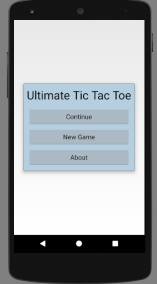
摘自《Hello, Android》
Android井字游戏(一)首页制作的更多相关文章
- [Android]Android Debug key 的制作
Android Debug key 的制作 背景 在Android App 开发过程中,我们经常会使用一些第三方的服务,但是很多的第三方服务都会要求我们提供包名,签名安装包,这时候,我们在日常调试时, ...
- Android - TabHost 与 Fragment 制作页面切换效果
Android - TabHost 与 Fragment 制作页面切换效果 Android API 19 , API 23 三个标签页置于顶端 效果图: 在文件BoardTabHost.java中定义 ...
- Android 仿QQ首页的消息和电话的切换,首页的头部(完全用布局控制)
Android 仿QQ首页的消息和电话的切换,首页的头部(完全用布局控制) 首先贴上七个控制布局代码 1.title_text_sel.xml 字体颜色的切换 放到color文件夹下面 <?xm ...
- Android—9.png的制作和去除黑线
在开发中为了避免图片因为拉伸而失真我们会把背景图片设置为9.png图片,这篇博客介绍的是如何将图片设置为9.png的 1.首先在android—>sdk—>tools文件夹中打开下图所示文 ...
- Android - FragmentTabHost 与 Fragment 制作页面切换效果
使用 FragmentTabHost 与 Fragment 制作页面切换效果 API 19 TabHost已经不建议使用了.用 FragmentTabHost 来代替TabHost.实际上 Fragm ...
- android .9图片的制作
android .9PNG图片制作 在android开发的过程中,我们经常因为没有好的美工图片失真,这样使界面看起来要逊色很多,有的时候可能我们会想在drawable-hdpi,ldpi,mdpi下放 ...
- android 欢迎界面的制作
再打开手机app的时候,最先映入我们眼帘的是一个覆盖手机全屏的欢迎界面,在这个界面显示出来的时候整个手机屏幕只会显示这一个界面,上面的标题栏,以及手机最顶端的状态栏都会消失,只有欢迎页面结束跳转到其他 ...
- 【Android 应用开发】Android中使用ViewPager制作广告栏效果 - 解决ViewPager占满全屏页面适配问题
. 参考界面 : 携程app首页的广告栏, 使用ViewPager实现 自制页面效果图 : 源码下载地址: http://download.csdn.net/detail/han1202 ...
- Android井字游戏(二)游戏界面
图片与代码可见书配套官网下载 1 棋盘 1.1 先将游戏界面所需的图片放于“drawable-xxhdpi”文件夹中,后缀xxhdpi表示超高密度. 然后将图片封装到drawable中一个名为til ...
随机推荐
- RMAN命令总结
一,RMANR 连接到库 1),连接本地数据库 a,如果本地有多少实例,则需要设置环境变量ORACLE_SID, windows 平台: set ORACLE_SID= INSTANACE NAME ...
- Spring简单集成Redis
- HTML5 Canvas火焰效果 像火球发射一样
Canvas是HTML5中非常重要而且有用的东西,我们可以在Canvas上绘制任意的元素,就像你制作Flash一样.今天我们就在Canvas上来制作一款火焰发射的效果.就像古代的火球炮一样,而且可以在 ...
- Hbuilder MUI里面使用java.net.URL发送网络请求,操作cookie
1. 引入所需网络请求类: var URL = plus.android.importClass("java.net.URL"); var URLConnection = plus ...
- RGB转LAB色彩空间
1.原理 RGB无法直接转换成LAB,需要先转换成XYZ再转换成LAB,即:RGB——XYZ——LAB 因此转换公式分两部分: (1)RGB转XYZ 假设r,g,b为像素三个通道,取值范围均为[0,2 ...
- 限制 Text Field 输入的内容类型:只允许输入数字
效果如下: ViewController.h #import <UIKit/UIKit.h> @interface ViewController : UIViewController< ...
- Lua常用时间函数
常用时间函数 print(os.time()) --当前系统时间值 print(os.date( print(os.date("*t"), os.time()) --当前系统时间表 ...
- 修改linux终端DIR显示颜色
头疼死,linux终端下,目录颜色蓝色在黑色的背景下,睁大双眼都看不清楚. 找办法修改,找到默认的颜色设置目录: # vi /etc/DIR_COLORS 查看文件,并查找DIR: 可以看到默认设定“ ...
- Android ScrollView 和ListView 一起使用的问题汇总
1.ScrollView 嵌套 ListView ,touch事件的截获问题. 参考 http://www.cnblogs.com/lqminn/archive/2013/03/02/2940194 ...
- ActiveMQ的消息存储方式
1. 队列存储 采取先进先出模式,同一时间,消息只会发送给某一个消费者,只有当该消息被消费并告知已收到时,它才能在代理的存储中被删除. 对于持久性订阅来说,每一个消费者都会 ...