
JQuery 在网页中查询
最近遇到客户的一个需求,要在网页中添加一个Search 功能,其实对于网页的搜索,Ctrl+F,真的是非常足够了,但是客户的需求,不得不做,这里就做了个关于Jquery Search function的简单研究。欢饮提出不同解决方法。
使用Contains函数。
描述: 选择所有包含指定文本的元素。
jQuery( ":contains(text)" )
text: 用来查找的一个文本字符串。这是区分大小写的。
这里是官方链接:http://www.jquery123.com/api/contains-selector/
这里看个简单的demo.
<html xmlns="http://www.w3.org/1999/xhtml">

<head runat="server">

    <title></title>

    <script src="Script/jquery-1.11.2.min.js" type="text/javascript"></script>

    <script type="text/javascript">

        $(function () {

            $("div:contains('John')").css("text-decoration", "underline");

        });

        </script>

</head>

<body>

    <form id="form1" runat="server">

        <div>John Resig</div>

        <div>George Martin</div>

        <div>Malcom John Sinclair</div>

        <div>J. Ohn</div>

        <div>john mohan</div>

    </form>

</body>

</html>
在浏览器中可以看到。
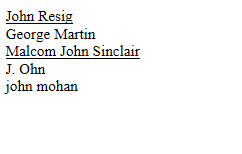
这是个非常简单的例子,在div中,只要包含了John,就添加下划线,这里区分大小写的。
如果我们不想区分大小写,这里需要用到Jquery 扩展;
可以查看这个链接:https://css-tricks.com/snippets/jquery/make-jquery-contains-case-insensitive/
        jQuery.expr[':'].Contains = function (a, i, m) {

            return jQuery(a).text().toUpperCase().indexOf(m[3].toUpperCase()) >= 0;

        };
在包含上述代码后,再在浏览器中查看效果;
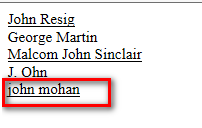
可以看出,这里已经不区分大小写了。
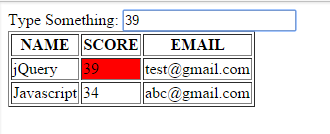
如果我们想,在搜索输入框中,输入关键字,然后文本高亮显示,使用Contains函数,看这个demo。
这里是链接:http://jsfiddle.net/bipen/dyfRa/
这里是Html 代码;
Type Something: <input id="textBoxID" />

<table id="table" border=1>

  <tr style="display:table-row">

        <th class="Name">NAME</th>

        <th class="Score">SCORE</th>

        <th class="Email">EMAIL</th>

    </tr>

    <tr>

        <!--tabledata-->

        <td >jQuery</td>

        <td >39</td>

        <td >test@gmail.com</td>

    </tr>

     <tr>

        <td >Javascript</td>

        <td >34</td>

        <td >abc@gmail.com</td>

    </tr>

</table>
再看Jquery 代码:
$.extend($.expr[":"], {

"containsIN": function(elem, i, match, array) {

return (elem.textContent || elem.innerText || "").toLowerCase().indexOf((match[3] || "").toLowerCase()) >= 0;

}

});

$('#textBoxID').keyup(function(){

      $('td').css("background-color",'');

    var value= $(this).val();

     $('td:containsIN("'+value+'")').css("background-color",'red');

 });
查看效果;
项目实践:
在实际的应用中,一般都要求会比较高,比如优先匹配全文(full text match)。然后匹配数目多的(split word by word)。根据匹配数目的多少排序。
排序需要用到数组的Sort函数,看个简单例子
Example
Sort numbers in an array in ascending order:
var points = [40, 100, 1, 5, 25, 10];

points.sort(function(a, b){return a-b});
The result of points will be:
在我们搜索后,如果想关键字高亮显示,这可以使用简单的插件。查看完整代码;
<%@ Page Language="C#" AutoEventWireup="true" CodeBehind="SearchDemo.aspx.cs" Inherits="Jquery_Programming.SearchDemo" %>

<!DOCTYPE html PUBLIC "-//W3C//DTD XHTML 1.0 Transitional//EN" "http://www.w3.org/TR/xhtml1/DTD/xhtml1-transitional.dtd">

<html xmlns="http://www.w3.org/1999/xhtml">

<head runat="server">

    <title></title>

    <script src="Script/jquery-1.11.2.min.js" type="text/javascript"></script>

    <script type="text/javascript">

        $(function () {

            // $("div:Contains('John')").css("text-decoration", "underline");

            //press enter key to trigger click button

            $('#txtSearch').keypress(function (event) {

                if (event.keyCode == 13) {

                    $('#btnSearch').trigger('click');

                    event.stopPropagation();

                    return false;

                }

            });

            $('#btnSearch').click(function () {

                var item = $('#txtSearch').val();

                if (item.length > 0) {

                    //清空查询结果

                    $('#searchResult').html('');

                    var itemIndex = 0;

                    var newHtml = "";

                    //Use a regular expression (\s matches spaces, tabs, new lines, etc.)

                    var itemArr = item.split(/\s+/);

                    var newItemArr = [];

                    var maxCount = 0;

                    var fullMaxCount = 100;

                    $('.Faq > li').each(function (index) {

                        var $this = $(this).clone();

                        //first time the full text match

                        if ($this.is(":contains('" + item + "')")) {

                            $this.highlight(item);

                            var p = {};

                            p.index = index;

                            p.keyCount = fullMaxCount;

                            p.refThis = $this;

                            p.refText = $this.text();

                            newItemArr[index] = p;

                            return; //jump the belowing code.

                        }

                        //then match word by word

                        for (var i = 0, len = itemArr.length; i < len; i++) {

                            // if ($this.text().toLowerCase().split(/\s+/).indexOf(itemArr[i].toLowerCase()) >= 0) {

                            if ($this.is(":contains('" + itemArr[i] + "')")) {

                                if (newItemArr[index] && newItemArr[index] != null) {

                                    newItemArr[index].keyCount++;

                                }

                                else {

                                    $this.highlight(itemArr[i]);

                                    var p = {};

                                    p.index = index;

                                    p.keyCount = 1;

                                    p.refThis = $this;

                                    p.refText = $this.text();

                                    newItemArr[index] = p;

                                }

                            }

                        }

                    });

                    if (newItemArr.length > 0) {

                        newItemArr.sort(function (a, b) {

                            return b.keyCount - a.keyCount;

                        });

                        var icount = Math.floor(maxCount / 2);

                        $.each(newItemArr, function (i, obj) {

                            if (obj != undefined) {

                                obj.refThis.find('i').text(itemIndex++);

                                newHtml += "<li> " + obj.refThis.html() + "</li>";

                            }

                        });

                    }

                    if (newHtml.length == 0) {

                        newHtml = "<h1>0 results </h1>";

                        newHtml += "<br />Your search returned no matches.";

                    }

                    $('#searchResult').append(newHtml);

                    $('.Faq').hide();

                }

            });

        });

        $.expr[":"].contains = $.expr.createPseudo(function (arg) {

            return function (elem) {

                return $(elem).text().toUpperCase().indexOf(arg.toUpperCase()) >= 0;

            };

        });

        jQuery.fn.highlight = function (pat) {

            function innerHighlight(node, pat) {

                var skip = 0;

                if (node.nodeType == 3) {

                    var pos = node.data.toUpperCase().indexOf(pat);

                    if (pos >= 0) {

                        var spannode = document.createElement('span');

                        spannode.className = 'highlight';

                        var middlebit = node.splitText(pos);

                        var endbit = middlebit.splitText(pat.length);

                        var middleclone = middlebit.cloneNode(true);

                        spannode.appendChild(middleclone);

                        middlebit.parentNode.replaceChild(spannode, middlebit);

                        skip = 1;

                    }

                }

                else if (node.nodeType == 1 && node.childNodes && !/(script|style)/i.test(node.tagName)) {

                    for (var i = 0; i < node.childNodes.length; ++i) {

                        i += innerHighlight(node.childNodes[i], pat);

                    }

                }

                return skip;

            }

            return this.each(function () {

                innerHighlight(this, pat.toUpperCase());

            });

        };

        jQuery.fn.removeHighlight = function () {

            function newNormalize(node) {

                for (var i = 0, children = node.childNodes, nodeCount = children.length; i < nodeCount; i++) {

                    var child = children[i];

                    if (child.nodeType == 1) {

                        newNormalize(child);

                        continue;

                    }

                    if (child.nodeType != 3) { continue; }

                    var next = child.nextSibling;

                    if (next == null || next.nodeType != 3) { continue; }

                    var combined_text = child.nodeValue + next.nodeValue;

                    new_node = node.ownerDocument.createTextNode(combined_text);

                    node.insertBefore(new_node, child);

                    node.removeChild(child);

                    node.removeChild(next);

                    i--;

                    nodeCount--;

                }

            }

            return this.find("span.highlight").each(function () {

                var thisParent = this.parentNode;

                thisParent.replaceChild(this.firstChild, this);

                newNormalize(thisParent);

            }).end();

        };

    </script>

    <style type="text/css">

        li

        {

            line-height: 30px;

            font-family: Arial;

        }

        #txtSearch

        {

            width: 200px;

        }

        i

        {

            font-size: 14px;

            font-weight: bold;

            margin: 10px;

        }

        ul

        {

            list-style-type: none;

        }

            .highlight {

    background-color: #fff34d;

    -moz-border-radius: 5px; /* FF1+ */

    -webkit-border-radius: 5px; /* Saf3-4 */

    border-radius: 5px; /* Opera 10.5, IE 9, Saf5, Chrome */

    -moz-box-shadow: 0 1px 4px rgba(0, 0, 0, 0.7); /* FF3.5+ */

    -webkit-box-shadow: 0 1px 4px rgba(0, 0, 0, 0.7); /* Saf3.0+, Chrome */

    box-shadow: 0 1px 4px rgba(0, 0, 0, 0.7); /* Opera 10.5+, IE 9.0 */

}

.highlight {

    padding:1px 4px;

    margin:0 -4px;

}

    </style>

</head>

<body>

    <form id="form1" runat="server">

    <div>

        Search Here:<input id="txtSearch" placeholder="Please input key words to search" />

        <input type="button" id="btnSearch" value="Search" /></div>

    <ul id="searchResult">

    </ul>

    <ul class="Faq">

        <li><i>1</i>Question bans do not affect other privileges, such as commenting or voting,

            and there is no indication to the rest of the community that a particular user has

            been banned.</li>

        <li><i>2</i>The ban will be lifted automatically by the system when it determines that

            your positive contributions outweigh those questions which were poorly received.</li>

        <li><i>3</i>The only way to end a posting block is to positively contribute to the site;

            automatic bans never expire or "time out".</li>

        <li><i>4</i>If you see a similar message when trying to post an answer, please see our

            guidance on what to do about answer bans.</li>

        <li><i>5</i>Reading your question out loud to yourself can help you understand what

            it sounds like to others. Here are some additional tips for writing good, useful

            questions:</li>

    </ul>

    </form>

</body>

</html>
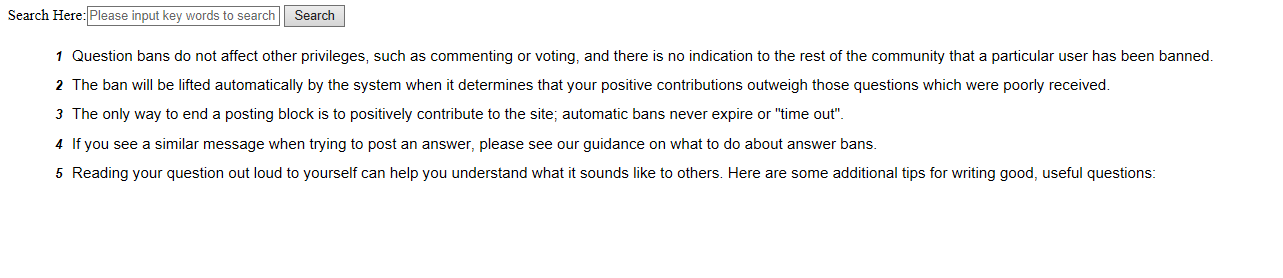
这里是网页显示截图;
查看搜索效果:

从上图中可以看到,有一个搜索框,一个Search的按钮,一些文本内容,当我们输入关键词,可以按enter 键或者点击Search button.
当如果有搜索结果时,我们隐藏以前的内容,只显示搜索结果。
为什么直接在输入框中按enter键可以工作呢,看这里代码;
  $('#txtSearch').keypress(function (event) {

                if (event.keyCode === 13) {

                    $('#btnSearch').trigger('click');

                    event.stopPropagation();

                    return false;

                }

            });
如果keyCode ===13, 我们就trigger the button's click method.
如果从数据库查询,这个需要用到Freetext in mssql.
然后通过DataTable 绑定到显示控件,或者用Ajax 绑定到UI.这里就不列例子了。
欢迎提出不同解决方案,期待更好的解决方案。
JQuery 在网页中查询的更多相关文章
- 使用jquery获取网页中图片的高度——解惑
jQuery获取网页中图片的高度 使用jquery获取网页中图片的高度其实很简单,有两种常用的方法都可以打到我们的目的 $("img").whith();(返回纯数字) $(&qu ...
- JQuery模拟网页中自定义鼠标右键菜单
题外话.......最近在开发一个网站项目的时候,需要用到网页自定义右键菜单,在网上看了各路前辈大神的操作,头晕目眩,为了达到目的,突然灵机一动,于是便有了这篇文章. 先放个效果图(沾沾自喜,大神勿喷 ...
- jQuery判断网页中的id是否有重复的
From:http://blog.csdn.net/china_skag/article/details/6915323判断网页中的ID是否有重复的:指定ID判断 $(function(){ $(&q ...
- 扩展jQuery高亮网页中的文本选中
<script type="text/javascript"> //1.扩展jQuery $.fn.selectRange = function (start, end ...
- jquery阻止网页中右键的点击
<body onmousedown="whichElement(event)"> </body> function whichElement(e) { if ...
- JQuery制作网页—— 第七章 jQuery中的事件与动画
1. jQuery中的事件: ●和WinForm一样,在网页中的交互也是需要事件来实现的,例如tab切换效果,可以通过鼠标单击事件来实现 ●jQuery事件是对JavaScript事件的封装,常用事件 ...
- 2018.2.28 PHP中使用jQuery+Ajax实现分页查询多功能如何操作
PHP中使用jQuery+Ajax实现分页查询多功能如何操作 1.首先做主页Ajax_pag.php 代码如下 <!DOCTYPE html> <html> <head& ...
- 如何在网页中添加 jQuery。
转自:http://www.runoob.com/jquery/jquery-install.html 网页中添加 jQuery 可以通过多种方法在网页中添加 jQuery. 您可以使用以下方法: 从 ...
- C#开发BIMFACE系列50 Web网页中使用jQuery加载模型与图纸
BIMFACE二次开发系列目录 [已更新最新开发文章,点击查看详细] 在前一篇博客<C#开发BIMFACE系列49 Web网页集成BIMFACE应用的技术方案>中介绍了目前市场主流 ...
随机推荐
- 基础的shell脚本
#! /bin/sha="hello world"echo "A is " echo $a echo "<br />" ec ...
- LeetCode 318. Maximum Product of Word Lengths (状态压缩)
题目大意:给出一些字符串,找出两个不同的字符串之间长度之积的最大值,但要求这两个字符串之间不能拥有相同的字符.(字符只考虑小写字母). 题目分析:字符最多只有26个,因此每个字符串可以用一个二进制数来 ...
- arc路径例子-磊哥
<!DOCTYPE html><html xmlns="http://www.w3.org/1999/xhtml"><head> & ...
- [Leetcode] Unique binary search trees 唯一二叉搜索树
Given n, how many structurally unique BST's (binary search trees) that store values 1...n? For examp ...
- Windows 7 英文版操作系统中文软件乱码解决方法
http://blog.csdn.net/lqhbupt/article/details/18863243
- python 加密 解密 签名 验证签名 公钥 私钥 非对称加密 RSA
加密与解密,这很重要,我们已经可以用pypcap+npcap简单嗅探到网络中的数据包了.而这个工具其实可以嗅探到更多的数据.如果我们和别人之间传输的数据被别人嗅探到,那么信息泄漏,信息被篡改,将给我们 ...
- MyEclipse WebSphere开发教程:WebSphere 7安装指南(四)
[周年庆]MyEclipse个人授权 折扣低至冰点!立即开抢>> [MyEclipse最新版下载] 六.管理配置文件 现在您已经安装了WebSphere 7的所有更新,您必须创建一个配置文 ...
- bean的实例化
bean的实例化 构造器方式 静态方法方式 普通工厂方式 一般的,默认bean实例化使用的是构造器方式,调用的是无参的构造方法 package com.Model; public class Dog ...
- PSP个人软件开发系统面向对象需求分析与设计文档
1.引言 1.1编写的目的 编写该文档的目的是,对产品进行定义,详尽说明该产品的软件需求,简述我们对 PSP个人软件开发系统的初步设想,及划分的各功能模块以及各模块的实体图和数据流图. 1.2预期的读 ...
- P1174 互素
P1174 互素 时间: 1000ms / 空间: 131072KiB / Java类名: Main 描述 对于某个数n,,我们这次的工作仅是求出小于n且和n互质的数的个数,,比如n=10时 1,3, ...