
saltstack 实现redis主从
centos7.4
172.16.80.5 redis 主
172.16.80.6 redis 从
目录结构如下
file_roots:

  base:

    - /srv/salt/base

  dev:

    - /srv/salt/dev

  test:

    - /srv/salt/test

  prod:

    - /srv/salt/prod
[root@zabbix redis]# vim /srv/salt/base/top.sls

[root@zabbix redis]# cat  redis.sls

redis-install:

  pkg.installed:

    - name: redis

redis-config:

  file.managed:

    - name: /etc/redis.conf

    - source: salt://redis/files/redis.conf

    - user: root

    - group: root
    - mode: 644

    - template: jinja

    - defaults:

      IPADDR: {{ grains['fqdn_ip4'][] }}

      PORT:

redis-service:

  service.running:

    - name: redis

    - enable: True

    - reload: True

[root@zabbix redis]# cat master.sls

include:

  - redis.redis

[root@zabbix redis]# cat slave.sls

include:

  - redis.redis

slave_config:

  cmd.run:

    - name: redis-cli -h 172.16.80.6 slaveof 172.16.80.5

    - unless: redis-cli -h 172.16.80.6 info|grep role:slave

    - require:

      - service: redis-service
Vim files/redis.conf 修改如下配置文件
bind {{ IPADDR }}
port {{ PORT }}
daemonize yes
[root@zabbix redis]# salt '*' state.highstate

zabbix:

----------

          ID: redis-install

    Function: pkg.installed

        Name: redis

      Result: True

     Comment: The following packages were installed/updated: redis

     Started: ::42.414507

    Duration: 20238.065 ms

     Changes:

              ----------

              redis:

                  ----------

                  new:

                      3.2.-.el7

                  old:

----------

          ID: redis-config

    Function: file.managed

        Name: /etc/redis.conf

      Result: True

     Comment: File /etc/redis.conf updated

     Started: ::02.743576

    Duration: 421.028 ms

     Changes:

              ----------

              diff:

                  ---

                  +++

                  @@ -, +, @@

                   # Examples:

                   #

                   # bind 192.168.1.100 10.0.0.1

                  -# bind 127.0.0.1 ::

                  +bind 172.16.80.5

                   #

                   # ~~~ WARNING ~~~ If the computer running Redis is directly exposed to the

                   # internet, binding to all the interfaces is dangerous and will expose the

                  @@ -, +, @@

                   # IF YOU ARE SURE YOU WANT YOUR INSTANCE TO LISTEN TO ALL THE INTERFACES

                   # JUST COMMENT THE FOLLOWING LINE.

                   # ~~~~~~~~~~~~~~~~~~~~~~~~~~~~~~~~~~~~~~~~~~~~~~~~~~~~~~~~~~~~~~~~~~~~~~~~

                  -bind 127.0.0.1

                   # Protected mode is a layer of security protection, in order to avoid that

                   # Redis instances left open on the internet are accessed and exploited.

                  @@ -, +, @@

                   # By default Redis does not run as a daemon. Use 'yes' if you need it.

                   # Note that Redis will write a pid file in /var/run/redis.pid when daemonized.

                  -daemonize no

                  +daemonize yes

                   # If you run Redis from upstart or systemd, Redis can interact with your

                   # supervision tree. Options:

              mode:

              user:

                  root

----------

          ID: redis-service

    Function: service.running

        Name: redis

      Result: True

     Comment: Service redis has been enabled, and is running

     Started: ::04.982412

    Duration: 174.844 ms

     Changes:

              ----------

              redis:

                  True

Summary for zabbix

------------

Succeeded:  (changed=)

Failed:

------------

Total states run:

Total run time:  20.834 s

k8s-node1:

----------

          ID: redis-install

    Function: pkg.installed

        Name: redis

      Result: True

     Comment: The following packages were installed/updated: redis

     Started: ::41.350432

    Duration: 47371.887 ms

     Changes:

              ----------

              redis:

                  ----------

                  new:

                      3.2.-.el7

                  old:

----------

          ID: redis-config

    Function: file.managed

        Name: /etc/redis.conf

      Result: True

     Comment: File /etc/redis.conf updated

     Started: ::28.751141

    Duration: 179.74 ms

     Changes:

              ----------

              diff:

                  ---

                  +++

                  @@ -, +, @@

                   # Examples:

                   #

                   # bind 192.168.1.100 10.0.0.1

                  -# bind 127.0.0.1 ::

                  +bind 172.16.80.6

                   #

                   # ~~~ WARNING ~~~ If the computer running Redis is directly exposed to the

                   # internet, binding to all the interfaces is dangerous and will expose the

                  @@ -, +, @@

                   # IF YOU ARE SURE YOU WANT YOUR INSTANCE TO LISTEN TO ALL THE INTERFACES

                   # JUST COMMENT THE FOLLOWING LINE.

                   # ~~~~~~~~~~~~~~~~~~~~~~~~~~~~~~~~~~~~~~~~~~~~~~~~~~~~~~~~~~~~~~~~~~~~~~~~

                  -bind 127.0.0.1

                   # Protected mode is a layer of security protection, in order to avoid that

                   # Redis instances left open on the internet are accessed and exploited.

                  @@ -, +, @@

                   # By default Redis does not run as a daemon. Use 'yes' if you need it.

                   # Note that Redis will write a pid file in /var/run/redis.pid when daemonized.

                  -daemonize no

                  +daemonize yes

                   # If you run Redis from upstart or systemd, Redis can interact with your

                   # supervision tree. Options:

              mode:

              user:

                  root

----------

          ID: redis-service

    Function: service.running

        Name: redis

      Result: True

     Comment: Service redis has been enabled, and is running

     Started: ::29.930887

    Duration: 147.004 ms

     Changes:

              ----------

              redis:

                  True

----------

          ID: slave_config

    Function: cmd.run

        Name: redis-cli -h 172.16.80.6 slaveof 172.16.80.5

      Result: True

     Comment: Command "redis-cli -h 172.16.80.6 slaveof 172.16.80.5 6379" run

     Started: ::30.079706

    Duration: 33.352 ms

     Changes:

              ----------

              pid:

              retcode:

              stderr:

              stdout:

                  OK

Summary for k8s-node1

------------

Succeeded:  (changed=)

Failed:

------------

Total states run:

Total run time:  47.732 s
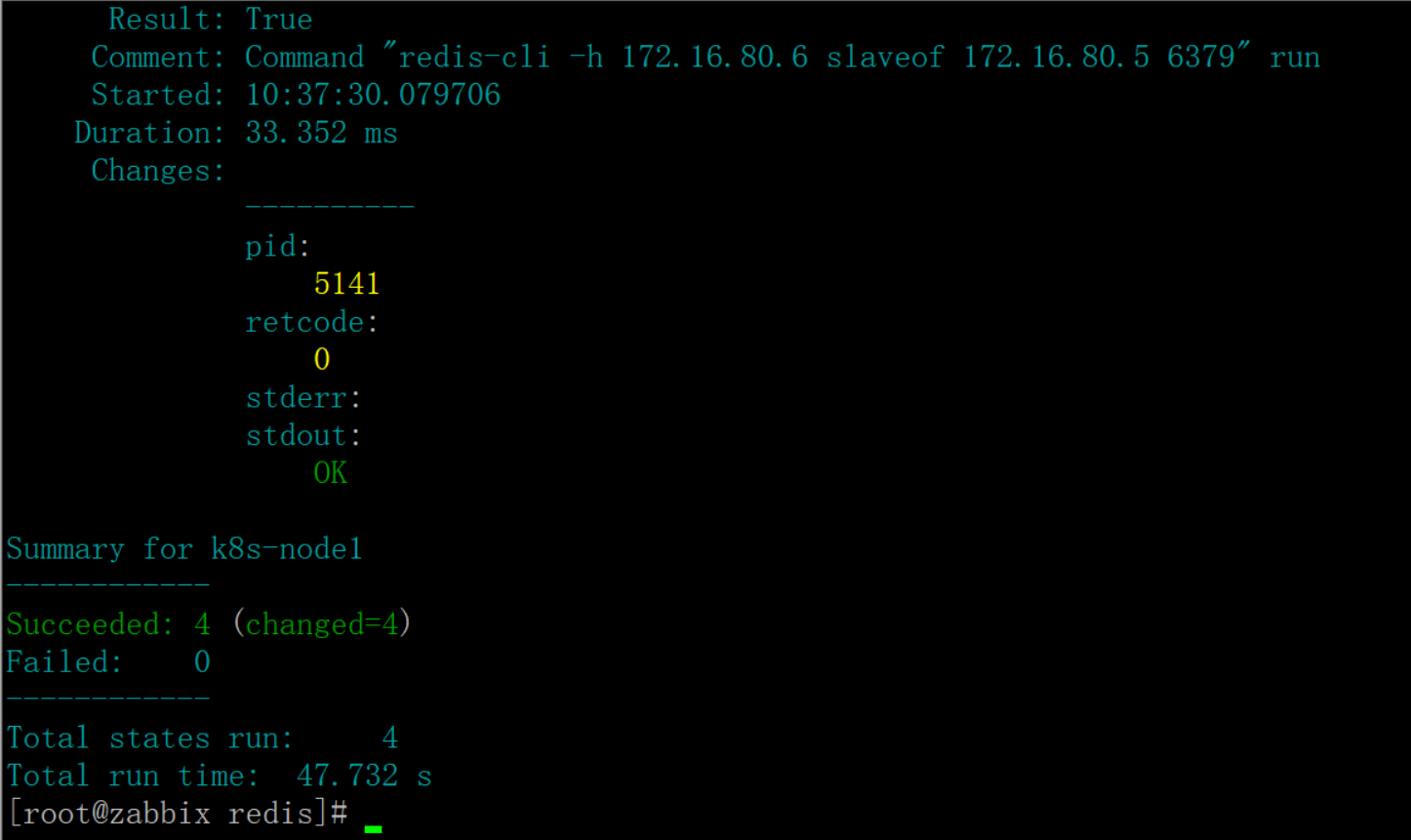
验证结果


saltstack 实现redis主从的更多相关文章
- SaltStack部署redis主从
需求: 一,部署redis主从,一台主一台从 二,redis监听自己的IP地址,而不是0.0.0.0 主:安装,配置,启动 从:安装,配置,启动,主从
- 5 LAMP配置管理:模块(state、file、pkg、service)、jinja模板、job管理、redis主从
1. 配置管理:state和file https://docs.saltstack.com/en/latest/topics/states/index.html Full list of states ...
- SaltStack入门篇(六)之部署Redis主从实现和Job管理
一.部署Redis主从 需求: 192.168.56.11是主,192.168.56.12是从 redis监听自己的ip地址,而不是0.0.0.0 分析: linux-node1 安装 配置 启动 l ...
- puppet工作原理及部署redis主从篇
一.简介 1.国际惯例什么是puppet puppet是一种Linux.Unix.windows平台的集中配置管理系统,使用自有的puppet描述语言,可管理配置文件.用户.cron任务.软件包.系统 ...
- Redis系列之(二):Redis主从同步,读写分离
1. Redis主从同步 Redis支持主从同步.数据可以从主服务器向任意数量的从服务器上同步,同步使用的是发布/订阅机制. 2. 配置主从同步 Mater Slave的模式,从Slave向Maste ...
- Redis 主从配置和参数详解
安装redis 下载redis wget http://download.redis.io/releases/redis-3.0.7.tar.gz 解压redis tar -xvf redis-.ta ...
- 基于Windows服务器集群的Redis主从配置指南
前段时间一个项目因并发量大.因防止宕机做了主从备份,首页的表连接查询又非常的耗时.故此拿出利器Redis缓存这个查询结果,并随着用户操作而更新. 因官方目前只有linux版,Windows版下载: ...
- redis 主从同步
修改redis.conf配置文件 vi redis.conf 在编辑模式下 输入 /slaveof 来搜索 将slaveof启用 即 将#删除 依次配置所有 slave 并将进程 kill 掉 重启 ...
- redis主从 以及认证配置
以前用redis用的很多,各种数据类型用的飞起,算是用得很溜了.不过那都是封装好的方法,自己直接调用.以前的公司比较规范,开发只是开发,很少去做跟运维相关的事情. 换了一份工作,不过这边项目刚开始起步 ...
随机推荐
- PHP审计(一)
一.php中常见的危险函数和审计要点 危险函数(功能过于强大) 参数是否外部可控,有没有正确的过滤. PHP获取外界传入参数是通过下面几个全局函数的形式,所以审计参数传入经常要和下面几个变量打交 ...
- linux-shell——02
Linux命令的通用命令格式 :命令字 [选项] [参数] 选项: 作用:用于调节命令的具体功能 "-"引导短格式选项(单个字符) EX:“-l” "--"引导 ...
- Dialog BLE 学习之 修改分散加载文件 (2)
最近搞Dialog的BLE SDK,发现空间不够了,询问原厂,得知可以通过调整分散加载文件而增加空间,一方面是有42KB+8KB的硬件基础,另一方面是原有的程序限制为38KB+8KB.故顺便学习了下把 ...
- react+redux状态管理实现排序 合并多个reducer文件
这个demo只有一个reducer 所以合并reducer这个demo用不到 ,但是我写出来这样大家以后可以用到,很好用,管理多个reducer,因为只要用到redux就不会只有一个reducer所以 ...
- Numpy数据存取与函数
数据的CSV文件存取 多维数据的存取 NumPy的随机数函数 NumPy的统计函数 NumPy的梯度函数
- jQuery的Ajax初识
1. 什么是Ajax? Ajax是“Asynchronous Javascript And XML(异步Javascript和XML)”的缩写, 是指一种创建交互式网页应用的网站开发技术. Ajax不 ...
- 树&二叉树&哈夫曼树
1.树 需要注意的两点:n(n>=0)表示结点的个数,m表示子树的个数 (1)n>0时,树的根节点是唯一的. (2)m>0时,子树的个数没有限制. 结点的度和树的度 (1)结点的度是 ...
- 批量上传图片(jQuery-File-Upload使用)
jQuery-File-Upload jQuery-File-Upload是一个jquery下的ajax文件上传插件,支持批量上传,github地址:https://github.com/blueim ...
- laravel5.5授权系统
目录 1. Gates 1.1 一个简单的使用Gates的例子 1.2 编写Gates 1.3 授权动作 2. policy策略 2.1 还是先看个例子 2.2 编写策略 2.3 授权策略 2.3.1 ...
- USACO Section2.3 Money Systems 解题报告 【icedream61】
money解题报告------------------------------------------------------------------------------------------- ...