
spring06Aop

1.实现前置增强 必须实现接口MethodBeforeAdvice接口
创建对应的文件
public interface Animal {//主业务接口

    void  eat();  //目标方法

    void  sleep();

}
Animal接口
public class Dog implements Animal {//目标对象

    /*

     * 专心我们的逻辑

     * 至于方法之前和方法之后要做的事情!我不关注!

     * Ioc:降低了主业务之间的耦合度

     * AOP:降低了主业务和交叉业务逻辑之间的耦合度

     */

    @Override

    public void eat() {

        System.out.println("Dog在吃骨头");

    }

    @Override

    public void sleep() {

         System.out.println("Dog睡觉");

    }

}
Dog实现类
public class AnimalBeforeAdvice implements MethodBeforeAdvice {

    /**

     * method:执行的方法

     * args:方法的参数

     * target:目标类对象

     */

    @Override

    public void before(Method method, Object[] args, Object target)

            throws Throwable {

        System.out.println("进入 了 前置 增强..............MethodBeforeAdvice");

    }

}
前置增强类
<?xml version="1.0" encoding="UTF-8"?>

<beans xmlns="http://www.springframework.org/schema/beans"

    xmlns:xsi="http://www.w3.org/2001/XMLSchema-instance"

    xmlns:p="http://www.springframework.org/schema/p"

    xmlns:c="http://www.springframework.org/schema/c"

    xmlns:context="http://www.springframework.org/schema/context"

    xsi:schemaLocation="

        http://www.springframework.org/schema/beans

         http://www.springframework.org/schema/beans/spring-beans.xsd

        http://www.springframework.org/schema/context

         http://www.springframework.org/schema/context/spring-context.xsd">

<!-- 配置 目标对象 -->

<bean id="dog" class="cn.bdqn.dao.impl.Dog"/>

<!-- 配置前置 增强 -->

<bean id="before" class="cn.bdqn.advice.AnimalBeforeAdvice"/>

<!--  生成 代理对象  -->

 <bean id="proxyFactoryBean" class="org.springframework.aop.framework.ProxyFactoryBean">

     <!-- 设置目标对象(被代理的对象)<property name="targetName" value="dog"/>  -->

   <property name="target" ref="dog"/>

      <!-- 设置增强方式 -->

   <property name="interceptorNames">

        <value>before</value>

   </property>

  </bean>

</beans>
applicationContext.xml文件
public class AnimalTest {

    @Test

    public  void  test01(){

        ApplicationContext context=

                new ClassPathXmlApplicationContext("applicationContext.xml");

        //使用代理对象进行操作

        Animal animal=(Animal) context.getBean("proxyFactoryBean");

        animal.eat();

        System.out.println("************");

        animal.sleep();

    }

}
测试类
2.实现后置增强 必须实现接口AfterReturningAdvice接口
public class AnimalAfterAdvice implements AfterReturningAdvice {

/**

 * returnValue:返回值 ,能获取返回值 但是如果对返回值进行了操作!没有意义!

 * afterReturning()就没有返回值

 */

    @Override

    public void afterReturning(Object returnValue, Method method,

            Object[] args, Object target) throws Throwable {

            System.out.println("执行了 后置 通知.................AfterReturningAdvice");

    }

}
后置增强类
<?xml version="1.0" encoding="UTF-8"?>

<beans xmlns="http://www.springframework.org/schema/beans"

    xmlns:xsi="http://www.w3.org/2001/XMLSchema-instance"

    xmlns:p="http://www.springframework.org/schema/p"

    xmlns:c="http://www.springframework.org/schema/c"

    xmlns:context="http://www.springframework.org/schema/context"

    xsi:schemaLocation="

        http://www.springframework.org/schema/beans

         http://www.springframework.org/schema/beans/spring-beans.xsd

        http://www.springframework.org/schema/context

         http://www.springframework.org/schema/context/spring-context.xsd">

<!-- 配置 目标对象 -->

<bean id="dog" class="cn.bdqn.dao.impl.Dog"/>

<!-- 配置前置 通知-->

<bean id="before" class="cn.bdqn.advice.AnimalBeforeAdvice"/>

<!-- 配置后置 通知-->

<bean id="after" class="cn.bdqn.advice.AnimalAfterAdvice"/>

<!--  生成 代理对象  -->

 <bean id="proxyFactoryBean" class="org.springframework.aop.framework.ProxyFactoryBean">

     <!-- 设置目标对象(被代理的对象)<property name="targetName" value="dog"/>  -->

   <property name="target" ref="dog"/>

      <!-- 设置增强方式     同时配置多个增强方式01 .value="before,after"-->

   <property name="interceptorNames" >

       <!--   02. 使用array

        <array>

          <value>before</value>

          <value>after</value>

        </array> -->

         <list>

          <value>before</value>

          <value>after</value>

        </list>

   </property>

  </bean>

</beans>
修改后的xml文件
测试代码不变 直接运行
3.实现环绕增强 必须实现接口MethodInterceptor接口
public class AnimalAroundAdvice implements MethodInterceptor {

/**

 *

 * 环绕增强  是在前置增强之后  和后置增强之前  执行!

 * 可以对方法的返回值进行一系列的操作

 */

    @Override

    public Object invoke(MethodInvocation invocation) throws Throwable {

         System.out.println("方法之前........MethodInterceptor");

         Object result = invocation.proceed();

          //判断是否有返回值

         if (result!=null) {

        result=((String)result).toUpperCase();

        }

         System.out.println("方法之后........MethodInterceptor");

        return result;

    }

}
环绕增强类
可以修改Animal中的任意一个方法带有返回值的进行测试! 如
public interface Animal {//主业务接口

    String  eat();  //目标方法

    void  sleep();

}
改变后的Animal接口
public class Dog implements Animal {//目标对象

    @Override

    public String eat() {

        System.out.println("Dog在吃骨头");

        return  "abcd";

    }

    @Override

    public void sleep() {

         System.out.println("Dog睡觉");

    }

}
改变后的Dog实现类
<?xml version="1.0" encoding="UTF-8"?>

<beans xmlns="http://www.springframework.org/schema/beans"

    xmlns:xsi="http://www.w3.org/2001/XMLSchema-instance"

    xmlns:p="http://www.springframework.org/schema/p"

    xmlns:c="http://www.springframework.org/schema/c"

    xmlns:context="http://www.springframework.org/schema/context"

    xsi:schemaLocation="

        http://www.springframework.org/schema/beans

         http://www.springframework.org/schema/beans/spring-beans.xsd

        http://www.springframework.org/schema/context

         http://www.springframework.org/schema/context/spring-context.xsd">

<!-- 配置 目标对象 -->

<bean id="dog" class="cn.bdqn.dao.impl.Dog"/>

<!-- 配置环绕 通知-->

<bean id="around" class="cn.bdqn.advice.AnimalAroundAdvice"/>

<!--  生成 代理对象  -->

 <bean id="proxyFactoryBean" class="org.springframework.aop.framework.ProxyFactoryBean">

   <property name="target" ref="dog"/>

   <property name="interceptorNames" >

         <list>

          <value>around</value>

        </list>

   </property>

  </bean>

</beans>
xml文件
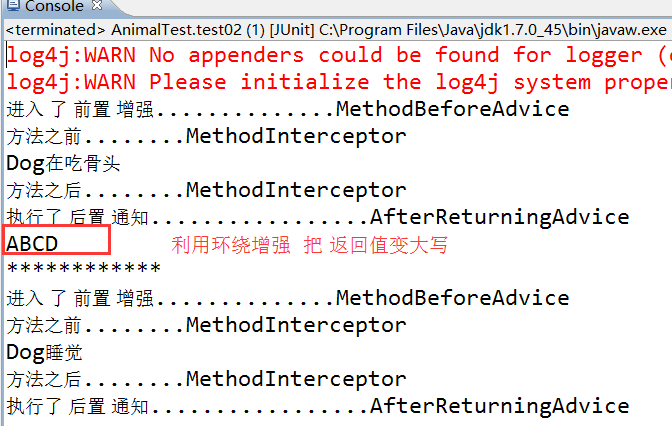
    //测试返回值

    @Test

    public  void  test02(){

        ApplicationContext context=

                new ClassPathXmlApplicationContext("applicationContext.xml");

        //使用代理对象进行操作

        Animal animal=(Animal) context.getBean("proxyFactoryBean");

        System.out.println(animal.eat());

        System.out.println("************");

        animal.sleep();

    }
测试类
效果图
4.实现自定义增强
并不是所有的方法都需要增强,那么我们就需要自定义增强的方法
<?xml version="1.0" encoding="UTF-8"?>

<beans xmlns="http://www.springframework.org/schema/beans"

    xmlns:xsi="http://www.w3.org/2001/XMLSchema-instance"

    xmlns:p="http://www.springframework.org/schema/p"

    xmlns:c="http://www.springframework.org/schema/c"

    xmlns:context="http://www.springframework.org/schema/context"

    xsi:schemaLocation="

        http://www.springframework.org/schema/beans

         http://www.springframework.org/schema/beans/spring-beans.xsd

        http://www.springframework.org/schema/context

         http://www.springframework.org/schema/context/spring-context.xsd">

<!-- 配置 目标对象 -->

<bean id="dog" class="cn.bdqn.dao.impl.Dog"/>

<!-- 配置前置 通知-->

<bean id="before" class="cn.bdqn.advice.AnimalBeforeAdvice"/>

 <!-- 自定义通知的切入点  -->

 <bean id="myAdvice" class="org.springframework.aop.support.NameMatchMethodPointcutAdvisor">

    <property name="advice"  ref="before"></property>

     <property name="mappedNames">

       <list>

        <value>eat</value> <!-- eat之外的方法就不会有前置通知了  -->

       </list>

     </property>

 </bean>

<!--  生成 代理对象  -->

 <bean id="proxyFactoryBean" class="org.springframework.aop.framework.ProxyFactoryBean">

   <property name="target" ref="dog"/>

   <property name="interceptorNames" >

         <list>

          <value>myAdvice</value>  <!--引入自定义增强  -->

        </list>

   </property>

  </bean>

</beans>
修改后的xml文件
测试代码不变
spring06Aop的更多相关文章
随机推荐
- javascript 常用array类型方法
concat:基于当前数组中的所有项创建一个新数据,会创建当前数组一个副本,然后将接受到的参数放到数组末尾,最后返回新数组.如果没有参数,则复制当前数组并返回副本. slice:基于当前数组中一个或多 ...
- linux ulimit的使用,如何产生core文件,调试段错误
---恢复内容开始--- 下面先简单介绍下ulimit命令: 1. limit -a 可以查看系统各种资源的限制,如: core文件大小,数据段的大小等. $ ulimit -a core file ...
- 探讨CMake中关于RPATH的使用
最近研究CMake,发现CMake对于RPATH的管理也非常人性化.官方说法是当动态库的编译也和执行档在同级目录下的时候,CMake会自动给执行档加入适当的RPATH.具体可以通过readelf -d ...
- Android学习-----Button点击事件几种写法
Button点击事件:大概可以分为以下几种: 匿名内部类 定义内部类,实现OnClickListener接口 定义的构造方法 用Activity实现OnClickListener接口 指定Button ...
- python中read、readline和readlines的区别
read 读取整个文件 readline 读取下一行 readlines 读取整个文件到一个迭代器以供我们遍历(读取到一个list中,以供使用,比较方便). 123.txt内容 ...
- 【HDOJ】2492 Ping pong
线段树+离散化. #include <cstdio> #include <cstring> #include <cstdlib> #define MAXN 2000 ...
- cf701C They Are Everywhere
Sergei B., the young coach of Pokemons, has found the big house which consists of n flats ordered in ...
- H - Highways - poj 1751(prim)
某个地方政府想修建一些高速公路使他们每个乡镇都可以相同通达,不过以前已经修建过一些公路,现在要实现所有的联通,所花费的最小代价是多少?(也就是最小的修建长度),输出的是需要修的路,不过如果不需要修建就 ...
- 网络智能和大数据公开课Homework3 Map-Reduce编程
Web Intelligence and Big Data by Dr. Gautam Shroff 这门课是关于大数据处理,本周是第一次编程作业,要求使用Map-Reduce对文本数据进行统计.使用 ...
- [置顶] Hibernate运行机理
Hibernate 的缓存体系 一级缓存: Session 有一个内置的缓存,其中存放了被当前工作单元加载的对象. 每个Session 都有自己独立的缓存,且只能被当前工作单元访问. 二级缓存: Se ...