
canvas-画图改进版
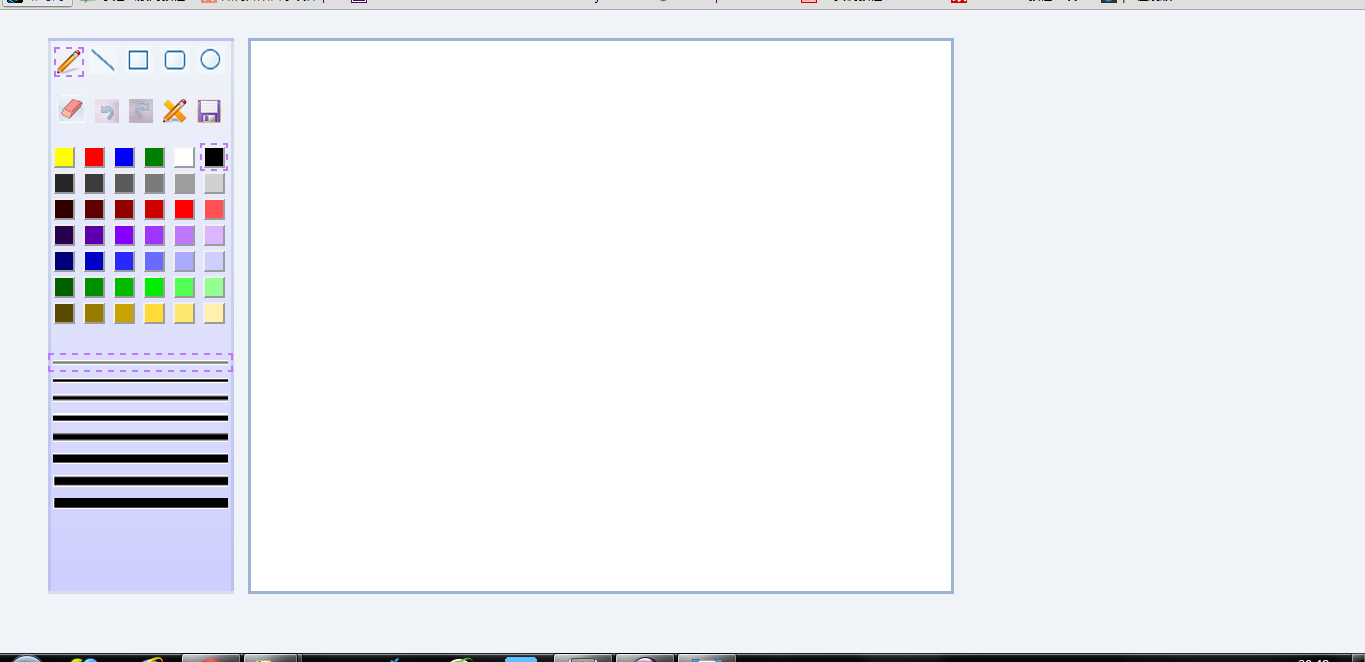
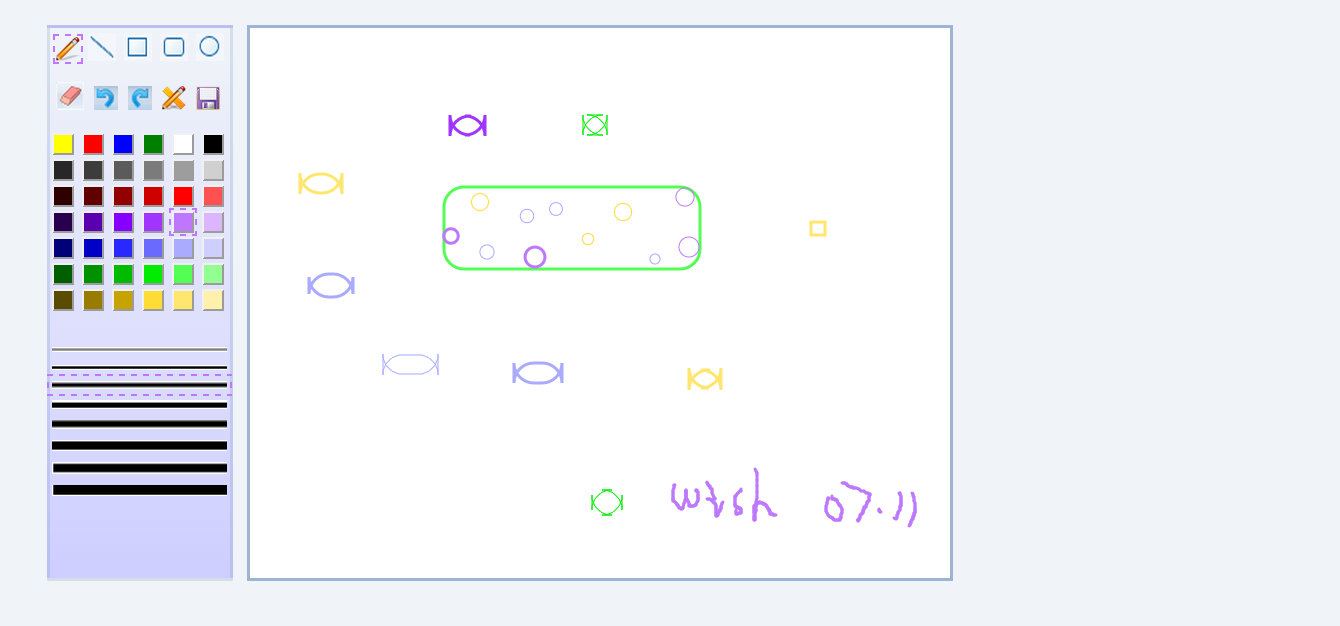
前几天在canvas——画板中做了个很简陋的画板,只能画简单的线条,可以选择颜色和线条粗度,今天在此简陋的画板上增加了新的形状,撤销,保存,橡皮擦等功能,虽然功能还是很简单,刚接触canvas,过程中还是遇到了很多困难。
形状包括:铅笔、直线、直角矩形,圆角矩形、原型(利用圆角矩形能够画出很多其他好玩的图形)
提供橡皮擦、撤销、重做、清屏、保存功能
1、html中使用两个canvas,一个相当于蒙版用于缓存
<div id="imgContent">
<canvas id="canvas" width="600" height="490">
浏览器不支持~
</canvas>
<!--此canvas用于暂存graph,绘制过程中需要清除context,因而需要缓存,否则更换形状时会出现问题 -->
<canvas id="canvasTemp"width="600" height="490" > </canvas>
</div>
2、主要鼠标事件:
        $(canvasTemp).unbind();

        $(canvasTemp).bind('mousedown',down);

        $(canvasTemp).bind('mousemove',move);

        $(canvasTemp).bind('mouseup',up);

        $(canvasTemp).bind('mouseout',out);
3、更换图形时需清空蒙版canvas即canvasTemp的context环境,并且将上次绘制内容添加到canvas中
4、另外需要为各种形状添加鼠标移动时的图标,例如选择circle时鼠标未按下时需要绘制一个小圆
    else if(type === "circle"){

                clearContext();

                if(mouseState === true){ //鼠标按下时

                    ctxTemp.beginPath();

                    var radius = Math.sqrt((oldX - newX) *  (oldX - newX)  + (oldY - newY) * (oldY - newY));

                    ctxTemp.arc(oldX,oldY,radius,0,Math.PI * 2,false);

                    ctxTemp.stroke();

                }else{

                    //鼠标没有按下时出现小圆

                    ctxTemp.beginPath();

                    //ctxTemp.strokeStyle ='#9F35FF';

                    ctxTemp.arc(newX,newY,10 ,0, Math.PI * 2,false);

                    ctxTemp.stroke();

                }
5、需要存储绘制的过程,以便撤销和重做
    function saveImageHistory(){

        cancelTimes = 0;

        imageHistoryList.push(canvas.toDataURL());

        if(imageHistoryList.length > 0){

            document.getElementById("undoImage").src="./images/undo.png";

        }

    }
6、由于body背景设置为蓝色,canvas fill 的是白色,因而用橡皮擦时如果直接用clearRect会擦出蓝色背景,因而采用填充白色代替
//ctx.clearRect(newX - lineWeight * 10 ,  newY - lineWeight * 10 , lineWeight * 20 , lineWeight * 20);

 //重新填充白色背景,否则擦出后是颜色背景

 ctx.fillStyle = "white";
  ctx.fillRect(newX - lineWeight * 10 ,  newY - lineWeight * 10 , lineWeight * 20 , lineWeight * 20);
7.问题总结:
1)body为蓝色背景,因而想将canvas背景设置为白色,然后尝试将canvas设置背景,这种方式是不行的,只能使用fillRect方式为canvas填充背景,此种方式为橡皮擦的擦除带来了问题,橡皮擦的擦除应该也使用fillRect方式而不能使用clearRect方式
2)DOM中定义的id会再javasvript中以变量自动定义,因而一定注意js中与id同名的变量或者方法可能不起作用
3)使用原生js时事件解绑中遇到问题,尝试了removeEventListener和最原始的将绑定事件置为null,但是没起作用,没找到解决方法因而使用了jQuery的unbind,希望有人指导
8.代码:
var canvas,

        ctx,

        canvasTemp,

        ctxTemp,

        mouseState = false, //初始化鼠标是否按下和坐标点位置, true为按下

        oldX = 0,

        oldY = 0,

        pencilX = 0,

        pencilY = 0,

        lineColor = "black",

        lineWeight = 1,

        canvasTop,

        canvasLeft,

        canvasWidth = 700,

        canvasHeight = 550,

        cancelTimes = 0, //撤销次数

        imageHistoryList = new Array(); //存储图片绘制历史信息

    onLoad(function(){

        init(); //初始化canvas

        //颜色和线宽绑定点击事件

        var colorDiv = document.getElementById("color");

        var lineDiv = document.getElementById("lineWeight");

        colorDiv.addEventListener("click", chosen);

        lineDiv.addEventListener("click", chosen);

        document.getElementById("pencil").click(); //未选择图形时默认为铅笔

        document.getElementById("blackBtn").click(); //默认黑色

        document.getElementById("line1").click(); //默认线宽2px

    });

    var chosen = function(event){

        var parentNode = event.target.parentNode;

        for(var i=0; i<parentNode.childNodes.length; i++){

            parentNode.childNodes[i].className = "";

        }

        event.target.className = "chosen";

    };

    var init = function(){

        //初始化canvas

        canvas = document.getElementById("canvas");

        canvas.width = canvasWidth;

        canvas.height = canvasHeight;

        //判断是否支持canvas

        if(!canvas || !canvas.getContext){

            return false;

        }

        ctx = canvas.getContext("2d");

        //初始化画图区域白色背景

        ctx.fillStyle = "white";

        ctx.fillRect(0, 0, 700, 550);

        //初始化canvasTemp

        canvasTemp = document.getElementById("canvasTemp");

        canvasTemp.width = canvasWidth;

        canvasTemp.height = canvasHeight;

        ctxTemp = canvasTemp.getContext("2d");

        canvasTop = canvas.offsetTop,

        canvasLeft = canvas.offsetLeft;

        //初始化撤销和重做按钮状态

        document.getElementById("undoImage").src="./images/undoDis.png";

        document.getElementById("redoImage").src="./images/redoDis.png";

    };

    //绘制picture

    var drawPicture = function(type, obj){

        var down, //鼠标按下事件

            up, //鼠标弹起事件

            move, //鼠标移动事件

            out, //鼠标离开区域

            chosen, //图形选中

            clearContext; //清除canvas环境

        down = function(event){

            mouseState = true;

            event = event || window.event;

            oldX =  event.clientX - canvasLeft;

            pencilX =  event.clientX - canvasLeft;

            oldY = event.clientY - canvasTop;

            pencilY = event.clientY - canvasTop;

            ctxTemp.strokeStyle = lineColor;

            ctxTemp.lineWidth = lineWeight;

            ctxTemp.lineCap = "round";

            clearContext();

            ctxTemp.moveTo(oldX, oldY);

            if(type === "rubber"){

                //ctx.clearRect(oldX-lineWeight*10, oldY-lineWeight*10, lineWeight*20, lineWeight*20);

                //重新填充白色背景,否则擦出后是颜色背景

                ctx.fillStyle = "white";

                ctx.fillRect(oldX-lineWeight*10, oldY-lineWeight*10, lineWeight*20, lineWeight*20);

            }

        };

        up = function(event){

            //更改鼠标状态

            mouseState = false;

            event = event || window.event;

            //将canvasTemp中graph添加到canvas中

            var image = new Image();

            if(type !== "rubber"){

                image.src = canvasTemp.toDataURL();

                image.onload = function(){

                    ctx.drawImage(image, 0, 0, image.width, image.height);

                    clearContext();

                    //保存历史记录,撤销时使用

                    saveImageHistory();

                };

            }

        };

        chosen = function(obj){

            var shape = document.getElementById("shape");

            for(var i=0; i<shape.childNodes.length; i++){

                shape.childNodes[i].className = "";

            }

            if(type !== "rubber"){

                document.getElementById("rubber").className = "";

            }

            obj.className = "chosen";

        };

        //鼠标按下,拖动画图

        move = function(event){

            var newX = event.clientX - canvasLeft;

            var newY = event.clientY - canvasTop;

            if(type === "pencil"){

                if(mouseState === true){

                    ctxTemp.beginPath();

                    ctxTemp.moveTo(pencilX, pencilY);

                    ctxTemp.lineTo(newX, newY);

                    ctxTemp.stroke();

                    pencilX = newX;

                    pencilY = newY;

                }

            }else if(type === "rec"){

                clearContext();

                if(mouseState === true){

                    ctxTemp.beginPath();

                    ctxTemp.moveTo(oldX, oldY);

                    ctxTemp.lineTo(newX, oldY);

                    ctxTemp.lineTo(newX, newY);

                    ctxTemp.lineTo(oldX, newY);

                    ctxTemp.lineTo(oldX, oldY);

                    ctxTemp.stroke();

                }else{

                    //鼠标移动时出现矩形

                    ctxTemp.beginPath();

                    ctxTemp.moveTo(newX - 10 ,  newY - 10 );

                    ctxTemp.lineTo(newX + 10  , newY - 10 );

                    ctxTemp.lineTo(newX + 10  , newY + 10 );

                    ctxTemp.lineTo(newX - 10  , newY + 10 );

                    ctxTemp.lineTo(newX- 10  , newY - 10 );

                    ctxTemp.stroke();

                }

            }else if(type === "line"){

                if(mouseState === true){

                    ctxTemp.beginPath();

                    clearContext();

                    ctxTemp.moveTo(oldX, oldY);

                    ctxTemp.lineTo(newX, newY);

                    ctxTemp.stroke();

                }

            }else if(type === "circle"){

                clearContext();

                if(mouseState === true){

                    ctxTemp.beginPath();

                    var radius = Math.sqrt((oldX - newX) *  (oldX - newX)  + (oldY - newY) * (oldY - newY));

                    ctxTemp.arc(oldX,oldY,radius,0,Math.PI * 2,false);

                    ctxTemp.stroke();

                }else{

                    //鼠标没有按下时出现小圆

                    ctxTemp.beginPath();

                    //ctxTemp.strokeStyle ='#9F35FF';

                    ctxTemp.arc(newX,newY,10 ,0, Math.PI * 2,false);

                    ctxTemp.stroke();

                }

            }else if(type === "roundRec"){

                clearContext();

                if(mouseState === true){

                    ctxTemp.beginPath();

                    ctxTemp.moveTo(oldX, oldY);

                    ctxTemp.lineTo(newX, oldY);

                    ctxTemp.arcTo(newX+20,oldY, newX+20, oldY+20, 20);

                    ctxTemp.lineTo(newX+20, newY);

                    ctxTemp.arcTo(newX+20,newY+20, newX, newY+20, 20);

                    ctxTemp.lineTo(oldX, newY+20);

                    ctxTemp.arcTo(oldX-20,newY+20, oldX-20, newY, 20);

                    ctxTemp.lineTo(oldX-20, oldY+20);

                    ctxTemp.arcTo(oldX-20,oldY, oldX, oldY, 20);

                    ctxTemp.stroke();

                }else{

                    //鼠标没有按下时出现小的圆角矩形

                    ctxTemp.beginPath();

                    //ctxTemp.strokeStyle ='#9F35FF';

                    ctxTemp.moveTo(newX - 10 ,  newY - 10);

                    ctxTemp.lineTo(newX, newY - 10);

                    ctxTemp.arcTo(newX + 10,newY - 10, newX + 10, newY, 10);

                    ctxTemp.lineTo(newX + 10, newY + 10);

                    ctxTemp.arcTo(newX + 10, newY + 20, newX, newY + 20, 10);

                    ctxTemp.lineTo(newX - 10, newY + 20);

                    ctxTemp.arcTo(newX - 20,newY + 20, newX - 20,newY + 10,10);

                    ctxTemp.lineTo(newX - 20,newY);

                    ctxTemp.arcTo(newX - 20,newY - 10, newX - 10,newY - 10, 10);

                    ctxTemp.stroke();

                }

            }else if(type === "rubber"){

                //鼠标没有按下时出现橡皮擦图标

                ctxTemp.beginPath();

                clearContext();

                ctxTemp.strokeStyle =  '#000000';

                ctxTemp.moveTo(newX - lineWeight * 10 ,  newY - lineWeight * 10 );

                ctxTemp.lineTo(newX + lineWeight * 10  , newY - lineWeight * 10 );

                ctxTemp.lineTo(newX + lineWeight * 10  , newY + lineWeight * 10 );

                ctxTemp.lineTo(newX - lineWeight * 10  , newY + lineWeight * 10 );

                ctxTemp.lineTo(newX- lineWeight * 10  , newY - lineWeight * 10 );

                ctxTemp.stroke();

                if(mouseState === true){

                    //ctx.clearRect(newX - lineWeight * 10 ,  newY - lineWeight * 10 , lineWeight * 20 , lineWeight * 20);

                    //重新填充白色背景,否则擦出后是颜色背景

                    ctx.fillStyle = "white";

                    ctx.fillRect(newX - lineWeight * 10 ,  newY - lineWeight * 10 , lineWeight * 20 , lineWeight * 20);

                }

            }

        };

        out = function(){

            clearContext();

        };

        clearContext = function(){

            ctxTemp.clearRect(0,0,canvas.width,canvas.height);

        };

        //将选中的形状置为选中状态

        chosen(obj);

        //canvas添加鼠标事件, 鼠标移动、鼠标按下和鼠标弹起

        /*

        canvasTemp.addEventListener("mousemove", move);

        canvasTemp.addEventListener("mousedown", down);

        canvasTemp.addEventListener("mouseup", up);

        canvasTemp.addEventListener("mouseout", out);

        */

        /*

         * 本来尝试使用原生js来写,但是在上面的事件解绑中遇到问题

         * 尝试了removeEventListener和最原始的将绑定事件置为null,但是没起作用,没找到解决方法因而使用了jQuery的unbind

         *

         */

        $(canvasTemp).unbind();

        $(canvasTemp).bind('mousedown',down);

        $(canvasTemp).bind('mousemove',move);

        $(canvasTemp).bind('mouseup',up);

        $(canvasTemp).bind('mouseout',out);

    };

    /*

     * 保存picture历史记录

     */

    function saveImageHistory(){

        cancelTimes = 0;

        imageHistoryList.push(canvas.toDataURL());

        if(imageHistoryList.length > 0){

            document.getElementById("undoImage").src="./images/undo.png";

        }

    }

    var  exportImage = function(event){

            var imgSrc = canvas.toDataURL("image/png");

            document.getElementById("image").src = imgSrc;

        };

    /*

     * undo 撤销一次

     */

    var undo = function(){

        cancelTimes++;

        if(cancelTimes >= imageHistoryList.length+1){

            cancelTimes--;

            return;

        }else if(cancelTimes == imageHistoryList.length){

            document.getElementById("redoImage").src="./images/redo.png";

            ctx.clearRect(0, 0, canvasWidth, canvasHeight);

            document.getElementById("undoImage").src="./images/undoDis.png";

        }else{

            document.getElementById("redoImage").src="./images/redo.png";

            ctx.clearRect(0, 0, canvasWidth, canvasHeight);

            var image = new Image();

            image.src = imageHistoryList[imageHistoryList.length-1-cancelTimes];

            image.onload = function(){

                ctx.drawImage(image, 0, 0, image.width, image.height);

            };

        }

    };

    /*

     * redo,重做上一次操作

     */

    var redo = function(){

        cancelTimes--;

        if(cancelTimes < 0){

         cancelTimes++;

            return;

        }else{

            if(cancelTimes == 0){

                document.getElementById("redoImage").src="./images/redoDis.png";

                document.getElementById("undoImage").src="./images/undo.png";

            }

            ctx.clearRect(0, 0, canvasWidth, canvasHeight);

            var image = new Image();

            image.src = imageHistoryList[imageHistoryList.length-1-cancelTimes];

            image.onload = function(){

                ctx.drawImage(image, 0, 0, image.width, image.height);

            };

        }

    };

    /**

     *清屏

     */

    function clearScreen(){

        ctx.clearRect(0, 0, canvasWidth, canvasHeight);

        ctxTemp.clearRect(0, 0, canvasWidth, canvasHeight);

    }

    /**

    * 工具函数onLoad,当文档载入完成时调用一个函数

    */

    function onLoad(f){

        if(onLoad.loaded){

            window.setTimeout(f,0);

        }else if(window.addEventListener){

            window.addEventListener("load",f,false);

        }else if(window.attachEvent){

            window.attachEvent("onload",f);

        }

    }

    onLoad.loaded = false;

    onLoad(function(){

        onLoad.loaded = true;

    });
canvas-画图改进版的更多相关文章
- html5之canvas画图基础
HTML5+CSS3的好处是,你可以编写一个页面分别用于不同的平台,只需要设置不同的css样式就可以了,现在基本主流浏览器都支持全新的HTML5和CSS3,因为它的跨平台开发.因为是原生代码所以它的页 ...
- Canvas画图在360浏览器中跑偏的问题
问题描述,canvas画图的js代码中编写的是画正方形的代码,结果在360浏览器上变成了长方形,不知道怎么回事,请问各位大神是否遇到过此类问题? <!DOCTYPE html> <h ...
- h5 canvas 画图
h5 canvas 画图 <!DOCTYPE html> <html lang="en"> <head> <meta charset=&q ...
- html5 Canvas画图3:1px线条模糊问题
点击查看原文地址: html5 Canvas画图3:1px线条模糊问题 本文属于<html5 Canvas画图系列教程> 接上一篇canvas画线条教程 上次我们讲到,canvas有时候会 ...
- 使用 canvas 画图时图像文字模糊的解决办法
最近在使用 canvas 画图的时候,遇到了图像文字模糊的问题,解决思路就是根据分辨率创建不同尺寸的画布.以下是创建高分辨率画布的代码: /** * 创建高分辨率画布 * @param w 画布宽 * ...
- html5 canvas 画图移动端出现锯齿毛边的解决方法
使用HTML5的canvas元素画出来的.在移动端手机上测试都发现画图有一点锯齿问题 出现这个问题的原因应该是手机的宽是720像素的, 而这个canvas是按照小于720像素画出来的, 所以在720像 ...
- HTML5 canvas画图
HTML5 canvas画图 HTML5 <canvas> 标签用于绘制图像(通过脚本,通常是 JavaScript).不过,<canvas> 元素本身并没有绘制能力(它仅仅是 ...
- HTML5 Canvas画图与动画学习59例
HTML5 Canvas画图与动画学习59例 学习HTML5 动画,画图的好资料. HTML5 Canvas画图与动画学习59例
- html Canvas 画图 能够选择并能移动
canvas 画图,能够选中所画的图片并且能够随意移动图片 <html xmlns="http://www.w3.org/1999/xhtml"> <head r ...
- 毕业设计总结(1)-canvas画图
去年6月底完成的毕业设计,到现在也才开始给它做个总结,里面有很多可以学习和借鉴的东西. 我的毕业设计的题目是“一种路径规划算法的改进与设计”,具体的要求可参见下面的表格: 题目 一种路径规划算法的改进 ...
随机推荐
- 《转载》CSS中的三种样式来源:创作人员、读者和用户代理
CSS中的样式一共有三种来源:创作人员.读者和用户代理,来源的不同会影响到样式的层叠方式,很多第一次学习CSS的朋友,对这三种来源可能会存在一些困惑,下面我写一下自己的理解,若有错误的地方还请指正. ...
- javascript moveTo() 函数
moveTo-- 移动窗体左上角到相对于屏幕左上角的(x,y)点,当使用负数做为参数时会吧窗体移出屏幕的可视区域 moveTo,中文"移动到"的意思 引用网址:http://www ...
- HTTP请求方式中get和post的区别
表单提交中get和post方式的区别有5点 1.get是从服务器上获取数据,post是向服务器传送数据. 2.get是把参数数据队列加到提交表单的ACTION属性所指的URL中,值和表单内各个字段一一 ...
- CSS 边框
CSS 边框属性 CSS边框属性允许你指定一个元素边框的样式和颜色. 边框样式 边框样式属性指定要显示什么样的边界. border-style属性用来定义边框的样式 border-style 值: ...
- session原理及实现集群session的方案原理
对Web服务器进行集群,Session的安全和同步是最大的问题,实现Session同步有很多种方案,常见的可能的方式有: 1.客户端Cookie加密. 用的较少,此处不详述. 2.Session ...
- Codevs 1337 银行里的迷宫
1337 银行里的迷宫 时间限制: 1 s 空间限制: 128000 KB 题目等级 : 白银 Silver 传送门 题目描述 Description 楚楚每一次都在你的帮助下过了一关又一关(比如他开 ...
- VC++ 17、18课
进程间通信的四种方式: 剪贴板 匿名管道 命名管道 邮槽 容器和服务器程序 容器应用程序是可以嵌入或链接对象的应用程序.word就是容器应用程序. 服务器应用程序是创建对象并且当对象呗双击时,可以被启 ...
- LVS 介绍以及配置应用
1.负载均衡集群介绍 1.1.什么是负载均衡集群 负载均衡集群提供了一种廉价.有效.透明的方法,来扩展网络设备和服务器的负载.带宽.增加吞吐量.加强网络数据的处理能力.提高网络的灵活性和可用性 搭建负 ...
- 使用php发送电子邮件(phpmailer)
在项目开发过程中,经常会用到通过程序发送电子邮件,例如:注册用户通过邮件激活,通过邮件找回密码,发送报表等.这里介绍几种通过PHP发送电子邮件的 方式(1)通过mail()函数发送邮件(2)使用fso ...
- php 执行linux 命令函数
php的内置函数exec,system都可以调用系统命令(shell命令),当然还有passthru,escapeshellcmd等函数. 在很多时候利用php的exec,system等函数调用系统命 ...