
JavaMail发送邮件第一版
首先,我们先来了解一个基本的知识点,用什么工具来发邮件?
简单的说一下,目前用的比较多的客户端:OutLook,Foxmail等
顺便了解一下POP3、SMTP协议的区别:
POP3,全名为“Post Office Protocol - Version 3”,即“邮局协议版本3”。是TCP/IP协议族中的一员,由RFC1939 定义。本协议主要用于支持使用客户端远程管理在服务器上的电子邮件,提供了SSL加密。
SMTP(Simple Mail Transfer Protocol)即简单邮件传输协议,它是一组用于由源地址到目的地址传送邮件的规则,由它来控制信件的中转方式。SMTP协议属于TCP/IP协议簇,它帮助每台计算机在发送或中转信件时找到下一个目的地。
POP服务器是用来收信的,而且每个Email地址一般只有一个。如果你要同时收取多个邮箱的信件,就必须挨个设置每个邮箱的POP3服务器地址。
SMTP则是负责邮件服务器与邮件服务器之间的寄信的通讯协定。
pop3的端口:110 smtp的端口:25
下面就是真实的例子了。
JAVA邮件发送的步骤:
1、构建一个继承自javax.mail.Authenticator的具体类,并重写里面的getPasswordAuthentication()方法。此类是用作登录校验的,以确保你对该邮箱有发送邮件的权利。
2、构建一个properties文件,该文件中存放SMTP服务器地址等参数。
3、通过构建的properties文件和javax.mail.Authenticator具体类来创建一个javax.mail.Session。Session的创建,就相当于登录邮箱一样。剩下的自然就是新建邮件。
4、构建邮件内容,一般是javax.mail.internet.MimeMessage对象,并指定发送人,收信人,主题,内容等等。
5、使用javax.mail.Transport工具类发送邮件。
示例1:使用JavaMail发送邮件——文本文件
EmailAuthenticator类
public class EmailAuthenticator extends Authenticator {
    private String username;   //用户名

    private String userpass;//密码

    /**
     * @return the username
     */
    public String getUsername() {
        return username;
    }

    /**
     * @return the userpass
     */
    public String getUserpass() {
        return userpass;
    }

    public void setUsername(String username) {
        this.username = username;
    }

    public void setUserpass(String userpass) {
        this.userpass = userpass;
    }
/**
 *
 */
    public EmailAuthenticator() {
    }
  /**
   *
   * @param username
   * @param userpass
   */
    public EmailAuthenticator(String username, String userpass) {
        this.username = username;
        this.userpass = userpass;
    }
    /**
     *
     */
    public PasswordAuthentication getPasswordAuthentication(){
        return new PasswordAuthentication(username,userpass);
    }

}
Mail类
public class Mail {
     private String mailServer,from,to,mailSubject,mailContent;
      private String username,password;
    public Mail() {
        //认证登录用户
        username="wgy@mail.com";
        //username="m15010033XXX_1@163.com";
          //认证密码
        password="wgy";
        //password="greatXXX";
          //认证的邮箱对应的邮件服务器
         // mailServer="192.168.15.XXX";
         mailServer="mail.com";
          //发件人信息
          from="wgy@mail.com";
          //from="m15010033XXX_1@163.com";
          //收件人信息
          to="dog@mail.com";
          //to="tom";
          //to="yyXXX@126.com";
          //邮件标题
          mailSubject="心跳";
          //邮件内容
          mailContent="XXX——————————————————————————————未知的时间和地点";
    }
     //设置邮件服务器
    @SuppressWarnings("static-access")
    public void sendInfo() {
        Properties props=System.getProperties();
          //指定邮件server
        props.put("mail.smtp.host", mailServer);
          //是否开启认证
        props.put("mail.smtp.auth", "true");
          //smtp协议的
        props.put(");
         //产生Session服务
        EmailAuthenticator authenticator=new EmailAuthenticator(username, password);
         // 根据邮件会话属性和密码验证器构造一个发送邮件的session
        Session session = Session.getInstance(props, authenticator);
        // 根据session创建一个邮件消息
        Message message=new MimeMessage(session);
    try {
         // 创建邮件发送者地址
        message.setFrom(new InternetAddress(from));
          // Message.RecipientType.TO属性表示接收者的类型为TO
        message.setRecipient(Message.RecipientType.TO, new InternetAddress(to));
        // 设置邮件消息的主题
        message.setSubject(mailSubject);
           //设置内容(设置字符集处理乱码问题) ,设置HTML内容
           message.setContent(mailContent,"text/html;charset=gbk");
           // 设置邮件消息发送的时间
           message.setSentDate(new Date());
           //创建Transport实例
           Transport tran=session.getTransport("smtp");
           //发送邮件
           tran.send(message,message.getAllRecipients());
           tran.close();
    } catch (Exception e) {
        e.getMessage();
    }

    }
Test类
public static void main(String[] args) {
    Mail mail=new Mail();//实例化
    mail.sendInfo();
    System.out.println("OK");
}
}
这样就可以实现了服务器之间的传输。
示例:使用Spring发送简单、带附件、HTML邮件
MailWithHTML类
public class MailWithHTML {
private JavaMailSender mailSender; //必须使用 JavaMailSender
public void setMailSender(JavaMailSender mailSender) {
this.mailSender = mailSender;
}
public void send() throws MessagingException,IOException{
MimeMessage mimeMessage = mailSender.createMimeMessage();
MimeMessageHelper helper = new MimeMessageHelper(mimeMessage, true, "UTF-8");
helper.setFrom("wgy@mail.com");
helper.setTo("tom");
helper.setSubject("欢迎来到员工社区");
StringBuffer sb = new StringBuffer();
sb.append("<html><head>");
sb.append("<meta http-equiv=\"content-type\" content=\"text/html;charset=utf-8\">");
sb.append("<head><body>");
sb.append("<font color='blue' size='5' face='Arial'>");
sb.append("尊敬的jerry您好:</font><br/><br/>");
sb.append(" ");
sb.append("<font color='black' size='4' face='Arial'>");
sb.append("恭喜您在员工社区注册账号成功!请妥善保管您的账号," +
"如果登录时忘记密码,可以在网站登录页找回。<br/>");
sb.append("<br/><br/>系统管理员</font>");
//增加内嵌图片设置
// sb.append("<br/><img src=\"cid:photo\"></img>");
sb.append("</body></html>");
helper.setText(sb.toString(),true);
//增加内嵌文件
ClassPathResource file = new ClassPathResource("/cn/bdqn/attachfiles/Quartz.rar");
helper.addInline("photo", file);
mailSender.send(mimeMessage);
}
MailWithAttachment类
public class MailWithAttachment {
    private JavaMailSender mailSender; //必须使用 JavaMailSender
    public void setMailSender(JavaMailSender mailSender) {
        this.mailSender = mailSender;
    }

    public void send() throws MessagingException,IOException{
        MimeMessage mimeMessage = mailSender.createMimeMessage();
        MimeMessageHelper helper = new MimeMessageHelper(mimeMessage, true, "UTF-8");
        helper.setFrom("wgy@mail.com");
        //helper.setFrom("m15010033582_1@163.com");
        helper.setTo("tom");

        helper.setSubject("问好");
        helper.setText("好久不见,最近好吗?");
        //添加附件1
        ClassPathResource file1 = new ClassPathResource(
                                        "/cn/bdqn/attachfiles/test.doc");
        helper.addAttachment(file1.getFilename(), file1.getFile());
        //添加附件2:附件的文件名为中文时,需要对文件名进行编码转换,解决乱码问题
        ClassPathResource file2 = new ClassPathResource(
                                        "/cn/bdqn/attachfiles/JAVA-SSH(三大框架)面试题.doc");
        helper.addAttachment(MimeUtility.encodeWord(file2.getFilename()),file2.getFile());
        mailSender.send(mimeMessage);
    }
Mail类
public class Mail {
    private MailSender mailSender;
    public void setMailSender(MailSender mailSender) {
        this.mailSender = mailSender;
    }
    public void send(){
        SimpleMailMessage message = new SimpleMailMessage();
        message.setFrom("wgy@mail.com");
        message.setTo("tom");
        message.setSubject("问好");
        message.setText("好久不见!!!!!!!!!");
        mailSender.send(message);
    }
}
applicationContext.xml
<?xml version="1.0" encoding="UTF-8"?>
<beans
    xmlns="http://www.springframework.org/schema/beans"
    xmlns:xsi="http://www.w3.org/2001/XMLSchema-instance"
    xmlns:p="http://www.springframework.org/schema/p"
    xsi:schemaLocation="http://www.springframework.org/schema/beans http://www.springframework.org/schema/beans/spring-beans-3.1.xsd">
    <bean id="mailSender" class="org.springframework.mail.javamail.JavaMailSenderImpl">
        <property name="host" value="192.168.15.2xx"></property><!-- 服务器 -->
        <!-- <property name="host" value="smtp.163.com"></property> --><!-- 服务器 -->
        <property name="></property><!-- 端口 -->
        <property name="username" value="wgy"></property><!-- 用户名 -->
    <!--     <property name="username" value="m15010033xxx_1@163.com"></property> -->
        <property name="password" value="wgy"></property><!-- 密码 -->
        <!--     <property name="password" value="greatxxx"></property> -->
        <property name="protocol" value="smtp" ></property><!-- 协议 -->
        <property name="defaultEncoding" value="utf-8"></property><!-- 默认编码 -->
        <property name="javaMailProperties">
            <props>
                <!-- 设置SMTP服务器需要用户验证  -->
                <prop key="mail.smtp.auth">true</prop>
            </props>
        </property>
    </bean>
    <bean id="mail" class="cn.bdqn.Mail">
        <property name="mailSender" ref="mailSender"></property>
    </bean>

    <bean id="mailWithAttachment" class="cn.bdqn.MailWithAttachment">
        <property name="mailSender" ref="mailSender"></property>
    </bean>

    <bean id="mailWithHtml" class="cn.bdqn.MailWithHTML">
        <property name="mailSender" ref="mailSender"></property>
    </bean>

</beans>
MailTest类
public class MailTest {
    public static void main(String[] args){
        ApplicationContext context = new ClassPathXmlApplicationContext("applicationContext.xml");
        /*测试简单邮件*/
        Mail mail = (Mail)context.getBean("mail");
        mail.send();

        /*测试带附件的邮件*/
        try{
            MailWithAttachment mailWithAttach = (MailWithAttachment)context.getBean("mailWithAttachment");
            mailWithAttach.send();
        }catch(Exception e){
            System.out.print(e.toString());
        }

        /*测试HTML格式的邮件*/
        try{
            MailWithHTML mailWithHtml = (MailWithHTML)context.getBean("mailWithHtml");
            mailWithHtml.send();
            System.out.println("我ok了");
        }catch(Exception e){
            System.out.print(e.toString());
        }
    }
注意
jar包
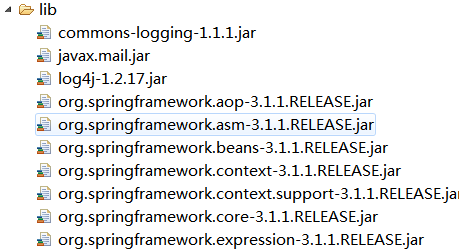
资源

示例:使用模板创建邮件正文
MailService类
public class MailService {
    private JavaMailSender mailSender;
    private Configuration freeMarkerConfiguration;
    public void setMailSender(JavaMailSender mailSender) {
        this.mailSender = mailSender;
    }
    public void setFreeMarkerConfiguration(Configuration freeMarkerConfiguration) {
        this.freeMarkerConfiguration = freeMarkerConfiguration;
    }
    private String getMailText(){
        String htmlText = "";
        try{
            //获取模板实例
            Template template = freeMarkerConfiguration.getTemplate("mail.ftl");
            //通过Map传递动态数据
            Map map = new HashMap();
            map.put("user", "jerry");
            //解析模板文件
            htmlText = FreeMarkerTemplateUtils
                                .processTemplateIntoString(template, map);
        }catch(IOException e){
            e.printStackTrace();
        }catch(TemplateException e){
            e.printStackTrace();
        }catch(Exception e){
            e.printStackTrace();
        }
        return htmlText;
    }

    public void sendMail() throws MessagingException,IOException{
        MimeMessage mimeMessage = mailSender.createMimeMessage();
        MimeMessageHelper helper = new MimeMessageHelper(
                                        mimeMessage, true, "UTF-8");
        helper.setFrom("tina@mail.com");
        helper.setTo("jerry@mail.com");
        helper.setSubject("欢迎来到员工社区");
        helper.setText(getMailText(),true);
        mailSender.send(mimeMessage);
    }
applicationContext.xml
<?xml version="1.0" encoding="UTF-8"?>
<beans
    xmlns="http://www.springframework.org/schema/beans"
    xmlns:xsi="http://www.w3.org/2001/XMLSchema-instance"
    xmlns:p="http://www.springframework.org/schema/p"
    xsi:schemaLocation="http://www.springframework.org/schema/beans http://www.springframework.org/schema/beans/spring-beans-3.1.xsd">
    <bean id="mailSender" class="org.springframework.mail.javamail.JavaMailSenderImpl">
        <property name="host" value="mail.com"></property>
        <property name="></property>
        <property name="username" value="tina"></property>
        <property name="></property>
        <property name="protocol" value="smtp" ></property>
        <property name="defaultEncoding" value="utf-8"></property>
        <property name="javaMailProperties">
            <props>
                <!-- 设置SMTP服务器需要用户验证  -->
                <prop key="mail.smtp.auth">true</prop>
            </props>
        </property>
    </bean>

    <bean id="freeMarkerConfiguration" class="org.springframework.ui.freemarker.FreeMarkerConfigurationFactoryBean">
        <!-- 指定模板文件路径 -->
        <property name="templateLoaderPath" value="cn/bdqn/mailtemplate/"></property>
        <!-- 设置FreeMarker环境变量  -->
        <property name="freemarkerSettings">
            <props>
                <prop key=</prop>
            </props>
        </property>
    </bean>

    <bean id="mailService" class="cn.bdqn.MailService">
        <property name="mailSender" ref="mailSender"></property>
        <property name="freeMarkerConfiguration" ref="freeMarkerConfiguration"></property>
    </bean>

</beans>
MailTest类
public class MailTest {
    public static void main(String[] args){
        ApplicationContext context = new ClassPathXmlApplicationContext("applicationContext.xml");

        try{
            MailService mailService = (MailService)context.getBean("mailService");
            mailService.sendMail();
        }catch(Exception e){
            System.out.print(e.toString());
        }
    }
注意:
jar包

资源

到这里就完成了。。。。。。。。。
JavaMail发送邮件第一版的更多相关文章
- JavaMail发送邮件
发送邮件包含的内容有: from字段 --用于指明发件人 to字段 --用于指明收件人 subject字段 --用于说明邮件主题 cc字段 -- 抄送,将邮件发送给收件人的同时抄 ...
- web应用中使用JavaMail发送邮件
现在很多的网站都提供有用户注册功能, 通常我们注册成功之后就会收到一封来自注册网站的邮件.邮件里面的内容可能包含了我们的注册的用户名和密码以及一个激活账户的超链接等信息.今天我们也来实现一个这样的功能 ...
- JavaMail发送邮件的笔记及Demo
最近碰到一个需求,就是注册用户时候需要向用户发送激活邮箱,于是照着网上搜来的demo自己试着运行了一下,发件时我用的是网易163邮箱,收件时用QQ邮箱,运行后报了一个错误: 网络上搜索解决方式,多次尝 ...
- web应用中使用JavaMail发送邮件 。。转载
现在很多的网站都提供有用户注册功能, 通常我们注册成功之后就会收到一封来自注册网站的邮件.邮件里面的内容可能包含了我们的注册的用户名和密码以及一个激活账户的超链接等信息.今天我们也来实现一个这样的功能 ...
- (转载)JavaWeb学习总结(五十三)——Web应用中使用JavaMail发送邮件
博客源地址:http://www.cnblogs.com/xdp-gacl/p/4220190.html 现在很多的网站都提供有用户注册功能, 通常我们注册成功之后就会收到一封来自注册网站的邮件.邮件 ...
- JavaWeb学习总结(五十三)——Web应用中使用JavaMail发送邮件
现在很多的网站都提供有用户注册功能, 通常我们注册成功之后就会收到一封来自注册网站的邮件.邮件里面的内容可能包含了我们的注册的用户名和密码以及一个激活账户的超链接等信息.今天我们也来实现一个这样的功能 ...
- javamail发送邮件的简单实例
今天学习了一下JavaMail,javamail发送邮件确实是一个比较麻烦的问题.为了以后使用方便,自己写了段代码,打成jar包,以方便以后使用.呵呵 以下三段代码是我的全部代码,朋友们如果想用,直接 ...
- javamail发送邮件的简单实例(转)
今天学习了一下JavaMail,javamail发送邮件确实是一个比较麻烦的问题.为了以后使用方便,自己写了段代码,打成jar包,以方便以后使用.呵呵 注意:要先导入javamail的mail.jar ...
- javamail发送邮件的简单实例(转)
javamail发送邮件的简单实例 今天学习了一下JavaMail,javamail发送邮件确实是一个比较麻烦的问题.为了以后使用方便,自己写了段代码,打成jar包,以方便以后使用.呵呵 以下三段代码 ...
随机推荐
- 太多选择——企业如何选择合适的BI工具?
在没认清现状前,企业当然不能一言不合就上BI. BI不同于一般的企业管理软件,不能简单归类为类似用于提高管理的ERP和WMS,或用于提高企业效率的OA.BPM.BI的本质应该是通过展现数据,用于加强企 ...
- SAP CRM 显示消息/在消息中进行导航
向用户展示消息,在任何软件中都是十分重要的. 在SAP CRM WEB UI中展示消息,不是一项很难的任务,只需要创建消息并在之后调用方法来显示它 消息类和消息号: 我在SE91中创建了如下的消息类和 ...
- 使用git进行源代码管理
git是一款非常流行的分布式版本控制系统,使用Local Repository追踪代码的修改,通过Push和Pull操作,将代码changes提交到Remote Repository,或从Remote ...
- Hello bokeyuan!
一个学习技术的年轻人 从2016/09/03进入大学学习计算机科学与技术这门学科,我已经学习了4个月了,大学的生活很枯燥,很麻烦,很多事,与我想象中的大学有很大的区别.但是这都不会影响我想要成为一个技 ...
- MemCache超详细解读
MemCache是什么 MemCache是一个自由.源码开放.高性能.分布式的分布式内存对象缓存系统,用于动态Web应用以减轻数据库的负载.它通过在内存中缓存数据和对象来减少读取数据库的次数,从而提高 ...
- 自定义Angular插件 - 网站用户引导
最近由于项目进行了较大的改版,为了让用户能够适应这次新的改版,因此在系统中引入了“用户引导”功能,对于初次进入系统的用户一些简单的使用培训training.对于大多数网站来说,这是一个很常见的功能.所 ...
- 线程笔记:Future模式
线程技术可以让我们的程序同时做多件事情,线程的工作模式有很多,常见的一种模式就是处理网站的并发,今天我来说说线程另一种很常见的模式,这个模式和前端里的ajax类似:浏览器一个主线程执行javascri ...
- C#委托使用详解(Delegates)
摘要 委托是C#编程一个非常重要的概念,也是一个难点.本文将系统详细讲解委托. 1. 委托是什么? 其实,我一直思考如何讲解委托,才能把委托说得更透彻.说实话,每个人都委托都有不同的见解,因为看问题的 ...
- ABP源码分析十八:UI Inputs
以下图中描述的接口和类都在Abp项目的Runtime/Validation, UI/Inputs目录下的.在当前版本的ABP(0.83)中这些接口和类并没有实际使用到.阅读代码时可以忽略,无需浪费时间 ...
- 解析大型.NET ERP系统 多国语言实现
实现多国语言有许多种实现方案,无外乎是一种字符串替换技术,将界面控件的文本标签替换成相应语言的文字..NET Windows Forms实现多国语言的方法有以下几种: 1 .NET的方案,使用资源文件 ...