
SpringBoot2.x入门:使用CommandLineRunner钩子接口
前提
这篇文章是《SpringBoot2.x入门》专辑的第6篇文章,使用的SpringBoot版本为2.3.1.RELEASE,JDK版本为1.8。
这篇文章主要简单聊聊钩子接口CommandLineRunner和ApplicationRunner,下文有时候统称两者为Runner。
Runner的回调时机
参考org.springframework.boot.SpringApplication#run()方法的源码,可以知道CommandLineRunner和ApplicationRunner的回调时机:
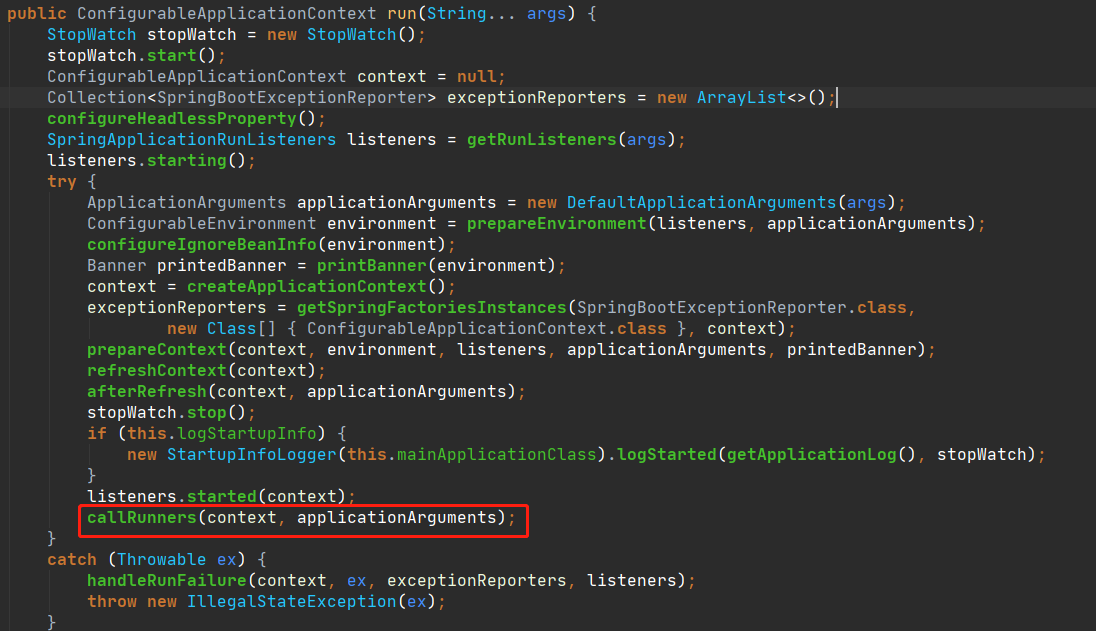
在所有的CommandLineRunner和ApplicationRunner回调之前,下面的步骤已经确保执行完毕:
Environment内置变量的创建和属性填充已经完成。Banner已经打印完毕。ApplicationContext和BeanFactory创建完成,并且完成了上下文刷新(refreshContext),意味着所有单例的Bean完成了初始化以及属性装配。Servlet容器启动成功,如内置的Tomcat、Jetty容器已经正常启动,可以正常接收请求和处理。- 启动信息完成打印,一般会看到日志输出类似
Started OrderExportApplication in XXX seconds (JVM running for YYY)。
也就是CommandLineRunner或者ApplicationRunner回调的时候,可以使用所有上下文中存在的单例Bean和Environment内置变量中已经存在的属性值,所以很多时候demo项目都会在CommandLineRunner或者ApplicationRunner中进行操作。
Runner的简单使用
CommandLineRunner和ApplicationRunner没有本质区别,唯一的区别在:CommandLineRunner#run()接收来自于main方法的参数,类型是字符串数组(不定字符串数组),而ApplicationRunner#run()接收ApplicationArguments类型的参数,对应的实现类是DefaultApplicationArguments。
可以直接把注解@Component应用在CommandLineRunner或者ApplicationRunner的实现类上,相对于把对应的实现单例添加到Spring上下文中。例如:
@Slf4j

@Component

public class CustomCommandLineRunner implements CommandLineRunner {

    @Override

    public void run(String... args) throws Exception {

        log.info("CustomCommandLineRunner runs...");

    }

}
也可以通过@Bean注解,直接作用于CommandLineRunner的匿名类对应的方法上,例如:
@Slf4j

@Configuration

public class CommandLineRunners {

    @Bean

    public CommandLineRunner commandLineRunner(){

        return args -> log.info("CommandLineRunners commandLineRunner");

    }

}
或者直接在启动类实现CommandLineRunner接口(这种方式不推荐使用):
@Slf4j

@SpringBootApplication

public class Ch5Application implements CommandLineRunner {

    public static void main(String[] args) {

        SpringApplication.run(Ch5Application.class, args);

    }

    @Override

    public void run(String... args) throws Exception {

        log.info("Ch5Application CommandLineRunner runs...");

    }

}
此外,可以通过实现org.springframework.core.Ordered接口或者@Order注解定义Runner回调的顺序,指定的顺序数越小,优先级越高。
Runner的使用场景
这一小节是根据个人的编程习惯提出的建议。Runner钩子接口回调的时候如果抛出异常,会直接导致应用进程退出,所以如果在Runner回调方法中一定要注意异常的捕获和处理。基于这个特性,结合前面分析Runner接口的回调时机,它适用的主要场景有:
- 打印日志用于标识服务启动成功或者标识某些属性加载成功。
- 设置属性值或者启动组件,例如开启某些组件的开关、一些应用级别缓存的加载、启动定时任务等等。
- 预加载数据(更常见于一些测试场景中,可以结合
@Profile注解使用,指定特定的profile才生效)。 - 需要使用
main方法的入参。
下面使用CommandLineRunner启动所有Quartz中的Job(记得先引入依赖spring-boot-starter-quartz以及quartz),为了简单起见调度器使用内存态:
@Slf4j

@DisallowConcurrentExecution

public class SimpleJob extends QuartzJobBean {

    @Override

    protected void executeInternal(JobExecutionContext context) throws JobExecutionException {

        log.info("SimpleJob run...");

    }

}

@Component

public class QuartzCommandLineRunner implements CommandLineRunner {

    @Autowired

    private Scheduler scheduler;

    @Override

    public void run(String... args) throws Exception {

        JobDetail job = JobBuilder.newJob(SimpleJob.class).storeDurably().withIdentity(JobKey.jobKey("SimpleJob")).build();

        // 30秒执行一次

        Trigger trigger = TriggerBuilder.newTrigger()

                .withSchedule(SimpleScheduleBuilder.simpleSchedule().repeatForever().withIntervalInSeconds(30))

                .forJob(job).build();

        scheduler.scheduleJob(job, trigger);

    }

}
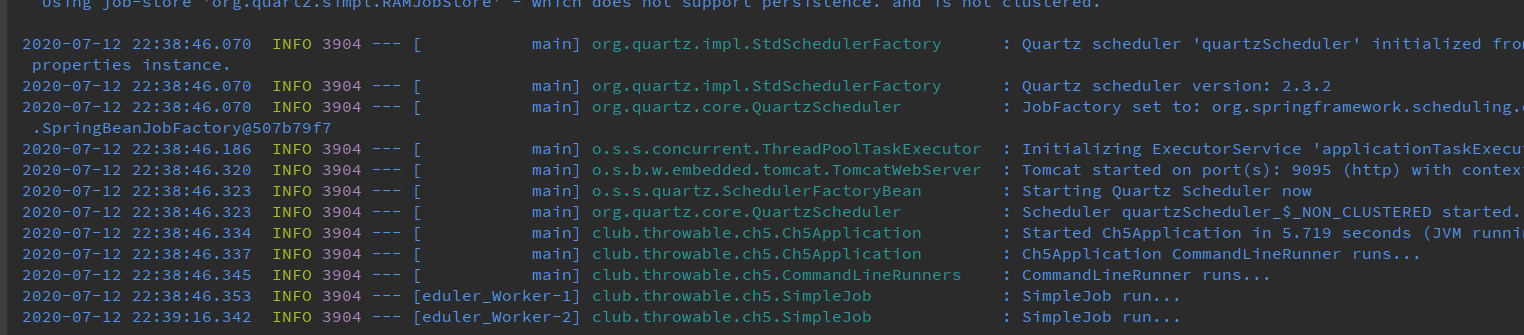
启动应用后,日志如下:
小结
本文demo项目仓库:
(本文完 c-2-d e-a-20200712)
技术公众号《Throwable文摘》(id:throwable-doge),不定期推送笔者原创技术文章(绝不抄袭或者转载):

SpringBoot2.x入门:使用CommandLineRunner钩子接口的更多相关文章
- SpringBoot2.x入门教程:理解配置文件
前提 这篇文章是<SpringBoot2.x入门>专辑的第4篇文章,使用的SpringBoot版本为2.3.1.RELEASE,JDK版本为1.8. 主要介绍SpringBoot配置文件一 ...
- SpringBoot2.x入门教程:引入jdbc模块与JdbcTemplate简单使用
这是公众号<Throwable文摘>发布的第23篇原创文章,收录于专辑<SpringBoot2.x入门>. 前提 这篇文章是<SpringBoot2.x入门>专辑的 ...
- SpringBoot2.x入门:使用MyBatis
这是公众号<Throwable文摘>发布的第25篇原创文章,收录于专辑<SpringBoot2.x入门>. 前提 这篇文章是<SpringBoot2.x入门>专辑的 ...
- SpringBoot2.x入门:快速创建一个SpringBoot应用
前提 这篇文章是<SpringBoot2.x入门>专辑的第2篇文章,使用的SpringBoot版本为2.3.1.RELEASE,JDK版本为1.8. 常规的套路会建议使用Spring官方提 ...
- SpringBoot2.x入门:引入web模块
前提 这篇文章是<SpringBoot2.x入门>专辑的第3篇文章,使用的SpringBoot版本为2.3.1.RELEASE,JDK版本为1.8. 主要介绍SpringBoot的web模 ...
- Springboot2.x入门——helloWorld
Springboot2.x入门--helloWorld 一.简介 1.1 Springboot简介 Spring Boot是由Pivotal团队提供的全新框架,其设计目的是用来简化新Spring应用的 ...
- MyBatis基础入门《四》接口方式.Select查询集合
MyBatis基础入门<四>接口方式.Select查询集合 描述: 在<MyBatis基础入门<二>Select查询>中有说过,SQLSession有两种用法,这里 ...
- Spring(七)核心容器 - 钩子接口
目录 前言 1.Aware 系列接口 2.InitializingBean 3.BeanPostProcessor 4.BeanFactoryPostProcessor 5.ImportSelecto ...
- SpringBoot2.x入门:应用打包与启动
前提 这篇文章是<SpringBoot2.x入门>专辑的第5篇文章,使用的SpringBoot版本为2.3.1.RELEASE,JDK版本为1.8. 这篇文章分析一个偏向于运维方面的内容: ...
随机推荐
- 使用Python解密仿射密码
新学期有一门密码学课,课上老师布置了一道密码学题,题目如下: 解密由仿射密码加密的密文“DBUHU SPANO SMPUS STMIU SBAKN OSMPU SS” 想解密这个密文,首先必须要知道仿 ...
- 一、Adobe Premiere Pro CC概述
一.Adobe Premiere Pro CC概述 使用建议 一.开始 二.在Adobe Premiere Pro CC执行非线性编辑 1.标准的视频剪辑工作流 2.使用Premiere增强工作流 p ...
- 分享 HT 实用技巧:实现指南针和 3D 魔方导航
前言 三维场景时常需要一个导航标识,用来确定场景所处的方位. 一般有两种表现形式:指南针.小方盒(方位魔方). 参考一下百度百科中的 maya 界面,可以看到右上角有一个标识方位的小盒子,说的就是它: ...
- 音视频前沿:新一代 AV1 视频标准究竟是怎样一种存在?
AV1是开放媒体联盟Alliance for Open Media (AOM) 开发的第一代视频编码标准,自推出以来获得了产业界巨大关注和支持.腾讯多媒体实验室也加入进来和其他公司团队一同积极推动AV ...
- 【总结】Github通过Git Bash上传文件到仓库
1-ML新文件夹连接仓库gir clone(最好用SSH不需要输入账户密码 SSH需要设置秘钥) 2-ML中设立空文件夹与项目同名(要新建 打开隐藏文件选项 文件夹内不许有文件会报错) 3-在项 ...
- 你想了解的 HTTPS 都在这里
HTTP 协议仅仅制定了互联网传输的标准,简化了直接使用 TCP 协议进行通信的难度.有关 HTTP 协议相关的讲解请看前面两节: HTTP 协议详解 HTTP协议详解(二) less is more ...
- Spring — 循环依赖
读完这篇文章你将会收获到 Spring 循环依赖可以分为哪两种 Spring 如何解决 setter 循环依赖 Spring 为何是三级缓存 , 二级不行 ? Spring 为啥不能解决构造器循环依赖 ...
- java.sql.SQLException: The server time zone value '�й���ʱ��' is unrecognized
idea数据库连接字符串需要添加一些参数: ?useUnicode=true&characterEncoding=UTF-8&serverTimezone=Asia/Shanghai ...
- day08获取图片
wxml: <!--pages/publish/publish.wxml--> <text>pages/publish/publish.wxml</text> &l ...
- HTTPS协议详解(三):PKI 体系
转自:https://blog.csdn.net/hherima/article/details/52469488 1.RSA身份验证的隐患 身份验证和密钥协商是TLS的基础功能,要求的前提是合 ...