
SpringBoot2.x入门:使用CommandLineRunner钩子接口
前提
这篇文章是《SpringBoot2.x入门》专辑的第6篇文章,使用的SpringBoot版本为2.3.1.RELEASE,JDK版本为1.8。
这篇文章主要简单聊聊钩子接口CommandLineRunner和ApplicationRunner,下文有时候统称两者为Runner。
Runner的回调时机
参考org.springframework.boot.SpringApplication#run()方法的源码,可以知道CommandLineRunner和ApplicationRunner的回调时机:
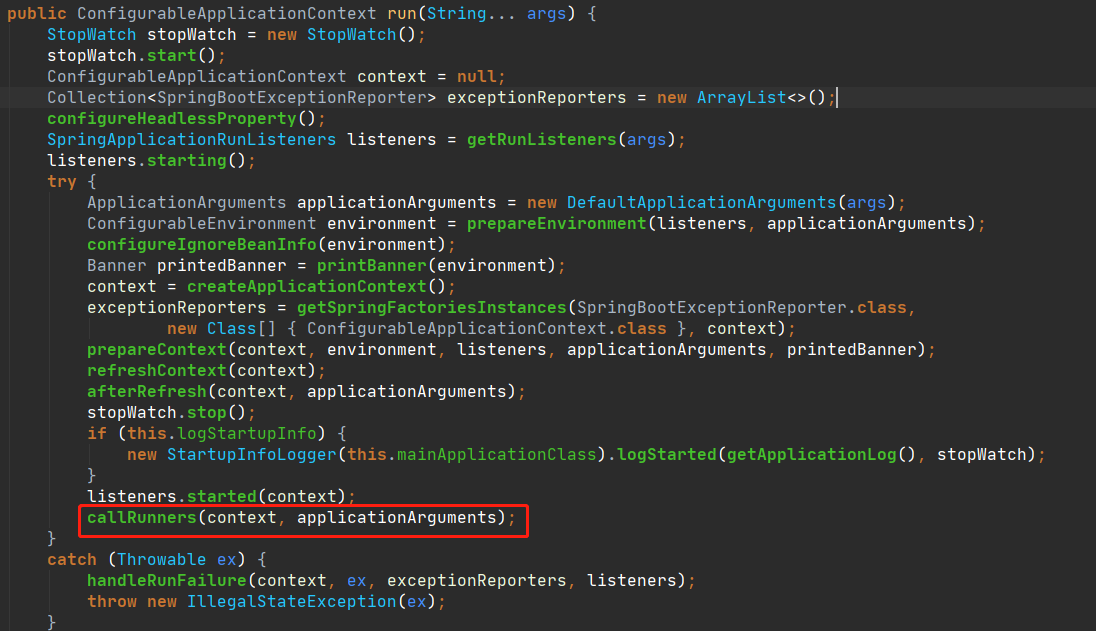
在所有的CommandLineRunner和ApplicationRunner回调之前,下面的步骤已经确保执行完毕:
Environment内置变量的创建和属性填充已经完成。Banner已经打印完毕。ApplicationContext和BeanFactory创建完成,并且完成了上下文刷新(refreshContext),意味着所有单例的Bean完成了初始化以及属性装配。Servlet容器启动成功,如内置的Tomcat、Jetty容器已经正常启动,可以正常接收请求和处理。- 启动信息完成打印,一般会看到日志输出类似
Started OrderExportApplication in XXX seconds (JVM running for YYY)。
也就是CommandLineRunner或者ApplicationRunner回调的时候,可以使用所有上下文中存在的单例Bean和Environment内置变量中已经存在的属性值,所以很多时候demo项目都会在CommandLineRunner或者ApplicationRunner中进行操作。
Runner的简单使用
CommandLineRunner和ApplicationRunner没有本质区别,唯一的区别在:CommandLineRunner#run()接收来自于main方法的参数,类型是字符串数组(不定字符串数组),而ApplicationRunner#run()接收ApplicationArguments类型的参数,对应的实现类是DefaultApplicationArguments。
可以直接把注解@Component应用在CommandLineRunner或者ApplicationRunner的实现类上,相对于把对应的实现单例添加到Spring上下文中。例如:
@Slf4j

@Component

public class CustomCommandLineRunner implements CommandLineRunner {

    @Override

    public void run(String... args) throws Exception {

        log.info("CustomCommandLineRunner runs...");

    }

}
也可以通过@Bean注解,直接作用于CommandLineRunner的匿名类对应的方法上,例如:
@Slf4j

@Configuration

public class CommandLineRunners {

    @Bean

    public CommandLineRunner commandLineRunner(){

        return args -> log.info("CommandLineRunners commandLineRunner");

    }

}
或者直接在启动类实现CommandLineRunner接口(这种方式不推荐使用):
@Slf4j

@SpringBootApplication

public class Ch5Application implements CommandLineRunner {

    public static void main(String[] args) {

        SpringApplication.run(Ch5Application.class, args);

    }

    @Override

    public void run(String... args) throws Exception {

        log.info("Ch5Application CommandLineRunner runs...");

    }

}
此外,可以通过实现org.springframework.core.Ordered接口或者@Order注解定义Runner回调的顺序,指定的顺序数越小,优先级越高。
Runner的使用场景
这一小节是根据个人的编程习惯提出的建议。Runner钩子接口回调的时候如果抛出异常,会直接导致应用进程退出,所以如果在Runner回调方法中一定要注意异常的捕获和处理。基于这个特性,结合前面分析Runner接口的回调时机,它适用的主要场景有:
- 打印日志用于标识服务启动成功或者标识某些属性加载成功。
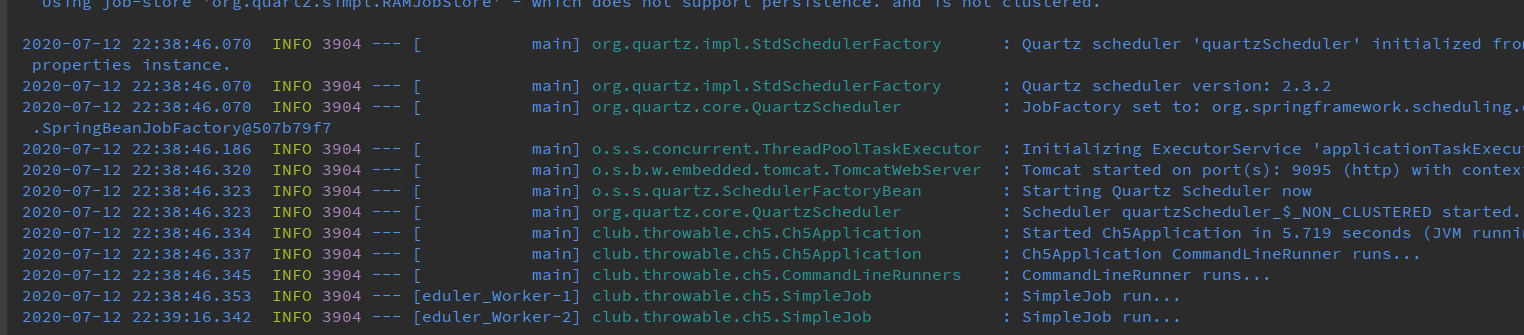
- 设置属性值或者启动组件,例如开启某些组件的开关、一些应用级别缓存的加载、启动定时任务等等。
- 预加载数据(更常见于一些测试场景中,可以结合
@Profile注解使用,指定特定的profile才生效)。 - 需要使用
main方法的入参。
下面使用CommandLineRunner启动所有Quartz中的Job(记得先引入依赖spring-boot-starter-quartz以及quartz),为了简单起见调度器使用内存态:
@Slf4j

@DisallowConcurrentExecution

public class SimpleJob extends QuartzJobBean {

    @Override

    protected void executeInternal(JobExecutionContext context) throws JobExecutionException {

        log.info("SimpleJob run...");

    }

}

@Component

public class QuartzCommandLineRunner implements CommandLineRunner {

    @Autowired

    private Scheduler scheduler;

    @Override

    public void run(String... args) throws Exception {

        JobDetail job = JobBuilder.newJob(SimpleJob.class).storeDurably().withIdentity(JobKey.jobKey("SimpleJob")).build();

        // 30秒执行一次

        Trigger trigger = TriggerBuilder.newTrigger()

                .withSchedule(SimpleScheduleBuilder.simpleSchedule().repeatForever().withIntervalInSeconds(30))

                .forJob(job).build();

        scheduler.scheduleJob(job, trigger);

    }

}
启动应用后,日志如下:
小结
本文demo项目仓库:
(本文完 c-2-d e-a-20200712)
技术公众号《Throwable文摘》(id:throwable-doge),不定期推送笔者原创技术文章(绝不抄袭或者转载):

SpringBoot2.x入门:使用CommandLineRunner钩子接口的更多相关文章
- SpringBoot2.x入门教程:理解配置文件
前提 这篇文章是<SpringBoot2.x入门>专辑的第4篇文章,使用的SpringBoot版本为2.3.1.RELEASE,JDK版本为1.8. 主要介绍SpringBoot配置文件一 ...
- SpringBoot2.x入门教程:引入jdbc模块与JdbcTemplate简单使用
这是公众号<Throwable文摘>发布的第23篇原创文章,收录于专辑<SpringBoot2.x入门>. 前提 这篇文章是<SpringBoot2.x入门>专辑的 ...
- SpringBoot2.x入门:使用MyBatis
这是公众号<Throwable文摘>发布的第25篇原创文章,收录于专辑<SpringBoot2.x入门>. 前提 这篇文章是<SpringBoot2.x入门>专辑的 ...
- SpringBoot2.x入门:快速创建一个SpringBoot应用
前提 这篇文章是<SpringBoot2.x入门>专辑的第2篇文章,使用的SpringBoot版本为2.3.1.RELEASE,JDK版本为1.8. 常规的套路会建议使用Spring官方提 ...
- SpringBoot2.x入门:引入web模块
前提 这篇文章是<SpringBoot2.x入门>专辑的第3篇文章,使用的SpringBoot版本为2.3.1.RELEASE,JDK版本为1.8. 主要介绍SpringBoot的web模 ...
- Springboot2.x入门——helloWorld
Springboot2.x入门--helloWorld 一.简介 1.1 Springboot简介 Spring Boot是由Pivotal团队提供的全新框架,其设计目的是用来简化新Spring应用的 ...
- MyBatis基础入门《四》接口方式.Select查询集合
MyBatis基础入门<四>接口方式.Select查询集合 描述: 在<MyBatis基础入门<二>Select查询>中有说过,SQLSession有两种用法,这里 ...
- Spring(七)核心容器 - 钩子接口
目录 前言 1.Aware 系列接口 2.InitializingBean 3.BeanPostProcessor 4.BeanFactoryPostProcessor 5.ImportSelecto ...
- SpringBoot2.x入门:应用打包与启动
前提 这篇文章是<SpringBoot2.x入门>专辑的第5篇文章,使用的SpringBoot版本为2.3.1.RELEASE,JDK版本为1.8. 这篇文章分析一个偏向于运维方面的内容: ...
随机推荐
- python学习日记2019.9.2
1 定义一个字符串对象str str.title() #将字符串中用空格分隔的字符段首字母大写 str.rstrip() #将字符串末的空格删去 str.strip() #将字符串首末的空格删去 st ...
- python基础内容整理(一)
基本数据类型 字符串 String 字符串是不可变类型 字符串的分割: s.split(sep)以给定的sep为分隔符对s进行分割. In [4]: s = "hello world&quo ...
- jmeter组件中 测试计划,线程组,sampler等等
[测试计划] 这边用户定义的变量,定义整个测试中使用的重复值(全局变量),一般定义服务器的ip,端口号 [线程组] 关于,线程组,我简单聊聊,有不对的地方欢迎大家拨乱反正 线程数:你需要运行的线程 比 ...
- APP移动端测试
重点: app测试的内容 add 命令 monkey命令 次重点:模拟器的安装 雷电 夜神 android 自带的模拟器 真机测试 简单了解云测Testing 腾讯云() 了解:市场有点移动端的操 ...
- pyhton 月份和天数的计算
http://stackoverflow.com/questions/546321/how-do-i-calculate-the-date-six-months-from-the-current-da ...
- http 的8中请求方式:
http 的8中请求方式: 1.OPTIONS 返回服务器针对特定资源所支持的HTTP请求方法,也可以利用向web服务器发送‘*’的请求来测试服务器的功能性 2.HEAD 向服务器索与GET请求相一致 ...
- Maven发展历史
1.1 Maven是什么 Maven是一个项目管理和综合工具. Maven提供了开发人员构建一个完整的生命周期框架.开发者团队可以自动完成项目的基础工具建设, Maven使用标准的目录结构和默认构建生 ...
- Error: Cannot find module 'webpack'
运行 npm start 报错 Error: Cannot find module 'webpack' 安装了 npm install --save-dev webpack cnpm install ...
- Vmware虚拟机克隆以及关闭防火墙
vmware虚拟机克隆之后,一定要修改克隆机器的mac地址和IP上网地址,不能和之前的机器一样
- MySQL新密码机制介绍caching_sha2_password
MySQL添加了对身份验证插件的支持,该插件现在称为mysql_native_password.该mysql_native_password插件使用SHA1哈希 将密码(SHA1(SHA1(passw ...