
IDA报错fatal error before kernel init
编写了一个IDA64插件,结果再打开IDA后报错fatal error before kernel init,然后闪退。
检查了一遍代码没发现有问题,后来发现是环境有一处配置错误,
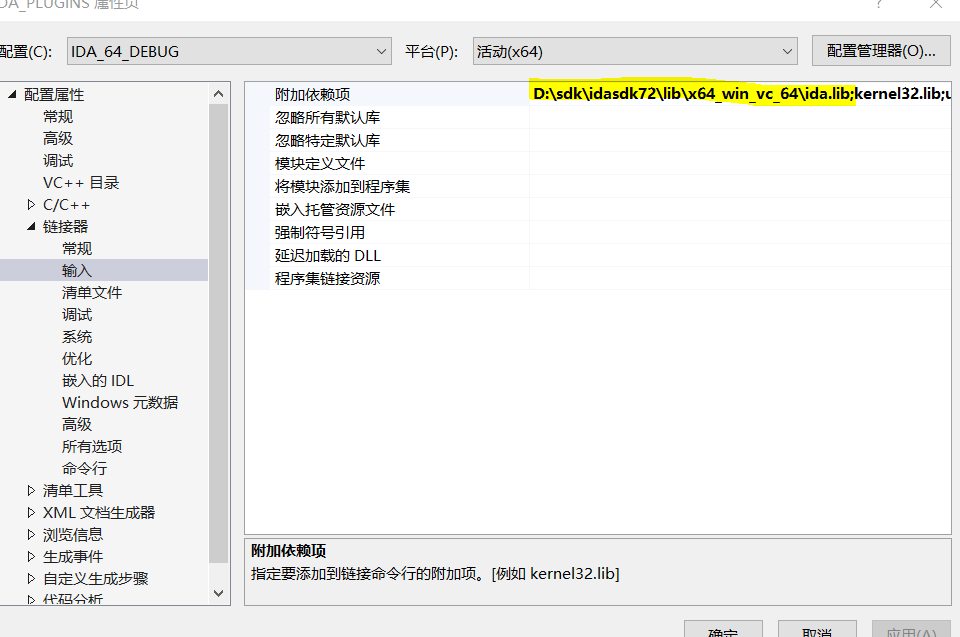
IDA64.exe插件环境配置:
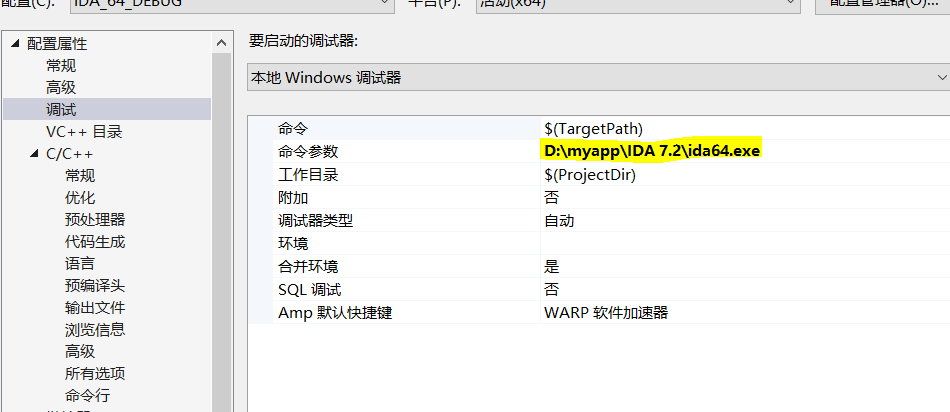
1、调试器设置,用来调试插件。
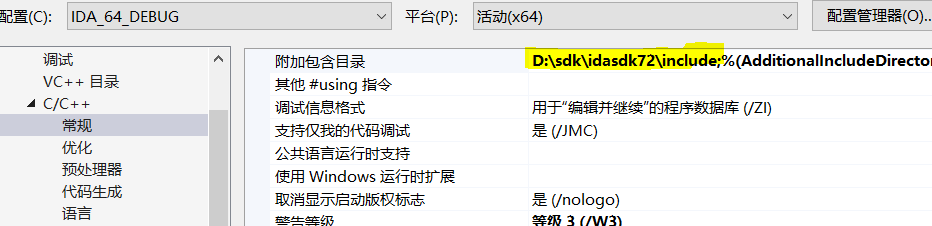
2、头文件包含
3、预处理器

4、链接依赖库

5、

详细配置可以查看idasdk目录下的install_visual.txt文件


Please read "readme.txt" before reading this file!

How to set up Visual C++ 2017 for IDA Plugins

---------------------------------------------

This guide will help you set up a Visual C++ project that targets both ida32 and ida64 plugins.

Remember that, even though ida32 is used to work on 32-bit files, it is also an x64 application.

Therefore, both plugins (ida32 and ida64) must be built for the x64 platform.

1. File | New | Project From Existing Code...

2. What type of project would you like to create: Visual C++

   <next>

3. Project file location: <folder where you have your files>

   Project name: <your plugin's name>

   <finish>

Once the project is initialized, right-click on the project name and pick Properties.

4. Configuration Manager...

     Active solution platform: select "x64"

   <Close>

5. General | Project Defaults | Configuration Type

     Dynamic Library (.dll)

   <apply>

6. C/C++ | General | Additional Include Directories

     Enter the SDK's include folder in "Include search paths (/I)": eg. C:\idasdk\include;

   <apply>

7. C/C++ | Code Generation | Runtime library (visible only after you add one .cpp file to the project)

     Multi-threaded DLL (/MD)

   <apply>

8. Linker | Command Line | Additional options

     - for processor modules: /EXPORT:LPH

     - for plugins: /EXPORT:PLUGIN

     - for loaders: /EXPORT:LDSC

   <apply>

The steps above constituted the common configuration for both ida32 and ida64 configurations.

We will now create the separate configurations.

9. Still under "Configuration Manager..."

     - under the "Configuration" column, click on "Debug"

     - click "<Edit...>"

     - click "Rename"

     - add an "ida32" prefix to the configuration name, such as "ida32 Debug"

     - <Enter>

     - <Yes>

     - <Close>

     - under "Active solution configuration", click on "Debug"

     - click "<Edit...>"

     - click "Rename"

     - add an "ida32" prefix to the configuration name, such as "ida32 Debug"

     - <Enter>

     - <Yes>

     - <Close>

     - under "Active solution configuration", click on the new configuration name "ida32 Debug"

     - click "<New...>"

     - use a similar name, but with the "ida64" prefix, such as "ida64 Debug"

     - Copy settings from: "ida32 Debug"

     - <Ok>

     - <Close>

In the "Property Page", under "Configuration", select "ida32 Debug".

10. Debugging | Command

      - for ida32: C:\Program Files\IDA 7.2\ida.exe

      - for ida64: C:\Program Files\IDA 7.2\ida64.exe

    <apply>

11. C/C++ | Preprocessor | Preprocessor Definitions

      - for ida32: __NT__;

      - for ida64: __NT__;__EA64__;

    <apply>

12. Linker | General | Output File:

      - for ida32: $(OutDir)\$(ProjectName).dll

      - for ida64: $(OutDir)\$(ProjectName)64.dll

    <apply>

13. Linker | Input | Additional Dependencies

      - for ida32: C:\idasdk\lib\x64_win_vc_32\ida.lib

      - for ida64: C:\idasdk\lib\x64_win_vc_64\ida.lib

    <apply>

In the "Property Page", under "Configuration", select "ida64 Debug" and repeat the last three steps.

You should now be capable to easily switch between the "ida32 Debug" and "ida64 Debug" configurations and build your project.
IDA报错fatal error before kernel init的更多相关文章
- IDA64 Fatal error before kernel init
http://www.tuicool.com/articles/7FZVZna 第一次看到这个错误还以为是修改文件导致的,但是觉得又不大像,因为在Win7底下是完全正常的.搜索了一下才发现是由于插件导 ...
- pip运行报错Fatal error in launcher: Unable to create process using pip.exe
使用pip的时候报错Fatal error in launcher: Unable to create process using pip.exe 解决办法,升级pip python -m pip i ...
- pip3命令报错Fatal error in launcher: Unable to create process using '"d:\old_files\py3.6\python.exe" "E:\py3.6\Scripts\pip3.exe" list'
cmd输入pip3 list命令报错 Fatal error in launcher: Unable to create process using '"d:\old_files\py3.6 ...
- centos6的kibana7.1无法启动报错 FATAL Error: /lib64/libc.so.6: version `GLIBC_2.14' not found 升级glibc的问题处理
centos6的kibana7.1无法启动报错 FATAL Error: /lib64/libc.so.6: version `GLIBC_2.14' not found 升级glibc的问题处理 ...
- Mysql报错Fatal error: Can't open and lock privilege tables: Table 'mysql.host' doesn't exist
安装mysql后,启动时候没有启动成功,查看了下日志报错如下:---------------------------------------------1 可以:初始化mysql:mysql_in ...
- phprpc的使用示例以及报错Fatal error: Cannot redeclare gzdecode() in D:\wamp\www\immoc\phprpc\compat.php 处理
今天看书,发现了PHPRPC这个好东东,故在此写下来以作笔记. PHPRPC 是一个轻型的.安全的.跨网际的.跨语言的.跨平台的.跨环境的.跨域的.支持复杂对象传输的.支持引用参数传递的.支持内容输出 ...
- pip安装lxml报错 Fatal error in launcher: Unable to create process using '"c:\users\administrator\appdata\local\programs\python\python36\python.exe" "C:\Users\Administrator\AppData\L
pip install lxml 安装报错 E:\apollo\spider_code>Fatal error in launcher: Unable to create process usi ...
- php连接mysql报错——Fatal error: Call to undefined function mysql_connect() in
练习php连接mysql数据库 代码:mysql_connect("127.0.0.1:3306","root", ..... 浏览器报错:Fatal erro ...
- fabric报错:Fatal error: run() received nonzero return code 1 while executing!
今天在使用fabric远程安装rpm时,一直报:Fatal error: run() received nonzero return code 1 while executing! 这看起来也是没笔病 ...
随机推荐
- 【算法】KMP算法
简介 KMP算法由 Knuth-Morris-Pratt 三位科学家提出,可用于在一个 文本串 中寻找某 模式串 存在的位置. 本算法可以有效降低在一个 文本串 中寻找某 模式串 过程的时间复杂度.( ...
- 强网杯 2019]随便注(堆叠注入,Prepare、execute、deallocate)
然后就是今天学的新东西了,堆叠注入. 1';show databases; # 1';show tables; # 发现两个表1919810931114514.words 依次查询两张表的字段 1'; ...
- map & forEach
map & forEach let logs = `2018-05-23 20:24:09,876 [Timer-2] ERROR org.gil.sydb.server.table.sync ...
- free online business card generator
free online business card generator 免费在线名片生成器 https://www.logaster.cn/business-card/ https://www.chu ...
- css text gradient color, css fonts gradient color
css text gradient color, css fonts gradient color css 字体渐变色 demo https://codepen.io/xgqfrms/pen/OJya ...
- PAUL ADAMS ARCHITECT :阿联酋和美国富人推动英国高端房地产市场
来自2020年前三季度的数据显示,在英国高端市场上,由国际买家担保的抵押贷款交易数量最多,阿联酋目前处于领先地位.到目前为止,在2020年完成的所有交易中,有35%来自阿联酋. PAUL ADAMS ...
- ArrayList的简单实现
class AList<E>{ //属性:数组和实际元素个数 private Object[] data; private int size; //构造函数:有参.无参 public AL ...
- 🤔 移动端 JS 引擎哪家强?美国硅谷找......
如果你喜欢我写的文章,可以把我的公众号设为星标 ,这样每次有更新就可以及时推送给你啦 在一般的移动端开发场景中,每次更新应用功能都是通过 Native 语言开发并通过应用市场版本分发来实现的.但是市场 ...
- 使用Prometheus搞定微服务监控
最近对服务进行监控,而当前监控最流行的数据库就是 Prometheus,同时 go-zero 默认接入也是这款数据库.今天就对 go-zero 是如何接入 Prometheus ,以及开发者如何自己定 ...
- LeetCode113. 路径总和 II
原题链接 1 class Solution: 2 def pathSum(self, root: TreeNode, sum: int) -> List[List[int]]: 3 ans,tm ...