
Cesium加载倾斜摄影数据
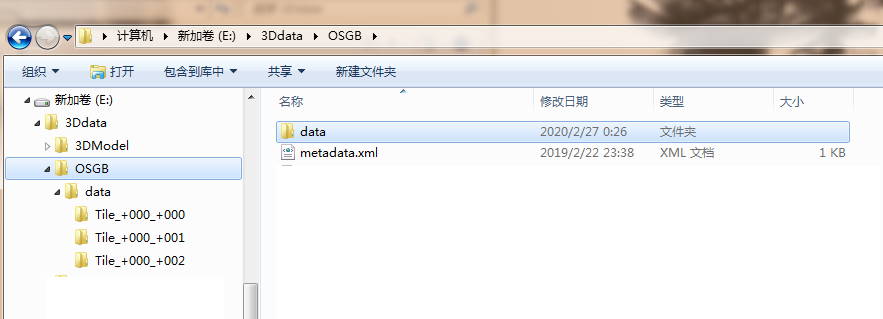
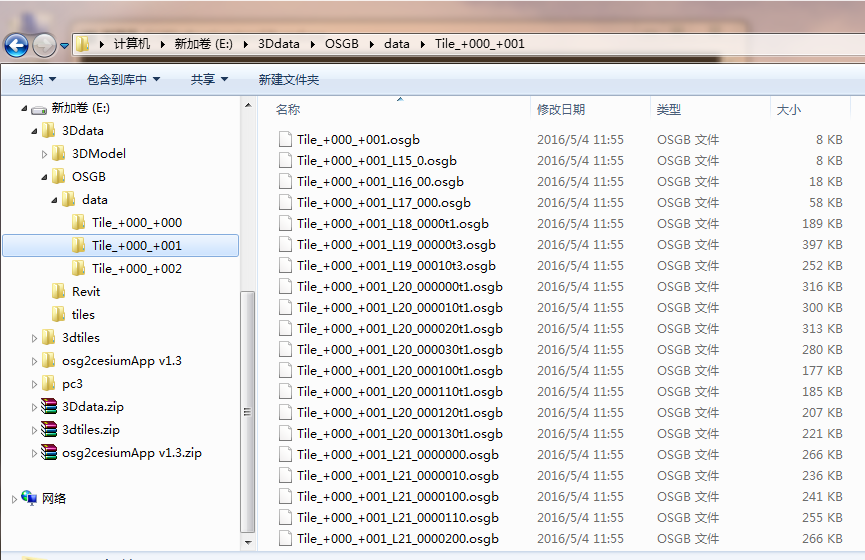
(1)倾斜摄影数据仅支持 smart3d 格式的 osgb 组织方式, 数据目录必须有一个 “Data” 目录的总入口, “Data” 目录同级放置一个 metadata.xml 文件用来记录模型的位置信息。
(2)每个瓦片目录下,必须有个和目录名同名的 osgb 文件,否则无法识别根节点。
cesuim暂不支持.osgb格式数据显示,所以要将.osgb格式数据转换为3dtile 格式
3dtile.exe -f osgb -i E:\3Ddata\OSGB\ -o E:\pc3
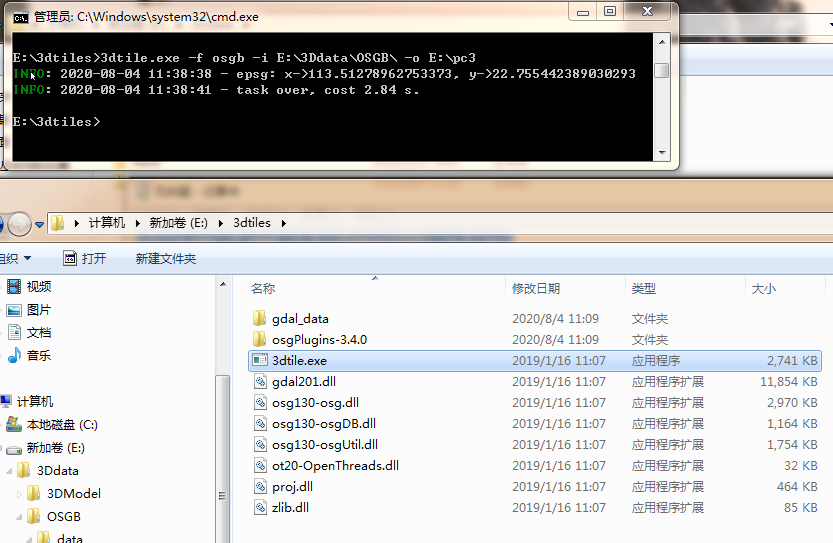
或者用这个工具
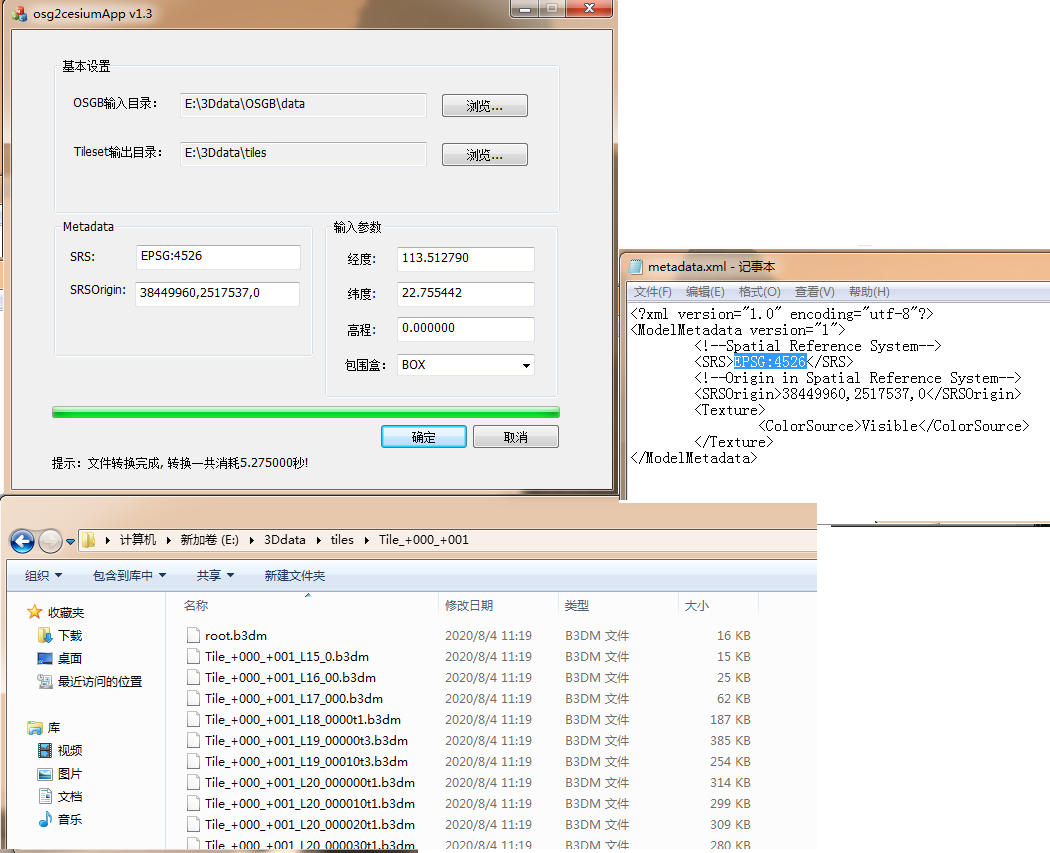
加载倾斜摄影数据


  <div id="cesiumContainer"></div>

    Cesium.Ion.defaultAccessToken = 'eyJhbGciOiJIUzI1NiIsIn。。。。。-0qxkrLi06l58vNYZg';

    var viewer = new Cesium.Viewer("cesiumContainer", {

      animation: false,  //是否显示动画控件

      baseLayerPicker: false, //是否显示图层选择控件

      geocoder: false, //是否显示地名查找控件

      timeline: false, //是否显示时间线控件

      sceneModePicker: false, //是否显示投影方式控件

      navigationHelpButton: false, //是否显示帮助信息控件

      infoBox: false,  //是否显示点击要素之后显示的信息

      // imageryProvider : new Cesium.WebMapTileServiceImageryProvider({

      //     url: "http://t0.tianditu.com/vec_w/wmts?service=wmts&request=GetTile&version=1.0.0&LAYER=vec&tileMatrixSet=w&TileMatrix={TileMatrix}&TileRow={TileRow}&TileCol={TileCol}&style=default&format=tiles",

      //     layer: "tdtVecBasicLayer",

      //     style: "default",

      //     format: "image/jpeg",

      //     tileMatrixSetID: "GoogleMapsCompatible",

      //     show: false

      // })

    });

    viewer.imageryLayers.get(0).show = false;

    viewer.scene.globe.imageryLayers.removeAll();

    viewer.scene.globe.baseColor = Cesium.Color.BLACK;

    //http://localhost:8087/Apps/3dtiles4.html

    viewer.scene.globe.depthTestAgainstTerrain = true;

    //加载倾斜摄影数据

    var url = "tiles/tileset.json";

    var tileset = new Cesium.Cesium3DTileset({

        url: url

      });

    var primitive = viewer.scene.primitives.add(tileset);

    primitive.readyPromise.then(function (t) {

      var originalSphere = t.boundingSphere;

      var radius = originalSphere.radius;

      viewer.zoomTo(t, new Cesium.HeadingPitchRange(0.5, -0.5, radius * 4.0));

      fixGltf();

    }).otherwise(function (error) {

      var msg = JSON.stringify(error);

      console.log(msg);

    });
会有一个渲染错误
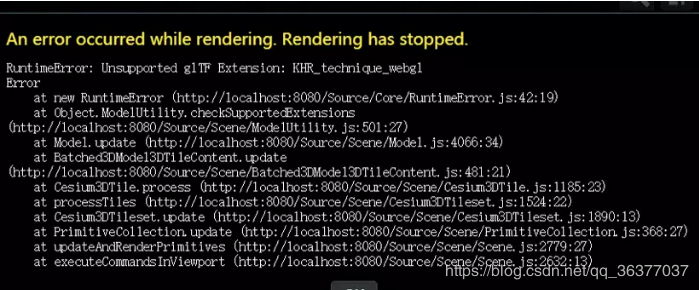
    //Unsupported glTF Extension: KHR_technique_webgl

    //参考:

    //https://blog.csdn.net/qq_36266612/article/details/89497047

  var fixGltf = function(gltf) {

    if (!gltf.extensionsUsed) {

        return;

    }

    var v = gltf.extensionsUsed.indexOf('KHR_technique_webgl');

    var t = gltf.extensionsRequired.indexOf('KHR_technique_webgl');

    // 中招了。。

    if (v !== -1) {

        gltf.extensionsRequired.splice(t, 1, 'KHR_techniques_webgl');

        gltf.extensionsUsed.splice(v, 1, 'KHR_techniques_webgl');

        gltf.extensions = gltf.extensions || {};

        gltf.extensions['KHR_techniques_webgl'] = {};

        gltf.extensions['KHR_techniques_webgl'].programs = gltf.programs;

        gltf.extensions['KHR_techniques_webgl'].shaders = gltf.shaders;

        gltf.extensions['KHR_techniques_webgl'].techniques = gltf.techniques;

        var techniques = gltf.extensions['KHR_techniques_webgl'].techniques;

        gltf.materials.forEach(function (mat, index) {

            gltf.materials[index].extensions['KHR_technique_webgl'].values = gltf.materials[index].values;

            gltf.materials[index].extensions['KHR_techniques_webgl'] = gltf.materials[index].extensions['KHR_technique_webgl'];

            var vtxfMaterialExtension = gltf.materials[index].extensions['KHR_techniques_webgl'];

            for (var value in vtxfMaterialExtension.values) {

                var us = techniques[vtxfMaterialExtension.technique].uniforms;

                for (var key in us) {

                    if (us[key] === value) {

                        vtxfMaterialExtension.values[key] = vtxfMaterialExtension.values[value];

                        delete vtxfMaterialExtension.values[value];

                        break;

                    }

                }

            };

        });

        techniques.forEach(function (t) {

            for (var attribute in t.attributes) {

                var name = t.attributes[attribute];

                t.attributes[attribute] = t.parameters[name];

            };

            for (var uniform in t.uniforms) {

                var name = t.uniforms[uniform];

                t.uniforms[uniform] = t.parameters[name];

            };

        });

    }

}

Object.defineProperties(Cesium.Model.prototype, {

    _cachedGltf: {

        set: function (value) {

            this._vtxf_cachedGltf = value;

            if (this._vtxf_cachedGltf && this._vtxf_cachedGltf._gltf) {

                fixGltf(this._vtxf_cachedGltf._gltf);

            }

        },

        get: function () {

            return this._vtxf_cachedGltf;

        }

    }

});
来个完整的
<!DOCTYPE html>

<head>

  <meta charset="utf-8">

  <meta http-equiv="X-UA-Compatible" content="IE=edge">

  <meta name="viewport" content="width=device-width, initial-scale=1, maximum-scale=1, minimum-scale=1, user-scalable=no">

  <title>加载3Dtiles数据</title>

  <script src="../Build/Cesium/Cesium.js"></script>

  <script type="text/javascript">

   // require.config({ baseUrl : '../Source', waitSeconds : 60 });

   </script>

  <style>

      @import url(../Build/Cesium/Widgets/widgets.css);

      html, body, #cesiumContainer {

          width: 100%; height: 100%; margin: 0; padding: 0; overflow: hidden;

      }

  </style>

</head>

<body>

  <div id="cesiumContainer"></div>

  <script>

    Cesium.Ion.defaultAccessToken = 'eyJhbGciOiJIUzI1NiIsInR5cCI6IkpXVCJ9.eyJqdGkiOiI4NzM5NjZjZC1mYjY2LTQ5YTEtOTY0Ni0zYzBmM2YwOTM5YmYiLCJpZCI6MTk1OTQsInNjb3BlcyI6WyJhc2wiLCJhc3IiLCJnYyJdLCJpYXQiOjE1NzU4NzgzMzF9.eZ0FL7BHtgX9wPq0lyf34JEhh-0qxkrLi06l58vNYZg';

    var viewer = new Cesium.Viewer("cesiumContainer", {

      animation: false,  //是否显示动画控件

      baseLayerPicker: false, //是否显示图层选择控件

      geocoder: false, //是否显示地名查找控件

      timeline: false, //是否显示时间线控件

      sceneModePicker: false, //是否显示投影方式控件

      navigationHelpButton: false, //是否显示帮助信息控件

      infoBox: false,  //是否显示点击要素之后显示的信息

      // imageryProvider : new Cesium.WebMapTileServiceImageryProvider({

      //     url: "http://t0.tianditu.com/vec_w/wmts?service=wmts&request=GetTile&version=1.0.0&LAYER=vec&tileMatrixSet=w&TileMatrix={TileMatrix}&TileRow={TileRow}&TileCol={TileCol}&style=default&format=tiles",

      //     layer: "tdtVecBasicLayer",

      //     style: "default",

      //     format: "image/jpeg",

      //     tileMatrixSetID: "GoogleMapsCompatible",

      //     show: false

      // })

    });

    viewer.imageryLayers.get(0).show = false;

    viewer.scene.globe.imageryLayers.removeAll();

    viewer.scene.globe.baseColor = Cesium.Color.BLACK;

    //http://localhost:8087/Apps/3dtiles4.html

    viewer.scene.globe.depthTestAgainstTerrain = true;

    //加载倾斜摄影数据

    var url = "tiles/tileset.json";

    var tileset = new Cesium.Cesium3DTileset({

        url: url

      });

    var primitive = viewer.scene.primitives.add(tileset);

    primitive.readyPromise.then(function (t) {

      var originalSphere = t.boundingSphere;

      var radius = originalSphere.radius;

      viewer.zoomTo(t, new Cesium.HeadingPitchRange(0.5, -0.5, radius * 4.0));

      fixGltf();

    }).otherwise(function (error) {

      var msg = JSON.stringify(error);

      console.log(msg);

    });

    //Unsupported glTF Extension: KHR_technique_webgl

    //参考:

    //https://blog.csdn.net/qq_36266612/article/details/89497047

  var fixGltf = function(gltf) {

    if (!gltf.extensionsUsed) {

        return;

    }

    var v = gltf.extensionsUsed.indexOf('KHR_technique_webgl');

    var t = gltf.extensionsRequired.indexOf('KHR_technique_webgl');

    // 中招了。。

    if (v !== -1) {

        gltf.extensionsRequired.splice(t, 1, 'KHR_techniques_webgl');

        gltf.extensionsUsed.splice(v, 1, 'KHR_techniques_webgl');

        gltf.extensions = gltf.extensions || {};

        gltf.extensions['KHR_techniques_webgl'] = {};

        gltf.extensions['KHR_techniques_webgl'].programs = gltf.programs;

        gltf.extensions['KHR_techniques_webgl'].shaders = gltf.shaders;

        gltf.extensions['KHR_techniques_webgl'].techniques = gltf.techniques;

        var techniques = gltf.extensions['KHR_techniques_webgl'].techniques;

        gltf.materials.forEach(function (mat, index) {

            gltf.materials[index].extensions['KHR_technique_webgl'].values = gltf.materials[index].values;

            gltf.materials[index].extensions['KHR_techniques_webgl'] = gltf.materials[index].extensions['KHR_technique_webgl'];

            var vtxfMaterialExtension = gltf.materials[index].extensions['KHR_techniques_webgl'];

            for (var value in vtxfMaterialExtension.values) {

                var us = techniques[vtxfMaterialExtension.technique].uniforms;

                for (var key in us) {

                    if (us[key] === value) {

                        vtxfMaterialExtension.values[key] = vtxfMaterialExtension.values[value];

                        delete vtxfMaterialExtension.values[value];

                        break;

                    }

                }

            };

        });

        techniques.forEach(function (t) {

            for (var attribute in t.attributes) {

                var name = t.attributes[attribute];

                t.attributes[attribute] = t.parameters[name];

            };

            for (var uniform in t.uniforms) {

                var name = t.uniforms[uniform];

                t.uniforms[uniform] = t.parameters[name];

            };

        });

    }

}

Object.defineProperties(Cesium.Model.prototype, {

    _cachedGltf: {

        set: function (value) {

            this._vtxf_cachedGltf = value;

            if (this._vtxf_cachedGltf && this._vtxf_cachedGltf._gltf) {

                fixGltf(this._vtxf_cachedGltf._gltf);

            }

        },

        get: function () {

            return this._vtxf_cachedGltf;

        }

    }

});

  </script>

</body>

</html>
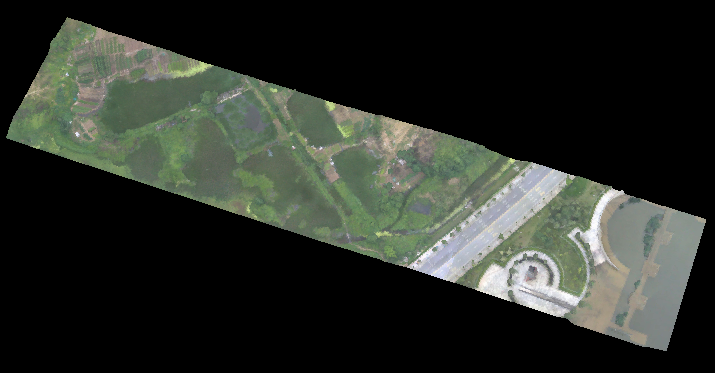
效果:
Cesium加载倾斜摄影数据的更多相关文章
- Cesium加载地形数据只显示半个地球
Cesium第0级地形包括两个瓦片:0/0/0.terrain,0/1/0.terrain,分别为左半球和右半球(具体参考:https://blog.csdn.net/u013929284/artic ...
- Cesium 加载地形数据
1.注册Cesium Ion账号,注册地址:Sign In | Cesium ion 否则,加载数据会报错{code: "InvalidCredentials", message: ...
- cesium 加载倾斜摄影模型(这里有一坑)
代码如下: // Construct the default list of terrain sources. var terrainModels = Cesium.createDefaultTerr ...
- OSG加载倾斜摄影数据
目录 1. 概述 2. 实例 2.1. 代码 2.2. 解析 3. 结果 1. 概述 ContextCapture(Smart3D)生成的倾斜摄影模型数据一般都形如如下组织结构: 在Data目录下包含 ...
- Cesium加载三维倾斜摄影数据
具体技术来源自论文 基于Cesium的倾斜摄影三维模型Web加载与应用研究. 技术架构图 应用实例 利用一个实际实例来详细说明如何利用Cesium加载倾斜摄影数据,并进行可视化和交互操作. 首先,利用 ...
- 使用 Cesium 动态加载 GeoJSON 数据
前言 需求是这样的,我需要在地图中显示 08 年到现在的地震情况,地震都是发生在具体的时间点的,那么问题就来了,如何实现地震情况按照时间动态渲染而不是一次全部加载出来. 一. 方案分析 这里面牵扯到两 ...
- ceisum_加载倾斜摄影模型
osgb转换为3Dtiles格式(使用工具转换) 然后加载到cesium中(加载代码见下,可以控制模型高度) var offset = function(height,tileset) { conso ...
- cesium加载gltf模型
cesium加载gltf模型 一.采用vue-cesium:在项目里加载依赖包.命令如下: npm i --save vue-cesium 在main.js中加入如下代码: https://www.n ...
- geotrellis使用(二十三)动态加载时间序列数据
目录 前言 实现方法 总结 一.前言 今天要介绍的绝对是华丽的干货.比如我们从互联网上下载到了一系列(每天或者月平均等)的MODIS数据,我们怎么能够对比同一区域不同时间的数据情况,采用 ...
随机推荐
- 数据可视化之 图表篇(二)如何用Power BI制作疫情地图?
丁香园制作的这个地图可视化,相信大家每天都会看好几遍,这里不讨论具体数据,仅来探讨一下PowerBI地图技术. 这个地图很简洁,主要有三个特征: 1,使用着色地图,根据数据自动配色 2,只显示中国地图 ...
- 数据可视化实例(十五):有序条形图(matplotlib,pandas)
偏差 (Deviation) 有序条形图 (Ordered Bar Chart) 有序条形图有效地传达了项目的排名顺序. 但是,在图表上方添加度量标准的值,用户可以从图表本身获取精确信息. https ...
- 前端01 /HTML简单简绍
前端01 /HTML简单简绍 目录 前端01 /HTML简单简绍 1.web服务本质 2.浏览器的工作流程 3.HTML是什么 4.web服务本质 5.HTML文档结构 6.HTML注释 6.标签语法 ...
- Python函数07/有参装饰器/多个装饰器装饰一个函数
Python函数07/有参装饰器/多个装饰器装饰一个函数 目录 Python函数07/有参装饰器/多个装饰器装饰一个函数 内容大纲 1.有参装饰器 2.多个装饰器装饰一个函数 3.今日总结 3.今日练 ...
- vue-router 报错、:Avoided redundant navigation to current location 错误、路由重复
在用vue-router 做单页应用的时候重复点击一个跳转的路由会出现报错 这个报错是重复路由引起的只需在注册路由组建后使用下方重写路由就可以 const originalReplace = VueR ...
- Unity-ECS-实践
Archetypes原型 (它的存在使得遍历组件的命中率非常高) Archetype是一个容器,Unity规定每个ArcheType的大小16kb,不够就再开.始终保存内存的连续性 World 世界 ...
- SpringCloud或SpringBoot+Mybatis-Plus利用AOP+mybatis插件实现数据操作记录及更新对比
引文 本文主要介绍如何使用Spring AOP + mybatis插件实现拦截数据库操作并根据不同需求进行数据对比分析,主要适用于系统中需要对数据操作进行记录.在更新数据时准确记录更新字段 核心:AO ...
- DEX文件解析--3、dex文件字符串解析
一.前言 前两篇文章链接: 1.DEX文件头解析 2.DEX文件校验和解析 PS:前几天检查文件夹的时候发现DEX文件解析还只写了开头,正好找点事情来做,就去接着解析DEX ...
- 深入理解JVM内存回收机制(不包含垃圾收集器)
目录 垃圾回收发生的区域 如何判断对象是否可以被回收 HotSpot实现 垃圾回收算法 JVM中使用的垃圾收集算法 GC的分类 总结 参考资料 垃圾回收发生的区域 堆是java创建对象的区域(Stri ...
- kubernetes系列(十七) - 通过helm安装dashboard详细教程
1. 前提条件 2. 配置https证书为secret 3. dashboard安装 3.1 helm拉取dashboard的chart 3.2 配置dashboard的chart包配置 3.3 he ...