
springBoot整合Sentinel实现降级限流熔断
由于hystrix的停止更新,以及阿里Sentinel在历年双十一的贡献。项目中使用了Sentinel,今天我们来讲讲Sentinel的入门教程,本文使用1.6.3版本进行讲解
本文通过Sentinel_dashBoard进行讲解,当然不引入监控看板也能实现限流熔断降级功能,但是监控看板能够直观的看到请求的QPS,成功率等等,同时可以实时的进行降级限流策略的修改与新建。
1.sentinel_dashboard的引入
https://github.com/alibaba/Sentinel/releases,下载sentinel-dashboard-1.6.3.jar
由于dashboard是springboot的项目,在CMD模式下使用命令
java -Dserver.port=8080
-Dcsp.sentinel.dashboard.server=localhost:8080
-Dproject.name=sentinel-dashboard
-jar sentinel-dashboard-1.6.3.jar
进行控制看板服务的启动。
其中,-Dserver.port=8080 代表看板项目的端口号,-Dcsp.sentinel.dashboard.server=localhost:8080代表本看板服务将会注册到自己的看板上,-Dproject.name=sentinel-dashboard代表本看板服务的项目名称。
访问localhost:8080;输入用户名,密码,均是sentinel,如果要自定义用户名和密码,在启动命令加上-Dsentinel.dashboard.auth.username=sentinel,
-Dsentinel.dashboard.auth.password=123456即可。
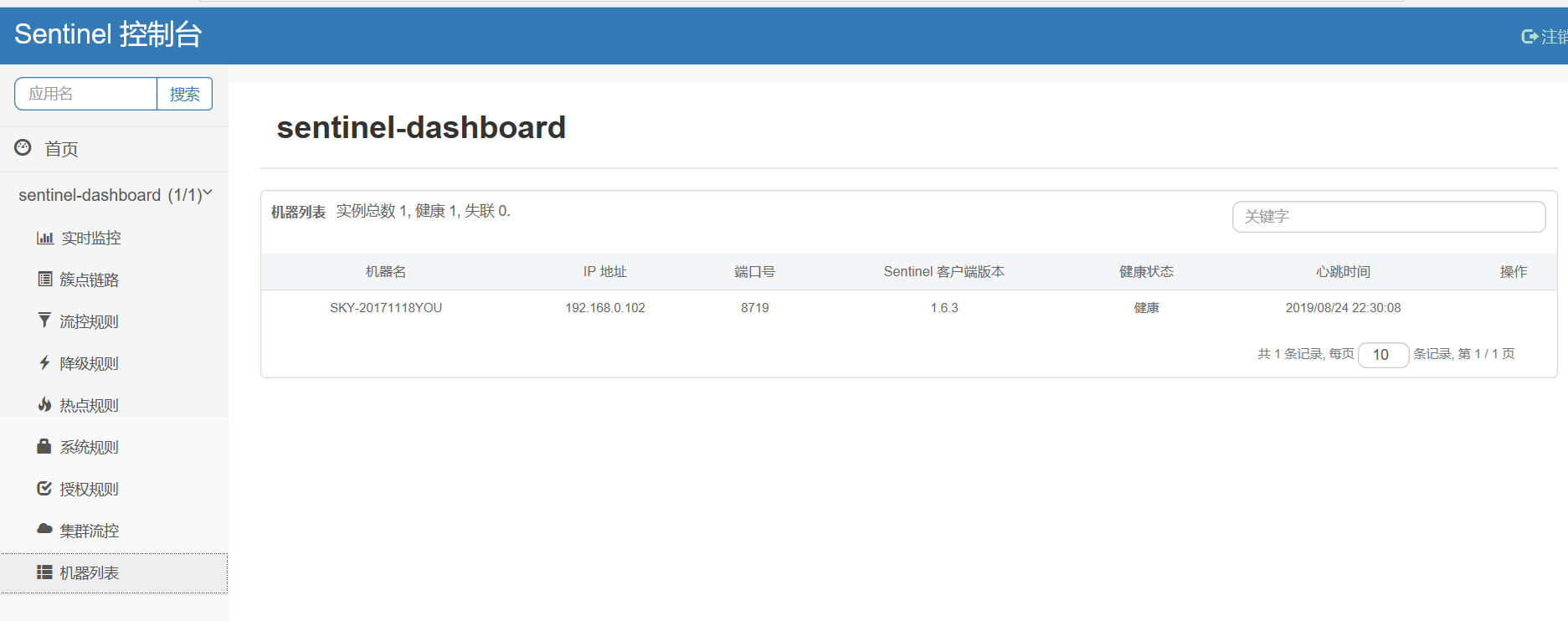
我们可以看到控制台自身的服务已经注册到了控制台上。
2. 接下来,引入需要接入sentinel功能的项目。
3.maven依赖
<?xml version="1.0" encoding="UTF-8"?>

<project xmlns="http://maven.apache.org/POM/4.0.0"

         xmlns:xsi="http://www.w3.org/2001/XMLSchema-instance"

         xsi:schemaLocation="http://maven.apache.org/POM/4.0.0 http://maven.apache.org/xsd/maven-4.0.0.xsd">

    <modelVersion>4.0.0</modelVersion>

    <groupId>spring.sentinel</groupId>

    <artifactId>spring-sentinel</artifactId>

    <version>1.0-SNAPSHOT</version>

    <parent>

        <groupId>org.springframework.boot</groupId>

        <artifactId>spring-boot-starter-parent</artifactId>

        <version>2.0.5.RELEASE</version>

        <relativePath/> <!-- lookup parent from repository -->

    </parent>

    <properties>

        <maven.compiler.source>1.8</maven.compiler.source>

        <maven.compiler.target>1.8</maven.compiler.target>

        <project.build.sourceEncoding>UTF-8</project.build.sourceEncoding>

    </properties>

    <dependencies>

        <dependency>

            <groupId>org.springframework.boot</groupId>

            <artifactId>spring-boot-starter-web</artifactId>

        </dependency>

        <dependency>

            <groupId>org.springframework.boot</groupId>

            <artifactId>spring-boot-starter</artifactId>

        </dependency>

        <dependency>

            <groupId>com.alibaba.csp</groupId>

            <artifactId>sentinel-annotation-aspectj</artifactId>

            <version>1.6.3</version>

        </dependency>

        <dependency>

            <groupId>com.alibaba.csp</groupId>

            <artifactId>sentinel-core</artifactId>

            <version>1.6.3</version>

        </dependency>

        <dependency>

            <groupId>com.alibaba.csp</groupId>

            <artifactId>sentinel-transport-simple-http</artifactId>

            <version>1.6.3</version>

        </dependency>

    </dependencies>

</project>
4. 编写启动类
package sentile;

import org.springframework.boot.SpringApplication;

import org.springframework.boot.autoconfigure.SpringBootApplication;

@SpringBootApplication

public class SentileApp {

    public static void main(String[] args) {

        SpringApplication.run(SentileApp.class, args);

    }

}
5. 编写配置类
package sentile.config;

import com.alibaba.csp.sentinel.annotation.aspectj.SentinelResourceAspect;

import com.alibaba.csp.sentinel.slots.block.RuleConstant;

import com.alibaba.csp.sentinel.slots.block.flow.FlowRule;

import org.springframework.context.annotation.Bean;

import org.springframework.context.annotation.Configuration;

import javax.annotation.PostConstruct;

import java.util.ArrayList;

import java.util.List;

@Configuration

public class SentileConfig {

    @Bean

    public SentinelResourceAspect sentinelResourceAspect() {

        return new SentinelResourceAspect();

    }

    @PostConstruct

    private void initRules() throws Exception {

        FlowRule rule1 = new FlowRule();

        rule1.setResource("test.hello");

        rule1.setGrade(RuleConstant.FLOW_GRADE_QPS);

        rule1.setCount(1);   // 每秒调用最大次数为 1 次

        List<FlowRule> rules = new ArrayList<>();

        rules.add(rule1);

        // 将控制规则载入到 Sentinel

        com.alibaba.csp.sentinel.slots.block.flow.FlowRuleManager.loadRules(rules);

    }

}
6. 编写测试入口
package sentile.controller;

import com.alibaba.csp.sentinel.annotation.SentinelResource;

import org.springframework.stereotype.Controller;

import org.springframework.web.bind.annotation.GetMapping;

import org.springframework.web.bind.annotation.ResponseBody;

@Controller

@ResponseBody

public class TestController {

    @GetMapping("hello")

    @SentinelResource(value = "test.hello", fallback = "helloError")

    public String hello(String name){

        return "hello,"+name;

    }

    public String helloError(String name, Throwable e){

        return "error,"+name;

    }

}
7. 添加启动参数,启动服务
-Dproject.name=app1
-Dcsp.sentinel.dashboard.server=localhost:8080
-Dserver.port=9090
(由于8080已经被控制台服务占据,我们修改客户端服务端口为9090)
由于注册是懒加载的,所以我们先访问一下服务,再去看控制台看板
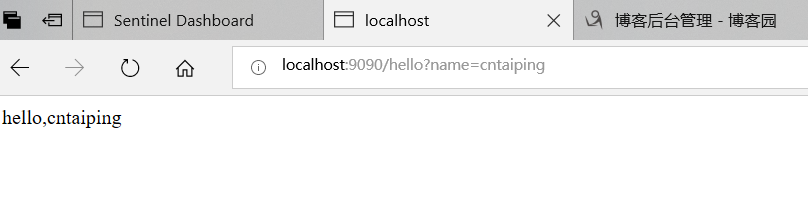
服务正常访问
通过同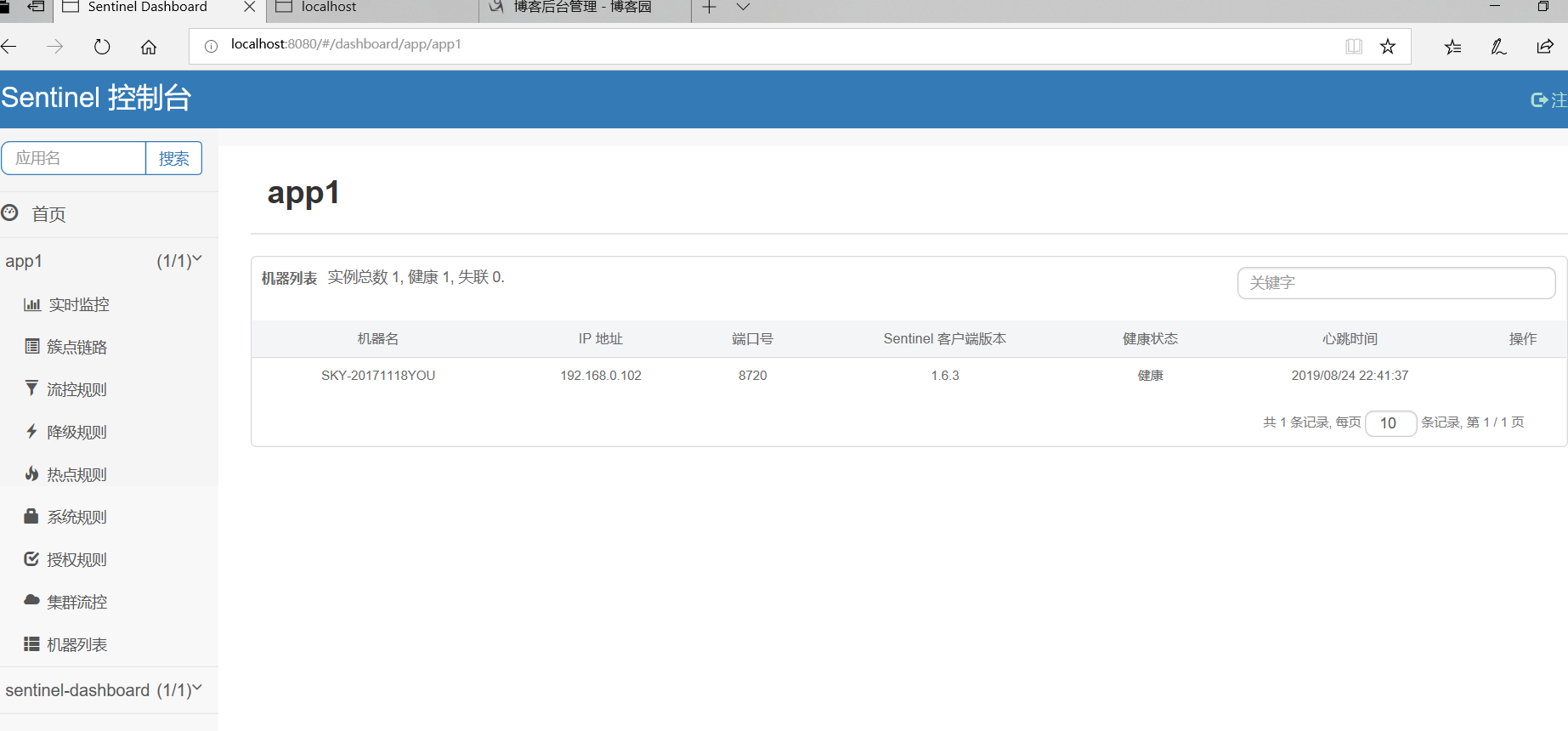
通过观察控制台,我们发现我们的项目名为app1的项目已经注册到了控制台
接下来,我们就可以在卒簇族链路进行规则设置啦
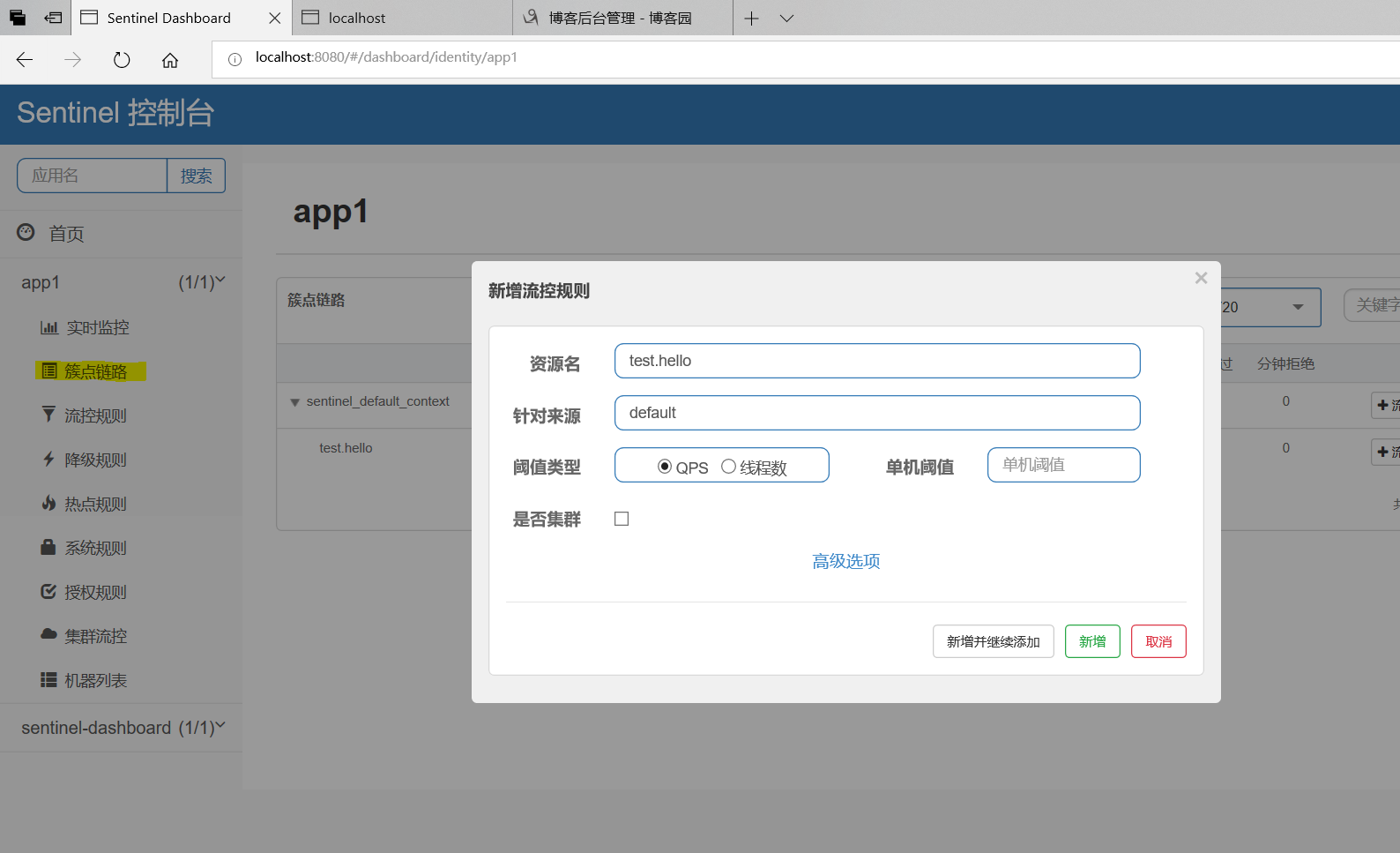
以上的方法适合非springboot,springcloud的项目实现,如果项目本身是springboot,springcloud项目,可以直接引入
spring-cloud-starter-alibaba-sentinel

添加配置文件application.yml:
spring:
  application:
    name: baobanserver
  cloud:
    sentinel:
      transport:
        dashboard: localhost:9999
      #eager: true
往后甚至不用写@SentinelResource注解,直接按照正常的springboot写法即可实现。然后再Sentinel的控制台进行链路规则设置即可!
springBoot整合Sentinel实现降级限流熔断的更多相关文章
- Hystrix介绍以及服务的降级限流熔断
(dubbo熔断,Hystrix问的少) 无论是缓存层还是存储层都会有出错的概率,可以将它们视同为资源.作为并发量较大的系统,假如有一个资源不可用,可能会造成线程全部 hang (挂起)在这个资源上, ...
- Spring Cloud alibaba网关 sentinel zuul 四 限流熔断
spring cloud alibaba 集成了 他内部开源的 Sentinel 熔断限流框架 Sentinel 介绍 官方网址 随着微服务的流行,服务和服务之间的稳定性变得越来越重要.Sentine ...
- springcloud3(六) 服务降级限流熔断组件Resilience4j
代码地址:https://github.com/showkawa/springBoot_2017/tree/master/spb-demo/spb-gateway/src/test/java/com/ ...
- spring cloud gateway整合sentinel作网关限流
说明: sentinel可以作为各微服务的限流,也可以作为gateway网关的限流组件. spring cloud gateway有限流功能,但此处用sentinel来作为替待. 说明:sentine ...
- Spring Cloud Alibaba基础教程:使用Sentinel实现接口限流
最近管点闲事浪费了不少时间,感谢网友libinwalan的留言提醒.及时纠正路线,继续跟大家一起学习Spring Cloud Alibaba. Nacos作为注册中心和配置中心的基础教程,到这里先告一 ...
- Spring Cloud Alibaba 使用Sentinel实现接口限流
Sentinel是什么 Sentinel的官方标题是:分布式系统的流量防卫兵.从名字上来看,很容易就能猜到它是用来作服务稳定性保障的.对于服务稳定性保障组件,如果熟悉Spring Cloud的用户,第 ...
- 快速体验 Sentinel 集群限流功能,只需简单几步
️ Pic by Alibaba Tech on Facebook 集群限流 可以限制某个资源调用在集群内的总 QPS,并且可以解决单机流量不均导致总的流控效果不佳的问题,是保障服务稳定性的利器. S ...
- .net core使用ocelot---第四篇 限流熔断
简介 .net core使用ocelot---第一篇 简单使用 .net core使用ocelot---第二篇 身份验证 .net core使用ocelot---第三篇 日志记录 前几篇文章我们陆续介 ...
- .Net微服务实践(四)[网关]:Ocelot限流熔断、缓存以及负载均衡
目录 限流 熔断 缓存 Header转化 HTTP方法转换 负载均衡 注入/重写中间件 后台管理 最后 在上篇.Net微服务实践(三)[网关]:Ocelot配置路由和请求聚合中我们介绍了Ocelot的 ...
随机推荐
- C语言讲义——dll调用
DLL:Dynamic Link Library,动态链接库.一个应用程序可使用多个DLL文件,一个DLL文件也可以被不同的应用程序使用. 先新建一个dll项目 再创建C项目进行调用 #include ...
- [Android systrace系列] systrace入门第一式
转载请注明出处:https://www.cnblogs.com/zzcperf/p/13978915.html Android systrace是分析性能问题最称手的工具之一,可以提供丰富的手机运行信 ...
- get、post、
1.get请求 get请求会把参数放在url后面,中间用?隔开,也可以把参数放在请求body中,如果参数中有中文,http传的时候requests框架会将中文换成urlencode编码 2.get和p ...
- CentOS 7防火墙的关闭与开启
(1)CentOS 7.0默认使用的是firewall作为防火墙:若没有启用iptables 作为防火墙,则使用以下方式关闭防火墙: systemctl stop firewalld.service ...
- C++调用C接口
目录 C++调用C代码 解决调用失败问题 思考:那C代码能够被C程序调用吗 C代码既能被C++调用又能被C调用 C++调用C代码 一个C语言文件p.c #include <stdio.h> ...
- 转载的一篇文章eclipse添加插件
eclipse没有(添加)"Dynamic Web Project"选项的方法 转载海边的第八只螃蟹 最后发布于2015-11-24 21:24:15 阅读数 40814 收藏 ...
- Maven 依赖树的解析规则
对于 Java 开发工程师来说,Maven 是依赖管理和代码构建的标准.遵循「约定大于配置」理念.Maven 是 Java 开发工程师日常使用的工具,本篇文章简要介绍一下 Maven 的依赖树解析. ...
- docker centos容器无法yum
问题 dockerfile yum -y install vim的时候一直未响应 但是在本地虚拟机centos7上运行则没问题 https://blog.csdn.net/jimiao_xxx ...
- python核心高级学习总结1---------*args和**kwargs
*args 和 ** kwargs 的用法 首先,这两者在用法上都是用来补充python中对不定参数的接受. 比如下面的列子 def wrappedfunc(*args, **kwargs): pri ...
- OpenCV击中击不中HMTxingt变换最容易理解的解释
OpenCV击中击不中变换是几个形态变换中相对比较拗口.不容易理解的,给初学者理解带来了很多困难,虽然网上也有许多的公开资料,原理和算法基本上介绍比较清晰,但是是要OpenCV进行形态变换大多还是说得 ...