
WEB-INF目录下文件复制的几种方式
2018年1月31日 10:42:55
工作完写点博客记录下。
需求:从web-inf下拷贝文件到指定目录。
目录结构
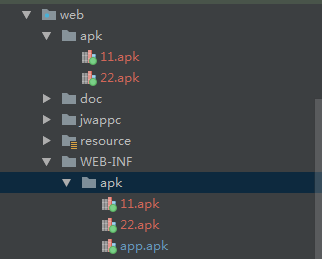
直接贴代码
第一种方式,字节流读取
 try {

                   int index = 0;

                   System.out.println("开始读取");

             File filef = new File("web/WEB-INF/apk/"+channel+".apk");

             System.out.println(filef.getAbsolutePath());

             InputStream inputStream = new FileInputStream(filef.getAbsolutePath());//获取文件所在路径并读入

                   if(inputStream!=null){

                       //读取文件(缓存字节流)

                       BufferedInputStream in = new BufferedInputStream(inputStream);

                       //写入相应的文件

                       BufferedOutputStream out = new BufferedOutputStream(new FileOutputStream("web/apk/"+channel+".apk"));

                       //读取数据

                       //一次性取多少字节

                       byte[] bytes = new byte[2048];

                       //接受读取的内容

                       int n = -1;

                       //循环取出数据

                       while ((n = in.read(bytes,0,bytes.length)) != -1) {

                           //转换成字符串

                           String str = new String(bytes,0,n,"GBK");

                           System.out.println(str);

                           //写入相关文件

                           out.write(bytes, 0, n);

                       }

                       //清除缓存

                       out.flush();

                       //关闭流

                       in.close();

                       out.close();

                   }else if(index<=1){

                       index++;

                   }

                  //}

             /*}*/

         } catch (Exception e) {

             e.printStackTrace();

         }
注意读取的文件路径要从web开始写!
第二种方式
使用apache的commons的FileUtils
jar:commons-io-2.4.jar
使用方式
 @Test

     public void test2(){

         File file2 = new File("web/apk/22.apk");

         File file1 = new File("web/WEB-INF/apk/22.apk");

         System.out.println(file1.getAbsolutePath());

         try {

             FileUtils.copyFile(file1,file2);

         } catch (IOException e) {

             e.printStackTrace();

         }

     }
file1是要读取的路径,file2是要写入的路径
贴一下人家工具类的源码
 /**

      * Copies a file to a new location.

      * <p>

      * This method copies the contents of the specified source file

      * to the specified destination file.

      * The directory holding the destination file is created if it does not exist.

      * If the destination file exists, then this method will overwrite it.

      * <p>

      * <strong>Note:</strong> Setting <code>preserveFileDate</code> to

      * {@code true} tries to preserve the file's last modified

      * date/times using {@link File#setLastModified(long)}, however it is

      * not guaranteed that the operation will succeed.

      * If the modification operation fails, no indication is provided.

      *

      * @param srcFile          an existing file to copy, must not be {@code null}

      * @param destFile         the new file, must not be {@code null}

      * @param preserveFileDate true if the file date of the copy

      *                         should be the same as the original

      *

      * @throws NullPointerException if source or destination is {@code null}

      * @throws IOException          if source or destination is invalid

      * @throws IOException          if an IO error occurs during copying

      * @throws IOException          if the output file length is not the same as the input file length after the copy

      * completes

      * @see #copyFileToDirectory(File, File, boolean)

      * @see #doCopyFile(File, File, boolean)

      */

     public static void copyFile(final File srcFile, final File destFile,

                                 final boolean preserveFileDate) throws IOException {

         checkFileRequirements(srcFile, destFile);

         if (srcFile.isDirectory()) {

             throw new IOException("Source '" + srcFile + "' exists but is a directory");

         }

         if (srcFile.getCanonicalPath().equals(destFile.getCanonicalPath())) {

             throw new IOException("Source '" + srcFile + "' and destination '" + destFile + "' are the same");

         }

         final File parentFile = destFile.getParentFile();

         if (parentFile != null) {

             if (!parentFile.mkdirs() && !parentFile.isDirectory()) {

                 throw new IOException("Destination '" + parentFile + "' directory cannot be created");

             }

         }

         if (destFile.exists() && destFile.canWrite() == false) {

             throw new IOException("Destination '" + destFile + "' exists but is read-only");

         }

         doCopyFile(srcFile, destFile, preserveFileDate);

     }
 /**

      * Internal copy file method.

      * This caches the original file length, and throws an IOException

      * if the output file length is different from the current input file length.

      * So it may fail if the file changes size.

      * It may also fail with "IllegalArgumentException: Negative size" if the input file is truncated part way

      * through copying the data and the new file size is less than the current position.

      *

      * @param srcFile          the validated source file, must not be {@code null}

      * @param destFile         the validated destination file, must not be {@code null}

      * @param preserveFileDate whether to preserve the file date

      * @throws IOException              if an error occurs

      * @throws IOException              if the output file length is not the same as the input file length after the

      * copy completes

      * @throws IllegalArgumentException "Negative size" if the file is truncated so that the size is less than the

      * position

      */

     private static void doCopyFile(final File srcFile, final File destFile, final boolean preserveFileDate)

             throws IOException {

         if (destFile.exists() && destFile.isDirectory()) {

             throw new IOException("Destination '" + destFile + "' exists but is a directory");

         }

         try (FileInputStream fis = new FileInputStream(srcFile);

25              FileChannel input = fis.getChannel();

26              FileOutputStream fos = new FileOutputStream(destFile);

27              FileChannel output = fos.getChannel()) {

             final long size = input.size(); // TODO See IO-386

             long pos = 0;

             long count = 0;

             while (pos < size) {

                 final long remain = size - pos;

                 count = remain > FILE_COPY_BUFFER_SIZE ? FILE_COPY_BUFFER_SIZE : remain;

                 final long bytesCopied = output.transferFrom(input, pos, count);

                 if (bytesCopied == 0) { // IO-385 - can happen if file is truncated after caching the size

                     break; // ensure we don't loop forever

                 }

                 pos += bytesCopied;

             }

         }

         final long srcLen = srcFile.length(); // TODO See IO-386

         final long dstLen = destFile.length(); // TODO See IO-386

         if (srcLen != dstLen) {

             throw new IOException("Failed to copy full contents from '" +

                     srcFile + "' to '" + destFile + "' Expected length: " + srcLen + " Actual: " + dstLen);

         }

         if (preserveFileDate) {

             destFile.setLastModified(srcFile.lastModified());

         }

     }
重点看红色部分,底层还是字节流,没具体看,可能效率上会更高。
能自己写的就别用人家封装好的,即使用了,也要分析人家的实现方式!
WEB-INF目录下文件复制的几种方式的更多相关文章
- java中文件复制的4种方式
今天一个同事问我文件复制的问题,他一个100M的文件复制的指定目录下竟然成了1G多,吓我一跳,后来看了他的代码发现是自己通过字节流复制的,定义的字节数组很大,导致复制后目标文件非常大,其实就是空行等一 ...
- Java实现文件复制的四种方式
背景:有很多的Java初学者对于文件复制的操作总是搞不懂,下面我将用4中方式实现指定文件的复制. 实现方式一:使用FileInputStream/FileOutputStream字节流进行文件的复制操 ...
- shell脚本监控目录下文件被篡改时报警
思路: 目录下文件被篡改的几种可能: 1.被修改 2.被删除 3.新增文件 md5命令详解 参数: -b 以二进制模式读入文件内容 -t 以文本模式读入文件内容 -c 根据已生成的md5值,对现存文件 ...
- C# 获取目录下文件
using System; using System.Collections.Generic; using System.ComponentModel; using System.Data; usin ...
- linux 目录下文件批量植入和删除,按日期打包
linux目录下文件批量植入 [root@greymouster http2]# find /usr/local/http2/htdocs/ -type f|xargs sed -i " ...
- Linux中/proc目录下文件详解
转载于:http://blog.chinaunix.net/uid-10449864-id-2956854.html Linux中/proc目录下文件详解(一)/proc文件系统下的多种文件提供的系统 ...
- php遍历目录下文件,并读取内容
<?php echo "<h2>遍历目录下文件,并读取内容</h2><br>\n"; function listDir($dir) { i ...
- linux获得目录下文件个数
获得当前目录下文件个数赋值给变量panonum: panonum=$(ls -l |grep "^-" | wc -l) 获取指定目录下文件个数赋值给指定变量: panonum=$ ...
- 安装debian 9.1后,中文环境下将home目录下文件夹改为对应的英文
安装了debian 9.1后,中文环境下home目录下文件夹显示的是中文,相当不方便cd命令,改为对应的英文吧,需要用到的软件xdg-user-dirs-gtk #安装需要的软件 sudo apt i ...
随机推荐
- [数据预处理]-中心化 缩放 KNN(一)
据预处理是总称,涵盖了数据分析师使用它将数据转处理成想要的数据的一系列操作.例如,对某个网站进行分析的时候,可能会去掉 html 标签,空格,缩进以及提取相关关键字.分析空间数据的时候,一般会把带单位 ...
- 快速搭建appium自动测试环境
首先申明本文是基本于Python与Android来快速搭建Appium自动化测试环境: 主要分为以下几个步骤: 前提条件: 1)安装与配置python环境,打开 Python官网,找到"Do ...
- 我在vs文本编辑中常用的快捷键----常更新
1. Ctrl+向上键----文本向上滚动 Ctrl+向下键----文本向下滚动 Ctrl+Enter-----向下增加一行 Ctrl+Shift+Enter-------向上增加一行 2. 避 ...
- thinkphp3.2.2邮箱发送
浏览:7510 最后更新:2017-03-18 14:21 分类:类库 关键字: PHPMailer 第一步:准备PHPMailer 将下载的PHPMailer放到ThinkPHP/library/V ...
- 面试官最爱的volatile关键字
在Java相关的岗位面试中,很多面试官都喜欢考察面试者对Java并发的了解程度,而以volatile关键字作为一个小的切入点,往往可以一问到底,把Java内存模型(JMM),Java并发编程的一些特性 ...
- Flexible Box布局基础知识详解
1.基本概念,借用阮一峰老师的一张图: 容器默认存在两根轴:水平的主轴(main axis)和垂直的交叉轴(cross axis).主轴的开始位置(与边框的交叉点)叫做main start,结束位置叫 ...
- socket 编程--sockaddr与sockaddr_in区别与联系(转)
在linux环境下,结构体struct sockaddr在/usr/include/linux/socket.h中定义,具体如下:typedef unsigned short sa_family_t; ...
- linux常用命令_1
linux中命令格式是什么? 命令 [参数选项] [文件或路径] 中括号表示可选,命令的参数与路径文件可选 参数选择表示一个命令的不同功能 命令 和 参数选项 中必有一空格,多个参数连在一起写 几乎所 ...
- WebSphere--部署Servlet
在WebSphere应用服务器上部署 Servlet需要四个步骤:编译 Servlet 或 Web 应用程序.将类文件放到 WebSphere应用服务器上.将相关的 HTML.JSP 和 SHTML ...
- Databricks缓存提升Spark性能--为什么NVMe固态硬盘能够提升10倍缓存性能(原创)
我们兴奋的宣布Databricks缓存的通用可用性,作为统一分析平台一部分的 Databricks 运行时特性,它可以将Spark工作负载的扫描速度提升10倍,并且这种改变无需任何代码修改. 1.在本 ...