
maridb数据库表及字段增删改
mariadb数据类型
mariadb数据类型分为数字、日期、时间以及字符串值。
适用类型原则:够用就行,尽量使用范围小的,而不用大的
常用数据类型:
1、整数 int,bit #例如 年纪 适用于必须是整数的
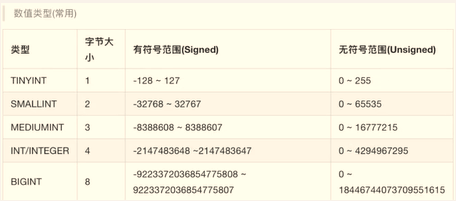
2、小数 decimal # 例如 身高、收入 #decimal(5,2) 5位数保留小数点后两位 decimal(7,1)7位数保留小数点后两位
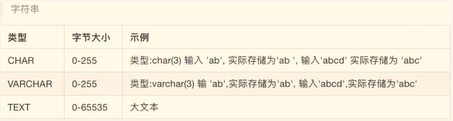
3、字符串 char,varchar (可定义字符) #例如 姓名 、班级、籍贯等等,也可以整数、小数等数据类型 但是不能函数运算
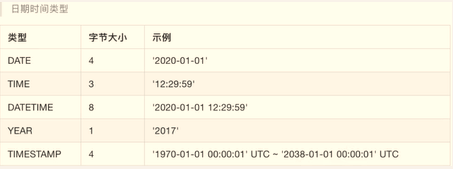
4、日期时间 date,time,datetime
5、枚举类型 enum #可指定的类型 例如 性别
约束:
主键primary key:物理上存储的顺序
非空not null:此字段不能为空
唯一unique:此字段不允许重复
默认default:当不填写此值时会使用默认值,如果填写则已填写为准
外键foreign key:对关系字段进行约束,当为关系字段填写值时,会到关联的表中查询此值是否存在,如果存在则填写成功,如果不存在则填写失败并抛出异常
创建一张class表 (id,name,age)
MariaDB [testdb]> create table class(id int primary key not null auto_increment,name varchar(20), age tinyint unsigned);

Query OK, 0 rows affected (0.00 sec)
在class表中插入数据 insert into
MariaDB [testdb]> insert into class(name,age) values('李志锋',29);

Query OK, 1 row affected (0.00 sec)
查看class表 select
MariaDB [testdb]> select * from class;

+----+-----------+------+

| id | name      | age  |

+----+-----------+------+

|  1 | 李志锋    |   29 |

+----+-----------+------+

1 row in set (0.00 sec)
查看表结构 desc
MariaDB [testdb]> desc class;

+-------+---------------------+------+-----+---------+----------------+

| Field | Type                | Null | Key | Default | Extra          |

+-------+---------------------+------+-----+---------+----------------+

| id    | int(11)             | NO   | PRI | NULL    | auto_increment |

| name  | varchar(20)         | YES  |     | NULL    |                |

| age   | tinyint(3) unsigned | YES  |     | NULL    |                |

+-------+---------------------+------+-----+---------+----------------+

3 rows in set (0.00 sec)
修改表-添加字段 --alter table 表名 add 列名 类型;
MariaDB [testdb]> alter table class add gender enum ('男','女','保密');

Query OK, 0 rows affected (0.00 sec)

Records: 0  Duplicates: 0  Warnings: 0

MariaDB [testdb]> desc class;

+--------+----------------------------+------+-----+---------+----------------+

| Field  | Type                       | Null | Key | Default | Extra          |

+--------+----------------------------+------+-----+---------+----------------+

| id     | int(11)                    | NO   | PRI | NULL    | auto_increment |

| name   | varchar(20)                | YES  |     | NULL    |                |

| age    | tinyint(3) unsigned        | YES  |     | NULL    |                |

| gender | enum('男','女','保密')     | YES  |     | NULL    |                |

+--------+----------------------------+------+-----+---------+----------------+

4 rows in set (0.00 sec)
修改表-修改表字段类型不重名版本 --alter table 表名 modify 列名 类型及约束;
MariaDB [testdb]> alter table class modify gender enum('男','女','保密') default'保密';

Query OK, 0 rows affected (0.00 sec)

Records: 0  Duplicates: 0  Warnings: 0

MariaDB [testdb]> desc class;

+----------+----------------------------+------+-----+---------+----------------+

| Field    | Type                       | Null | Key | Default | Extra          |

+----------+----------------------------+------+-----+---------+----------------+

| id       | int(11)                    | NO   | PRI | NULL    | auto_increment |

| name     | varchar(20)                | YES  |     | NULL    |                |

| age      | tinyint(3) unsigned        | YES  |     | NULL    |                |

| gender   | enum('男','女','保密')     | YES  |     | 保密    |                |

| birthday | datetime                   | YES  |     | NULL    |                |

+----------+----------------------------+------+-----+---------+----------------+

5 rows in set (0.00 sec)
修改表-修改表字段名称、类型 --alter table 表名 change 原名 新名 类型及约束;
MariaDB [testdb]> alter table class change birthday birth date;

Query OK, 1 row affected (0.02 sec)

Records: 1  Duplicates: 0  Warnings: 0

MariaDB [testdb]> desc class;

+--------+----------------------------+------+-----+---------+----------------+

| Field  | Type                       | Null | Key | Default | Extra          |

+--------+----------------------------+------+-----+---------+----------------+

| id     | int(11)                    | NO   | PRI | NULL    | auto_increment |

| name   | varchar(20)                | YES  |     | NULL    |                |

| age    | tinyint(3) unsigned        | YES  |     | NULL    |                |

| gender | enum('男','女','保密')     | YES  |     | 保密    |                |

| birth  | date                       | YES  |     | NULL    |                |

+--------+----------------------------+------+-----+---------+----------------+

5 rows in set (0.00 sec)
修改表-删除字段 -- alter table 表名 drop 列名;
MariaDB [testdb]> alter table class drop gender;

Query OK, 0 rows affected (0.01 sec)

Records: 0  Duplicates: 0  Warnings: 0

MariaDB [testdb]> desc class;

+-------+---------------------+------+-----+---------+----------------+

| Field | Type                | Null | Key | Default | Extra          |

+-------+---------------------+------+-----+---------+----------------+

| id    | int(11)             | NO   | PRI | NULL    | auto_increment |

| name  | varchar(20)         | YES  |     | NULL    |                |

| age   | tinyint(3) unsigned | YES  |     | NULL    |                |

| birth | date                | YES  |     | NULL    |                |

+-------+---------------------+------+-----+---------+----------------+

4 rows in set (0.00 sec)
修改表内容
 --update 表名 set 列1=值1, 列2=值2... where 条件;
例: 将class表中的绿帽子改成红帽
MariaDB [testdb]> select * from class;

+----+-----------+------+-------+------+

| id | name      | age  | birth | high |

+----+-----------+------+-------+------+

|  1 | 李志锋    |   29 | NULL  | NULL |

|  2 | 绿帽子    |   19 | NULL  | NULL |

|  3 | 王晶      |   29 | NULL  | NULL |

+----+-----------+------+-------+------+

3 rows in set (0.00 sec)

MariaDB [testdb]> update class set name=('红帽') where id=2;

Query OK, 1 row affected (0.00 sec)

Rows matched: 1  Changed: 1  Warnings: 0

MariaDB [testdb]> select * from class;

+----+-----------+------+-------+------+

| id | name      | age  | birth | high |

+----+-----------+------+-------+------+

|  1 | 李志锋    |   29 | NULL  | NULL |

|  2 | 红帽      |   19 | NULL  | NULL |

|  3 | 王晶      |   29 | NULL  | NULL |

+----+-----------+------+-------+------+

3 rows in set (0.00 sec)
删除表内容
delete from 表名 where 条件
例:将class表中的红帽删除
MariaDB [testdb]> delete from class where name=('红帽');

Query OK, 1 row affected (0.00 sec)

MariaDB [testdb]> select * from class;

+----+-----------+------+-------+------+

| id | name      | age  | birth | high |

+----+-----------+------+-------+------+

|  1 | 李志锋    |   29 | NULL  | NULL |

|  3 | 王晶      |   29 | NULL  | NULL |

+----+-----------+------+-------+------+

2 rows in set (0.00 sec)
maridb数据库表及字段增删改的更多相关文章
- Oracle创建表、删除表、修改表、字段增删改 语句总结
创建表: create table 表名 ( 字段名1 字段类型 默认值 是否为空 , 字段名2 字段类型 默认值 是否为空, 字段名3 字段类型 默认值 是否为空, ...... ); 创建一个us ...
- 一、数据库表中字段的增删改查,二、路由基础.三、有名无名分组.四、多app共存的路由分配.五、多app共存时模板冲突问题.六、创建app流程.七、路由分发.八、路由别名,九、名称空间.十、反向解析.十一、2.x新特性.十二、自定义转换器
一.数据库表中字段的增删改查 ''' 直接在modules中对字段进行增删改查 然后在tools下点击Run manage.py Task执行makemigrations和migrate 注意在执行字 ...
- Django框架之第二篇--app注册、静态文件配置、form表单提交、pycharm连接数据库、django使用mysql数据库、表字段的增删改查、表数据的增删改查
本节知识点大致为:静态文件配置.form表单提交数据后端如何获取.request方法.pycharm连接数据库,django使用mysql数据库.表字段的增删改查.表数据的增删改查 一.创建app,创 ...
- PreparedStatement实现表数据的增删改 & 封装数据库链接和关闭操作
PreparedStatement实现表数据的增删改 PreparedStatementUpdateTest package com.aff.PreparedStatement; import jav ...
- sqlite数据库操作详细介绍 增删改查,游标
sqlite数据库操作详细介绍 增删改查,游标 本文来源于www.ifyao.com禁止转载!www.ifyao.com Source code package com.example ...
- Delphi - cxGrid连接Oracle数据库 实现数据的增删改查
cxGrid连接Oracle数据库 实现数据的增删改查 cxGrid连接Oracle数据库 1:通过OraSession连接数据库.OraDataSet实现OraSession和OraDataSour ...
- django-orm框架表单的增删改查
08.14自我总结 django-orm框架 一.orm基本配置 1.创建django项目 命令行:cmd先去到django创建目录,然后输入django-admin startproject dja ...
- 使用JDBC分别利用Statement和PreparedStatement来对MySQL数据库进行简单的增删改查以及SQL注入的原理
一.MySQL数据库的下载及安装 https://www.mysql.com/ 点击DOWNLOADS,拉到页面底部,找到MySQL Community(GPL)Downloads,点击 选择下图中的 ...
- mysql数据库表的自增主键号不规律,重新排列
mysql数据库表的自增主键ID乱了,需要重新排序. 原理:删除原有的自增ID,重新建立新的自增ID. 1.删除原有主键: ALTER TABLE `table_name` DROP `id`; 2. ...
- 5.创建表,使用alter进行表信息的增删改,Oracle回收站,集合运算
1 Oracle基于用户的管理方案 2 DDL语句可以管理数据库的对象有:视图 索引 序列 同义词 约束 3 创建一个表,有2个条件(1 有权限:2有表空间) Oracle给你提 ...
随机推荐
- 窗口退出&初始化
class Test(QtWidgets.QMainWindow, Ui_dlg): def closeEvent(self, e): #to do super().closeEvent(e) def ...
- WDA学习(28):Drag &Drop使用
1.21 Drag Drop使用 本实例测试Drag Drop; 运行结果: Drag图标Drop到添加Icon,会将一条记录添加到Table; Drag Table记录Drop到垃圾桶Icon,会将 ...
- SQL数据库常用命令
数据库操作: 创建库:create database 数据库名 删除库:drop database 数据库名 选择库:use 数据库名 Database changed 关闭安全模式:set sql_ ...
- 收缩SqlServer数据库日志语句
收缩SqlServer数据库日志SQL语句 USE[master] ALTER DATABASE XXX SET RECOVERY SIMPLE WITH NO_WAIT ALTER DATABASE ...
- 微信小程序 table表格 固定表头和首列 右侧表格可以左右滚动(多种表格演练)
https://blog.csdn.net/m0_61073617/article/details/124430213
- python自动化-取消"Chrome正受到自动软件的控制"提示
chrome浏览器V78及以上版本解决做法,代码如下: from selenium import webdriver chrome_options = webdriver.ChromeOptions( ...
- 思科数据中心CCIE v3.0考试内容
考试内容: CCIE DC LAB V3.0 考试内容 1 Design 30 + 选择,拖图及勾选题 2 Deploy&Operate&Optimize 1 套 含3部分 备考安排: ...
- js数组去重,删除重复的属性值
let a=[] let hash={} a=a.reduce((pre,next)=>{ hash[next.name]?"":(hash[next.name]=true& ...
- windows 系统进行升级之后,如何删除 Windows.old 文件夹。
首先用鼠标右键点击 C 盘,在弹出的下拉列表里找到"属性"并点击它. 步骤阅读 2 在打开的 C 盘属性里的常规找到"磁盘清理",点击它打开. 步骤阅读 3 这 ...
- jemter 分布式压测
1.测试机搭建 首选 压力机A,压力机B,压力机C, 压力机A作为控制台 压力机B,压力机C作为分布式的测试机 压力机Aip:172.16.23.69, 压力机Bip:192.168.184.128 ...