
Android实例-MotionSensor加速度(XE8+小米2)
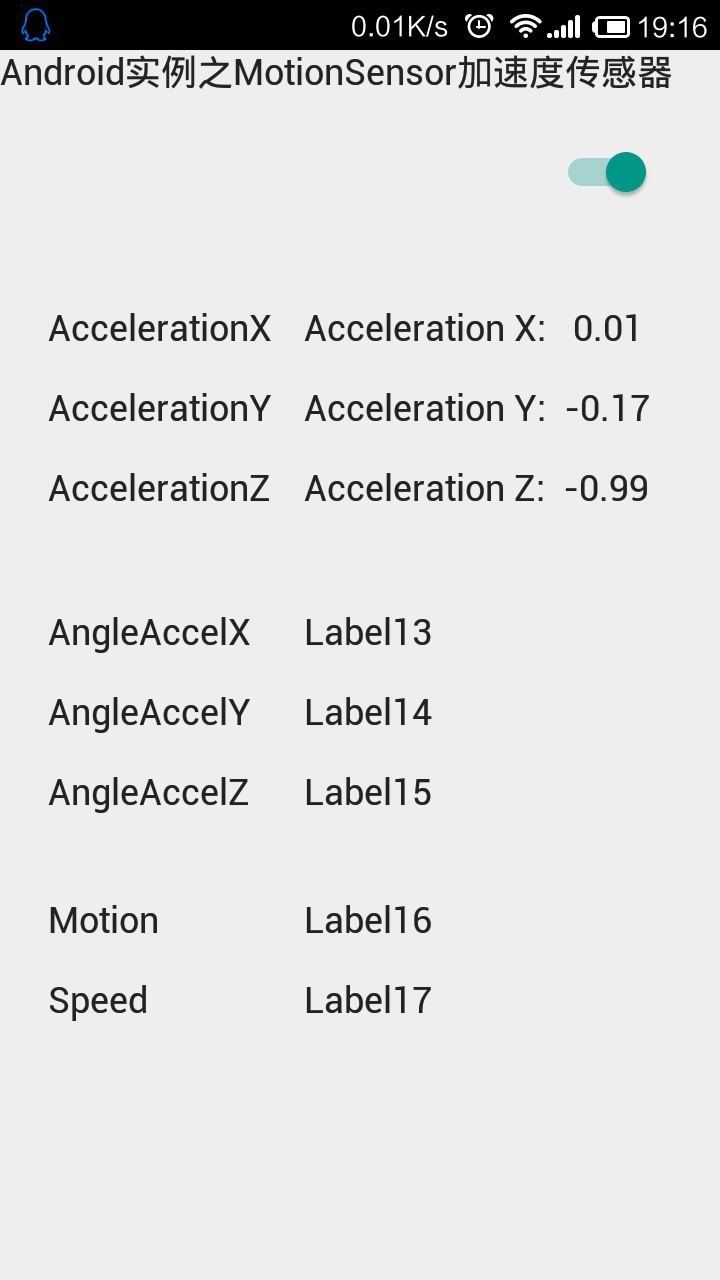
结果:
1.
实例代码:
 unit Unit1;

 interface

 uses

   System.SysUtils, System.Types, System.UITypes, System.Classes, System.Variants,

   FMX.Types, FMX.Controls, FMX.Forms, FMX.Graphics, FMX.Dialogs, System.Sensors,

   FMX.StdCtrls, FMX.Controls.Presentation, System.Sensors.Components;

 type

   TForm1 = class(TForm)

     MotionSensor1: TMotionSensor;

     Switch1: TSwitch;

     Label1: TLabel;

     Timer1: TTimer;

     Label2: TLabel;

     Label3: TLabel;

     Label4: TLabel;

     Label5: TLabel;

     Label6: TLabel;

     Label7: TLabel;

     Label8: TLabel;

     Label9: TLabel;

     Label10: TLabel;

     Label11: TLabel;

     Label12: TLabel;

     Label13: TLabel;

     Label14: TLabel;

     Label15: TLabel;

     Label16: TLabel;

     Label17: TLabel;

     procedure Switch1Click(Sender: TObject);

     procedure Timer1Timer(Sender: TObject);

     procedure FormCreate(Sender: TObject);

   private

     { Private declarations }

   public

     { Public declarations }

   end;

 var

   Form1: TForm1;

 implementation

 {$R *.fmx}

 {$R *.NmXhdpiPh.fmx ANDROID}

 procedure TForm1.FormCreate(Sender: TObject);

 begin

   Timer1.Enabled := False;

 end;

 procedure TForm1.Switch1Click(Sender: TObject);

 begin

   MotionSensor1.Active := Switch1.IsChecked;

   Timer1.Enabled := Switch1.IsChecked;

 end;

 procedure TForm1.Timer1Timer(Sender: TObject);

 var

   LProp: TCustomMotionSensor.TProperty;//所有可能得到的参数

 begin

   for LProp in MotionSensor1.Sensor.AvailableProperties do//开始循环,如果手机支持该参数则显示出来

   begin

     case LProp of

       TCustomMotionSensor.TProperty.AccelerationX:

       begin

         Label10.Visible := True;

         Label10.Text := Format('Acceleration X: %6.2f', [MotionSensor1.Sensor.AccelerationX]);

       end;

       TCustomMotionSensor.TProperty.AccelerationY:

       begin

         Label11.Visible := True;

         Label11.Text := Format('Acceleration Y: %6.2f', [MotionSensor1.Sensor.AccelerationY]);

       end;

       TCustomMotionSensor.TProperty.AccelerationZ:

       begin

         Label12.Visible := True;

         Label12.Text := Format('Acceleration Z: %6.2f', [MotionSensor1.Sensor.AccelerationZ]);

       end;

       TCustomMotionSensor.TProperty.AngleAccelX:

       begin

         Label13.Visible := True;

         Label13.Text := Format('Angle X: %6.2f', [MotionSensor1.Sensor.AngleAccelX]);

       end;

       TCustomMotionSensor.TProperty.AngleAccelY:

       begin

         Label14.Visible := True;

         Label14.Text := Format('Angle Y: %6.2f', [MotionSensor1.Sensor.AngleAccelY]);

       end;

       TCustomMotionSensor.TProperty.AngleAccelZ:

       begin

         Label15.Visible := True;

         Label15.Text := Format('Angle Z: %6.2f', [MotionSensor1.Sensor.AngleAccelZ]);

       end;

       TCustomMotionSensor.TProperty.Motion:

       begin

         Label16.Visible := True;

         Label16.Text := Format('Motion: %6.2f', [MotionSensor1.Sensor.Motion]);

       end;

       TCustomMotionSensor.TProperty.Speed:

       begin

         Label17.Visible := True;

         Label17.Text := Format('Speed: %6.2f', [MotionSensor1.Sensor.Speed]);

       end;

     end;

   end;

 end;

 end.
Android实例-MotionSensor加速度(XE8+小米2)的更多相关文章
- Android实例-操作摄像头(XE8+小米2)
结果: 1.同样是照相,自己的程序设置为高质量时刷新慢,而小米手机的相机那真心反映快呀. 2.就算我设置为最高质量,可相片也没有小米手机的相片大.我最大是2000*1000,而小米可以做到3000*2 ...
- Android实例-手机震动(XE8+小米2)
相关资料:http://blog.csdn.net/laorenshen/article/details/41148843 结果: 1.打开Vibrate权限为True. 2.规律震动我没感觉出来,有 ...
- Android实例-LocationSensor位置传感器(XE8+小米2)
结果: 1.启动后有时会闪退,后来重新做的工程就好了.原因不明(可能与地理反码有关). 2.原文是用的GOOGLE地图显示位置,但在咱们这里好像不行,改为百度,但百度用的是HTML文件.太麻烦了,大家 ...
- Android实例-消息框(XE8+小米2)
方法一支持. 方法二与方法三都是三方单元,功能相同. 方法4与方法5报错,提示平台不支持. 第三方单元一: unit Android.JNI.Toast; // Java bridge class i ...
- Android实例-实现扫描二维码并生成二维码(XE8+小米5)
相关资料: 第三方资料太大没法写在博文上,请下载CSDN的程序包. 程序包下载: http://download.csdn.net/detail/zhujianqiangqq/9657186 注意事项 ...
- Android实例-调用GOOGLE的TTS实现文字转语音(XE7+小米2)(无图)
注意:在手机上必须选安装文字转语音引擎“google Text To Speech”地址:http://www.shouji56.com/soft/GoogleWenZiZhuanYuYinYinQi ...
- Android实例-调用GOOGLE的TTS实现文字转语音(XE7+小米2)(XE10.1+小米5)
相关资料: 注意:在手机上必须选安装文字转语音引擎“google Text To Speech”地址:http://www.shouji56.com/soft/GoogleWenZiZhuanYuYi ...
- 45个android实例源码
分享45个android实例源码,很好很强大http://www.apkbus.com/android-20978-1-1.html andriod闹钟源代码http://www.apkbus.com ...
- 分享45个android实例源码,很好很强大
分享45个android实例源码,很好很强大 http://www.apkbus.com/android-20978-1-1.html 分享45个android实例源码,很好很强大http://www ...
随机推荐
- 云风的BLOG❳可靠 UDP 传输
http://mp.weixin.qq.com/s?__biz=MzA3NjYxOTA0MQ==&mid=405432715&idx=1&sn=2e40ceafd4b298e1 ...
- 你只是看起来很努力(只是做了一遍真题,草草的对了一遍答案,然后冲出自习室继续她学生会的事情了,骗自己更容易)good——想起了自己在六大时候的无奈
(转)你只是看起来很努力一次上课,一个女孩子垂头丧气的跟我说,老师,我考了四次四级,还没过,究竟是为什么. 我说,你真题做了吗?单词背了吗?她拿出已经翻破了的真题,跟我说,你讲的所有的题目我连答案都记 ...
- DELPHI下API简述(1800个API)
DELPHI下API简述 http://zero.cnbct.org/show.asp?id=144 auxGetDevCaps API 获取附属设备容量 auxGetNumDevs API 返回附属 ...
- Android四大基本组件
Android四大基本组件分别是 Activity:整个应用程序的门面,负责与用户进行交互. Service:承担大部分工作. Content Provider内容提供者:负责对外提供数据,并允许需要 ...
- 省市区 Mysql 数据库表
1.查省SELECT * FROM china WHERE china.Pid=02.查市SELECT * FROM chinaWHERE china.Pid=3300003.查区SELECT * F ...
- SQL Server Mobile 和 .NET 数据访问接口之间的数据类型映射
.NET 数据类型 SQL Server Mobile 数据类型 binary varbinary boolean bit byte tinyint byte[] varbinary dateti ...
- node.js模块之fs文件系统
fs 模块是文件操作的封装,它提供了文件的读取.写入.更名.删除.遍历目录.链接等 POSIX 文件系统操作.与其他模块不同的是,fs 模块中所有的操作都提供了异步的和同步的两个版本, 例如读取文件内 ...
- php/ java/asp.net
php大型网站用得多 企业级开发 java/asp.net用得多 这个很好理解 php 执行效率好 可塑性强 接近底层 java asp.net 封装了更多的东西,开发企业级业务 效率更高, 但是高性 ...
- 搜索插件:ack.vim
ack.vim是Perl脚本ack的前端,对于Vim,也是grepprg和quickfix的简单封装,非常适合搜索 github地址为 https://github.com/mileszs/ack.v ...
- Hadoop单机模式安装
一.实验环境说明 1. 环境登录 无需密码自动登录,系统用户名shiyanlou,密码shiyanlou 2. 环境介绍 本实验环境采用带桌面的Ubuntu Linux环境,实验中会用到桌面上的程序: ...