
Android实例-操作摄像头(XE8+小米2)
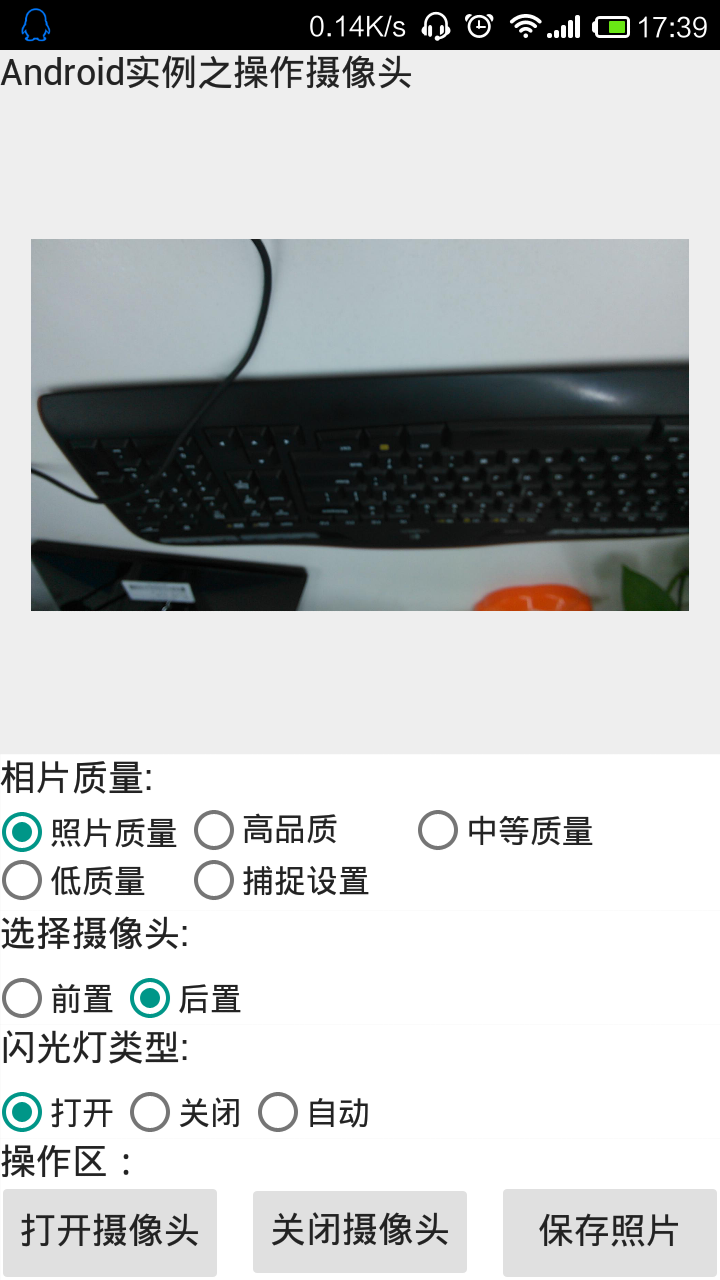
结果:
1.同样是照相,自己的程序设置为高质量时刷新慢,而小米手机的相机那真心反映快呀。
2.就算我设置为最高质量,可相片也没有小米手机的相片大。我最大是2000*1000,而小米可以做到3000*2000,如果有人问我为什么都是整数,我会K你的。
实例代码:
 unit Unit1;

 interface

 uses

   System.SysUtils, System.Types, System.UITypes, System.Classes, System.Variants,

   FMX.Types, FMX.Controls, FMX.Forms, FMX.Graphics, FMX.Dialogs,

   FMX.Controls.Presentation, FMX.StdCtrls, FMX.Objects, FMX.Media,

   FMX.Platform,//需要引入

   system.IOUtils,//需要引入

   FMX.Layouts;

 type

   TForm1 = class(TForm)

     Label1: TLabel;

     Image1: TImage;

     GroupBox1: TGroupBox;

     RadioButton1: TRadioButton;

     RadioButton2: TRadioButton;

     GroupBox2: TGroupBox;

     RadioButton3: TRadioButton;

     RadioButton4: TRadioButton;

     RadioButton5: TRadioButton;

     GroupBox3: TGroupBox;

     Button1: TButton;

     Button2: TButton;

     Button3: TButton;

     CameraComponent1: TCameraComponent;

     Timer1: TTimer;

     Layout1: TLayout;

     RadioButton6: TRadioButton;

     RadioButton7: TRadioButton;

     RadioButton8: TRadioButton;

     RadioButton9: TRadioButton;

     GroupBox4: TGroupBox;

     RadioButton10: TRadioButton;

     procedure FormCreate(Sender: TObject);

     procedure FormResize(Sender: TObject);

     procedure Timer1Timer(Sender: TObject);

     procedure RadioButton5Change(Sender: TObject);

     procedure RadioButton1Change(Sender: TObject);

     procedure RadioButton2Change(Sender: TObject);

     procedure RadioButton4Change(Sender: TObject);

     procedure RadioButton3Change(Sender: TObject);

     procedure Button1Click(Sender: TObject);

     procedure Button2Click(Sender: TObject);

     procedure Button3Click(Sender: TObject);

     procedure CameraComponent1SampleBufferReady(Sender: TObject;

       const ATime: TMediaTime);

     procedure RadioButton6Change(Sender: TObject);

     procedure RadioButton7Change(Sender: TObject);

     procedure RadioButton9Change(Sender: TObject);

     procedure RadioButton8Change(Sender: TObject);

     procedure RadioButton10Change(Sender: TObject);

   private

     //需要定义

     function AppEvent(AAppEvent: TApplicationEvent; AContext: TObject): Boolean;

     procedure GetImage;

     { Private declarations }

   public

     { Public declarations }

   end;

 var

   Form1: TForm1;

 implementation

 {$R *.fmx}

 {$R *.NmXhdpiPh.fmx ANDROID}

 //程序事件处理

 function TForm1.AppEvent(AAppEvent: TApplicationEvent;

   AContext: TObject): Boolean;

 begin

   case AAppEvent of

     TApplicationEvent.aeWillBecomeInactive: // 当程序将要变为不活动时

       CameraComponent1.Active := False;

     TApplicationEvent.aeEnteredBackground: // 当程序进入后台时

       CameraComponent1.Active := False;

     TApplicationEvent.aeWillTerminate: // 当程序将要关闭时

       CameraComponent1.Active := False;

   end;

 end;

 //打开摄像头

 procedure TForm1.Button1Click(Sender: TObject);

 begin

   CameraComponent1.Active := True;

 end;

 //关闭摄像头

 procedure TForm1.Button2Click(Sender: TObject);

 begin

   CameraComponent1.Active := False;

 end;

 //保存照片

 procedure TForm1.Button3Click(Sender: TObject);

 begin

   Image1.Bitmap.SaveToFile(TPath.GetSharedCameraPath+'/temp.jpg');

   showmessage('保存成功!');

 end;

 //从摄像头那里取相片

 procedure TForm1.CameraComponent1SampleBufferReady(Sender: TObject;

   const ATime: TMediaTime);

 begin

   GetImage;

 end;

 procedure TForm1.FormCreate(Sender: TObject);

 var

   AppEventSvc: IFMXApplicationEventService;

 begin

   //启动一个服务,用来监控摄像头的状态

   if TPlatformServices.Current.SupportsPlatformService(IFMXApplicationEventService, IInterface(AppEventSvc)) then

     AppEventSvc.SetApplicationEventHandler(AppEvent); //AppEvent 为具做事的一个函数

   CameraComponent1.Quality := TVideoCaptureQuality.vcPhotoQuality;//设置图像质量

   //设置对焦方式

   CameraComponent1.FocusMode := TFocusMode.fmContinuousAutoFocus;

 end;

 procedure TForm1.FormResize(Sender: TObject);

 begin

   if Height < Width then //如果是横屏

     Image1.RotationAngle := ;

   if Height > Width then //如果是竖屏

   if CameraComponent1.Kind = FMX.Media.TCameraKind.ckFrontCamera then//如果是前置摄像头

     Image1.RotationAngle := -

   else

     Image1.RotationAngle := ;

 end;

 //取相片

 procedure TForm1.GetImage;

 begin

   CameraComponent1.SampleBufferToBitmap(Image1.Bitmap, true);

 end;

 //选择摄像头

 procedure TForm1.RadioButton1Change(Sender: TObject);

 begin

   //选择后置摄像头

   CameraComponent1.Active := False;

   CameraComponent1.Kind := FMX.Media.TCameraKind.ckBackCamera;

   CameraComponent1.Active := True;

   // 后置时,图像要旋转 90 度,如果是竖屏的话

   if Height > Width then

   Image1.RotationAngle := ;

 end;

 procedure TForm1.RadioButton2Change(Sender: TObject);

 begin

   //选择前置摄像头

   CameraComponent1.Active := False;

   CameraComponent1.Kind := FMX.Media.TCameraKind.ckFrontCamera;

   CameraComponent1.Active := True;

   //前置时,图像要旋转-90 度,如果是竖屏的话

   if Height > Width then

   Image1.RotationAngle := -;

 end;

 //如果有闪光灯,打开, ,但在程序运行过程中,看不出什么效果

 procedure TForm1.RadioButton3Change(Sender: TObject);

 begin

   if CameraComponent1.HasFlash then

     CameraComponent1.FlashMode := FMX.Media.TFlashMode.fmFlashOn;

 end;

 //如果有闪光灯,关闭,但在程序运行过程中,看不出什么效果

 procedure TForm1.RadioButton4Change(Sender: TObject);

 begin

   if CameraComponent1.HasFlash then

     CameraComponent1.FlashMode := FMX.Media.TFlashMode.fmFlashOff;

 end;

 //将闪光灯设置为自动模式

 procedure TForm1.RadioButton5Change(Sender: TObject);

 begin

   if CameraComponent1.HasFlash then

     CameraComponent1.FlashMode := FMX.Media.TFlashMode.fmAutoFlash;

 end;

 //相片质量

 procedure TForm1.RadioButton6Change(Sender: TObject);

 begin

   CameraComponent1.Quality := TVideoCaptureQuality.PhotoQuality;

 end;

 //高质量

 procedure TForm1.RadioButton7Change(Sender: TObject);

 begin

   CameraComponent1.Quality := TVideoCaptureQuality.HighQuality;

 end;

 //中等质量

 procedure TForm1.RadioButton10Change(Sender: TObject);

 begin

   CameraComponent1.Quality := TVideoCaptureQuality.CaptureSettings;

 end;

 //低质量

 procedure TForm1.RadioButton8Change(Sender: TObject);

 begin

   CameraComponent1.Quality := TVideoCaptureQuality.MediumQuality;

 end;

 //捕捉设置

 procedure TForm1.RadioButton9Change(Sender: TObject);

 begin

   CameraComponent1.Quality := TVideoCaptureQuality.LowQuality;

 end;

 //刷新得到的摄像头的照片的显示

 procedure TForm1.Timer1Timer(Sender: TObject);

 begin

   Image1.Repaint;

 end;

 end.
Android实例-操作摄像头(XE8+小米2)的更多相关文章
- Android实例-手机震动(XE8+小米2)
相关资料:http://blog.csdn.net/laorenshen/article/details/41148843 结果: 1.打开Vibrate权限为True. 2.规律震动我没感觉出来,有 ...
- Android实例-LocationSensor位置传感器(XE8+小米2)
结果: 1.启动后有时会闪退,后来重新做的工程就好了.原因不明(可能与地理反码有关). 2.原文是用的GOOGLE地图显示位置,但在咱们这里好像不行,改为百度,但百度用的是HTML文件.太麻烦了,大家 ...
- Android实例-MotionSensor加速度(XE8+小米2)
结果: 1. 实例代码: unit Unit1; interface uses System.SysUtils, System.Types, System.UITypes, System.Classe ...
- Android实例-消息框(XE8+小米2)
方法一支持. 方法二与方法三都是三方单元,功能相同. 方法4与方法5报错,提示平台不支持. 第三方单元一: unit Android.JNI.Toast; // Java bridge class i ...
- Android实例-操作sqlite数据库之Grid显示图片(XE8+小米2)
结果: 1.数据库文件,记得打包到程序中(assets\internal\). 操作方法: 1.新建firemonkey mobile application①菜单->File->New- ...
- Android实例-操作sqlite数据之自建导航(XE8+小米2)
相关资料: 源文:http://blog.sina.com.cn/s/blog_77691fb90101g9hh.html help://embarcadero.rs_xe5/rad/Mobile_T ...
- Android实例-实现扫描二维码并生成二维码(XE8+小米5)
相关资料: 第三方资料太大没法写在博文上,请下载CSDN的程序包. 程序包下载: http://download.csdn.net/detail/zhujianqiangqq/9657186 注意事项 ...
- Android实例-调用GOOGLE的TTS实现文字转语音(XE7+小米2)(无图)
注意:在手机上必须选安装文字转语音引擎“google Text To Speech”地址:http://www.shouji56.com/soft/GoogleWenZiZhuanYuYinYinQi ...
- Android实例-调用GOOGLE的TTS实现文字转语音(XE7+小米2)(XE10.1+小米5)
相关资料: 注意:在手机上必须选安装文字转语音引擎“google Text To Speech”地址:http://www.shouji56.com/soft/GoogleWenZiZhuanYuYi ...
随机推荐
- PHP基础语法3
文件系统 判断文件是否存在 如果只是判断文件存在,使用file_exists就行,file_exists不仅可以判断文件是否存在,同时也可以判断目录是否存在,从函数名可以看出, is_file是确切的 ...
- CentOS7 64位 自动分配IP地址设置
vim /etc/sysconfig/network-scripts/ifcfg-eno16777736 # ifcfg-后接网卡名称 配置如下,ONBOOT设置为yes HWADDR=:0C::E9 ...
- puppet&mcollective客户端安装
一.环境: 1.客户端: fedora 19 2.DnsServer: 192.168.0.160 3.server1.xxx.com(10.8.1.201):运行以下服 ...
- cdev[典]
linux-2.6.22/include/linux/cdev.hstruct cdev { struct kobject kobj; // 每个 cdev 都是一个 kobje ...
- 获取View的高度宽度,屏幕参数,状态栏高度
基础 各区域示例,注意绿色,紫色,橙色区域 注意: 在onCreate只是对象的初始创建过程,这时并没有draw,这时view.getHeight返回0,可在onStart里用getHeight等. ...
- SequenceSum
SequenceSum Sum of 'n' Numbers sum_of_n (or SequenceSum.sumOfN in Java, SequenceSum.SumOfN in C#) ta ...
- CodeWars可以学习的
http://www.codewars.com/kata/54ff3102c1bad923760001f3/solutions/csharp 判断给定的字符串有多少个a e i o u using S ...
- poj3275
比较笨啊,一直在想,到底问几次绝对能知道所有的关系呢? 后来看了题解才知道,问一次最少确定一对关系………… 这就好办le,n头牛有C(2,n)个关系 现在给出m条边,以确定的关系有多少呢?直接dfs啊 ...
- UVa 658 (Dijkstra) It's not a Bug, it's a Feature!
题意: 有n个BUG和m个补丁,每个补丁用一个串表示打补丁前的状态要满足的要求,第二个串表示打完后对补丁的影响,还有打补丁所需要的时间. 求修复所有BUG的最短时间. 分析: 可以用n个二进制位表示这 ...
- windows获取窗口句柄
1.使用FindWindow函数获取窗口句柄 示例:使用FindWindow函数获取窗口句柄,然后获得窗口大小和标题,并且移动窗口到指定位置. #include <Windows.h> # ...