
【mongoDB高级篇①】聚集运算之group,aggregate
group
语法
db.collection.group({

    key:{field:1},//按什么字段进行分组

    initial:{count:0},//进行分组前变量初始化,该处声明的变量可以在以下回调函数中作为result的属性使用

    cond:{},//类似mysql中的having,分组后的查询返回

    reduce: function ( curr, result ) { }, //The function takes two arguments: the current document and an aggregation result document for that group.先迭代出分组,然后再迭代分组中的文档,即curr变量就代表当前分组中此刻迭代到的文档,result变量就代表当前分组。

   keyf:function(doc){},//keyf和key二选一,传入的参数doc代表当前文档,如果分组的字段是经过运算后的字段用到,作用类似mysql中的group by left('2015-09-12 14:05:22',10);

   finalize:function(result) {}//该result也就是reduce的result,都是代表当前分组,这个函数是在走完当前分组结束后回调;

})
除了分组的key字段外,就只返回有result参数的回调函数中的操作的属性字段;
实例
# 表结构如下

{

  _id: ObjectId("5085a95c8fada716c89d0021"),

  ord_dt: ISODate("2012-07-01T04:00:00Z"),

  ship_dt: ISODate("2012-07-02T04:00:00Z"),

  item: { sku: "abc123",

          price: 1.99,

          uom: "pcs",

          qty: 25 }

}
#Example1

SELECT ord_dt, item_sku

FROM orders

WHERE ord_dt > '01/01/2012'

GROUP BY ord_dt, item_sku

↓↓↓↓

db.orders.group(

   {

     key: { ord_dt: 1, 'item.sku': 1 },

     cond: { ord_dt: { $gt: new Date( '01/01/2012' ) } },

     reduce: function ( curr, result ) { },

     initial: { }

   }

)

#Example2

SELECT ord_dt, item_sku, SUM(item_qty) as total

FROM orders

WHERE ord_dt > '01/01/2012'

GROUP BY ord_dt, item_sku

↓↓↓↓

db.orders.group(

   {

     key: { ord_dt: 1, 'item.sku': 1 },

     cond: { ord_dt: { $gt: new Date( '01/01/2012' ) } },

     reduce: function( curr, result ) {

                 result.total += curr.item.qty;

             },

     initial: { total : 0 }

   }

)

#Example3

db.orders.group(

   {

     keyf: function(doc) {

               return { day_of_week: doc.ord_dt.getDay() };

           },

     cond: { ord_dt: { $gt: new Date( '01/01/2012' ) } },

    reduce: function( curr, result ) {

                result.total += curr.item.qty;

                result.count++;

            },

    initial: { total : 0, count: 0 },

    finalize: function(result) {

                  var weekdays = [

                       "Sunday", "Monday", "Tuesday",

                       "Wednesday", "Thursday",

                       "Friday", "Saturday"

                      ];

                  result.day_of_week = weekdays[result.day_of_week];

                  result.avg = Math.round(result.total / result.count);

              }

   }

)

[

  { "day_of_week" : "Sunday", "total" : 70, "count" : 4, "avg" : 18 },

  { "day_of_week" : "Friday", "total" : 110, "count" : 6, "avg" : 18 },

  { "day_of_week" : "Tuesday", "total" : 70, "count" : 3, "avg" : 23 }

]
工作中用到的实例
#查询每个栏目最贵的商品价格, max()操作

{

  key:{cat_id:1},

  cond:{},

  reduce:function(curr , result) {

      if(curr.shop_price > result.max) {

          result.max = curr.shop_price;

      }

  },

  initial:{max:0}

}

#查询每个栏目下商品的平均价格

{

  key:{cat_id:1},

  cond:{},

  reduce:function(curr , result) {

      result.cnt += 1;

      result.sum += curr.shop_price;

  },

  initial:{sum:0,cnt:0},

  finalize:function(result) {

      result.avg = result.sum/result.cnt; //在每次分组完毕后进行运算

  }

}
group其实略微有点鸡肋,因为既然用到了mongodb,那复制集和分片是避无可免的,而group是不支持分片的运算
Aggregation
聚合管道是一个基于数据处理管道概念的框架。通过使用一个多阶段的管道,将一组文档转换为最终的聚合结果。
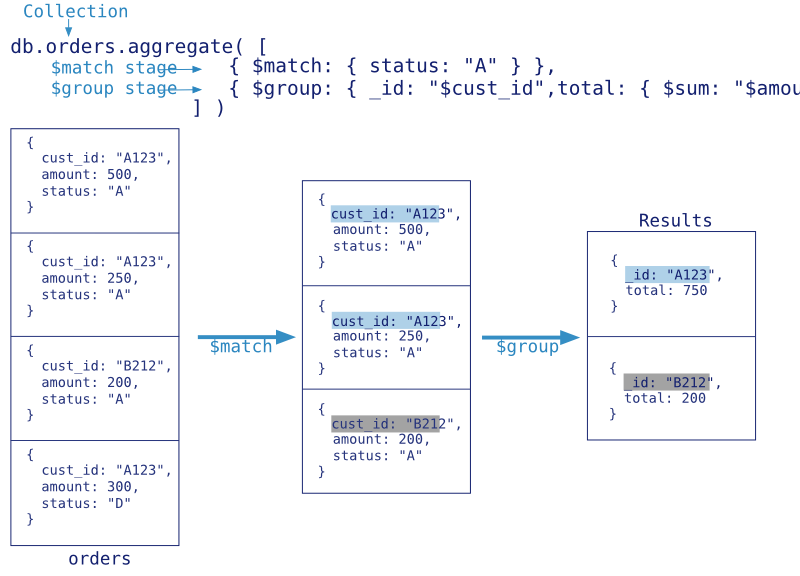
语法
参考手册: http://docs.mongoing.com/manual-zh/core/aggregation-pipeline.html
db.collection.aggregate(pipeline, options);

pipeline Array

# 与mysql中的字段对比说明

$project # 返回哪些字段,select,说它像select其实是不太准确的,因为aggregate是一个阶段性管道操作符,$project是取出哪些数据进入下一个阶段管道操作,真正的最终数据返回还是在group等操作中;

$match # 放在group前相当于where使用,放在group后面相当于having使用

$sort # 排序1升-1降 sort一般放在group后,也就是说得到结果后再排序,如果先排序再分组没什么意义;

$limit # 相当于limit m,不能设置偏移量

$skip # 跳过第几个文档

$unwind # 把文档中的数组元素打开,并形成多个文档,参考Example1

$group: { _id: <expression>, <field1>: { <accumulator1> : <expression1> }, ...  # 按什么字段分组,注意所有字段名前面都要加$,否则mongodb就为以为不加$的是普通常量,其中accumulator又包括以下几个操作符

# $sum,$avg,$first,$last,$max,$min,$push,$addToSet

#如果group by null就是 count(*)的效果

$geoNear # 取某一点的最近或最远,在LBS地理位置中有用

$out # 把结果写进新的集合中。注意1,不能写进一个分片集合中。注意2,不能写进
实例
Example1: unwind
> db.test.insert({ "_id" : 1, "item" : "ABC1", sizes: [ "S", "M", "L"] });

WriteResult({ "nInserted" : 1 })

> db.test.aggregate( [ { $unwind : "$sizes" } ] )

{ "_id" : 1, "item" : "ABC1", "sizes" : "S" }

{ "_id" : 1, "item" : "ABC1", "sizes" : "M" }

{ "_id" : 1, "item" : "ABC1", "sizes" : "L" }

db.test.insert({ "_id" : 2, "item" : "ABC1", sizes: [ "S", "M", "L",["XXL",'XL']] });

WriteResult({ "nInserted" : 1 })

> db.test.aggregate( [ { $unwind : "$sizes" } ] )

{ "_id" : 1, "item" : "ABC1", "sizes" : "S" }

{ "_id" : 1, "item" : "ABC1", "sizes" : "M" }

{ "_id" : 1, "item" : "ABC1", "sizes" : "L" }

{ "_id" : 2, "item" : "ABC1", "sizes" : "S" }

{ "_id" : 2, "item" : "ABC1", "sizes" : "M" }

{ "_id" : 2, "item" : "ABC1", "sizes" : "L" }

{ "_id" : 2, "item" : "ABC1", "sizes" : [ "XXL", "XL" ] } # 只能打散一维数组
Example2
#数据源

{ "_id" : 1, "item" : "abc", "price" : 10, "quantity" : 2, "date" : ISODate("2014-03-01T08:00:00Z") }

{ "_id" : 2, "item" : "jkl", "price" : 20, "quantity" : 1, "date" : ISODate("2014-03-01T09:00:00Z") }

{ "_id" : 3, "item" : "xyz", "price" : 5, "quantity" : 10, "date" : ISODate("2014-03-15T09:00:00Z") }

{ "_id" : 4, "item" : "xyz", "price" : 5, "quantity" : 20, "date" : ISODate("2014-04-04T11:21:39.736Z") }

{ "_id" : 5, "item" : "abc", "price" : 10, "quantity" : 10, "date" : ISODate("2014-04-04T21:23:13.331Z") }

# 综合示例

db.sales.aggregate([

  # 由上到下,分阶段的进行,注意该数组中的顺序是有意义的

  {

    $project:{item:1,price:1,quantity:1} # 1.取出什么元素待操作;

  },

  {

    $group:{ # 2. 对已取出的元素进行聚合运算;

      _id:"$item", # 根据什么来分组

      quantityCount:{$sum:'$quantity'},

      priceTotal:{$sum:'$price'}

    }

  },

  {

    $sort:{

      quantityCount:1 #3.升序

    }

  },

  # 4.基于上面的结果,取倒数第二名

  {

    $skip: 2

  },

  {

    $limit:1

  },

  # 5.然后把结果写到result集合中

  {

    $out:'result'

  }

])

#表达式$month,$dayOfMonth,$year,$sum,$avg

db.sales.aggregate(

   [

      {

        $group : {

           _id : { month: { $month: "$date" }, day: { $dayOfMonth: "$date" }, year: { $year: "$date" } }, #按月日年分组

           totalPrice: { $sum: { $multiply: [ "$price", "$quantity" ] } },

           averageQuantity: { $avg: "$quantity" },

           count: { $sum: 1 }

        }

      }

   ]

)

#结果

{ "_id" : { "month" : 3, "day" : 15, "year" : 2014 }, "totalPrice" : 50, "averageQuantity" : 10, "count" : 1 }

{ "_id" : { "month" : 4, "day" : 4, "year" : 2014 }, "totalPrice" : 200, "averageQuantity" : 15, "count" : 2 }

{ "_id" : { "month" : 3, "day" : 1, "year" : 2014 }, "totalPrice" : 40, "averageQuantity" : 1.5, "count" : 2 }

#

#

# 表达式$push

db.sales.aggregate(

   [

     {

       $group:

         {

           _id: { day: { $dayOfYear: "$date"}, year: { $year: "$date" } },

           itemsSold: { $push:  { item: "$item", quantity: "$quantity" } }

         }

     }

   ]

)

# result

{

   "_id" : { "day" : 46, "year" : 2014 },

   "itemsSold" : [

      { "item" : "abc", "quantity" : 10 },

      { "item" : "xyz", "quantity" : 10 },

      { "item" : "xyz", "quantity" : 5 },

      { "item" : "xyz", "quantity" : 10 }

   ]

}

{

   "_id" : { "day" : 34, "year" : 2014 },

   "itemsSold" : [

      { "item" : "jkl", "quantity" : 1 },

      { "item" : "xyz", "quantity" : 5 }

   ]

}

{

   "_id" : { "day" : 1, "year" : 2014 },

   "itemsSold" : [ { "item" : "abc", "quantity" : 2 } ]

}

#

#

# 表达式$addToSet

db.sales.aggregate(

   [

     {

       $group:

         {

           _id: { day: { $dayOfYear: "$date"}, year: { $year: "$date" } },

           itemsSold: { $addToSet: "$item" }

         }

     }

   ]

)

#result

{ "_id" : { "day" : 46, "year" : 2014 }, "itemsSold" : [ "xyz", "abc" ] }

{ "_id" : { "day" : 34, "year" : 2014 }, "itemsSold" : [ "xyz", "jkl" ] }

{ "_id" : { "day" : 1, "year" : 2014 }, "itemsSold" : [ "abc" ] }

#

#

# 表达式 $first

db.sales.aggregate(

   [

     { $sort: { item: 1, date: 1 } },

     {

       $group:

         {

           _id: "$item",

           firstSalesDate: { $first: "$date" }

         }

     }

   ]

)

# result

{ "_id" : "xyz", "firstSalesDate" : ISODate("2014-02-03T09:05:00Z") }

{ "_id" : "jkl", "firstSalesDate" : ISODate("2014-02-03T09:00:00Z") }

{ "_id" : "abc", "firstSalesDate" : ISODate("2014-01-01T08:00:00Z") }
Example3
db.sales.aggregate(

   [

      {

        $group : {

           _id : null, # 如果为null,就统计出全部

           totalPrice: { $sum: { $multiply: [ "$price", "$quantity" ] } },

           averageQuantity: { $avg: "$quantity" },

           count: { $sum: 1 }

        }

      }

   ]

)
Example4
# 数据源

{ "_id" : 8751, "title" : "The Banquet", "author" : "Dante", "copies" : 2 }

{ "_id" : 8752, "title" : "Divine Comedy", "author" : "Dante", "copies" : 1 }

{ "_id" : 8645, "title" : "Eclogues", "author" : "Dante", "copies" : 2 }

{ "_id" : 7000, "title" : "The Odyssey", "author" : "Homer", "copies" : 10 }

{ "_id" : 7020, "title" : "Iliad", "author" : "Homer", "copies" : 10 }

# 根据作者分组,获得其著多少书籍

db.books.aggregate(

   [

     { $group : { _id : "$author", books: { $push: "$title" } } }

   ]

)

# result

{ "_id" : "Homer", "books" : [ "The Odyssey", "Iliad" ] }

{ "_id" : "Dante", "books" : [ "The Banquet", "Divine Comedy", "Eclogues" ] }

# 通过系统变量$$ROOT(当前的根文档)来分组

db.books.aggregate(

   [

     { $group : { _id : "$author", books: { $push: "$$ROOT" } } }

   ]

)

# result

{

  "_id" : "Homer",

  "books" :

     [

       { "_id" : 7000, "title" : "The Odyssey", "author" : "Homer", "copies" : 10 },

       { "_id" : 7020, "title" : "Iliad", "author" : "Homer", "copies" : 10 }

     ]

}

{

  "_id" : "Dante",

  "books" :

     [

       { "_id" : 8751, "title" : "The Banquet", "author" : "Dante", "copies" : 2 },

       { "_id" : 8752, "title" : "Divine Comedy", "author" : "Dante", "copies" : 1 },

       { "_id" : 8645, "title" : "Eclogues", "author" : "Dante", "copies" : 2 }

     ]

}
邮政编码数据集的聚合实例: http://docs.mongoing.com/manual-zh/tutorial/aggregation-zip-code-data-set.html
对用户爱好数据做聚合实例:
http://docs.mongoing.com/manual-zh/tutorial/aggregation-with-user-preference-data.html
【mongoDB高级篇①】聚集运算之group,aggregate的更多相关文章
- 【mongoDB高级篇③】综合实战(1): 分析国家地震数据
数据准备 下载国家地震数据 http://data.earthquake.cn/data/ 通过navicat导入到数据库,方便和mysql语句做对比 shard分片集群配置 # step 1 mkd ...
- 【mongoDB高级篇①】聚集运算之group与aggregate
group 语法 db.collection.group({ key:{field:1},//按什么字段进行分组 initial:{count:0},//进行分组前变量初始化,该处声明的变量可以在 ...
- 【mongoDB高级篇②】大数据聚集运算之mapReduce(映射化简)
简述 mapReduce从字面上来理解就是两个过程:map映射以及reduce化简.是一种比较先进的大数据处理方法,其难度不高,从性能上来说属于比较暴力的(通过N台服务器同时来计算),但相较于grou ...
- Mongodb高级篇-性能优化
1.监控 mongodb可以通过profile来监控数据,进行优化. 查看当前是否开启profile功能用命令:db.getProfilingLevel()返回level等级,值为0|1|2,分别代表 ...
- MongoDB聚合运算之group和aggregate聚集框架简单聚合(10)
聚合运算之group 语法: db.collection.group( { key:{key1:1,key2:1}, cond:{}, reduce: function(curr,result) { ...
- Mongodb高级查询【二】
上一篇文章,写了mongodb常规操作,继续写入,本章主要讲高级查询,文本,聚集,大数据查询. Mongodb的查询语法是很多的,是NOSQL队伍中比较丰富的一个.当然有很多查询跟关系型查询无法相比. ...
- ORM查询语言(OQL)简介--高级篇:脱胎换骨
相关文章内容索引: ORM查询语言(OQL)简介--概念篇 ORM查询语言(OQL)简介--实例篇 ORM查询语言(OQL)简介--高级篇:脱胎换骨 ORM查询语言(OQL)简介--高级篇(续):庐山 ...
- PHP笔记(PHP高级篇)
高级篇中将涉及数据库的使用以及Cookie和Session会话,提高PHP的开发效率和运行效率 PHP程序员需要掌握的MySQL操作 为项目设计表 使用SQL语句 MySQL的目录结构 data目录中 ...
- ORM查询语言(OQL)简介高级篇
ORM查询语言(OQL)简介--高级篇:脱胎换骨 在写本文之前,一直在想文章的标题应怎么取.在写了<ORM查询语言(OQL)简介--概念篇>.<ORM查询语言(OQL)简介--实例篇 ...
随机推荐
- 运行yum报错Error: Cannot retrieve metalink for repository: epel. Please verify its path and try again
今天给Centos通过rpm -Uvh装了个epel的扩展后,执行yum就开始报错: Error: Cannot retrieve metalink for repository: epel. Ple ...
- jquery效果- 显示和隐藏 淡入淡出 滑动 隐藏
jQuery 效果- 隐藏和显示:hide() 和 show() 规定隐藏/显示的速度,可以取以下值:"slow"."fast" 或毫秒 您可以使用 toggl ...
- 百度的domain命令到底有用吗?
曾几何时,站长和seoer们在百度输入domain:xxxxxxxx的时候弹出的结果数量让多少人兴奋和失落,为什么我们对百度的domain命令如此着迷呢?因为我们都认为百度的domain命令是查询网站 ...
- JavaScript移除数组元素减少长度的方法
JavaScript移除数组元素减少长度的方法,代码如下: //数组移除长度方法 var array=[]; array[0]="张三"; array[1]="李四& ...
- 关于CSS中的PX值(像素)
场景: 人物:前端实习生「阿树」与 切图工程师「玉凤」事件:设计师出设计稿,前端实现页面 玉凤:树,设计稿发给你啦,差那么点像素,就叼死你┏(  ̄へ ̄)=☞阿树:~(>_<)~毛问题噶啦~ ...
- iphone document 图片存储和读取
转载自:http://longquan.iteye.com/blog/1669990 存: //此处首先指定了图片存取路径(默认写到应用程序沙盒 中) NSArray *paths = NSSearc ...
- opencv的初体验
http://guoming.me/opencv-config 这篇文章有讲解opencv的安装与配置 一些常用库 opencv_core249d.lib opencv_imgproc249d.li ...
- C# 获得手机归属地功能
今天通过查资料了解到web的页面抓取功能,应用HttpWebRequest和HttpWebResponse功能,从http://www.showji.com网站中抓取归属地信息 应该说这个方法是从别的 ...
- 安装mysql 5.5.14 报错
提示cmake nod foundyum install cmake 原因是曾经服务器安装过mysql数据库Installing MySQL system tables...101223 14:28: ...
- OC内存管理 @property的增强
涉及到内存管理,只读,多线程等很多功能时,setter和getter方法也就没那么简单了:当然@property依然强大,很好用: 1:内存管理相关参数: *:retain: (如果是oc对象类型) ...