
3.使用Selenium模拟浏览器抓取淘宝商品美食信息
# 使用selenium+phantomJS模拟浏览器爬取淘宝商品信息

# 思路:

# 第一步:利用selenium驱动浏览器,搜索商品信息,得到商品列表

# 第二步:分析商品页数,驱动浏览器翻页,并得到商品信息

# 第三步:爬取商品信息

# 第四步:存储到mongodb

from selenium import webdriver

from selenium.webdriver.common.by import By

from selenium.webdriver.support.ui import WebDriverWait

from selenium.webdriver.support import expected_conditions as EC

from selenium.common.exceptions import TimeoutException

from config import *

import re
browser = webdriver.PhantomJS(executable_path='/usr/bin/phantomjs',service_args=SERVICE_ARGS)
# 表示给browser浏览器一个10秒的加载时间

wait = WebDriverWait(browser,)

# 使用webdriver打开chrome,打开淘宝页面,搜索美食关键字,返回总页数

def search():

    print('正在搜索……')

    try:

        # 打开淘宝首页

        browser.get('http://www.taobao.com')

        # 判断输入框是否已经加载

        input = wait.until(

            EC.presence_of_element_located((By.ID,'q'))

        )

        # < selenium.webdriver.remote.webelement.WebElement(session="d575fc60-91a9-11e8-917b-3dd730d5073d",element=":wdc:1532701944023") >

        # 判断搜索按钮是否可以进行点击操作

        submit = wait.until(

            EC.element_to_be_clickable((By.CSS_SELECTOR,'#J_TSearchForm > div.search-button > button'))

        )

        # 输入美食

        input.send_keys(KEYWORD)

        # 点击搜索按钮

        submit.click()

        # 使用css_selector找到显示总页面的元素

        total = wait.until(

            EC.presence_of_element_located((By.CSS_SELECTOR,'#mainsrp-pager > div > div > div > div.total'))

        )

        return total.text

    except TimeoutException:

        print('超时')

        return search()

def main():

    total = search()

    print(total)

    total = int(re.compile('(\d+)').search(total).group())

    print(total)

if __name__ == '__main__':

    main()
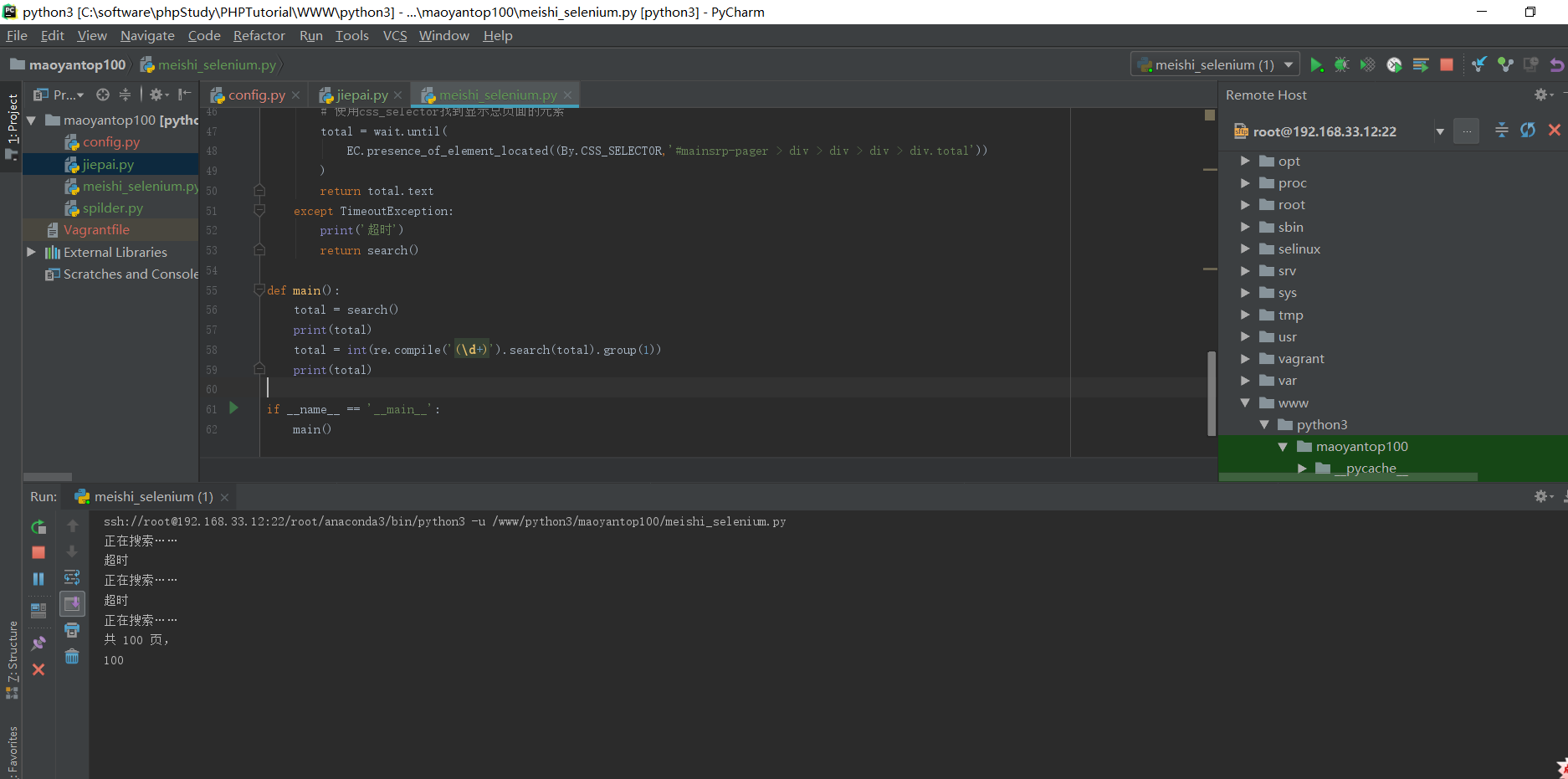
phantomJS爬数据比较慢,下面的测试结果,大概经过5分多钟才返回结果,正在搜索和超时提示返回比较慢
phantojs的其他配置方法:
# 引入配置对象DesiredCapabilities

from selenium.webdriver.common.desired_capabilities import DesiredCapabilities

dcap = dict(DesiredCapabilities.PHANTOMJS)

# 从USER_AGENTS列表中随机选一个浏览器头,伪装浏览器

dcap["phantomjs.page.settings.userAgent"] = USER_AGENTS

# 不载入图片,爬页面速度会快很多

dcap["phantomjs.page.settings.loadImages"] = False

# 设置代理

service_args = ['--disk-cache=true','--load-images=false']

# 打开带配置信息的phantomJS浏览器

browser = webdriver.PhantomJS(executable_path='/usr/bin/phantomjs', desired_capabilities=dcap, service_args=service_args)

# 隐式等待5秒,可以自己调节

browser.implicitly_wait()

# 设置10秒页面超时返回,类似于requests.get()的timeout选项,driver.get()没有timeout选项

# 以前遇到过driver.get(url)一直不返回,但也不报错的问题,这时程序会卡住,设置超时选项能解决这个问题。

browser.set_page_load_timeout()

# 设置10秒脚本超时时间

browser.set_script_timeout()
完整代码
# 使用selenium+phantomJS模拟浏览器爬取淘宝商品信息

# 思路:

# 第一步:利用selenium驱动浏览器,搜索商品信息,得到商品列表

# 第二步:分析商品页数,驱动浏览器翻页,并得到商品信息

# 第三步:爬取商品信息

# 第四步:存储到mongodb

from selenium import webdriver

from config import *

from selenium.webdriver.common.by import By

from selenium.webdriver.support.ui import WebDriverWait

from selenium.webdriver.support import expected_conditions as EC

from selenium.common.exceptions import TimeoutException

import re

from pyquery import PyQuery as pq

import pymongo

# client = pymongo.MongoClient(MONGO_URL)

client = pymongo.MongoClient(host='192.168.33.12', port=)

db = client[MONGO_DB_SELENIUM]

browser = webdriver.PhantomJS(executable_path=EXECUTABLE_PATH,service_args=SERVICE_ARGS)

browser.set_window_size(, )

# 表示给browser浏览器一个10秒的加载时间

wait = WebDriverWait(browser,)

# 使用webdriver打开chrome,打开淘宝页面,搜索美食关键字,返回总页数

def search():

    print('正在搜索……')

    try:

        # 打开淘宝首页

        browser.get('http://www.taobao.com')

        # 判断输入框是否已经加载

        input = wait.until(

            EC.presence_of_element_located((By.CSS_SELECTOR,'#q'))

        )

        # 判断搜索按钮是否可以进行点击操作

        submit = wait.until(

            EC.element_to_be_clickable((By.CSS_SELECTOR,'#J_TSearchForm > div.search-button > button'))

        )

        # 输入美食

        input.send_keys(KEYWORD_SELENIUM)

        # 点击搜索按钮

        submit.click()

        # 使用css_selector找到显示总页面的元素

        total = wait.until(

            EC.presence_of_element_located((By.CSS_SELECTOR,'#mainsrp-pager > div > div > div > div.total'))

        )

        # 获取商品信息

        get_products()

        return total.text

    except TimeoutException:

        print('超时')

        return search()

# 跳转到下一页

def next_page(page_number):

    try:

        # 输入要跳转的页数

        input = wait.until(

            EC.presence_of_element_located((By.CSS_SELECTOR, "#mainsrp-pager > div > div > div > div.form > input"))

        )

        # 确认进行跳转

        submit = wait.until(

            EC.element_to_be_clickable((By.CSS_SELECTOR, "#mainsrp-pager > div > div > div > div.form > span.btn.J_Submit"))

        )

        input.clear()

        input.send_keys(page_number)

        submit.click()

        # 判断当前的页数与网页的高亮显示是否对应得上

        wait.until(

            EC.text_to_be_present_in_element((By.CSS_SELECTOR, "#mainsrp-pager > div > div > div > ul > li.item.active > span"), str(page_number))

        )

        # 获取商品信息

        get_products()

    except TimeoutException:

        next_page(page_number)

# 获取商品信息

def get_products():

    # 判断商品是否加载成功

    wait.until(

        EC.presence_of_element_located((By.CSS_SELECTOR, "#mainsrp-itemlist .items .item"))

    )

    # 获取页面信息

    html = browser.page_source
    # 使用PyQuery来解析html

    doc = pq(html)

    items = doc("#mainsrp-itemlist .items .item").items()

    for item in items:

        product = {

            # 去掉价格中的换行符

            "price": item.find(".price").text().replace("\n", ""),

            "image": item.find(".pic .img").attr("src"),

            "name": item.find(".title").text(),

            "location": item.find(".location").text(),

            "shop": item.find(".shop").text(),

        }

        """

            需要保存的商品信息:

            ()商品的图片

            ()商品的价格

            ()商品的名字

            ()商品来源

            ()商品店铺

        """

        # print(product)

        # {'price': '¥32.80',

        #  'image': '//g-search1.alicdn.com/img/bao/uploaded/i4/imgextra/i4/95948676/TB2IdzpcnnI8KJjSszbXXb4KFXa_!!0-saturn_solar.jpg_230x230.jpg',

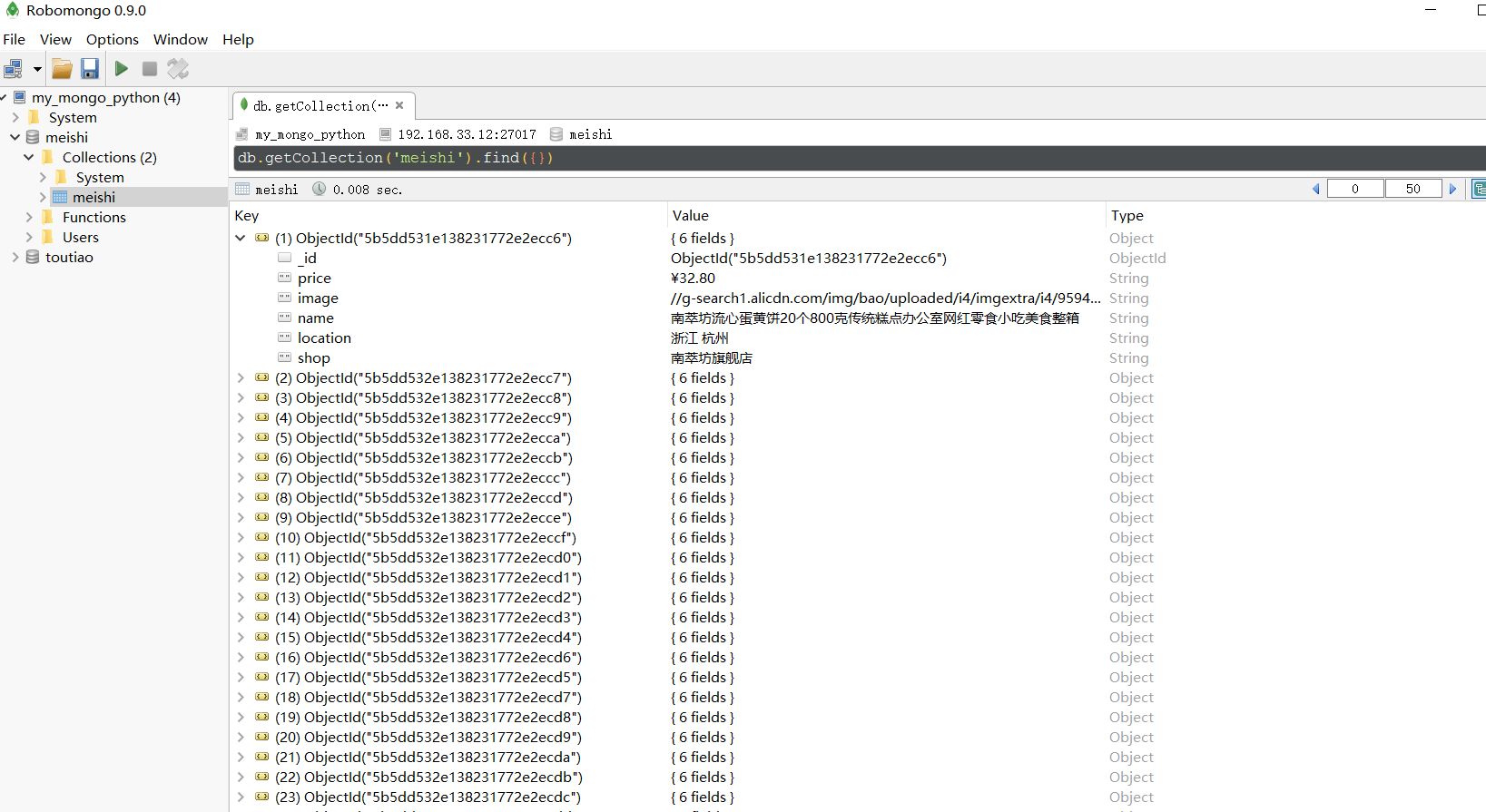
        #  'name': '南萃坊流心蛋黄饼20个800克传统糕点办公室网红零食小吃美食整箱', 'location': '浙江 杭州', 'shop': '南萃坊旗舰店'}

        save_products(product)

        # print("=" * )

        # == == == == == == == == == == == == == == ==

# 将商品的信息存储到MongoDB数据库、txt文件中

def save_products(result):

    try:

        # 尝试将结果集插入到数据库中

        if db[MONGO_TABLE_SELENIUM].insert(result):

            print("存储到MongoDB数据库成功!", result)

            # 存储到MongoDB数据库成功! {'price': '¥33.00',

            #                   'image': '//g-search1.alicdn.com/img/bao/uploaded/i4/i2/110202222/TB2k.9bhcj_B1NjSZFHXXaDWpXa_!!110202222.jpg_230x230.jpg',

            #                   'name': '陕西特产红星软香酥小吃美食零食礼包早餐糕点豆沙西安网红千层饼', 'location': '陕西 咸阳', 'shop': '红星软香酥专卖',

            #                   '_id': ObjectId('5b5dd570e138231772e2ef5d')}

            # == == == == == == == == == == == == == == ==

            # {'price': '¥24.90',

            #  'image': '//g-search1.alicdn.com/img/bao/uploaded/i4/imgextra/i1/13621870/TB2V3LhX56guuRjy1XdXXaAwpXa_!!0-saturn_solar.jpg_230x230.jpg',

            #  'name': '卜珂椰丝球椰蓉球美食早餐糕点心好吃的点心休闲零食品批发店小吃', 'location': '江苏 苏州', 'shop': '卜珂巧克力旗舰店'}

            # 存储到MongoDB数据库成功! {'price': '¥24.90',

            #                   'image': '//g-search1.alicdn.com/img/bao/uploaded/i4/imgextra/i1/13621870/TB2V3LhX56guuRjy1XdXXaAwpXa_!!0-saturn_solar.jpg_230x230.jpg',

            #                   'name': '卜珂椰丝球椰蓉球美食早餐糕点心好吃的点心休闲零食品批发店小吃', 'location': '江苏 苏州', 'shop': '卜珂巧克力旗舰店',

            #                   '_id': ObjectId('5b5dd575e138231772e2ef5e')}

            # == == == == == == == == == == == == == == ==

        # 将结果集存储到txt文件中

        if result:

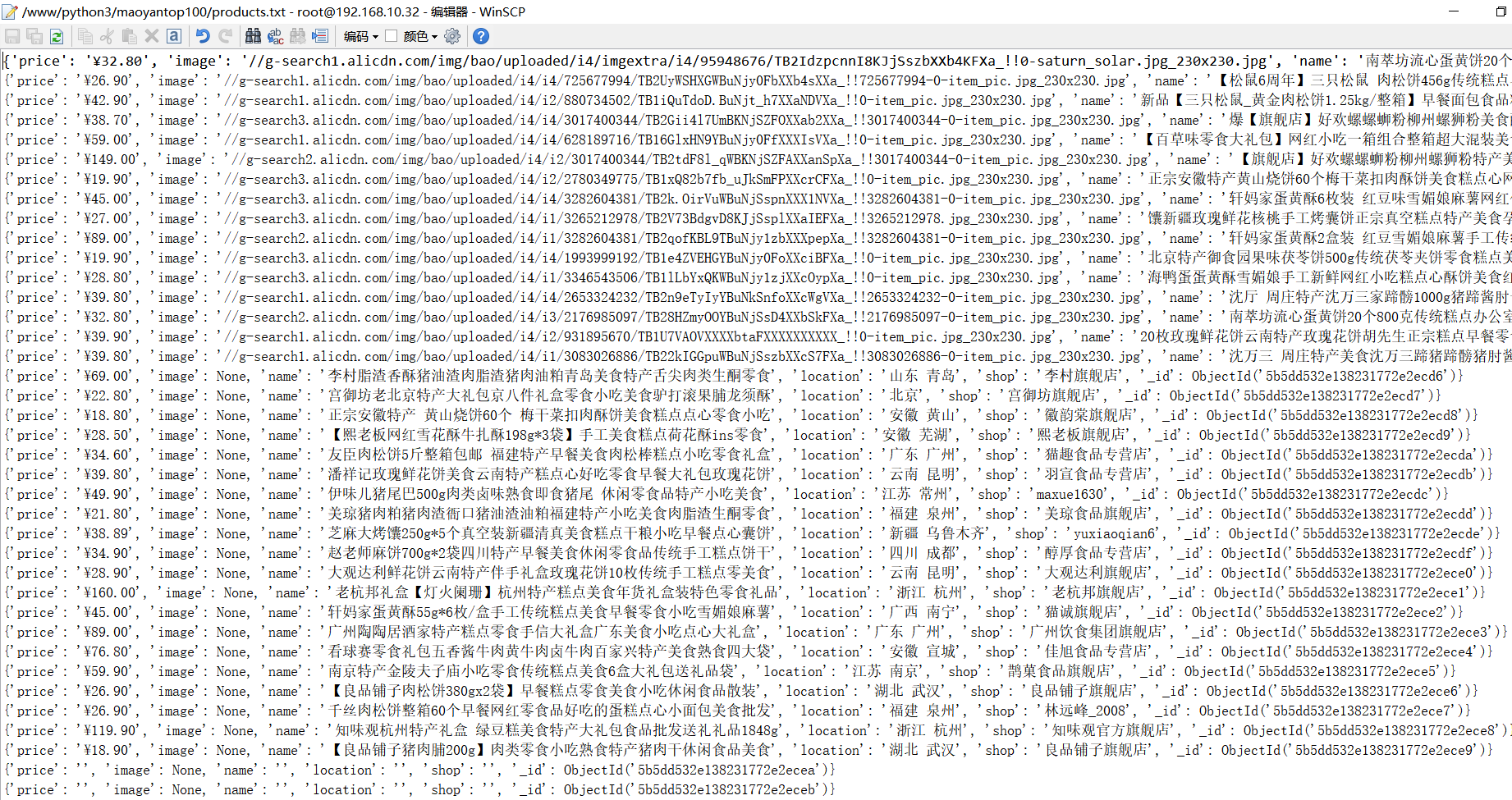
            with open("products.txt", "a", encoding="utf-8") as f:

                f.write(str(result) + "\n")

                f.close()

    except Exception:

        print("存储失败!", result)

def main():

    try:

        total = search()

        # print(total)

        total = int(re.compile('(\d+)').search(total).group())

        # print(total)

        for i in range(, total + ):

            next_page(i)

    except Exception:

        print("出错啦!")

    finally:

        browser.close()  # 最后一定都要关闭浏览器

if __name__ == '__main__':

    main()

参考博文:
Selenium分手PhantomJS
盘点selenium phantomJS使用的坑
3.使用Selenium模拟浏览器抓取淘宝商品美食信息的更多相关文章
- Python爬虫学习==>第十二章:使用 Selenium 模拟浏览器抓取淘宝商品美食信息
学习目的: selenium目前版本已经到了3代目,你想加薪,就跟面试官扯这个,你赢了,工资就到位了,加上一个脚本的应用,结局你懂的 正式步骤 需求背景:抓取淘宝美食 Step1:流程分析 搜索关键字 ...
- 16-使用Selenium模拟浏览器抓取淘宝商品美食信息
淘宝由于含有很多请求参数和加密参数,如果直接分析ajax会非常繁琐,selenium自动化测试工具可以驱动浏览器自动完成一些操作,如模拟点击.输入.下拉等,这样我们只需要关心操作而不需要关心后台发生了 ...
- 使用Selenium模拟浏览器抓取淘宝商品美食信息
代码: import re from selenium import webdriver from selenium.webdriver.common.by import By from seleni ...
- 爬虫实战--使用Selenium模拟浏览器抓取淘宝商品美食信息
from selenium import webdriver from selenium.webdriver.common.by import By from selenium.common.exce ...
- 使用selenium模拟浏览器抓取淘宝信息
通过Selenium模拟浏览器抓取淘宝商品美食信息,并存储到MongoDB数据库中. from selenium import webdriver from selenium.common.excep ...
- Selenium模拟浏览器抓取淘宝美食信息
前言: 无意中在网上发现了静觅大神(崔老师),又无意中发现自己硬盘里有静觅大神录制的视频,于是乎看了其中一个,可以说是非常牛逼了,让我这个用urllib,requests用了那么久的小白,体会到sel ...
- Selenium+Chrome/phantomJS模拟浏览器爬取淘宝商品信息
#使用selenium+Carome/phantomJS模拟浏览器爬取淘宝商品信息 # 思路: # 第一步:利用selenium驱动浏览器,搜索商品信息,得到商品列表 # 第二步:分析商品页数,驱动浏 ...
- 关于爬虫的日常复习(10)—— 实战:使用selenium模拟浏览器爬取淘宝美食
- Python开发爬虫之动态网页抓取篇:爬取博客评论数据——通过Selenium模拟浏览器抓取
区别于上篇动态网页抓取,这里介绍另一种方法,即使用浏览器渲染引擎.直接用浏览器在显示网页时解析 HTML.应用 CSS 样式并执行 JavaScript 的语句. 这个方法在爬虫过程中会打开一个浏览器 ...
随机推荐
- Linux下编译并使用miracl密码库
参考:http://blog.sina.com.cn/s/blog_53fdf1590102y9ox.html MIRACL(Multiprecision Integer and RationalAr ...
- netty(一)---服务端源码阅读
NIO Select 知识 select 示例代码 : //创建 channel 并设置为非阻塞 ServerSocketChannel serverChannel = ServerSocketCha ...
- A Simple Problem with Integers(树状数组区间变化和区间求和)
You have N integers, A1, A2, ... , AN. You need to deal with two kinds of operations. One type of op ...
- ASP.NET Core搭建多层网站架构【7-使用NLog日志记录器】
2020/01/29, ASP.NET Core 3.1, VS2019, NLog.Web.AspNetCore 4.9.0 摘要:基于ASP.NET Core 3.1 WebApi搭建后端多层网站 ...
- go开发工具goclipse的安装
(1) 安装Eclipse 建议下载Eclipse时直接下载"Eclipse IDE for Java Developers"的package,而不要下载较小的Installer. ...
- 理解Linux内核注释
内核是Linux的心脏,它是在引导时装入的程序,用来提供用户层程序和硬件之间的接口,执行发生在多任务系统中的实际任务转换,处理读写磁盘的需求,处理网络接口,以及管理内存.一般情况下,自动安装的内核无需 ...
- 《梳理业务的三个难点》---创业学习---训练营第二课---HHR---
一,<开始学习> 1,融资的第一步:把业务一块一块的梳理清楚. 2,预热思考题: (1)投资人会问能做多大,天花板怎么算?你的答案可以得到大家的认同吗?(四种方法,直接引用,自顶向下,自底 ...
- windows远程linux的方法(不用xshell)
先cmd进入DOS,再输入命令ssh root@要远程的linux的ip 输入密码 即可进入linux后台.如下图,即为edr后台,可以见到unabackup服务了. 如果是多次远程不同IP,第二次远 ...
- POJ-3821-Dining (拆点网络流)
这题为什么不能用 左边放食物,中间放牛,后面放水? 原因很简单,假设一头牛喜欢两个食物AB和两种水AB. 此时可以从一个食物A,走到牛A,再走到水A. 但是还可以有另一条路,从另一个食物B,走到该牛A ...
- 获取class对象的三种方法以及通过Class对象获取某个类中变量,方法,访问成员
public class ReflexAndClass { public static void main(String[] args) throws Exception { /** * 获取Clas ...