
5-create-react-app整合antDesign功能
使用ant-design:
首先创建react项目:
create-react-app app
cd app
其次
AntDesign的高级配置:按需导入组件,自定义主题
1.下载依赖(利用yarn,或者npm都行)
yarn add react-router-dom //装路由插件
yarn add antd //装antd 插件 在 create-react-app 创建的工程中使用 antd 组件
yarn add react-app-rewired customize-cra //react-app-rewired (一个对 create-react-app 进行自定义配置的社区解决方案)
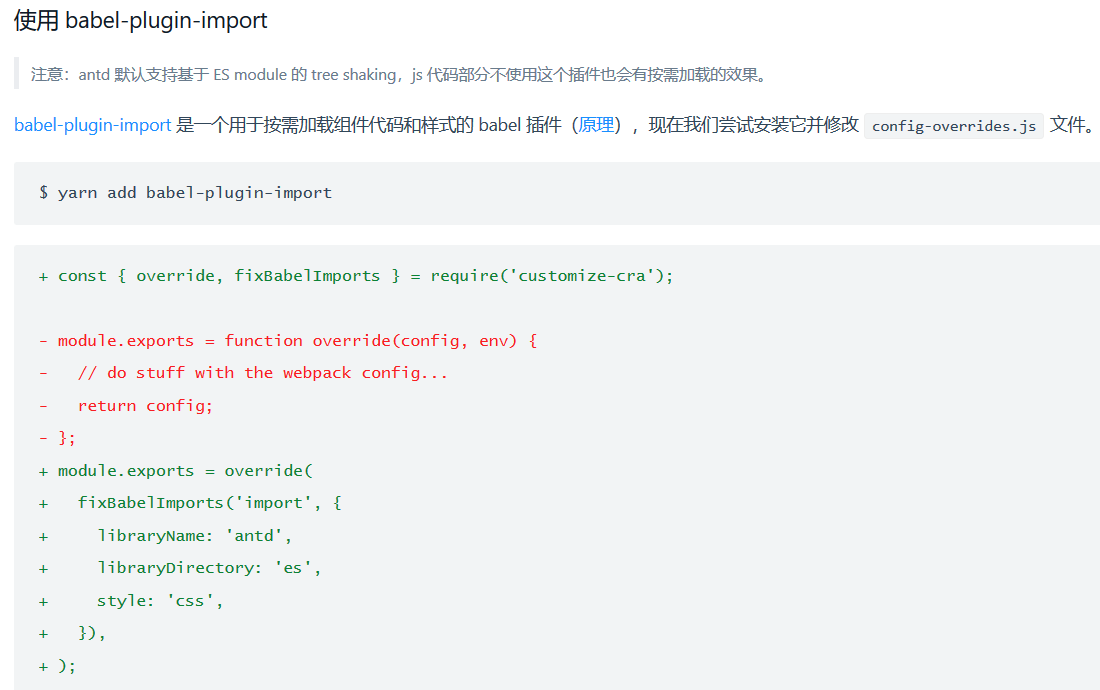
yarn add babel-plugin-import //babel-plugin-import 是一个用于按需加载组件代码和样式的 babel 插件
yarn add less less-loader //按照 配置主题 的要求,自定义主题需要用到 less 变量覆盖功能。
2.修改package.json
"scripts": {
"start": "react-app-rewired start",
"build": "react-app-rewired build",
"test": "react-app-rewired test",
}
- 表示要删除的
+ 表示要添加的

3,在项目根目录创建config-overrides.js
在项目根目录创建一个 config-overrides.js 用于修改默认配置。(js配置文件需要修改)
module.exports = function override(config, env) {
// do stuff with the webpack config...
return config;};

const { override, fixBabelImports, addLessLoader } = require('customize-cra');
module.exports = override(
fixBabelImports('import', {
libraryName: 'antd',
libraryDirectory: 'es',
style: true,
}),
addLessLoader({
javascriptEnabled: true,
modifyVars: { '@primary-color': '#1DA57A' },
}),
);

5-create-react-app整合antDesign功能的更多相关文章
- 如何扩展 Create React App 的 Webpack 配置
如何扩展 Create React App 的 Webpack 配置 原文地址https://zhaozhiming.github.io/blog/2018/01/08/create-react-a ...
- 深入 Create React App 核心概念
本文差点难产而死.因为总结的过程中,多次怀疑本文是对官方文档的直接翻译和简单诺列:同时官方文档很全面,全范围的介绍无疑加深了写作的心智负担.但在最终的梳理中,发现走出了一条与众不同的路,于是坚持分享出 ...
- 在 .NET Core 5 中集成 Create React app
翻译自 Camilo Reyes 2021年2月22日的文章 <Integrate Create React app with .NET Core 5> [1] Camilo Reyes ...
- tap news:week5 0.0 create react app
参考https://blog.csdn.net/qtfying/article/details/78665664 先创建文件夹 安装create react app 这个脚手架(facebook官方提 ...
- 使用create react app教程
This project was bootstrapped with Create React App. Below you will find some information on how to ...
- Create React App
Facebook开源了React前端框架(MIT Licence),也同时提供了React脚手架 - create-react-app. create-react-app遵循约定优于配置(Coc)的原 ...
- Create React App 安装less 报错
执行npm run eject 暴露模块 安装 npm i less less-loader -D 1.打开 react app 的 webpack.config.js const sassRege ...
- [React] Use the Fragment Short Syntax in Create React App 2.0
create-react-app version 2.0 added a lot of new features. One of the new features is upgrading to Ba ...
- [React] {svg, css module, sass} support in Create React App 2.0
create-react-app version 2.0 added a lot of new features. One of the new features is added the svgr ...
随机推荐
- MBA 报考
1. 作者:MBA薛老师链接:https://www.zhihu.com/question/277811289/answer/397083199来源:知乎著作权归作者所有.商业转载请联系作者获得授 ...
- ZOJ1002 —— 深度优先搜索
ZOJ1002 —— Fire net Time Limit: 2000 ms Memory Limit: 65536 KB Suppose that we have a square city wi ...
- Navicat Premium 12安装、激活
Navicat Premium 12安装 Navicat Premium 12激活
- itest(爱测试) 4.3.0 发布,开源BUG 跟踪管理 & 敏捷测试管理软件
itest 简介:查看简介 test 开源敏捷测试管理,testOps 践行者.可按测试包分配测试用例执行,也可建测试迭代(含任务,测试包,BUG)来组织测试工作,也有测试环境管理,还有很常用的测试度 ...
- springboot整合cache报错org.springframework.cache.ehcache.EhCacheCacheManager cannot be cast to net.sf.ehcache.CacheManager
原来的代码 private static CacheManager cacheManager = SpringContextHolder.getBean("cacheManager" ...
- <img>标签在vue中的使用
定义和用法 onerror 事件会在文档或图像加载过程中发生错误时被触发. 在装载文档或图像的过程中如果发生了错误,就会调用该事件句柄. 实例 加载缩略图 <img :src="'/x ...
- 洛谷P1064 金明的预算方案(01背包)
题目描述 金明今天很开心,家里购置的新房就要领钥匙了,新房里有一间金明自己专用的很宽敞的房间.更让他高兴的是,妈妈昨天对他说:“你的房间需要购买哪些物品,怎么布置,你说了算,只要不超过NNN元钱就行” ...
- Arrays类的概述和常用的方法
1. 2.为了防止外界创造对象,系统把Arrays的无参构造方法设为私有: 并且再其类方法用静态修饰,强制你用类名调用方法,另外math和system也是如此
- phpstorm 断点调试
1.设置php的xdebug 在php.ini中设置 [XDebug] xdebug.profiler_output_dir="H:\phystudy\PHPTutorial\tmp\xde ...
- Vue-设置默认路由选中
需求分析: 一个导航组件,需要其中一个是选中状态,并且样式呈现高亮,选中的导航对应的页面也需要展示出来. 功能实现: router-link内置有一个选中状态,当处于当前路由时,会给 router-l ...