
TNS-12540: TNS:internal limit restriction exceeded
应用程序以及客户端工具(Toad、PL/SQL Developer等)出现突然连接不上数据库服务器的情况,监听日志listener.log里面出现了TSN-12518与TSN-12540错误,如下所示,
27-JAN-2015 10:10:19 * (CONNECT_DATA=(SERVICE_NAME=scm2)(CID=(PROGRAM=c:\windows\system32\inetsrv\w3wp.exe)(HOST=POS)(USER=SYSTEM)))
* (ADDRESS=(PROTOCOL=tcp)(HOST=192.168.xxx.xxx)(PORT=1667)) * establish * scm2 * 12518
TNS-12518: TNS:listener could not hand off client connection
TNS-12540: TNS:internal limit restriction exceeded
27-JAN-2015 10:10:19 * (CONNECT_DATA=(SERVICE_NAME=scm2)(CID=(PROGRAM=c:\windows\system32\inetsrv\w3wp.exe)(HOST=CEGWEB1)(USER=NETWO
RK?SERVICE))) * (ADDRESS=(PROTOCOL=tcp)(HOST=192.168.xxx.xxx)(PORT=1284)) * establish * scm2 * 12518
TNS-12518: TNS:listener could not hand off client connection
TNS-12540: TNS:internal limit restriction exceeded
经过这几天的努力,终于解决了这个问题,所以修改、补充了这篇先前的文章,希望能对其他人有所借鉴。下面整理了一下解决问题的步骤。如下所示:
1:首先查看监听服务的进程是否正常,如下所示,监听服务完全正常
ps -ef | grep tnslsnr
oraescm 6669 5979 0 14:03 pts/5 00:00:00 grep tnslsnr
oraescm 29877 1 0 08:12 ? 00:00:11 /u01/app/oracle/product/10.2.0/db_1/bin/tnslsnr LISTENER -inherit
2:检查查看监听服务的状态(lsnrctl status)
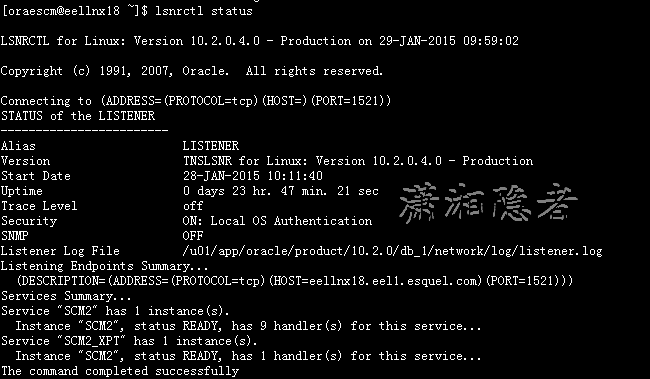
3: 检查lsnrctl services后, 发现一个奇怪的情况Dispatcher没有拒绝监听的记录,如下所示

4:检查Dispatcher进程的是否繁忙,结果查询时一直查询不出结果,立即取消了当前查询
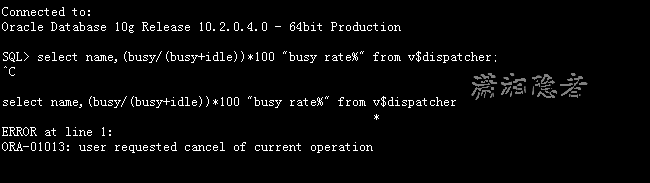
像平时查询时(如下所示)的速度是非常快的。如果”busy rate%“比例超过50%一般建议加SHARED SERVER OR DISPATCHER
SQL> select name,(busy/(busy+idle))*100 "busy rate%" from v$dispatcher;
NAME busy rate%
---- ----------
D000 .194393707
D001 .124595175
D002 .102238233
D003 .097416229
D004 .140182022
D005 .114123279
D006 .137454634
D007 .148511476
D008 .148901287
D009 .111103697
10 rows selected.
5:检查会话、进程数量。发现当前会话数为483,历史最大值为720. sessions最大值为1000 ,processes参数最大值为870, 应该可以排除processes与session参数值设置过小导致。
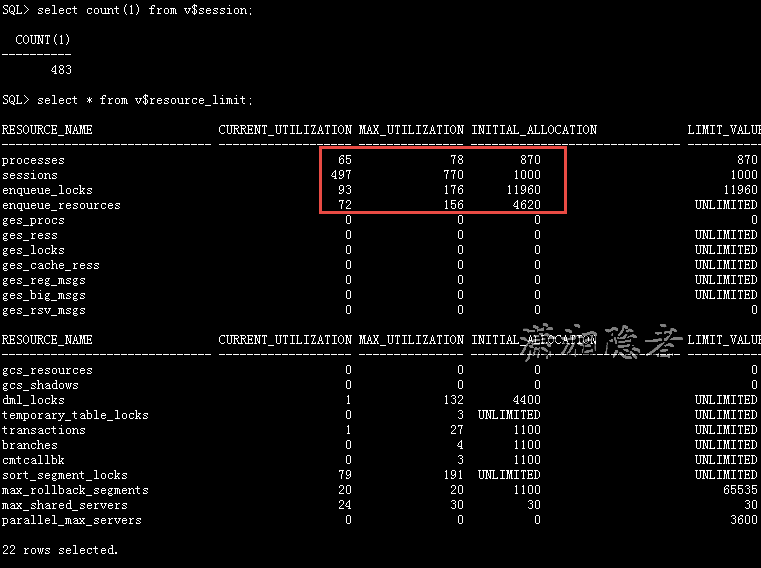
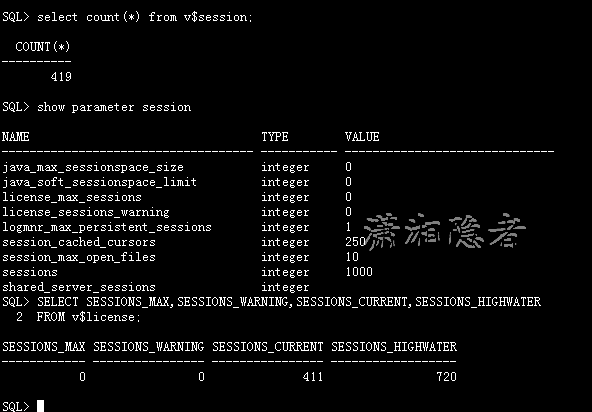
select * from v$resource_limit;
select count(1) from v$session;
SELECT SESSIONS_MAX,SESSIONS_WARNING,SESSIONS_CURRENT,SESSIONS_HIGHWATER
FROM v$license;
select count(1) from v$process;
select count(1) from v$session;
select busy/(busy+idle) from v$shared_server;
select name,busy/(busy+idle)*100 "Dispatcher Busy Rate" from v$dispatcher;
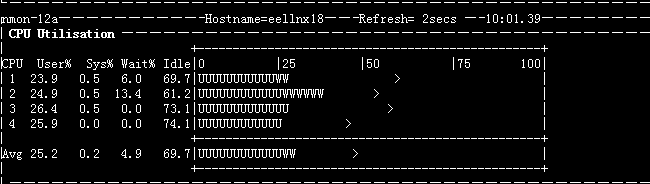
6:检查服务器CPU、RAM资源。如下所示,CPU利用率非常低。检查内存,发现物理内存只剩下204M大小,但是Swap还有13729M剩余。另外告警日志里面并没有发现任何错误信息。

在官方文档查看TSN-12540错误信息,如下所示:
TNS-12540: TNS:internal limit restriction exceeded
Cause: Too many TNS connections open simultaneously.
Action: Wait for connections to close and re-try.
http://docs.oracle.com/cd/B28359_01/network.111/b28316/troublestng.htm#CEGDGHBJ
TNS-12540/ORA-12540: TNS:internal limit restriction exceeded and TNS-00510: Internal limit restriction exceeded
Cause: An internal limit has been exceeded. Possible limits include:
Number of open connection that Oracle Net can process simultaneously
Number of memory buffers which can be used simultaneously
Number of processes a particular database instance is allowed
The first two are examples of hard limits. The third is an example of a limit which can be increased by setting PROCESSES parameter in the database initialization file to a larger value. In this case, a TNS-12500/ORA-12500 error is also returned. In some cases, these errors can be caused by the same conditions which cause TNS-12549/ORA-12549 and TNS-00519 errors.
Action: Perform these steps:
Wait for the open connections to close and retry. If the error persists, then check the sqlnet.log or listener.log file for detailed error stack information.
ORA-12540: TNS:internal limit restriction exceeded
Cause: Too many TNS connections open simultaneously.
Action: Wait for connections to close and re-try.
This error is not an indication of a network problem unless it occurs on all connections (in other words you have never been able to connect). If so it is a .ora configuration problem.
If you can make connections up to a certain point but then fails it is an indication of a resource limitation at the os level (this sounds like your scenario)
Typical problems are:
Out of system memory / swap
Out of process slots in the process table
Streams resources depleted
Physical connections allows by the kernal.
Out of File Handles
但是如下所示,检查了Linux系统的一些内核参数设置,也没有发现有设置不当的地方
[orxxm@xxxx ~]$ ulimit -a
core file size (blocks, -c) 0
data seg size (kbytes, -d) unlimited
scheduling priority (-e) 0
file size (blocks, -f) unlimited
pending signals (-i) 193217
max locked memory (kbytes, -l) 64
max memory size (kbytes, -m) unlimited
open files (-n) 65536
pipe size (512 bytes, -p) 8
POSIX message queues (bytes, -q) 819200
real-time priority (-r) 0
stack size (kbytes, -s) 4194302
cpu time (seconds, -t) unlimited
max user processes (-u) 16384
virtual memory (kbytes, -v) unlimited
file locks (-x) unlimited
check to count the number of existing socket handles on your db server (as root):
[oraescm@eellnx18 bdump]$ lsof -i 4 -a | wc -l
473
[oraescm@eellnx18 bdump]$ cat /proc/sys/fs/file-max
2414114
最后,我们决定增加Dispatcher的数量,从8改为10,尝试解决问题,结果问题不再重现。问题解决了。
SQL>alter system set dispatchers='(protocol=TCP)(disp=10)(serv=SCM2)' scope=both;
SQL> show parameter dispatchers
NAME TYPE VALUE
------------------------------------ ----------- ------------------------------
dispatchers string (protocol=TCP)(disp=10)(serv=S
CM2)
max_dispatchers integer
SQL>
205-02-03 添加:
几天过去了,悲催的是今天下午又出现了TSN-12540错误,纠结啊,这个问题已经把我折腾惨了!
参考资料:
http://t.askmaclean.com/forum.php?mod=viewthread&tid=1442
http://www.dba-oracle.com/t_ora_12540_tns_internal_limit_restriction_exceeded.htm
http://database.ccidnet.com/art/1105/20060601/569461_1.html
http://blog.itpub.net/81018/viewspace-812609/
http://www.bkjia.com/sjkqy/902979.html
http://www.cyberciti.biz/faq/linux-increase-the-maximum-number-of-open-files/
TNS-12540: TNS:internal limit restriction exceeded的更多相关文章
- Overflow sort stage buffered data usage of 33554495 bytes exceeds internal limit of 33554432 bytes
MongoDB执行错误: Overflow sort stage buffered data usage of 33554495 bytes exceeds internal limit of 335 ...
- [WebException: The underlying connection was closed: The message length limit was exceeded.]解决方法
[WebException: The underlying connection was closed: The message length limit was exceeded.] Syste ...
- 场景报错Error -27492: "HttpSendRequest" failed, Windows error code=12029 (cannot connect) and retry limit (0) exceeded for URL=""
1.现象:loadrunner场景执行,tps图是一段很平稳,然后直线触底,一段时间,直线恢复平稳,触底这段时间报错信息如下: Action.c(6): Error -27492: "Htt ...
- .net Core 解决Form value count limit 1024 exceeded. (文件上传过大)
异常清空如图 原因:.net core提交的表单限制太小导致页面表单提交失败 在控制器上使用 RequestFormLimits attribute [RequestFormLimits(ValueC ...
- Form key length limit 2048 exceeded ,提交数据时,数据的键过长 或者是上传文件过大
在ASP.NET Core MVC中,文件的key 默认最大为2048,文件上传的最大上传文件默认为20MB,如果我们想上传一些比较大的文件,就不知道怎么去设置了,没有了Web.Config我们应该如 ...
- ORACLE 博客文章目录(2015-05-27更新)
从接触ORACLE到深入学习,已有好几年了,虽然写的博客不多,质量也参差不齐,但是,它却是成长的历程的点点滴滴的一个见证,见证了我在这条路上的寻寻觅觅,朝圣的心路历程,现在将ORACLE方面的博客整理 ...
- C/S端开发问题汇总
0.先推荐几款工具,连接远程客户端DameWare Mini Remote Control,搜索本地文件Everything,以及sysinternals的系列工具: FileMon-监视所有文件修改 ...
- ORACLE 博客文章目录(2015
从接触ORACLE到深入学习,已有好几年了,虽然写的博客不多,质量也参差不齐,但是,它却是成长的历程的点点滴滴的一个见证,见证了我在这条路上的寻寻觅觅,朝圣的心路历程,现在将ORACLE方面的博客整理 ...
- Oracle内存全面分析
Oracle内存全面分析 Oracle的内存配置与oracle性能息息相关.而且关于内存的错误(如4030.4031错误)都是十分令人头疼的问题.可以说,关于内存的配置,是最影响Oracle性能的配置 ...
随机推荐
- JavaScript使用构造函数获取变量的类型名
在JavaScript中,如何准确获取变量的类型名是一个经常使用的问题. 但是常常不能获取到变量的精确名称,或者必须使用jQuery 中的方法,这里 我通过 typeof ,jQuery.type 和 ...
- 在IE11下设置SharePoint Server 2013却遇到“需要 Internet Explorer 才能使用此功能。”的解决办法
就在昨天顺利升级到Windows 8.1 随之IE也升级到了IE11,但是当打开IE11设置SharePoint Server 2013的时候遇到了一些小情况: Figure 1使用Windows 8 ...
- Android-Universal-Image-Loader 图片异步加载类库的使用
在博客中看到一篇利用组件进行图片异步加载的文章在此作记录 原文:http://blog.csdn.net/vipzjyno1/article/details/23206387 这个图片异步加载并缓存的 ...
- Struts2 源码分析——Result类实例
本章简言 上一章笔者讲到关于DefaultActionInvocation类执行action的相关知识.我们清楚的知道在执行action类实例之后会相关处理返回的结果.而这章笔者将对处理结果相关的内容 ...
- 微信浏览器是移动端的IE6?微信升级内核后Html5和CSS3兼容性总结
今年4月,自从微信浏览器X5 升级Blink内核之后,各前端社区一片高潮,仿佛看到了前端er,眼含热泪进而抱头痛头的说:终于可以不用兼容这"移动端的IE6 "了,可以早点回家了!! ...
- Visual Studio 2008 Package Load Failure:未能正确加载包“Microsoft.VisualStudio.Xaml”
在安装好Visual Studio 2008后,启动Visual Studio 2008 发现如下提示: 包加载失败 未能正确加载包“Microsoft.VisualStudio.Xaml”( GUI ...
- 【转】App开放接口api安全性—Token签名sign的设计与实现
前言 在app开放接口api的设计中,避免不了的就是安全性问题,因为大多数接口涉及到用户的个人信息以及一些敏感的数据,所以对这些接口需要进行身份的认证,那么这就需要用户提供一些信息,比如用户名密码等, ...
- DevExtreme 学习应用[1]
DevExtreme学习开发 [1] 用HTML开发手机应用,看一哈帮助文档觉得还很不错. 在开发前一定要安装DevExteme 下载连接地址: ftp://211.101.1.108/DevExp ...
- 解决WebApi入参时多对象的问题
我们的项目是用WebApi提供数据服务,且WebPage跟APP中都有调用到. WebApi提供的接口一多,就发现一个问题,我们项目中有很多接口是接收POST(安全原因,我们采用的是https)请求的 ...
- 第一个hadoop 程序
首先检查hadoop是否安装并配置正确然后建立WordCount.java文件里面保存package org.myorg; import java.io.IOException;import java ...