
Android 装逼技术之暗码启动应用

什么是暗码?
在拨号盘中输入*#*#<code>#*#*后,APP 可以监控到这些输入,然后做相应的动作,比如启动应用,是不是有点骚。
下面看下这个骚操作是如何实现的。
效果预览
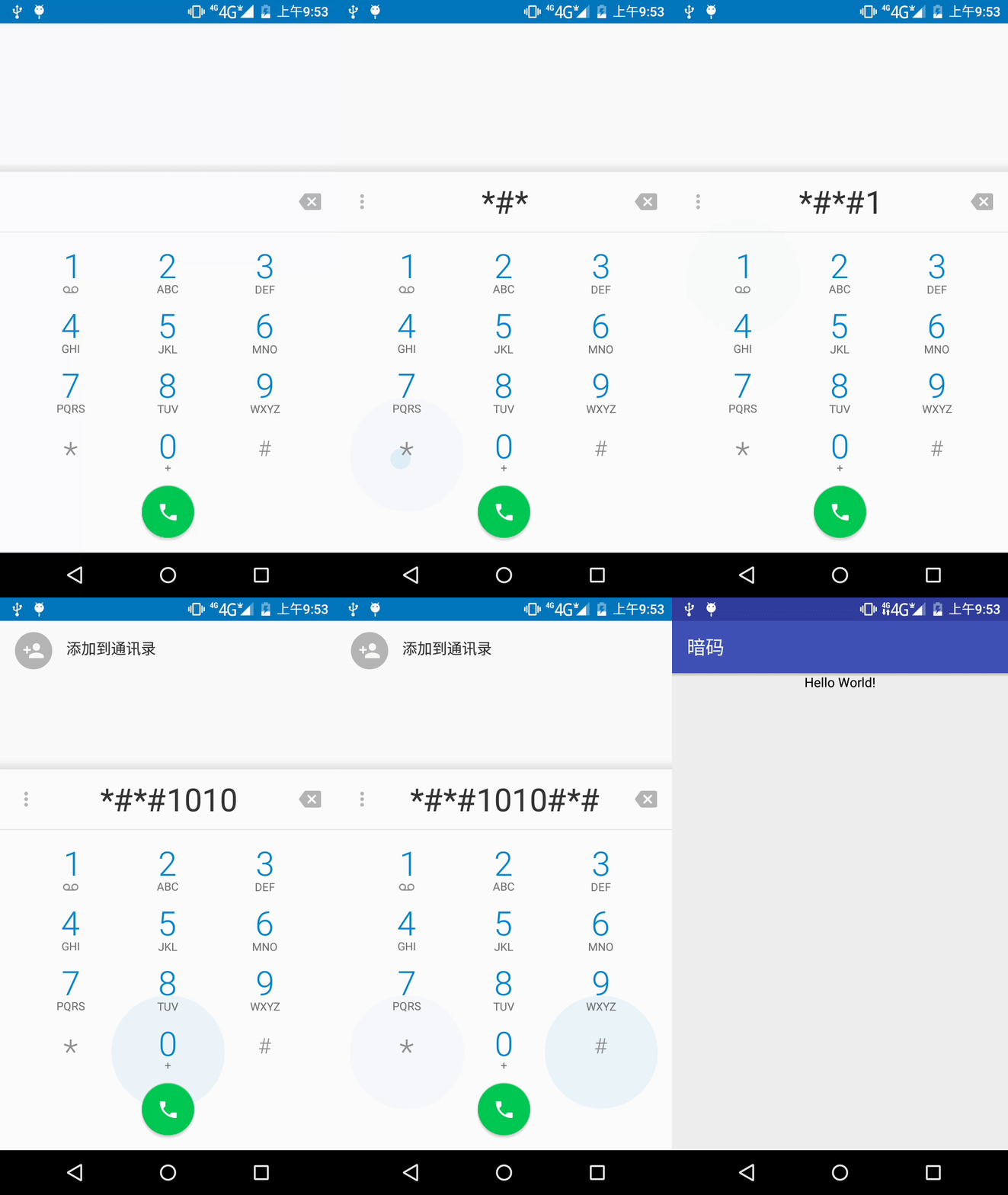
源码
DialtactsActivity#showDialpadFragment
DialtactsActivity 中有个 showDialpadFragment 方法,用来加载显示拨号盘,因此入口就从 showDialpadFragment 看起,基于 Android P 分析。
private void showDialpadFragment(boolean animate) {

  //……

  final FragmentTransaction ft = getFragmentManager().beginTransaction();

  if (dialpadFragment == null) {

    dialpadFragment = new DialpadFragment();

    ft.add(R.id.dialtacts_container, dialpadFragment, TAG_DIALPAD_FRAGMENT);

  } else {

    ft.show(dialpadFragment);

  }

  //……

}
具体实现在 DialpapFragment 中,看到 DialpapFragment 实现了 TextWatcher,TextWatcher 有 3 个重要方法,分别为:beforeTextChanged,onTextChanged 和 afterTextChanged,重点看 afterTextChanged 方法。
DialpadFragment#afterTextChanged
public class DialpadFragment extends Fragment

        implements View.OnClickListener,

        View.OnLongClickListener,

        View.OnKeyListener,

        AdapterView.OnItemClickListener,

        TextWatcher,

        PopupMenu.OnMenuItemClickListener,

        DialpadKeyButton.OnPressedListener {

    //……

    @Override

    public void afterTextChanged(Editable input) {

        // When DTMF dialpad buttons are being pressed, we delay SpecialCharSequenceMgr sequence,

        // since some of SpecialCharSequenceMgr's behavior is too abrupt for the "touch-down"

        // behavior.

        if (!digitsFilledByIntent

                && SpecialCharSequenceMgr.handleChars(getActivity(), input.toString(), digits)) {

            // A special sequence was entered, clear the digits

            digits.getText().clear();

        }

        if (isDigitsEmpty()) {

            digitsFilledByIntent = false;

            digits.setCursorVisible(false);

        }

        if (dialpadQueryListener != null) {

            dialpadQueryListener.onDialpadQueryChanged(digits.getText().toString());

        }

        updateDeleteButtonEnabledState();

    }

    //……

}
这里调用了 SpecialCharSequenceMgr 辅助工具类的 handleChars 方法,看这个方法。
SpecialCharSequenceMgr#handleChars
public static boolean handleChars(Context context, String input, EditText textField) {

  // get rid of the separators so that the string gets parsed correctly

  String dialString = PhoneNumberUtils.stripSeparators(input);

  if (handleDeviceIdDisplay(context, dialString)

      || handleRegulatoryInfoDisplay(context, dialString)

      || handlePinEntry(context, dialString)

      || handleAdnEntry(context, dialString, textField)

      || handleSecretCode(context, dialString)) {

    return true;

  }

  if (MotorolaUtils.handleSpecialCharSequence(context, input)) {

    return true;

  }

  return false;

}
handleChars 方法中,会对各种特殊的 secret code 进行匹配处理,这里我们看 handleSecretCode。
SpecialCharSequenceMgr#handleSecretCode
static boolean handleSecretCode(Context context, String input) {

  // Secret code specific to OEMs should be handled first.

  if (TranssionUtils.isTranssionSecretCode(input)) {

    TranssionUtils.handleTranssionSecretCode(context, input);

    return true;

  }

  // Secret codes are accessed by dialing *#*#<code>#*#* or "*#<code_starting_with_number>#"

  if (input.length() > 8 && input.startsWith("*#*#") && input.endsWith("#*#*")) {

    String secretCode = input.substring(4, input.length() - 4);

    TelephonyManagerCompat.handleSecretCode(context, secretCode);

    return true;

  }

  return false;

}
再看下 TelephonyManagerCompat.handleSecretCode 方法。
TelephonyManagerCompat#handleSecretCode
public static void handleSecretCode(Context context, String secretCode) {

  // Must use system service on O+ to avoid using broadcasts, which are not allowed on O+.

  if (BuildCompat.isAtLeastO()) {

    if (!TelecomUtil.isDefaultDialer(context)) {

      LogUtil.e(

          "TelephonyManagerCompat.handleSecretCode",

          "not default dialer, cannot send special code");

      return;

    }

    context.getSystemService(TelephonyManager.class).sendDialerSpecialCode(secretCode);

  } else {

    // System service call is not supported pre-O, so must use a broadcast for N-.

    Intent intent =

        new Intent(SECRET_CODE_ACTION, Uri.parse("android_secret_code://" + secretCode));

    context.sendBroadcast(intent);

  }

}
可以看到在拨号中接收到*#*#<code>#*#* 这样的指令时,程序会对外发送广播,这就意味着我们能够接收这个广播然后可以做我们想做的事情。
接下来我们看看这个接受广播代码是怎么写。
应用
首先在 AndroidManifest 文件中注册广播接收器。
<receiver

    android:name=".SecretCodeReceiver">

    <intent-filter>

        <action android:name="android.provider.Telephony.SECRET_CODE" />

        <data android:scheme="android_secret_code" android:host="1010"  />

    </intent-filter>

</receiver>
接收广播,启动应用。
public class SecretCodeReceiver extends BroadcastReceiver {

    @Override

    public void onReceive(Context context, Intent intent) {

        if (intent != null && SECRET_CODE_ACTION.equals(intent.getAction())){

            Intent i = new Intent(Intent.ACTION_MAIN);

            i.setClass(context, MainActivity.class);

            i.setFlags(Intent.FLAG_ACTIVITY_NEW_TASK);

            context.startActivity(i);

        }

    }

}
这样只要在拨号中输入*#*#1010#*#*就能启动相应的应用程序,OK,收功。
公众号
我的公众号:吴小龙同学,欢迎关注交流~

Android 装逼技术之暗码启动应用的更多相关文章
- MTK Android 计算器Calculator输入暗码!77!+,启动工厂测试apk
Android8.0 计算器Calculator输入暗码!77!+,启动工厂测试apk 路径: packages/apps/ExactCalculator/src/com/android/calcul ...
- Android零基础入门第12节:熟悉Android Studio界面,开始装逼卖萌
原文:Android零基础入门第12节:熟悉Android Studio界面,开始装逼卖萌 通过前两期的学习,我们可以正确搭建好Android Studio的开发环境,也创建了HelloWorld工程 ...
- Android特效专辑(六)——仿QQ聊天撒花特效,无形装逼,最为致命
Android特效专辑(六)--仿QQ聊天撒花特效,无形装逼,最为致命 我的关于特效的专辑已经在CSDN上申请了一个专栏--http://blog.csdn.net/column/details/li ...
- 安卓工作室 Android studio 或 Intellij IDEA 美化 修改 汉化 酷炫 装逼 Android studio or Intellij IDEA beautify modify Chinesization cool decoration
安卓工作室 Android studio 或 Intellij IDEA 美化 修改 汉化 酷炫 装逼 Android studio or Intellij IDEA beautify modify ...
- WebApp简单制作(后端也可以装逼啦)
前端越来越吃香的感觉 年后回来,跟之前和几个同事和朋友聊天,发现有两个.net的和一个php的朋友都转到了前端,真是出乎意料.自从之前的webapp兴起后,前端感觉比后端吃香很多,总结朋友们转的原因, ...
- Android Small插件化框架源码分析
Android Small插件化框架源码分析 目录 概述 Small如何使用 插件加载流程 待改进的地方 一.概述 Small是一个写得非常简洁的插件化框架,工程源码位置:https://github ...
- 前端 JSer 装逼手册
阅读 8143收藏 2352016-7-18 SegmentFault 分享:吉祥物 @ SegmentFault 在装逼成本越来越高的 JS 圈,是时候充值一下了 -- 题记. 作者:kenberk ...
- 【转】Android 防破解技术简介
http://www.cnblogs.com/likeandroid/p/4888808.html Android 防破解技术简介 这几年随着互联网的不断发展,Android App 也越来越多!但是 ...
- 全面了解Android热修复技术
WeTest 导读 本文探讨了Android热修复技术的发展脉络,现状及其未来. 热修复技术概述 热修复技术在近年来飞速发展,尤其是在InstantRun方案推出之后,各种热修复技术竞相涌现.国内大部 ...
随机推荐
- WPF Calendar 日历控件 样式自定义
原文:WPF Calendar 日历控件 样式自定义 粗略的在代码上做了些注释 blend 生成出来的模版 有的时候 会生成 跟 vs ui界面不兼容的代码 会导致可视化设计界面 报错崩溃掉 但是确不 ...
- 图像滤镜艺术---(Nostalgla Filter)老照片滤镜
原文:图像滤镜艺术---(Nostalgla Filter)老照片滤镜 (Nostalgla Filter)老照片滤镜 Nostalgla Filter主要是通过算法来模拟一种复古,陈旧的照片风格,以 ...
- win10 uwp 异步转同步
原文:win10 uwp 异步转同步 有很多方法都是异步,那么如何从异步转到同步? 可以使用的方法需要获得是否有返回值,返回值是否需要. 如果需要返回值,使用GetResults 如从文件夹获取文件: ...
- GIS基础软件及操作(十一)
原文 GIS基础软件及操作(十一) 练习十一.3D 可视分析 1.对地理数据进行透视观察.三维浏览:2.制作飞行动画 GIS数据三维显示 (1) 运行程序:[开始菜单]>>[所有程序]&g ...
- ${FUNCNAME[@]}和$LINENO使用
$LINENO代表shell脚本的当前行号 [root@mysql-B ~]# cat test1.sh #!/bin/bash trap 'echo “before execute line:$LI ...
- C#根据对象的指定字段去除重复值
PersonInfo类: public class PersonInfo { public int Index; public string Name; public override string ...
- PowerShell将Windows store应用程序安装为开发者模式
原文: PowerShell将Windows store应用程序安装为开发者模式 在本地部署Windows 商店应用程序时,我们会遇到Add-AppDevPackage.ps1脚本,这个脚本和所在安装 ...
- 改善C#程序的建议8:避免锁定不恰当的同步对象
原文:改善C#程序的建议8:避免锁定不恰当的同步对象 在C#中让线程同步的另一种编码方式就是使用线程锁.所谓线程锁,就是锁住一个资源,使得应用程序只能在此刻有一个线程访问该资源.可以用下面这句不是那么 ...
- css的双飞翼布局
双飞翼布局的大概意思就是左右两边的内容是固定的,大小是固定的, 而中间的布局的随着页面的大小变化而自动变化的. 通过代码来解析: 1.四个div,也可以使用section,其中main,left.ri ...
- ASP.NET MVC5快速入门--MyFirstWeb并发布到Windows Azure上
博主刚刚学习ASP.NET MVC5,看着微软的文档一点点学,就把FirstWeb的建立展示一下下啦,本次建立一个带个人身份验证的例子(即有注册登录机制的动态网页),开始,啦啦啦~~ 新建一个项目,选 ...