
WPF Calendar 日历控件 样式自定义
粗略的在代码上做了些注释
blend 生成出来的模版 有的时候 会生成 跟 vs ui界面不兼容的代码 会导致可视化设计界面 报错崩溃掉 但是确不影响 程序的编译运行
这个样式表 在vs 里会提示动画不兼容 Foreground属性 报错
先上图看下样式
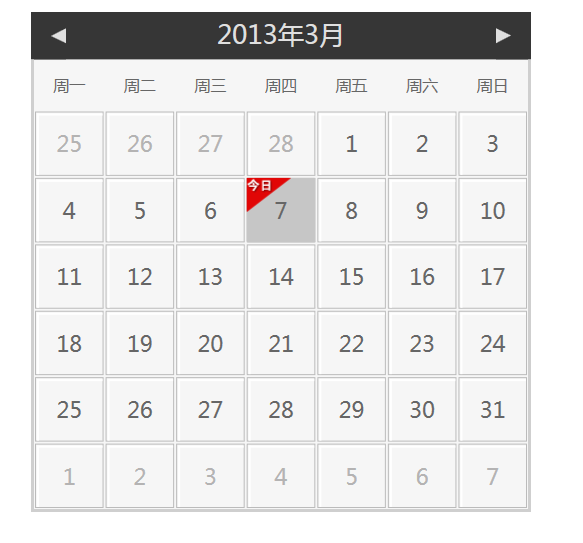
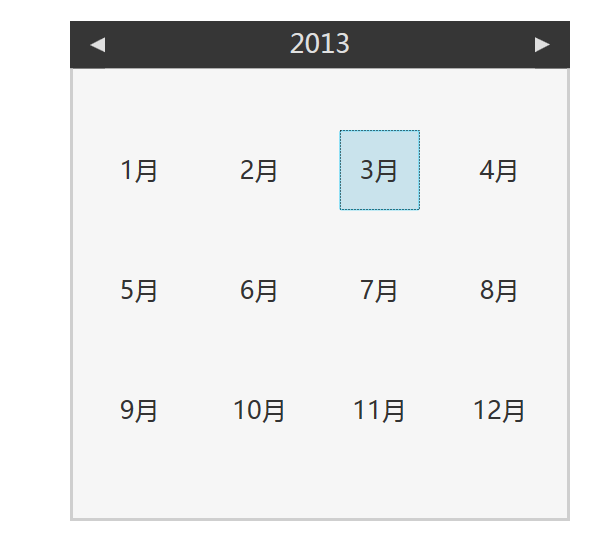

下面是代码
<Window x:Class="CalendarStyleWpfApplication.MainWindow"
xmlns="http://schemas.microsoft.com/winfx/2006/xaml/presentation"
xmlns:x="http://schemas.microsoft.com/winfx/2006/xaml"
Title="MainWindow"
Width="640"
Height="480"> <Window.Resources>
<Style x:Key="CalendarStyle1"
TargetType="{x:Type Calendar}">
<!--日历控件的背景色,也可以改成绑定的-->
<Setter Property="Background"
Value="#f6f6f6" />
<Setter Property="Template">
<Setter.Value>
<ControlTemplate TargetType="{x:Type Calendar}"> <StackPanel x:Name="PART_Root"
HorizontalAlignment="Center"
VerticalAlignment="Center">
<!--这个是日历控件的主体元件,也是内部元件PART_CalendarItem名称不要更改,可以改它的其它样式属性-->
<CalendarItem x:Name="PART_CalendarItem"
BorderBrush="{TemplateBinding BorderBrush}"
BorderThickness="{TemplateBinding BorderThickness}"
Background="{TemplateBinding Background}"
Style="{TemplateBinding CalendarItemStyle}"
Height="{TemplateBinding Height}"
Width="{TemplateBinding Width}"
HorizontalAlignment="Stretch"
VerticalAlignment="Stretch" />
</StackPanel> </ControlTemplate>
</Setter.Value>
</Setter>
</Style> <!--日历主体样式表-->
<Style x:Key="CalendarItemStyle1"
TargetType="{x:Type CalendarItem}">
<Setter Property="Template">
<Setter.Value>
<ControlTemplate TargetType="{x:Type CalendarItem}">
<ControlTemplate.Resources>
<DataTemplate x:Key="{x:Static CalendarItem.DayTitleTemplateResourceKey}">
<!--日历星期几的绑定样式,我格式化成周一,周二等-->
<TextBlock Foreground="#666666"
FontSize="16"
FontFamily="微软雅黑"
HorizontalAlignment="Center"
Margin="0 15"
Text="{Binding StringFormat=周{0} }"
VerticalAlignment="Center" />
</DataTemplate>
</ControlTemplate.Resources>
<Grid x:Name="PART_Root">
<Grid.Resources>
<!--设置日历控件 IsEnable=false 时的不可用遮罩层颜色,并且会播放过渡动画-->
<SolidColorBrush x:Key="DisabledColor"
Color="#A5FFFFFF" />
</Grid.Resources> <VisualStateManager.VisualStateGroups>
<VisualStateGroup x:Name="CommonStates">
<VisualState x:Name="Normal" />
<VisualState x:Name="Disabled">
<!--设置日历控件 IsEnable=false 时遮罩层透明度0-1变色动画-->
<Storyboard>
<DoubleAnimation Duration="0"
To="1"
Storyboard.TargetProperty="Opacity"
Storyboard.TargetName="PART_DisabledVisual" />
</Storyboard>
</VisualState>
</VisualStateGroup>
</VisualStateManager.VisualStateGroups> <Border BorderBrush="#cfcfcf"
BorderThickness="0"
Background="{TemplateBinding Background}"
CornerRadius="2">
<Border>
<Grid>
<Grid.Resources>
<!--日历头左箭头按钮样式模版-->
<ControlTemplate x:Key="PreviousButtonTemplate"
TargetType="{x:Type Button}">
<!--鼠标悬停在左箭头按钮上时改变鼠标指针样式-->
<Grid Cursor="Hand">
<VisualStateManager.VisualStateGroups>
<VisualStateGroup x:Name="CommonStates">
<VisualState x:Name="Normal" />
<VisualState x:Name="MouseOver">
<!--鼠标悬停在左箭头按钮上时左箭头颜色变化动画-->
<Storyboard>
<ColorAnimation Duration="0"
To="#FF73A9D8"
Storyboard.TargetProperty="(Shape.Fill).(SolidColorBrush.Color)"
Storyboard.TargetName="path" />
</Storyboard>
</VisualState>
<VisualState x:Name="Disabled">
<Storyboard>
<DoubleAnimation Duration="0"
To=".5"
Storyboard.TargetProperty="(Shape.Fill).(Brush.Opacity)"
Storyboard.TargetName="path" />
</Storyboard>
</VisualState>
</VisualStateGroup>
</VisualStateManager.VisualStateGroups>
<!--左箭头整个区域矩形块-->
<Rectangle Fill="#363636"
Opacity="1"
Stretch="Fill" />
<Grid>
<!--左箭头-->
<Path x:Name="path"
Data="M288.75,232.25 L288.75,240.625 L283,236.625 z"
Fill="#e0e0e0"
HorizontalAlignment="Left"
Height="15"
Width="15"
Margin="20,0,0,0"
Stretch="Fill"
VerticalAlignment="Center" />
</Grid>
</Grid>
</ControlTemplate>
<!--日历头右箭头按钮样式模版,这块跟左箭头样式模版没什么区别-->
<ControlTemplate x:Key="NextButtonTemplate"
TargetType="{x:Type Button}">
<Grid Cursor="Hand">
<VisualStateManager.VisualStateGroups>
<VisualStateGroup x:Name="CommonStates">
<VisualState x:Name="Normal" />
<VisualState x:Name="MouseOver">
<Storyboard>
<ColorAnimation Duration="0"
To="#FF73A9D8"
Storyboard.TargetProperty="(Shape.Fill).(SolidColorBrush.Color)"
Storyboard.TargetName="path" />
</Storyboard>
</VisualState>
<VisualState x:Name="Disabled">
<Storyboard>
<DoubleAnimation Duration="0"
To=".5"
Storyboard.TargetProperty="(Shape.Fill).(Brush.Opacity)"
Storyboard.TargetName="path" />
</Storyboard>
</VisualState>
</VisualStateGroup>
</VisualStateManager.VisualStateGroups>
<Rectangle Fill="#363636"
Opacity="1"
Stretch="Fill" />
<Grid>
<Path x:Name="path"
Data="M282.875,231.875 L282.875,240.375 L288.625,236 z"
Fill="#e0e0e0"
HorizontalAlignment="Right"
Height="15"
Width="15"
Margin="0,0,20,0"
Stretch="Fill"
VerticalAlignment="Center" />
</Grid>
</Grid>
</ControlTemplate>
<!--日历头中间年按钮样式模版-->
<ControlTemplate x:Key="HeaderButtonTemplate"
TargetType="{x:Type Button}">
<Grid Cursor="Hand">
<VisualStateManager.VisualStateGroups>
<VisualStateGroup x:Name="CommonStates">
<VisualState x:Name="Normal" />
<VisualState x:Name="MouseOver">
<Storyboard>
<ColorAnimation Duration="0"
To="#FF73A9D8"
Storyboard.TargetProperty="(TextElement.Foreground).(SolidColorBrush.Color)"
Storyboard.TargetName="buttonContent" />
</Storyboard>
</VisualState>
<VisualState x:Name="Disabled">
<Storyboard>
<DoubleAnimation Duration="0"
To=".5"
Storyboard.TargetProperty="Opacity"
Storyboard.TargetName="buttonContent" />
</Storyboard>
</VisualState>
</VisualStateGroup>
</VisualStateManager.VisualStateGroups>
<ContentPresenter x:Name="buttonContent"
ContentTemplate="{TemplateBinding ContentTemplate}"
Content="{TemplateBinding Content}"
TextElement.Foreground="#e0e0e0"
HorizontalAlignment="{TemplateBinding HorizontalContentAlignment}"
Margin="1,4,1,9"
VerticalAlignment="{TemplateBinding VerticalContentAlignment}" />
</Grid>
</ControlTemplate>
</Grid.Resources> <Grid.RowDefinitions>
<!--日历头,左箭头,年,右箭头-->
<RowDefinition Height="Auto" />
<!--日历内容,星期几和具体的日期几号几号-->
<RowDefinition Height="*" />
</Grid.RowDefinitions>
<Grid.ColumnDefinitions>
<!--左箭头-->
<ColumnDefinition Width="Auto" />
<!--年-->
<ColumnDefinition Width="*" />
<!--右箭头-->
<ColumnDefinition Width="Auto" />
</Grid.ColumnDefinitions>
<!--头,左箭头,年,右箭头,整体的背景色-->
<Border Grid.Row="0"
Grid.ColumnSpan="3"
Background="#363636"></Border>
<!--左箭头-->
<Button x:Name="PART_PreviousButton"
Grid.Column="0"
Focusable="False"
HorizontalAlignment="Left"
Grid.Row="0"
Template="{StaticResource PreviousButtonTemplate}" />
<!--年-->
<Button x:Name="PART_HeaderButton"
Grid.Column="1"
FontFamily="微软雅黑"
Focusable="False"
FontSize="26"
HorizontalAlignment="Center"
Grid.Row="0"
Template="{StaticResource HeaderButtonTemplate}"
VerticalAlignment="Center" />
<!--右箭头-->
<Button x:Name="PART_NextButton"
Grid.Column="2"
Focusable="False"
HorizontalAlignment="Right"
Grid.Row="0"
Template="{StaticResource NextButtonTemplate}" />
<!--日期几号几号内容显示-->
<Border Grid.Row="1"
Grid.ColumnSpan="3"
Margin="0"
BorderBrush="#cfcfcf"
BorderThickness="3,0,3,3">
<Grid x:Name="PART_MonthView"
HorizontalAlignment="Center"
Visibility="Visible">
<Grid.ColumnDefinitions>
<ColumnDefinition Width="*" />
<ColumnDefinition Width="*" />
<ColumnDefinition Width="*" />
<ColumnDefinition Width="*" />
<ColumnDefinition Width="*" />
<ColumnDefinition Width="*" />
<ColumnDefinition Width="*" />
</Grid.ColumnDefinitions>
<Grid.RowDefinitions>
<RowDefinition Height="auto" />
<RowDefinition Height="*" />
<RowDefinition Height="*" />
<RowDefinition Height="*" />
<RowDefinition Height="*" />
<RowDefinition Height="*" />
<RowDefinition Height="*" />
</Grid.RowDefinitions>
</Grid>
</Border> <!--月和年内容显示-->
<Grid x:Name="PART_YearView"
Grid.ColumnSpan="3"
HorizontalAlignment="Center"
Margin="6,-3,7,6"
Grid.Row="1"
Visibility="Hidden"
VerticalAlignment="Center">
<Grid.ColumnDefinitions>
<ColumnDefinition Width="*" />
<ColumnDefinition Width="*" />
<ColumnDefinition Width="*" />
<ColumnDefinition Width="*" />
</Grid.ColumnDefinitions>
<Grid.RowDefinitions>
<RowDefinition Height="*" />
<RowDefinition Height="*" />
<RowDefinition Height="*" />
</Grid.RowDefinitions>
</Grid>
</Grid>
</Border>
</Border>
<!--日历不可用的遮罩层-->
<Rectangle x:Name="PART_DisabledVisual"
Fill="{StaticResource DisabledColor}"
Opacity="0"
RadiusY="2"
RadiusX="2"
Stretch="Fill"
Stroke="{StaticResource DisabledColor}"
StrokeThickness="1"
Visibility="Collapsed" />
</Grid>
<!--触发器属性-->
<ControlTemplate.Triggers>
<Trigger Property="IsEnabled"
Value="False">
<Setter Property="Visibility"
TargetName="PART_DisabledVisual"
Value="Visible" />
</Trigger>
<DataTrigger Binding="{Binding DisplayMode, RelativeSource={RelativeSource FindAncestor, AncestorType={x:Type Calendar}}}"
Value="Year">
<Setter Property="Visibility"
TargetName="PART_MonthView"
Value="Hidden" />
<Setter Property="Visibility"
TargetName="PART_YearView"
Value="Visible" />
</DataTrigger>
<DataTrigger Binding="{Binding DisplayMode, RelativeSource={RelativeSource FindAncestor, AncestorType={x:Type Calendar}}}"
Value="Decade">
<Setter Property="Visibility"
TargetName="PART_MonthView"
Value="Hidden" />
<Setter Property="Visibility"
TargetName="PART_YearView"
Value="Visible" />
</DataTrigger>
</ControlTemplate.Triggers>
</ControlTemplate>
</Setter.Value>
</Setter>
</Style>
<!--单个几号几号按钮的样式模版-->
<Style x:Key="CalendarDayButtonStyle1"
TargetType="{x:Type CalendarDayButton}">
<Setter Property="Margin"
Value="1" />
<Setter Property="MinWidth"
Value="5" />
<Setter Property="MinHeight"
Value="5" />
<Setter Property="FontSize"
Value="22" />
<Setter Property="FontFamily"
Value="微软雅黑" />
<Setter Property="HorizontalContentAlignment"
Value="Center" />
<Setter Property="VerticalContentAlignment"
Value="Center" />
<Setter Property="Template">
<Setter.Value>
<ControlTemplate TargetType="{x:Type CalendarDayButton}">
<Grid>
<VisualStateManager.VisualStateGroups>
<VisualStateGroup x:Name="CommonStates">
<VisualStateGroup.Transitions>
<VisualTransition GeneratedDuration="0:0:0.1" />
</VisualStateGroup.Transitions>
<VisualState x:Name="Normal" />
<!--悬停的颜色动画-->
<VisualState x:Name="MouseOver">
<Storyboard>
<DoubleAnimation Duration="0"
To="0.5"
Storyboard.TargetProperty="Opacity"
Storyboard.TargetName="HighlightBackground" />
</Storyboard>
</VisualState>
<!--按下后动画-->
<VisualState x:Name="Pressed">
<Storyboard>
<DoubleAnimation Duration="0"
To="0.5"
Storyboard.TargetProperty="Opacity"
Storyboard.TargetName="HighlightBackground" />
</Storyboard>
</VisualState>
<!--不可用动画-->
<VisualState x:Name="Disabled">
<Storyboard>
<DoubleAnimation Duration="0"
To="0"
Storyboard.TargetProperty="Opacity"
Storyboard.TargetName="HighlightBackground" />
<DoubleAnimation Duration="0"
To=".35"
Storyboard.TargetProperty="Opacity"
Storyboard.TargetName="NormalText" />
</Storyboard>
</VisualState>
</VisualStateGroup>
<VisualStateGroup x:Name="SelectionStates">
<VisualStateGroup.Transitions>
<VisualTransition GeneratedDuration="0" />
</VisualStateGroup.Transitions>
<VisualState x:Name="Unselected" />
<!--选中某日期的样式-->
<VisualState x:Name="Selected">
<Storyboard>
<DoubleAnimation Duration="0"
To=".75"
Storyboard.TargetProperty="Opacity"
Storyboard.TargetName="SelectedBackground" />
<ColorAnimation Duration="0"
To="white"
Storyboard.TargetProperty="(TextElement.Foreground).(SolidColorBrush.Color)"
Storyboard.TargetName="NormalText" />
</Storyboard>
</VisualState>
</VisualStateGroup>
<VisualStateGroup x:Name="CalendarButtonFocusStates">
<VisualStateGroup.Transitions>
<VisualTransition GeneratedDuration="0" />
</VisualStateGroup.Transitions>
<VisualState x:Name="CalendarButtonFocused">
<Storyboard>
<ObjectAnimationUsingKeyFrames Duration="0"
Storyboard.TargetProperty="Visibility"
Storyboard.TargetName="DayButtonFocusVisual">
<DiscreteObjectKeyFrame KeyTime="0">
<DiscreteObjectKeyFrame.Value>
<Visibility>Visible</Visibility>
</DiscreteObjectKeyFrame.Value>
</DiscreteObjectKeyFrame>
</ObjectAnimationUsingKeyFrames>
</Storyboard>
</VisualState>
<VisualState x:Name="CalendarButtonUnfocused">
<Storyboard>
<ObjectAnimationUsingKeyFrames Duration="0"
Storyboard.TargetProperty="Visibility"
Storyboard.TargetName="DayButtonFocusVisual">
<DiscreteObjectKeyFrame KeyTime="0">
<DiscreteObjectKeyFrame.Value>
<Visibility>Collapsed</Visibility>
</DiscreteObjectKeyFrame.Value>
</DiscreteObjectKeyFrame>
</ObjectAnimationUsingKeyFrames>
</Storyboard>
</VisualState>
</VisualStateGroup>
<VisualStateGroup x:Name="ActiveStates">
<VisualStateGroup.Transitions>
<VisualTransition GeneratedDuration="0" />
</VisualStateGroup.Transitions>
<VisualState x:Name="Active" />
<VisualState x:Name="Inactive">
<Storyboard>
<ColorAnimation Duration="0"
To="#b4b3b3"
Storyboard.TargetProperty="(TextElement.Foreground).(SolidColorBrush.Color)"
Storyboard.TargetName="NormalText" />
</Storyboard>
</VisualState>
</VisualStateGroup>
<VisualStateGroup x:Name="DayStates">
<VisualStateGroup.Transitions>
<VisualTransition GeneratedDuration="0" />
</VisualStateGroup.Transitions>
<VisualState x:Name="RegularDay" />
<!--今天的样式-->
<VisualState x:Name="Today">
<Storyboard>
<DoubleAnimation Duration="0"
To="1"
Storyboard.TargetProperty="Opacity"
Storyboard.TargetName="TodayBackground" />
<ColorAnimation Duration="0"
To="#666666"
Storyboard.TargetProperty="(TextElement.Foreground).(SolidColorBrush.Color)"
Storyboard.TargetName="NormalText" /> <ObjectAnimationUsingKeyFrames Storyboard.TargetProperty="Visibility"
Storyboard.TargetName="imgToday">
<DiscreteObjectKeyFrame KeyTime="0">
<DiscreteObjectKeyFrame.Value>
<Visibility>Visible</Visibility>
</DiscreteObjectKeyFrame.Value>
</DiscreteObjectKeyFrame>
</ObjectAnimationUsingKeyFrames> </Storyboard>
</VisualState>
</VisualStateGroup>
<!--过期日期的-->
<VisualStateGroup x:Name="BlackoutDayStates">
<VisualStateGroup.Transitions>
<VisualTransition GeneratedDuration="0" />
</VisualStateGroup.Transitions>
<VisualState x:Name="NormalDay" />
<VisualState x:Name="BlackoutDay">
<Storyboard>
<DoubleAnimation Duration="0"
To=".2"
Storyboard.TargetProperty="Opacity"
Storyboard.TargetName="Blackout" />
</Storyboard>
</VisualState>
</VisualStateGroup>
</VisualStateManager.VisualStateGroups>
<Border BorderBrush="#bbbbbb"
BorderThickness="1">
<Border BorderBrush="white"
BorderThickness="2,2,0,0"
Margin="1,1,0,0"></Border>
</Border> <Rectangle x:Name="TodayBackground"
Fill="#c6c6c6"
Opacity="0"
RadiusY="1"
RadiusX="1" />
<Rectangle x:Name="SelectedBackground"
Fill="#6eafbf"
Opacity="0"
RadiusY="1"
RadiusX="1" />
<Border BorderBrush="{TemplateBinding BorderBrush}"
BorderThickness="{TemplateBinding BorderThickness}"
Background="{TemplateBinding Background}" />
<Rectangle x:Name="HighlightBackground"
Fill="#FFBADDE9"
Opacity="0"
RadiusY="1"
RadiusX="1" />
<ContentPresenter x:Name="NormalText"
TextElement.Foreground="#666666"
HorizontalAlignment="{TemplateBinding HorizontalContentAlignment}"
VerticalAlignment="{TemplateBinding VerticalContentAlignment}" />
<Path x:Name="Blackout"
Data="M8.1772461,11.029181 L10.433105,11.029181 L11.700684,12.801641 L12.973633,11.029181 L15.191895,11.029181 L12.844727,13.999395 L15.21875,17.060919 L12.962891,17.060919 L11.673828,15.256231 L10.352539,17.060919 L8.1396484,17.060919 L10.519043,14.042364 z"
Fill="#FF000000"
HorizontalAlignment="Stretch"
Margin="3"
Opacity="0"
RenderTransformOrigin="0.5,0.5"
Stretch="Fill"
VerticalAlignment="Stretch" />
<Rectangle x:Name="DayButtonFocusVisual"
IsHitTestVisible="false"
RadiusY="1"
RadiusX="1"
Stroke="#FF45D6FA"
Visibility="Collapsed" /> <Image x:Name="imgToday"
Width="44"
Height="34"
Source="/Images/Today.png"
VerticalAlignment="Top"
HorizontalAlignment="Left"
Visibility="Hidden" /> </Grid>
</ControlTemplate>
</Setter.Value>
</Setter>
</Style>
<Style x:Key="CalendarButtonStyle1"
TargetType="{x:Type CalendarButton}">
<Setter Property="Background"
Value="#FFBADDE9" />
<Setter Property="MinWidth"
Value="80" />
<Setter Property="MinHeight"
Value="80" />
<Setter Property="Margin"
Value="20" />
<Setter Property="FontSize"
Value="25" />
<Setter Property="HorizontalContentAlignment"
Value="Center" />
<Setter Property="VerticalContentAlignment"
Value="Center" />
<Setter Property="Template">
<Setter.Value>
<ControlTemplate TargetType="{x:Type CalendarButton}">
<Grid>
<VisualStateManager.VisualStateGroups>
<VisualStateGroup x:Name="CommonStates">
<VisualStateGroup.Transitions>
<VisualTransition GeneratedDuration="0:0:0.1" />
</VisualStateGroup.Transitions>
<VisualState x:Name="Normal" />
<VisualState x:Name="MouseOver">
<Storyboard>
<DoubleAnimation Duration="0"
To=".5"
Storyboard.TargetProperty="Opacity"
Storyboard.TargetName="Background" />
</Storyboard>
</VisualState>
<VisualState x:Name="Pressed">
<Storyboard>
<DoubleAnimation Duration="0"
To=".5"
Storyboard.TargetProperty="Opacity"
Storyboard.TargetName="Background" />
</Storyboard>
</VisualState>
</VisualStateGroup>
<VisualStateGroup x:Name="SelectionStates">
<VisualStateGroup.Transitions>
<VisualTransition GeneratedDuration="0" />
</VisualStateGroup.Transitions>
<VisualState x:Name="Unselected" />
<VisualState x:Name="Selected">
<Storyboard>
<DoubleAnimation Duration="0"
To=".75"
Storyboard.TargetProperty="Opacity"
Storyboard.TargetName="SelectedBackground" />
</Storyboard>
</VisualState>
</VisualStateGroup>
<VisualStateGroup x:Name="ActiveStates">
<VisualStateGroup.Transitions>
<VisualTransition GeneratedDuration="0" />
</VisualStateGroup.Transitions>
<VisualState x:Name="Active" />
<VisualState x:Name="Inactive">
<Storyboard>
<ColorAnimation Duration="0"
To="#FF777777"
Storyboard.TargetProperty="(TextElement.Foreground).(SolidColorBrush.Color)"
Storyboard.TargetName="NormalText" />
</Storyboard>
</VisualState>
</VisualStateGroup>
<VisualStateGroup x:Name="CalendarButtonFocusStates">
<VisualStateGroup.Transitions>
<VisualTransition GeneratedDuration="0" />
</VisualStateGroup.Transitions>
<VisualState x:Name="CalendarButtonFocused">
<Storyboard>
<ObjectAnimationUsingKeyFrames Duration="0"
Storyboard.TargetProperty="Visibility"
Storyboard.TargetName="CalendarButtonFocusVisual">
<DiscreteObjectKeyFrame KeyTime="0">
<DiscreteObjectKeyFrame.Value>
<Visibility>Visible</Visibility>
</DiscreteObjectKeyFrame.Value>
</DiscreteObjectKeyFrame>
</ObjectAnimationUsingKeyFrames>
</Storyboard>
</VisualState>
<VisualState x:Name="CalendarButtonUnfocused">
<Storyboard>
<ObjectAnimationUsingKeyFrames Duration="0"
Storyboard.TargetProperty="Visibility"
Storyboard.TargetName="CalendarButtonFocusVisual">
<DiscreteObjectKeyFrame KeyTime="0">
<DiscreteObjectKeyFrame.Value>
<Visibility>Collapsed</Visibility>
</DiscreteObjectKeyFrame.Value>
</DiscreteObjectKeyFrame>
</ObjectAnimationUsingKeyFrames>
</Storyboard>
</VisualState>
</VisualStateGroup>
</VisualStateManager.VisualStateGroups>
<Rectangle x:Name="SelectedBackground"
Fill="{TemplateBinding Background}"
Opacity="0"
RadiusY="1"
RadiusX="1" />
<Rectangle x:Name="Background"
Fill="{TemplateBinding Background}"
Opacity="0"
RadiusY="1"
RadiusX="1" />
<ContentPresenter x:Name="NormalText"
TextElement.Foreground="#FF333333"
HorizontalAlignment="{TemplateBinding HorizontalContentAlignment}"
Margin="1,0,1,1"
VerticalAlignment="{TemplateBinding VerticalContentAlignment}" />
<Rectangle x:Name="CalendarButtonFocusVisual"
IsHitTestVisible="false"
RadiusY="1"
RadiusX="1"
Stroke="#FF45D6FA"
Visibility="Collapsed" />
</Grid>
<ControlTemplate.Triggers>
<Trigger Property="IsFocused"
Value="True">
<Setter Property="Visibility"
TargetName="CalendarButtonFocusVisual"
Value="Visible" />
</Trigger>
</ControlTemplate.Triggers>
</ControlTemplate>
</Setter.Value>
</Setter>
</Style>
</Window.Resources> <Grid x:Name="LayoutRoot">
<Calendar Style="{DynamicResource CalendarStyle1}"
CalendarItemStyle="{DynamicResource CalendarItemStyle1}"
CalendarDayButtonStyle="{DynamicResource CalendarDayButtonStyle1}"
CalendarButtonStyle="{DynamicResource CalendarButtonStyle1}" Width="500"
Height="500"> </Calendar>
</Grid> </Window>
WPF Calendar 日历控件 样式自定义的更多相关文章
- 分享一个WPF下日历控件(Calendar)的样式
WPF日历控件的一个样式 WPF自带的日历控件样式可能会比较丑,要修改其样式看起来挺复杂的,实际上很简单,用Blend打开,修改三个模板,基本就能改变全部面貌,也很容易 先上图 样式如下: <S ...
- WPF 4 日历控件(Calendar)
原文:WPF 4 日历控件(Calendar) 在之前我已经写过两篇关于WPF 4 任务栏(Taskbar)相关的特性.相信自从VS2010 Beta 版放出后,WPF 的粉丝们肯定在第一时 ...
- WPF 4 DataGrid 控件(自定义样式篇)
原文:WPF 4 DataGrid 控件(自定义样式篇) 在<WPF 4 DataGrid 控件(基本功能篇)>中我们已经学习了DataGrid 的基本功能及使用方法.本篇将继续 ...
- WPF设置全局控件样式
原文:WPF设置全局控件样式 方法: 在资源文件APP.XAML中添加如下资源 <Application x:Class="_360UI.App" xmlns="h ...
- asp.net Calendar 日历控件用法
asp.net Calendar 是微软自带的一款日历控件,除了简单显示日期时间外, 还可以绑定一些需要的事件. Calendar_DayRender 事件,是在加载都去时间日期时候的方法,用此方法可 ...
- 【原创】.Net WebForm Calendar 日历控件常用方法
微软官方地址 https://msdn.microsoft.com/en-us/library/add3s294.aspx 1.设置日历控件单个日期Table Cell样式 颜色/外观/边距 prot ...
- WPF中Expander控件样式,ListBox的样式(带checkbox)恢复
Expander控件样式: <ControlTemplate x:Key="ExpanderToggleButton" TargetType="ToggleButt ...
- WPF自定义分页控件,样式自定义,简单易用
WPF自定义分页控件 做了许久伸手党,终于有机会贡献一波,搜索一下WPF分页控件,还是多,但是不太通用,主要就是样式问题,这个WPF很好解决,还有一个就是分页控件嘛,只关心几个数字的变动就行了,把页码 ...
- WPF获取原始控件样式。
要获取WPF控件的原始样式,需要我们安装Blend for Visual Studio. 然后,我们打开Blend for Visual Studio,创建一个WPF项目. 然后,我们向页面拖动一个B ...
随机推荐
- Codeforces 491B. New York Hotel 最远曼哈顿距离
最远曼哈顿距离有两个性质: 1: 对每一个点(x,y) 分别计算 +x+y , -x+y , x-y , -x-y 然后统计每种组合的最大值就能够了, 不会对结果产生影响 2: 去掉绝对值 , 设 ...
- iOS app审核参考信息地址
发件人:(苹果开发支持邮箱地址) 中国区电话:400-670-1855 chinadev<chinadev@asia.apple.com> 您好: 感谢您与 Apple 开发者计划支持 ...
- jar命令+7z:创建,替换,修改,删除Jar, war, ear包中的文件
虽然现在已经有各种智能的IDE可以为我们生成jar包,war包,ear包,甚至带上了自动替换,部署的功能.但一定会有那么些时候,你需要修改或是替换jar包,war包,ear包中的某个文件而不是整个重新 ...
- Architectures for concurrent graphics processing operations
BACKGROUND 1. Field The present invention generally relates to rendering two-dimension representatio ...
- 【Python 安装】安装第三方库时 PermissionError: [WinError 5] Access is denied
对于 windows 用户,在开始菜单中输入 cmd,右键以 run as administrator(以管理员身份运行). Python - PIP install trouble shooting ...
- 小强的HTML5移动开发之路(24)—— PhoneGap Android开发环境搭建
有关JDK及Android开发环境的搭建请看我前面的博文:http://blog.csdn.net/dawanganban/article/details/9748497 一.下载PhoneGap 下 ...
- 一起学Python:多线程-共享全局变量
多线程-共享全局变量 from threading import Thread import time g_num = 100 def work1(): global g_num for i in r ...
- AnimatorSet和PropertyValuesHolders.ofKeyframe
如果要多个动画配合工作,需要把他们放入AnimatorSet中 ObjectAnimator animator1 = ObjectAnimator.ofFloat(...); animator1.se ...
- spring boot jar包 linux 部署
前提: jar包路径:/usr/local/lib/app/app.jar 1.首先先用vi创建文件 命令: cd /usr/local/lib/app/vi app-start.sh 2.在文件ap ...
- CSS 常用 background 设置
CSS 背景图片设置: <!DOCTYPE html> <html> <head> <meta charset="utf-8"> & ...