
Matplotlib之Bar Chart
Matplotlib之Bar Chart:
import numpy as np

import matplotlib.pyplot as plt

data = [[300, 200, 250, 150, 280],

        [300, 166, 203, 250, 225],

        [100, 110, 115, 150, 112],

        [300, 200, 250, 150, 280],

        [20, 30, 15, 10, 12],

        [20, 10, 10, 10, 20]]

columns = ('Monday', 'Tuesday', 'Wednesday', 'Thursday', 'Friday')

rows = [x for x in ("EQP.NY", "EQB.NY", "EQP.LN", "EQB.LN", "FIP.NY", "FIB.NY")]

values = np.arange(0, 2000, 500)

# Get some pastel shades for the colors

colors = plt.cm.YlOrRd(np.linspace(0, 0.7, len(rows)))

n_rows = len(data)

index = np.arange(len(columns)) + 0.3

bar_width = 0.4

# Initialize the vertical-offset for the stacked bar chart.

y_offset = np.zeros(len(columns))

# Plot bars and create text labels for the table

cell_text = []

for row in range(n_rows):

    plt.bar(index, data[row], bar_width, bottom=y_offset, color=colors[row])

    y_offset = y_offset + data[row]

    cell_text.append(['%u' % x for x in data[row]])

# Reverse colors and text labels to display the last value at the top.

colors = colors[::-1]

cell_text.reverse()

# print(cell_text)

# Add a table at the bottom of the axes

the_table = plt.table(cellText=cell_text,

                      rowLabels=rows[::-1],

                      rowColours=colors,

                      colLabels=columns,

                      loc='bottom')

# Adjust layout to make room for the table:

plt.subplots_adjust(left=0.2, bottom=0.25)

# plt.ylabel("Loss in ${0}'s".format(value_increment))

plt.ylabel('Break counts')

# print(values)

plt.yticks(values, ['%d' % val for val in values])

plt.xticks([])

plt.title('Break Recon Summary')

plt.show()
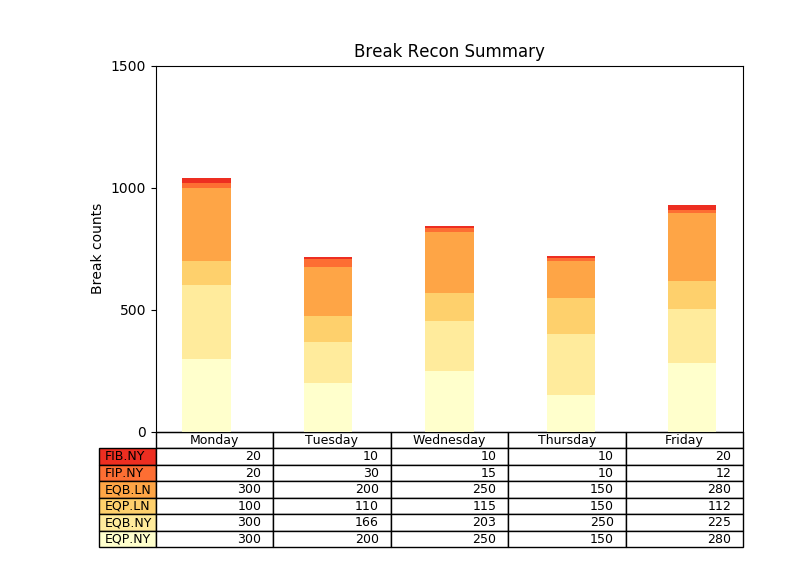
效果:
Matplotlib之Bar Chart的更多相关文章
- matplotlib 柱状图 Bar Chart 样例及参数
def bar_chart_generator(): l = [1,2,3,4,5] h = [20, 14, 38, 27, 9] w = [0.1, 0.2, 0.3, 0 ...
- Bar Chart of Frequency of modals in different sections of the Brown Corpus
Natural Language Processing with Python Chapter 4.8 colors = 'rgbcmyk' # red, green, blue, cyan, mag ...
- Highcharts - Bar Chart & Column Chart
1. 条形图(Bar Chart)需要的数据格式类型如下: ["Luke Skywalker", "Darth Vader", "Yoda" ...
- Relative-Frequency|frequency|pie chart |bar chart
2.2Organizing Qualitative Data The number of times a particular distinct value occurs is called its ...
- bubble chart|Matrix Scatter|Overlay Scatter|Scatterplots|drop-line|box plot|Stem-and-leaf plot|Histogram|Bar chart|Pareto chart|Pie chart|doughnut chart|
应用统计学 对类别数据要分类处理: Bar chart复式条形图便于对比: Pareto chart:对类别变量依据频数高低排列: Pie chart:饼图用于一个样本,可以区分类别数据 doughn ...
- Matplotlib学习---用matplotlib画柱形图,堆积柱形图,横向柱形图(bar chart)
这里利用Nathan Yau所著的<鲜活的数据:数据可视化指南>一书中的数据,学习画图. 数据地址:http://datasets.flowingdata.com/hot-dog-cont ...
- 转 HighCharts笔记之: Bar Chart
最近需要做一些Web图标,研究了几个开源的第三方工具后,最后决定使用HighCharts开发: Highcharts 是一个用纯JavaScript编写的一个图表库, 能够很简单便捷的在web网站或是 ...
- plot bar chart using python
Example import matplotlib.pyplot as plt import plotly.plotly as py # Learn about API authentication ...
- Bar Chart _Study
---恢复内容开始--- 以“3D BarChart”为例. 1.Select a theme.(选择一个主题模板) 2.Set up categories and groups.(设置类型和组) 3 ...
随机推荐
- [普及]NOIP 2015 推销员 贪心
NOIP 2015 推销员 题意: 有一个喜欢疲劳的推销员,告诉你在一个单口胡同(数轴)中的n户家庭的位置,和向他们推销可以获得的疲劳度.分别输出向(1,2,3,4...n)户人家推销可以得到的最大疲 ...
- GRE Words Revenge AC自动机 二进制分组
GRE Words Revenge 题意和思路都和上一篇差不多. 有一个区别就是需要移动字符串.关于这个字符串,可以用3次reverse来转换, 前面部分翻转一下, 后面部分翻转一下, 最后整个串翻转 ...
- codeforces 822 D. My pretty girl Noora(dp+素数筛)
题目链接:http://codeforces.com/contest/822/problem/D 题解:做这题首先要推倒一下f(x)假设第各个阶段分成d1,d2,d3...di组取任意一组来说,如果第 ...
- 如何在GitHub上上传自己的项目
此文为转载,地址:https://blog.csdn.net/m0_37725003/article/details/80904824 本文链接:https://blog.csdn.net/m0_37 ...
- 洛谷 P1980【计数问题】 题解(2)
还有一种办法,就是用stringstream函数将每一次的数全都转化成char一维数组样式的字符串,然后逐位扫一遍即可. (记得判断字符时将规定数字+48) //Stand up for the fa ...
- springboot使用Jpa连接数据库
springboot使用Jpa连接数据库 1.pom.xml: <?xml version="1.0" encoding="UTF-8"?> < ...
- 去重合并两个有序链表之直接操作和Set集合操作
两者思路对比: 直接操作:因为传入的是两个有序的链表,所以说我就直接以其中一个链表为基准,与另外一个链表比较,只将比返回值链表的最后一个记录的值大的插入,不将等值的插入,理论时间复杂度为O(n) Se ...
- [币严BIZZAN区块链]数字货币交易所钱包对接之比特币(BTC)
在币严BIZZAN开发数字货币交易所的过程中,一共有两大难点,一个是高速撮合交易引擎,另一个是钱包对接,这两者是我们团队以前没有接触过的.这个系列的文章主要介绍数字货币交易所钱包对接实现技术.第一个要 ...
- .Net基础篇_学习笔记_第四天_加加减减
using System.Linq; using System.Text; using System.Threading.Tasks; namespace 第四天_加加减减 { class Progr ...
- Winform中DevExpress的TreeList的入门使用教程(附源码下载)
场景 Winform控件-DevExpress18下载安装注册以及在VS中使用: https://blog.csdn.net/BADAO_LIUMANG_QIZHI/article/details/1 ...