
Entity Framework 6 中如何获取 EntityTypeConfiguration 的 Edm 信息?(四)
经过上一篇,里面有测试代码,循环60万次,耗时14秒。本次我们增加缓存来优化它。
DbContextExtensions.cs
using System;

using System.Collections.Generic;

using System.Data.Entity;

using System.Data.Entity.Core.Mapping;

using System.Data.Entity.Core.Metadata.Edm;

using System.Data.Entity.Infrastructure;

using System.Data.Entity.ModelConfiguration;

using System.Data.Entity.ModelConfiguration.Conventions;

using System.Linq;

using EntityFramework.Extensions;

using System.Linq.Expressions;

namespace EntityFrameworkSample

{

    public enum AcquiredEdmType

    {

        TableName,

        FirstPrimaryKeyNameString,

        ColumnName

    }

    public struct CachedEdmInfo

    {

        public EntitySetMapping Mapping { get; set; }

        public EntitySet TableEntitySet { get; set; }

        public Dictionary<string, string> PropertyColumnNameDic { get; set; }

    }

    public static class DbContextExtensions

    {

        private readonly static Dictionary<string, CachedEdmInfo> _mappingCache = new Dictionary<string, CachedEdmInfo>();

        #region 基础方法

        public static string GetTableName<TEntity>(this DbContext context)

        {

            return GetTableName(context, typeof(TEntity));

        }

        public static string GetTableName(this DbContext context, Type type)

        {

            return GetTableNameOrColumnName(context, type, AcquiredEdmType.TableName);

        }

        public static string GetFirstPrimaryKeyName<TEntity>(this DbContext context)

        {

            return GetFirstPrimaryKeyName(context, typeof(TEntity));

        }

        public static string GetFirstPrimaryKeyName(this DbContext context, Type type)

        {

            return GetTableNameOrColumnName(context, type, AcquiredEdmType.FirstPrimaryKeyNameString);

        }

        public static string GetColumnName<TEntity, TProperty>(this DbContext context, Expression<Func<TEntity, TProperty>> propertyExpression)

        {

            return GetTableNameOrColumnName(context, typeof(TEntity), AcquiredEdmType.ColumnName, LambdaHelper.GetPropName(propertyExpression));

        }

        public static string GetColumnName(this DbContext context, Type type, string propertyName)

        {

            return GetTableNameOrColumnName(context, type, AcquiredEdmType.ColumnName, propertyName);

        }

        private static string GetTableNameOrColumnName(this DbContext context, Type type, AcquiredEdmType edmType, string propertyName = null)

        {

            if (context == null)

            {

                throw new ArgumentNullException("dbContext");

            }

            if (type == null)

            {

                throw new ArgumentNullException("type");

            }

            CachedEdmInfo edmInfo;

            if (_mappingCache.ContainsKey(type.FullName))

            {

                edmInfo = _mappingCache[type.FullName];

            }

            else

            {

                MetadataWorkspace metadata = ((IObjectContextAdapter)context).ObjectContext.MetadataWorkspace;

                // Get the part of the model that contains info about the actual CLR types

                ObjectItemCollection objectItemCollection = ((ObjectItemCollection)metadata.GetItemCollection(DataSpace.OSpace));

                // Get the entity type from the model that maps to the CLR type

                EntityType entityType = metadata

                        .GetItems<EntityType>(DataSpace.OSpace)

                              .Single(e => objectItemCollection.GetClrType(e) == type);

                // Get the entity set that uses this entity type

                EntitySet entitySet = metadata

                    .GetItems<EntityContainer>(DataSpace.CSpace)

                          .Single()

                          .EntitySets

                          .Single(s => s.ElementType.Name == entityType.Name);

                // Find the mapping between conceptual and storage model for this entity set

                EntitySetMapping mapping = metadata.GetItems<EntityContainerMapping>(DataSpace.CSSpace)

                              .Single()

                              .EntitySetMappings

                              .Single(s => s.EntitySet == entitySet);

                // Find the storage entity set (table) that the entity is mapped

                EntitySet tableEntitySet = mapping

                    .EntityTypeMappings.Single()

                    .Fragments.Single()

                    .StoreEntitySet;

                edmInfo = new CachedEdmInfo

                {

                    Mapping = mapping,

                    TableEntitySet = tableEntitySet

                };

                _mappingCache.Add(type.FullName, edmInfo);

            }

            // Return the table name from the storage entity set

            object objTableName = edmInfo.TableEntitySet.MetadataProperties["Table"].Value;

            string tableName = objTableName == null ? edmInfo.TableEntitySet.Name : Convert.ToString(objTableName);

            switch (edmType)

            {

                case AcquiredEdmType.TableName:

                    return tableName;

                case AcquiredEdmType.FirstPrimaryKeyNameString:

                    {

                        var firstKeyProp = edmInfo.TableEntitySet.ElementType.KeyProperties[];

                        //return tableName + "." + firstKeyProp.Name;

                        return firstKeyProp.Name;

                    }

                case AcquiredEdmType.ColumnName:

                    {

                        // Find the storage property (column) that the property is mapped

                        edmInfo.PropertyColumnNameDic = edmInfo.PropertyColumnNameDic ?? new Dictionary<string, string>();

                        if (edmInfo.PropertyColumnNameDic.ContainsKey(propertyName))

                        {

                            return edmInfo.PropertyColumnNameDic[propertyName];

                        }

                        else

                        {

                            string columnName = edmInfo.Mapping

                            .EntityTypeMappings.Single()

                            .Fragments.Single()

                            .PropertyMappings

                            .OfType<ScalarPropertyMapping>()

                                  .Single(m => m.Property.Name == propertyName)

                            .Column

                            .Name;

                            //写入缓存

                            edmInfo.PropertyColumnNameDic.Add(propertyName, columnName);

                            //实际上,下面的 if 判断肯定为 true,但为了避免后期改动了本方法最上面的代码,所以加一个判断。

                            if (_mappingCache.ContainsKey(type.FullName))

                            {

                                _mappingCache[type.FullName] = edmInfo;

                            }

                            else

                            {

                                _mappingCache.Add(type.FullName, edmInfo);

                            }

                            //return tableName + "." + columnName;

                            return columnName;

                        }

                    }

                default:

                    throw new ArgumentNullException("Invalid argument");

            }

        }

        #endregion

        #region 额外方法

        #endregion

    }

}
Program.cs
using System;

using System.Collections.Generic;

using System.Data.Entity;

using System.Data.Entity.Core.Mapping;

using System.Data.Entity.Core.Metadata.Edm;

using System.Data.Entity.Infrastructure;

using System.Data.Entity.ModelConfiguration;

using System.Data.Entity.ModelConfiguration.Conventions;

using System.Linq;

using EntityFramework.Extensions;

using System.Linq.Expressions;

using EntityFrameworkSample;

namespace EntityFrameworkSample

{

    class Program

    {

        static void Main(string[] args)

        {

            using (var context = new BloggingContext(@"Data Source=.\SQLExpress;Initial Catalog=TestDB;Persist Security Info=True;User ID=sa;Password=123456"))

            {

                string blogTableName = context.GetTableName<Blog>();

                string postTableName = context.GetTableName<Post>();

                Console.WriteLine("Blog maps to: {0}", blogTableName);

                Console.WriteLine("Post maps to: {0}", postTableName);

                string blogPrimaryKeyName = context.GetFirstPrimaryKeyName<Blog>();

                string postPrimaryKeyName = context.GetFirstPrimaryKeyName<Post>();

                Console.WriteLine("Blog primary key name: {0}", blogPrimaryKeyName);

                Console.WriteLine("Post primary key name: {0}", postPrimaryKeyName);

                System.Diagnostics.Stopwatch watch = System.Diagnostics.Stopwatch.StartNew();

                for (int i = ; i < ; i++)

                {

                    context.GetColumnName<Blog, string>(c => c.BlogUrl); //经过测试,循环 60 万次,耗时 3.21 秒

                }

                watch.Stop();

                Console.WriteLine("经过测试,循环 60 万次,耗时 {0} 秒", (watch.ElapsedMilliseconds / (double)).ToString("f2"));

                string blogUrlColumnName = context.GetColumnName<Blog, string>(c => c.BlogUrl);

                string postTitleColumnName = context.GetColumnName<Post, string>(c => c.PostTitle);

                //Console.WriteLine("Blog.BlogUrl maps to: {0}.{1}", blogTableName, blogUrlColumnName);

                Console.WriteLine("Post.PostTitle maps to: {0}.{1}", postTableName, postTitleColumnName);

            }

            Console.ReadLine();

        }

    }

    public class BloggingContext : DbContext

    {

        public BloggingContext(string nameOrConnectionString)

            : base(nameOrConnectionString)

        {

        }

        public DbSet<Blog> Blogs { get; set; }

        public DbSet<Post> Posts { get; set; }

        protected override void OnModelCreating(DbModelBuilder modelBuilder)

        {

            modelBuilder.Configurations.Add(new BlogMap());

            modelBuilder.Configurations.Add(new PostMap());

            modelBuilder.Conventions.Remove<PluralizingTableNameConvention>();

            base.OnModelCreating(modelBuilder);

        }

    }

    public class Blog

    {

        public int Id { get; set; }

        public string BlogUrl { get; set; }

        public List<Post> Posts { get; set; }

    }

    public class Post

    {

        public int Id { get; set; }

        public string PostTitle { get; set; }

        public string Body { get; set; }

        public int BlogId { get; set; }

        public Blog Blog { get; set; }

    }

    public class BlogMap : EntityTypeConfiguration<Blog>

    {

        public BlogMap()

        {

            this.HasKey(c => c.Id);

            this.ToTable("t_blog");

            this.Property(c => c.Id).HasColumnName("BlogId");

            this.Property(c => c.BlogUrl).HasColumnName("Url");

        }

    }

    public class PostMap : EntityTypeConfiguration<Post>

    {

        public PostMap()

        {

            this.HasKey(c => c.Id);

            this.ToTable("t_post");

            this.Property(c => c.Id).HasColumnName("PostId");

            this.Property(c => c.PostTitle).HasColumnName("Title");

        }

    }

}
运行截图:
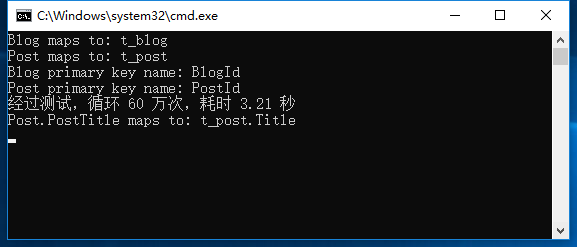
小计:优化后,经过测试,从原来的 循环60万次,耗时14秒,降低到 循环60万次,耗时 3.21 秒。
谢谢浏览!
Entity Framework 6 中如何获取 EntityTypeConfiguration 的 Edm 信息?(四)的更多相关文章
- Entity Framework 6 中如何获取 EntityTypeConfiguration 的 Edm 信息?(一)
1. 案例1 - 类型和表之间的EF代码优先映射 从EF6.1开始,有一种更简单的方法可以做到这一点.有关 详细信息,请参阅我的新EF6.1类型和表格之间的映射. 直接贴代码了 从EF6.1开始,有一 ...
- Entity Framework 6 中如何获取 EntityTypeConfiguration 的 Edm 信息?(五)
直接贴代码了: NewsInfo 实体类: public class NewsInfo { public int NewsInfoId { get; set; } public string News ...
- Entity Framework 6 中如何获取 EntityTypeConfiguration 的 Edm 信息?(三)
接着上一篇,我们继续来优化. 直接贴代码了: LambdaHelper.cs using System; using System.Collections.Generic; using System. ...
- Entity Framework 6 中如何获取 EntityTypeConfiguration 的 Edm 信息?(二)
接着上一篇 直接贴代码了: using System; using System.Collections.Generic; using System.Data.Entity; using System ...
- 浅析Entity Framework Core中的并发处理
前言 Entity Framework Core 2.0更新也已经有一段时间了,园子里也有不少的文章.. 本文主要是浅析一下Entity Framework Core的并发处理方式. 1.常见的并发处 ...
- 在Entity Framework 7中进行数据迁移
(此文章同时发表在本人微信公众号“dotNET每日精华文章”,欢迎右边二维码来关注.) 题记:虽然EF7重新设计了Entity Framework,不过也还是能够支持数据迁移的. Entity Fra ...
- [Programming Entity Framework] 第3章 查询实体数据模型(EDM)(一)
http://www.cnblogs.com/sansi/archive/2012/10/18/2729337.html Programming Entity Framework 第二版翻译索引 你可 ...
- 《Entity Framework 6 Recipes》中文翻译系列 (20) -----第四章 ASP.NET MVC中使用实体框架之在MVC中构建一个CRUD示例
翻译的初衷以及为什么选择<Entity Framework 6 Recipes>来学习,请看本系列开篇 第四章 ASP.NET MVC中使用实体框架 ASP.NET是一个免费的Web框架 ...
- 《Entity Framework 6 Recipes》中文翻译系列 (21) -----第四章 ASP.NET MVC中使用实体框架之在页面中创建查询和使用ASP.NET URL路由过虑
翻译的初衷以及为什么选择<Entity Framework 6 Recipes>来学习,请看本系列开篇 4.2. 构建一个搜索查询 搜索数据是几乎所有应用的一个基本功能.它一般是动态的,因 ...
随机推荐
- 【mysql】Mysql5.7--sys_schema视图
前言: MySQL 5.7中引入了一个新的sys schema,sys是一个MySQL自带的系统库,在安装MySQL 5.7以后的版本,使用mysqld进行初始化时,会自动创建sys库. sys库里面 ...
- go-gui-控件和信号
go-gui-控件和信号 控件 控件简介 控件是对数据和方法的封装.控件有自己的属性和方法.属性是指控件的特征.方法是指控件的一些简单而可见的功能.如按钮就是一个控件,这个按钮是方形的,里面有张图片, ...
- PlayJava Day010
今日所学: /* 2019.08.19开始学习,此为补档. */ 1.继承补充: ①不要仅为了获取其他类中某个功能而去继承,而是要有所属关系. ②Super关键字: a.代表父类对象的引用,且main ...
- Dynamics 365中计算字段与Now进行计算实体导入报错:You can't use Now(), which is of type DateTime, with the current function.
微软动态CRM专家罗勇 ,回复338或者20190521可方便获取本文,同时可以在第一间得到我发布的最新博文信息,follow me. 计算字段是从Dynamics CRM 2015 SP1版本开始推 ...
- 第三方库Mantle的简单实用
1. 测试时, 可以使用下面这个网址及代码来测试, 里面有模型,数组,以及字典, 还可以有long long 转NSDate, string 转 int等. NSURL *url = [NSURLU ...
- 【XML】利用Dom4j读取XML文档以及写入XML文档
Dom4j简介 dom4j是一个Java的XML API,是jdom的升级品,用来读写XML文件的.dom4j是一个十分优秀的JavaXML API,具有性能优异.功能强大和极其易使用的特点,它的性能 ...
- 怎么更改當前的USERENV('LANG')返回值
[php] SQL> ALTER SESSION SET NLS_LANGUAGE='AMERICAN'; Session altered. SQL> select USERENV('LA ...
- Vim基础配置
vim 个性化设置 安装插件管理器Vundle: 创建目录: mkdir -p ~/.vim/bundle 下载文件: git clone https://github.com/VundleVim/V ...
- CodeForces-1257D (贪心+双指针)
题意 https://vjudge.net/problem/CodeForces-1257D 你需要操作m个英雄去打败n只怪物,每个英雄的力量值为pi,可以打败si只怪物:每只怪物的力量值为ai. 当 ...
- 剑指Offer-2.替换空格(C++/Java)
题目: 请实现一个函数,将一个字符串中的每个空格替换成“%20”.例如,当字符串为We Are Happy.则经过替换之后的字符串为We%20Are%20Happy. 分析: 题意明确,就是将一个字符 ...