
"(error during evaluation)" computed
在vue-cli搭建的去哪网app项目中使用了 computed 计算属性
computed计算属性在chrome插件中的 vue devtools 插件中报错
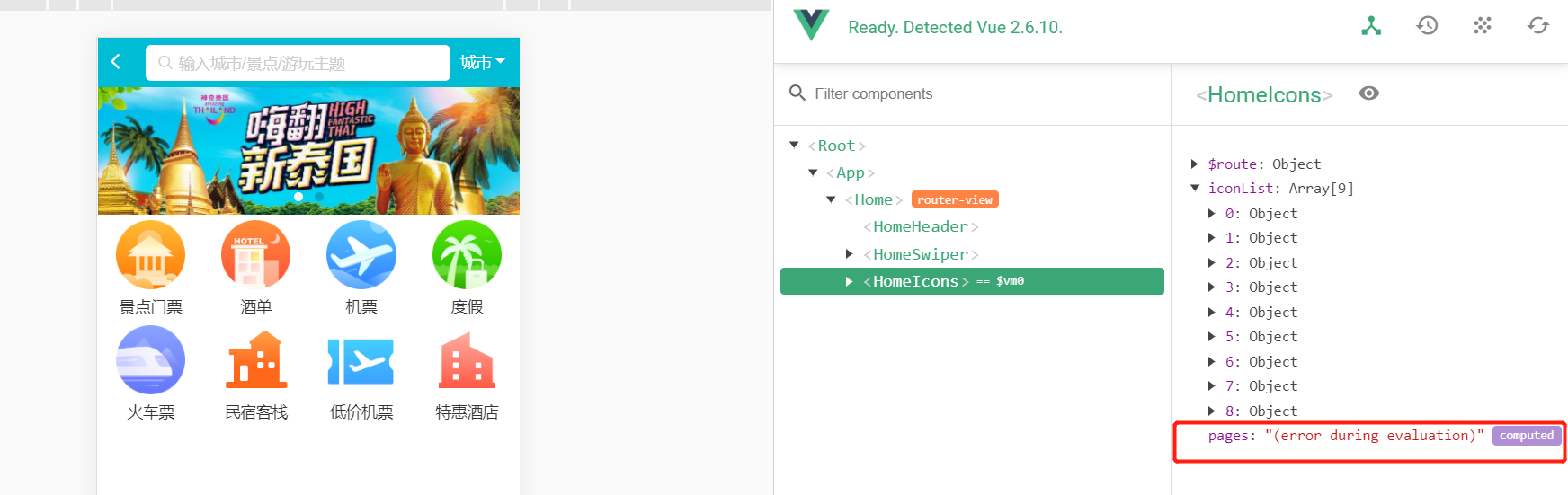
应该显示出来 computed 属性的下拉列。
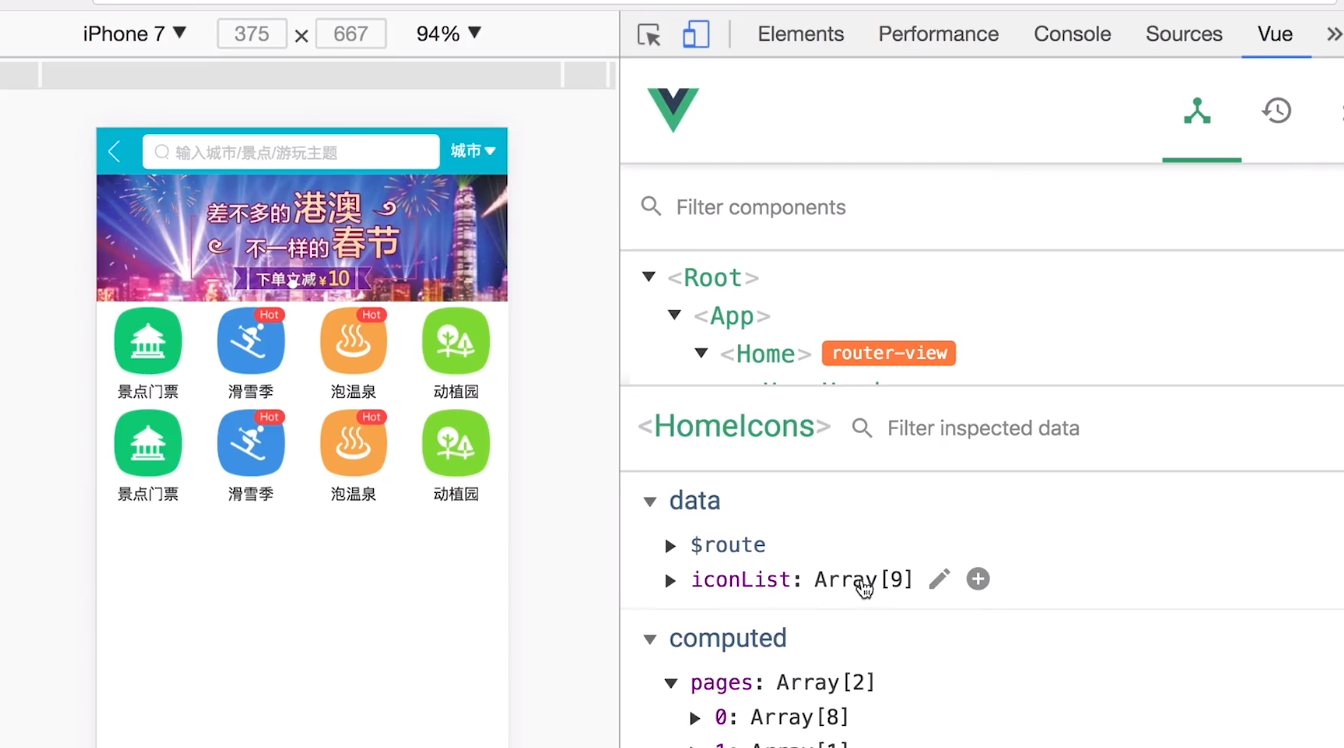
正确显示如下,这里右下角正确的显示出了computed , 求助报错原因!!!
代码如下:(红色代码处!)
<template>

    <div class="icons">

        <swiper>

            <swiper-slide>

                <div class="icon" v-for="item of iconList" :key="item.id">

                    <div class="icon-img">

                        <img class="icon-img-content" :src="item.imgUrl">

                    </div>

                    <p class="icon-desc">{{ item.desc }}</p>

                </div>

            </swiper-slide>

        </swiper>

    </div>

</template>

<script>

export default {

    name: 'HomeIcons',

    data() {

        return {

            iconList: [{

                id: '0001',

                imgUrl: '//s.qunarzz.com/homenode/images/touchheader/piao.png',

                desc: '景点门票'

            },

            {

                id: '0002',

                imgUrl: '//s.qunarzz.com/homenode/images/touchheader/hotel.png',

                desc: '酒单'

            },

            {

                id: '0003',

                imgUrl: '//s.qunarzz.com/homenode/images/touchheader/flight.png',

                desc: '机票'

            },

            {

                id: '0004',

                imgUrl: '//s.qunarzz.com/homenode/images/touchheader/package.png',

                desc: '度假'

            },

            {

                id: '0005',

                imgUrl: '//s.qunarzz.com/homenode/images/touchheader/train.png',

                desc: '火车票'

            },

            {

                id: '0006',

                imgUrl: '//s.qunarzz.com/homenode/images/touchheader/innBnb.png',

                desc: '民宿客栈'

            },

            {

                id: '0007',

                imgUrl: '//s.qunarzz.com/homenode/images/touchheader/bargainflight.png',

                desc: '低价机票'

            },

            {

                id: '0008',

                imgUrl: '//s.qunarzz.com/homenode/images/touchheader/group.png',

                desc: '特惠酒店'

            },

            {

                id: '0009',

                imgUrl: '//s.qunarzz.com/homenode/images/touchheader/haiwai.png',

                desc: '海外酒店'

            }]

        }

    },

    computed: {

        pages () {

            const pages = []

            this.iconList.forEach((item, index) => {

                const page = Math.floor(index / 8)

                if(!pages[page]) {

                    this.pages = []

                }

                pages[page].push(item)

            })

            return pages

        }

    }

}

</script>

<style lang="stylus" scoped>

    @import '~styles/varibles.styl'

    .icons >>> .swiper-container

        height 0

        padding-bottom 50%

    .icon

        position relative

        overflow hidden

        float left

        width 25%

        height 0

        padding-bottom 25%

        .icon-img

            position absolute

            left 0

            right 0

            top 0

            bottom .44rem

            box-sizing border-box

            padding .1rem

            .icon-img-content

                height 100%

                display block

                margin 0 auto

        .icon-desc

            position absolute

            left 0

            right 0

            bottom 0

            height .44rem

            line-height .44rem

            text-align center

            color $darkTextColor

</style>
"(error during evaluation)" computed的更多相关文章
- Python2.7.6标准库内建函数
Built-in Functions abs() divmod() input() open() staticmethod() all() enumerate() int() ord( ...
- Python中的内置函数
2.1 Built-in Functions The Python interpreter has a number of functions built into it that are alway ...
- 论文翻译——Dynamic Pooling and Unfolding Recursive Autoencoders for Paraphrase Detection
Dynamic Pooling and Unfolding Recursive Autoencoders for Paraphrase Detection 动态池和展开递归自动编码器的意译检测 论文地 ...
- Junit4断言
Junit4断言API: http://junit.org/javadoc/latest/index.html Constructor Summary protected Assert() ...
- 深入浅出OOP(六): 理解C#的Enums
MSDN定义:枚举类型(也称为枚举)为定义一组可以赋给变量的命名整数常量提供了一种有效的方法. 例如,假设您必须定义一个变量,该变量的值表示一周中的一天. 该变量只能存储七个有意义的值. 若要定义这 ...
- Matrix Chain Multiplication[HDU1082]
Matrix Chain Multiplication Time Limit: 2000/1000 MS (Java/Others) Memory Limit: 65536/32768 K (J ...
- UVA 442 二十 Matrix Chain Multiplication
Matrix Chain Multiplication Time Limit:3000MS Memory Limit:0KB 64bit IO Format:%lld & %l ...
- UVa 442 矩阵链乘(栈)
Input Specification Input consists of two parts: a list of matrices and a list of expressions. The f ...
- Cross Validation done wrong
Cross Validation done wrong Cross validation is an essential tool in statistical learning 1 to estim ...
随机推荐
- CoderForces999B- Reversing Encryption
time limit per test 1 second memory limit per test 256 megabytes input standard input output standar ...
- 从头学pytorch(二) 自动求梯度
PyTorch提供的autograd包能够根据输⼊和前向传播过程⾃动构建计算图,并执⾏反向传播. Tensor Tensor的几个重要属性或方法 .requires_grad 设为true的话,ten ...
- 详谈springboot启动类的@SpringBootApplication注解
前几天我们学会了如何创建springboot项目今天我们说一下他是怎么运行的为什么不需要我们再去编写繁重的配置文件的 @SpringBootApplication 首先我们看一下这个注解,他是用来标注 ...
- 使用FileReader在浏览器读取预览文件(image和txt)
如标题,之前在某个地方看到因为有Blob的存在,理论上可以在浏览器上查看所有格式的文件.自己想着试试现在暂时只能够查看图片和预览txt文件.其他的比如doc,docx格式的文件查看的时候是乱码 如图: ...
- Selnium IDE插件的安装与简单使用
一.Firefox在线安装IDE插件 1.启动Firefox,点击菜单工具->附加组件,如图: 2.在附件管理页面,手动输入Selenium IDE,搜索 3.在搜索结果中点击Selenium ...
- Bug复盘:接口异步返回的重要性
前言 最近接收了一个老项目,突然甲方 QA 报了一个 bug,连续请求 60 次,成功 8 次,后面的 52 次全部失败,而且成功的 case 返回时间普遍较长.看了日志,并非业务上的异常.这让刚毕业 ...
- mysql中where和having子句的区别和具体用法
1.mysql中的where和having子句的区别 having的用法 having字句可以让我们筛选成组后的各种数据,where字句在聚合前先筛选记录,也就是说作用在group by和having ...
- 《Java基础知识》一维,二维数组的申明和使用
为什么要使用数组: 因为不使用数组计算多个变量的时候太繁琐,不利于数据的处理. -------- 数组也是一个变量,是存储一组相同类型的变量 声明一个变量就是在内存中划出一块合适的空间 声明一个数 ...
- 《Java基础知识》Java this关键字详解
this 关键字用来表示当前对象本身,或当前类的一个实例,通过this可以调用对象的所有方法和属性. 例如: public class Demo { private int x = 10; priva ...
- mybatis源码学习(四)--springboot整合mybatis原理
我们接下来说:springboot是如何和mybatis进行整合的 1.首先,springboot中使用mybatis需要用到mybatis-spring-boot-start,可以理解为mybati ...