
Android 线性布局 计算器
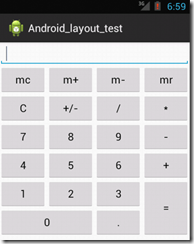
<?xml version="1.0" encoding="utf-8"?>

<LinearLayout xmlns:android="http://schemas.android.com/apk/res/android"

    android:layout_width="match_parent"

    android:layout_height="match_parent"

    android:background="#FFFFFF"

    android:orientation="vertical" >

    <LinearLayout

        android:layout_width="match_parent"

        android:layout_height="wrap_content"

        android:orientation="horizontal" >

        <EditText

            android:id="@+id/data"

            android:layout_width="match_parent"

            android:layout_height="wrap_content" />

    </LinearLayout>

    <LinearLayout

        android:layout_width="match_parent"

        android:layout_height="wrap_content"

        android:orientation="horizontal" >

        <Button

            android:layout_width="match_parent"

            android:layout_height="wrap_content"

            android:layout_weight="1"

            android:text="mc" />

        <Button

            android:layout_width="match_parent"

            android:layout_height="wrap_content"

            android:layout_weight="1"

            android:text="m+" />

        <Button

            android:layout_width="match_parent"

            android:layout_height="wrap_content"

            android:layout_weight="1"

            android:text="m-" />

        <Button

            android:layout_width="match_parent"

            android:layout_height="wrap_content"

            android:layout_weight="1"

            android:text="mr" />

    </LinearLayout>

    <LinearLayout

        android:layout_width="match_parent"

        android:layout_height="wrap_content"

        android:orientation="horizontal" >

        <Button

            android:layout_width="match_parent"

            android:layout_height="wrap_content"

            android:layout_weight="1"

            android:text="C" />

        <Button

            android:layout_width="match_parent"

            android:layout_height="wrap_content"

            android:layout_weight="1"

            android:text="+/-" />

        <Button

            android:layout_width="match_parent"

            android:layout_height="wrap_content"

            android:layout_weight="1"

            android:text="/" />

        <Button

            android:layout_width="match_parent"

            android:layout_height="wrap_content"

            android:layout_weight="1"

            android:text="*" />

    </LinearLayout>

    <LinearLayout

        android:layout_width="match_parent"

        android:layout_height="wrap_content"

        android:orientation="horizontal" >

        <Button

            android:layout_width="match_parent"

            android:layout_height="wrap_content"

            android:layout_weight="1"

            android:text="7" />

        <Button

            android:layout_width="match_parent"

            android:layout_height="wrap_content"

            android:layout_weight="1"

            android:text="8" />

        <Button

            android:layout_width="match_parent"

            android:layout_height="wrap_content"

            android:layout_weight="1"

            android:text="9" />

        <Button

            android:layout_width="match_parent"

            android:layout_height="wrap_content"

            android:layout_weight="1"

            android:text="-" />

    </LinearLayout>

    <LinearLayout

        android:layout_width="match_parent"

        android:layout_height="wrap_content"

        android:orientation="horizontal" >

        <Button

            android:layout_width="match_parent"

            android:layout_height="wrap_content"

            android:layout_weight="1"

            android:text="4" />

        <Button

            android:layout_width="match_parent"

            android:layout_height="wrap_content"

            android:layout_weight="1"

            android:text="5" />

        <Button

            android:layout_width="match_parent"

            android:layout_height="wrap_content"

            android:layout_weight="1"

            android:text="6" />

        <Button

            android:layout_width="match_parent"

            android:layout_height="wrap_content"

            android:layout_weight="1"

            android:text="+" />

    </LinearLayout>

    <LinearLayout

        android:layout_width="match_parent"

        android:layout_height="wrap_content"

        android:orientation="horizontal" >

        <LinearLayout

            android:layout_width="match_parent"

            android:layout_height="wrap_content"

            android:layout_weight="1"

            android:orientation="vertical" >

            <LinearLayout

                android:layout_width="match_parent"

                android:layout_height="wrap_content"

                android:orientation="horizontal" >

                <Button

                    android:layout_width="match_parent"

                    android:layout_height="wrap_content"

                    android:layout_weight="1"

                    android:text="1" />

                <Button

                    android:layout_width="match_parent"

                    android:layout_height="wrap_content"

                    android:layout_weight="1"

                    android:text="2" />

                <Button

                    android:layout_width="match_parent"

                    android:layout_height="wrap_content"

                    android:layout_weight="1"

                    android:text="3" />

            </LinearLayout>

            <LinearLayout

                android:layout_width="match_parent"

                android:layout_height="wrap_content"

                android:orientation="horizontal" >

                <Button

                    android:layout_width="match_parent"

                    android:layout_height="wrap_content"

                    android:layout_weight="1"

                    android:text="0" />

                <Button

                    android:layout_width="match_parent"

                    android:layout_height="wrap_content"

                    android:layout_weight="2"

                    android:text="." />

            </LinearLayout>

        </LinearLayout>

        <LinearLayout

            android:layout_width="match_parent"

            android:layout_height="match_parent"

            android:layout_weight="3" >

            <Button

                android:layout_width="match_parent"

                android:layout_height="match_parent"

                android:text="=" />

        </LinearLayout>

    </LinearLayout>

</LinearLayout>
Android 线性布局 计算器的更多相关文章
- Android线性布局(Linear Layout)
Android线性布局(Linear Layout) LinearLayout是一个view组(view group),其包含的所有子view都以一个方向排列,垂直或是水平方向.我们能够用androi ...
- Android 线性布局(LinearLayout)相关官方文档 - 指南部分
Android 线性布局(LinearLayout)相关官方文档 - 指南部分 太阳火神的漂亮人生 (http://blog.csdn.net/opengl_es) 本文遵循"署名-非商业用 ...
- Android 线性布局(LinearLayout)相关官方文档 - 布局參数部分
Android 线性布局(LinearLayout)相关官方文档 - 布局參数部分 太阳火神的漂亮人生 (http://blog.csdn.net/opengl_es) 本文遵循"署名-非商 ...
- android—-线性布局
android五大布局之线性布局. 1.线性布局的特点:各个子元素彼此连接,中间不留空白 而今天我们要讲解的就是第一个布局,LinearLayout(线性布局),我们屏幕适配的使用 用的比较多的就是L ...
- Android线性布局
线性布局 LinearLayout 是一个视图组,用于使所有子视图在单个方向(垂直或水平)保持对齐. 您可以使用 android:orientation 属性指定布局方向. LinearLayout ...
- android 线性布局
activity_main.xml线性布局 <?xml version="1.0" encoding="utf-8"?> <LinearLay ...
- Android线性布局和帧布局
第二次,本牛崽十分从容,今天咱们来讲讲Android Q之布局,我遇到的问题与自己学到的,大牛不要嘲笑哈,有错误可以指出来,本牛崽看到就改了. 今天我的学长跟我们开始了布局,布局看资料说好像有5种,又 ...
- [android] 线性布局和布局的组合
/****************2016年4月25日 更新******************************/ 知乎:对于开发者来说,Android 的开发者选项里有哪些实用的功能? 汤涛 ...
- Android 线性布局 LinearLayout
垂直布局 vertical <LinearLayout xmlns:android="http://schemas.android.com/apk/res/android" ...
随机推荐
- EntityFramework Core 3多次Include导致查询性能低之解决方案
前言 上述我们简单讲解了几个小问题,这节我们再来看看如标题EF Core中多次Include导致出现性能的问题,废话少说,直接开门见山. EntityFramework Core 3多次Include ...
- 【数据结构】之顺序表(Java语言描述)
之前总结过使用C语言描述的顺序表数据结构.在C语言类库中没有为我们提供顺序表的数据结构,因此我们需要自己手写,详细的有关顺序表的数据结构描述和C语言代码请见[我的这篇文章]. 在Java语言的JDK中 ...
- k8s 上使用 StatefulSet 部署 zookeeper 集群
目录 StatefulSet 部署 zookeeper 集群 创建pv StatefulSet 测试 StatefulSet 部署 zookeeper 集群 参考 k8s官网zookeeper集群的部 ...
- mac 终端高亮显示~
针对terminal采用bash模式: 编辑 ~/.bash_profile, 加入以下代码: export CLICOLOR=1 export LSCOLORS=gxfxaxdxcxegedabag ...
- 英语口语考试资料Volunteers
Being a volunteer is great! There are lots of volunteers around us now. And they don’t do it ...
- NSURLConnection发送GET请求
// ViewController.m // 04-掌握-NSURLConnection发送GET请求 // // Created by xiaomage on 16/2/22. // Copyrig ...
- Spring Cloud Hoxton正式发布,Spring Boot 2.2 不再孤单
距离Spring Boot 2.2.0的发布已经有一个半月左右时间,由于与之匹配的Spring Cloud版本一直没有Release,所以在这期间碰到不少读者咨询的问题都是由于Spring Boot和 ...
- 鲲鹏凌云,并行科技Paramon通过华为云鲲鹏云服务兼容性认证
随着Cloud2.0时代到来,5G技术开始应用普及,超算云服务需求不断升级,业务多样性.数据多样性不断延伸.2019年7月,华为召开鲲鹏计算产业发展峰会,依托在联接领域坚实的基础,华为未来将着力打造智 ...
- 16.Django学习之文件上传和下载
上传就这么六步! 一. settings配置文件中配置 MEDIA_URL = '/media/' MEDIA_ROOT = os.path.join(BASE_DIR, 'medias').repl ...
- 小白学 Python 爬虫(17):Requests 基础使用
人生苦短,我用 Python 前文传送门: 小白学 Python 爬虫(1):开篇 小白学 Python 爬虫(2):前置准备(一)基本类库的安装 小白学 Python 爬虫(3):前置准备(二)Li ...