
Flutter移动电商实战 --(27)列表页_现有Bug修复和完善
小解决小bug
默认右侧的小类没有被加载
数据加载完成后,就list的第一个子对象传递给provide进行赋值,这样右侧的小类就刷新了数据

默认加载了第一个类别

调整颜色
对比图片调整下颜色

这里的参数r:就是red红色
g:green绿色
b:blue蓝色
opacity:就是透明度

最终修改成颜色:
Color.fromRGBO(236, 236, 236, 1.0)

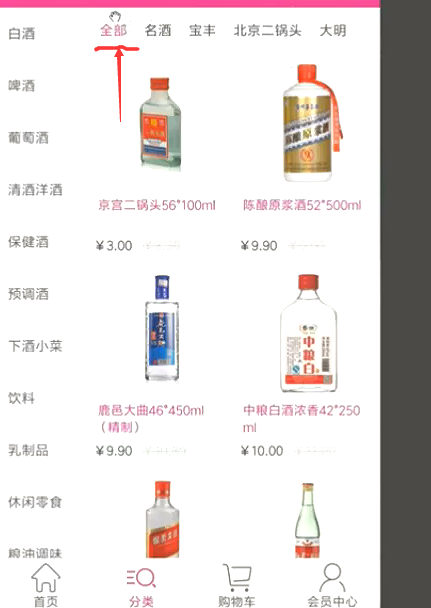
全部
点击类别的时候默认有一个全部,我们的数据里面默认是没有这个全部的。这就需要我们自己把这个子类加上
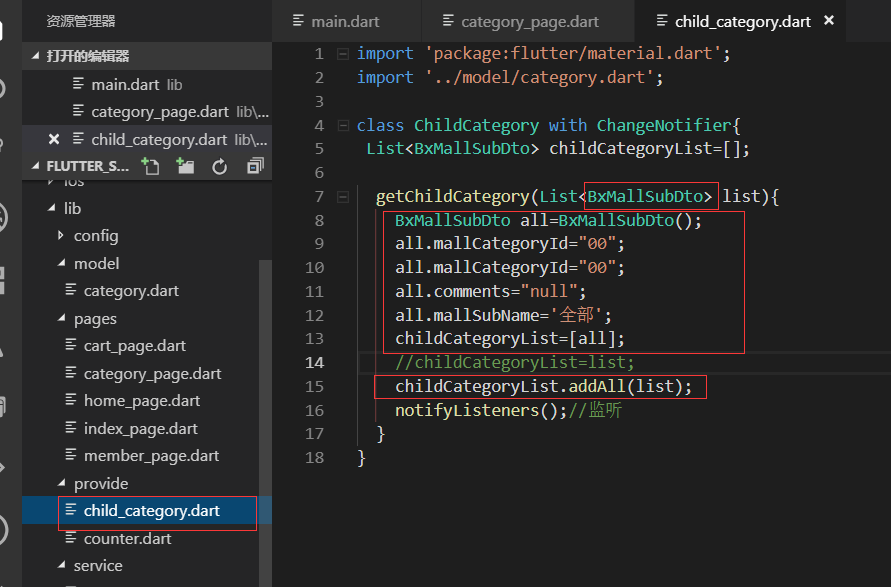
我们在Provide的类里面去实现。先声明一个BxMallSubDto的实体,然后字段都赋值,加入到childCategoryList里面。
最后childCategoryList再把传递过来的list也加上值
这样我们的全部的效果就出来了

最终代码:
category_page.dart
import 'package:flutter/material.dart';

import '../service/service_method.dart';

import 'dart:convert';

import '../model/category.dart';

import 'package:flutter_screenutil/flutter_screenutil.dart';

import 'package:provide/provide.dart';

import '../provide/child_category.dart';

class CategoryPage extends StatefulWidget {

  @override

  _CategoryPageState createState() => _CategoryPageState();

}

class _CategoryPageState extends State<CategoryPage> {

  @override

  Widget build(BuildContext context) {

    //_getCategory();

    return Scaffold(

      appBar: AppBar(title: Text('商品分类'),),

      body: Container(

        child: Row(

          children: <Widget>[

            LeftCategoryNav(),

            Column(

              children: <Widget>[

                RightCategoryNav()

              ],

            )

          ],

        ),

      ),

    );

  }

}

//左侧大类导航

class LeftCategoryNav extends StatefulWidget {

  @override

  _LeftCategoryNavState createState() => _LeftCategoryNavState();

}

class _LeftCategoryNavState extends State<LeftCategoryNav> {

  List list=[];

  var listIndex=0;

  @override

  void initState() {

    super.initState();

    _getCategory();//请求接口的数据

  }

  @override

  Widget build(BuildContext context) {

    return Container(

      width: ScreenUtil().setWidth(180),

      decoration: BoxDecoration(

        border: Border(

          right: BorderSide(width:1.0,color: Colors.black12),//有边框

        )

      ),

      child: ListView.builder(

        itemCount: list.length,

        itemBuilder: (contex,index){

          return _leftInkWell(index);

        },

      ),

    );

  }

  Widget _leftInkWell(int index){

    bool isClick=false;

    isClick=(index==listIndex)?true:false;

    return InkWell(

      onTap: (){

        setState(() {

         listIndex=index;

        });

        var childList=list[index].bxMallSubDto;//当前大类的子类的列表

        Provide.value<ChildCategory>(context).getChildCategory(childList);

      },

      child: Container(

        height: ScreenUtil().setHeight(100),

        padding: EdgeInsets.only(left:10.0,top:10.0),

        decoration: BoxDecoration(

          color: isClick?Color.fromRGBO(236, 236, 236, 1.0): Colors.white,

          border: Border(

            bottom: BorderSide(width: 1.0,color: Colors.black12)

          )

        ),

        child: Text(

          list[index].mallCategoryName,

          style: TextStyle(fontSize: ScreenUtil().setSp(28)),//设置字体大小,为了兼容使用setSp

        ),

      ),

    );

  }

   void _getCategory() async{

    await request('getCategory').then((val){

      var data=json.decode(val.toString());

      //print(data);

      CategoryModel category= CategoryModel.fromJson(data);

      setState(() {

       list=category.data;

      });

      Provide.value<ChildCategory>(context).getChildCategory(list[0].bxMallSubDto);

    });

  }

}

class RightCategoryNav extends StatefulWidget {

  @override

  _RightCategoryNavState createState() => _RightCategoryNavState();

}

class _RightCategoryNavState extends State<RightCategoryNav> {

  //List list = ['名酒','宝丰','北京二锅头','舍得','五粮液','茅台','散白'];

  @override

  Widget build(BuildContext context) {

    return Provide<ChildCategory>(

      builder: (context,child,childCategory){

        return  Container(

          height: ScreenUtil().setHeight(80),

          width: ScreenUtil().setWidth(570),//总的宽度是750 -180

          decoration: BoxDecoration(

            color: Colors.white,//白色背景

            border: Border(

              bottom: BorderSide(width: 1.0,color: Colors.black12)//边界线

            )

          ),

          child: ListView.builder(

            scrollDirection: Axis.horizontal,

            itemCount: childCategory.childCategoryList.length,

            itemBuilder: (context,index){

              return _rightInkWell(childCategory.childCategoryList[index]);

            },

          ),

        );

      }

    );

  }

  Widget _rightInkWell(BxMallSubDto item){

    return InkWell(

      onTap: (){},//事件留空

      child: Container(//什么都加一个container,这样好布局

        padding: EdgeInsets.fromLTRB(5.0, 10.0, 5.0, 10.0),//上下是10 左右是5.0

        child: Text(

          item.mallSubName,

          style:TextStyle(fontSize: ScreenUtil().setSp(28)),

        ),

      ),

    );

  }

}
provide/child_category.dart
import 'package:flutter/material.dart';

import '../model/category.dart';

class ChildCategory with ChangeNotifier{

 List<BxMallSubDto> childCategoryList=[];

  getChildCategory(List<BxMallSubDto> list){

    BxMallSubDto all=BxMallSubDto();

    all.mallCategoryId="00";

    all.mallCategoryId="00";

    all.comments="null";

    all.mallSubName='全部';

    childCategoryList=[all];

    //childCategoryList=list;

    childCategoryList.addAll(list);

    notifyListeners();//监听

  }

}
.
Flutter移动电商实战 --(27)列表页_现有Bug修复和完善的更多相关文章
- Flutter实战视频-移动电商-27.列表页_现有Bug修复和完善
27.列表页_现有Bug修复和完善 小解决小bug 默认右侧的小类没有被加载 数据加载完成后,就list的第一个子对象传递给provide进行赋值,这样右侧的小类就刷新了数据 默认加载了第一个类别 调 ...
- Flutter实战视频-移动电商-34.列表页_小BUG的修复
34.列表页_小BUG的修复 当高粱酒的子类没有数据返回的时候就会报错. 解决接口空数据报错的问题 没有数据的时候,给用户一个友好的提示, 我们没有数据的时候还要告诉用户,提示一下他没有数据,在我们的 ...
- Flutter移动电商实战 --(28)列表页_商品列表后台接口调试
主要调试商品列表页的接口 这个接口是最难的因为有大类.小类还有上拉加载 先配置接口 config/service_url.dart //const serviceUrl='http://test.ba ...
- Flutter移动电商实战 --(40)路由_Fluro的全局注入和使用方法
路由注册到顶层,使每个页面都可以使用,注册到顶层就需要在main.dart中 main.dart注册路由 注入 onGenerateRoute是MaterialApp自带的路由配置项, 首页跳转到详细 ...
- Flutter移动电商实战 --(35)列表页_上拉加载更多制作
右侧列表上拉加载配合类别的切换 上拉加载需要一个page参数,当点击大类或者小类的时候,这个page就要变成1 provide内定义参数 首先我们需要定义一个page的变量 下图是我们之前在首页的时候 ...
- Flutter移动电商实战 --(34)列表页_小BUG的修复
当高粱酒的子类没有数据返回的时候就会报错. 解决接口空数据报错的问题 没有数据的时候,给用户一个友好的提示, 我们没有数据的时候还要告诉用户,提示一下他没有数据,在我们的右侧列表的build方法内去判 ...
- Flutter移动电商实战 --(33)列表页_子类和商品列表交互效果
主要实现点击小类下面的列表跟着切换 获取右侧下面的列表信息,即要传递大类的id也要传递小类的,所以需要把左侧的大类的id也要Provide化 可以看下网站上的接口说明: https://jspang. ...
- Flutter移动电商实战 --(32)列表页_小类高亮交互效果制作
点击大类右侧的横向的小类红色显示当前的小类别 解决之前溢出的问题: 先解决一个bug,之前右侧的这里设置的高度是1000,但是有不同的虚拟机和手机设别的问题造成了溢出的问题 Expaned是有伸缩能力 ...
- Flutter移动电商实战 --(31)列表页_列表切换交互制作
点击左侧的大类右边的小类也跟着变化 新建provide 要改变哪里就建哪里的provide,我们现在要改变的是右边的商品列表的数组. category_goods_list.dart 这样我们的pro ...
随机推荐
- perl自定义简易的面向对象的栈与队列类
perl中的数组其实已经具备了栈与队列的特点,下面是对数组经过一些封装的stack,queue对象 1.Stack类 创建一个Stack.pm文件 package Stack; sub new{ $s ...
- java序列化和反序列化使用总结
一.概念 java对象序列化的意思就是将对象的状态转化成字节流,以后可以通过这些值再生成相同状态的对象.对象序列化是对象持久化的一种实现方法,它是将对象的属性和方法转化为一种序列化的形式用于存储和传输 ...
- (转载)关于FLASH寿命的读写方法
NOR(或非)和NAND(与非)是市场上两种主要的Flash闪存,sNORFLASH 和CPU之间不需要其他电路控制,NOR flash可以芯片内执行程序,而NAND FLASH 和CPU 的接口必须 ...
- fwrite、write、fread、read
1. write和read 1.1 write: 头文件:#include<unistd.h> 原型: ssize_t write(int fd,const void*buf,size_t ...
- Python爬微信好友头像,性别,所在地区
本文适合新手(有一定基础的小白) 今天没事,用的网页版微信,于是看源码心理作怪,F12打开,研究了一下,结果发现 /斜眼笑/斜眼笑/斜眼笑 再加上,没事干,(大家有好工作求介绍,本人待就业),Pyth ...
- Ajax长连接和SignalR(刷新客户端数据)的区别
ajax实现长连接 <%@ page language="java" import="java.util.*" pageEncoding=" ...
- Linux开机启动项总结
在应急响应时有时会遇到系统被植入后门,添加启动项等操作,如果不清楚启动项的话,可能会被黑客植入一些开机启动项,无法彻底清除后门程序,所以在这梳理下启动项的东西 1.操作系统接管硬件以后,首先读入 /b ...
- Spark(三)角色和搭建
目录 Spark(三)角色和搭建 一.Spark集群角色介绍 二.集群的搭建 三.history服务 四.使用spark-submit进行计算Pi 五.Spark On Yarn 六.shell脚本 ...
- JavaScript展开操作符(Spread operator)介绍
本文介绍JavaScript的展开操作符(Spread operator)....本文适合ES6初学者. 你可以通过展开操作符(Spread operator)...扩展一个数组对象和字符串.展开运算 ...
- Gradle 的使用
gradle 工具类似于maven工具,但是gradle 减少了maven中的那种使用xml 中大量的配置文件来下载依赖的jar包.而gradle大大简化了,能够很快速的添加依赖.具体关于gradle ...