
3.Bacula Client安装配置
1. Bacula Client安装配置
1.1. linux客户端安装
1.1.1. 安装依赖包
yum install libacl libacl-devel
1.1.2. Client安装
tar zxf bacula-9.2.2.tar.gz
cd bacula-9.2.2
CFLAGS="-g -Wall" ./configure \
--sbindir=/usr/local/bacula/bin \
--sysconfdir=/usr/local/bacula/etc \
--with-pid-dir=/usr/local/bacula/working \
--with-subsys-dir=/usr/local/bacula/working \
--with-working-dir=/usr/local/bacula/working \
--enable-client-only
make&&make install&&make install-autostart-fd
1.1.3. Client配置
vi /usr/local/bacula/etc/bacula-fd.conf
Director {
Name = server-dir
# 此Name为Director的名称,即server端名称而非client的名称。
Password = "3ydivk+gipxRjqbNCdwUeNi8ZWhGh3NXyvHXPZLAgMZ1"
# 定义client的密码,director需要通过此密码连接客户端
}
Director {
Name = server-mon
# 此Name为tray-monitor的名称,即monitor的名称而非client的名称。
Password = "w1yPbENlbfCMNrsD2gMarzBfLb+I1+kRN/UhUM3s5+VB"
# 配置 tray-monitor监控密码,详见《Tray Monitor服务》。。
Monitor = yes
1.1.4. Client启动
cd /usr/local/bacula/bin
./bacula start
1.2. Windows客户端安装
1.2.1. Client安装
选择自定义安装
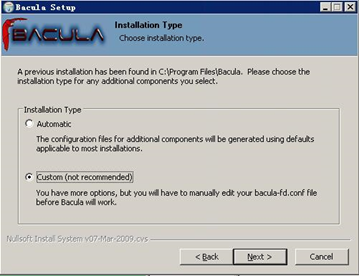
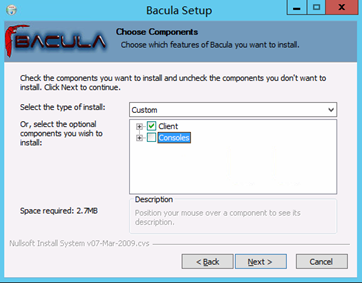
选择Client即可(console可以查看服务端备份任务的状态等,可以不用安装)
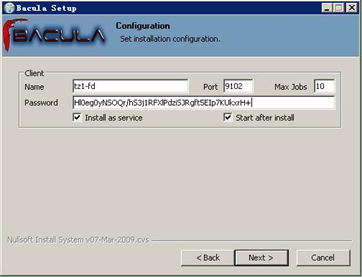
输入Client端信息(Name:client名称、port:默认9102、Max Jobs:默认10、Password:在服务端的dir配置文件中查看Client的password)
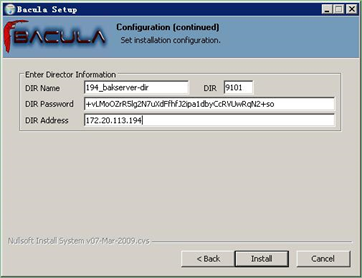
DIR配置(用于查看备份job信息,可以不配置)
(DIR Name:服务端DIR、DIR:9101默认端口、DIR Password:在服务端的dir或bconsole配置文件中查看password、DIR Address:DIR地址)
1.2.2. Client配置
安装完成后,默认配置默认位于C:\Program Files\Bacula ,配置文件为bacula-fd.conf
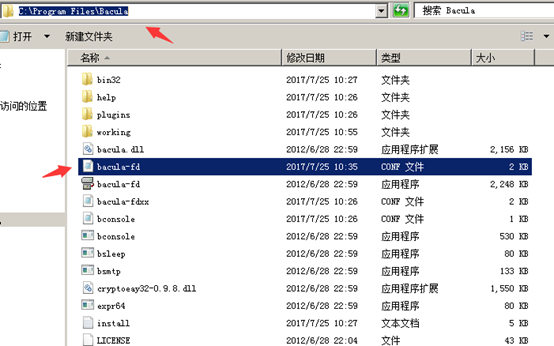
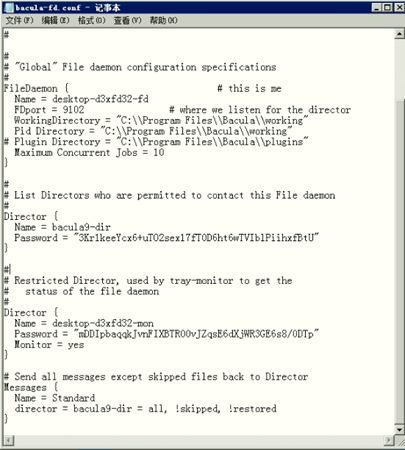
配置文件中:
Director {
Name = bacula9-dir
Password = "3Kr1keeYcx6+uTO2sex17fT0D6ht6wTVIblPiihxfBtU"
}
# 此处配置为允许哪个Director连接此客户端。
# Name为Server Director的name,Password为Director定义的该Client密码。
# Send all messages except skipped files back to Director
Messages {
Name = Standard
director = bacula9-dir = all, !skipped, !restored
}
# Restricted Director, used by tray-monitor to get the
# status of the file daemon
Director {
Name = desktop-d3xfd32-mon
# 此Name为tray-monitor的名称,即monitor的名称而非client的名称。
Password = "mDDIpbaqqkJvnFIXBTR00vJZqsE6dXjWR3GE6s8/0DTp"
# 配置 tray-monitor监控密码,详见《Tray Monitor服务》。。
Monitor = yes
}
1.2.3. Client启动
配置完成后可检测配置文件是否有误
C:\Users\sky>cd C:\Program Files\Bacula
C:\Program Files\Bacula>bacula-fd.exe -c "C:\Program Files\Bacula\bacula-fd.conf"
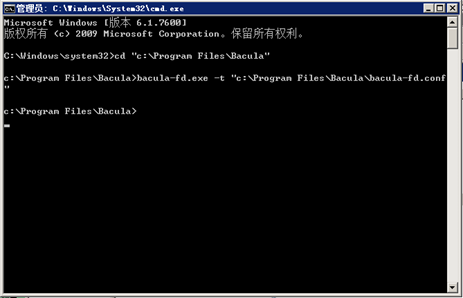
查看客户端服务状态

1.3. 通过bacula-dir.conf创建新备份(Server端)
vi bacula-dir.conf
… …
1.3.1. 添加备份计划
Schedule {
Name = "schedule1"
Run = Level=Full sun at 0:00
Run = Level=Incremental hourly at 0:00
}
1.3.2. 添加备份Pool
Pool {
Name = Pool1
Pool Type = Backup
Recycle = yes # Bacula can automatically recycle Volumes
AutoPrune = yes # Prune expired volumes
Volume Retention = 365 days # one year
Maximum Volume Bytes = 50G # Limit Volume size to something reasonable
Maximum Volumes = 100 # Limit number of Volumes in Pool
Label Format = "backup-"
}
1.3.3. 添加Client
# linux client
Client{
Name = "linux-fd"
Address = linuxip
FDPort = 9102
Catalog = MyCatalog
Password = "yn2FnKAoucIbFMLtESgdARYmFUvqjuPYITyeLKwDwd9k"
}
# windows client
Client{
Name = "windows-fd"
Address = windowsip
FDPort = 9102
Catalog = MyCatalog
Password = "Hl0eg0yNSOQr/hS3j1RFXlPdziSJRgft5EIp7KUkxrH+"
}
1.3.4. 定义需要备份的目录
# For linux
FileSet {
Name = "FileSet1"
Include {
Options {
signature = MD5
Compression = GZIP
}
File = /var/log/
}
}
# For windows
FileSet {
Name = "FileSet2"
Include {
Options {
signature = MD5
Compression = GZIP
}
File = "C:/myfiles"
}
}
1.3.5. 添加备份任务
# linux job
Job {
Name = "linux-backup1"
JobDefs = "DefaultJob"
Type = Backup
Client = "linux-fd"
FileSet = "FileSet1"
Storage = File1
Pool = Pool1
Schedule = "Schedule1"
}
Job {
Name = "linux-restores1"
Type = Restore
Client = "linux-fd"
FileSet = "FileSet1"
Storage = File1
Pool = Pool1
Messages = Standard
Where = /tmp
}
# windows job
Job {
Name = "windows-backup1"
JobDefs = "DefaultJob"
Type = Backup
Client = "windows-fd"
FileSet = "FileSet2"
Storage = File1
Pool = Pool1
Schedule = "Schedule1"
}
Job {
Name = "windows-restores1"
Type = Restore
Client = "windows-fd"
FileSet = "FileSet2"
Storage = File1
Pool = Pool1
Messages = Standard
Where = "c:/tmp"
}
1.4. 通过baculum-web创建新备份(需要安装Bacula-gui,后面会介绍)
1.4.1. 添加client
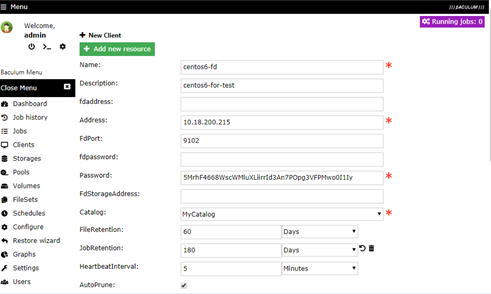
密码为client端定义的密码,登录client,查看该fd密码。
vi /usr/local/bacula/etc/bacula-fd.conf
#
Director {
Name = server-dir
Password = "7oV+FkA+JLKw1DtYOevB+CKAjHvfuGPctgtvLyHf9dji"
# client密码为该密码
}
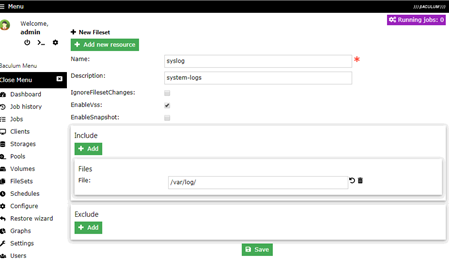
1.4.2. 添加Fileset
Fileset定义需要备份的内容
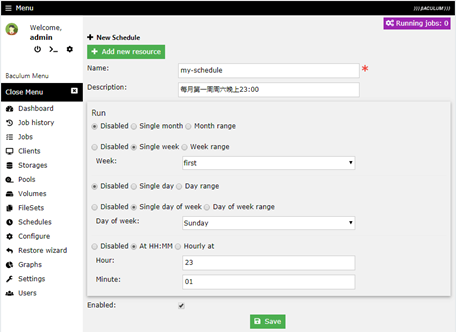
1.4.3. 添加Schedule
Name:不能使用中文(通过界面创建schedule功能不全,建议通过bacula-dir.conf配置)
每月第一周周六晚上23:00
1.4.4. 添加job
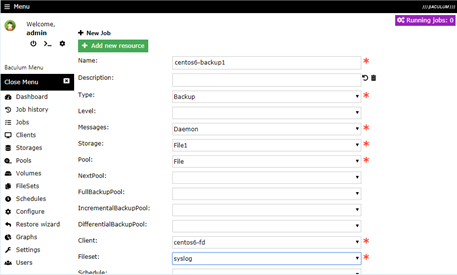
1.4.4.1. 添加备份任务
Name:最好能从名字确定系统和备份类型(如:centos01-backup、windows01-restore)
Type:选择备份类型
Storage:选择File1
Pool:选择默认的File
Client:选择刚创建的client
Fileset:选择刚创建需要备份的目录
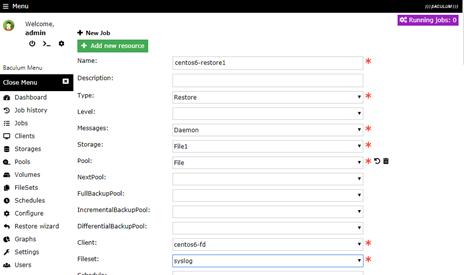
1.4.4.2. 添加restore任务
Name:最好能从名字确定系统和备份类型(如:centos01-backup、windows01-restore)
Type:选择备份类型(此处是restore)
Storage:选择File1
Pool:选择默认的File
Client:选择刚创建的client
Fileset:选择备份的那个目的fileset
1.4.5. 运行备份job
在Jobs中选中需要运行的job,单击Run job
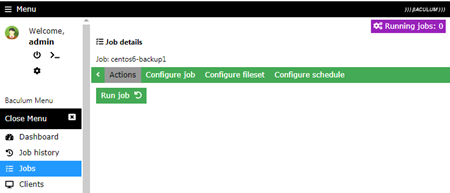
Job配置Storage为File1,在运行的时候如果选择File2是无效的,备份还是保存在File1中。

在Dashboard中查看完成的任务
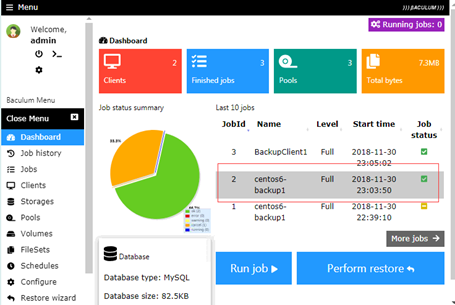
1.4.6. 运行还原job
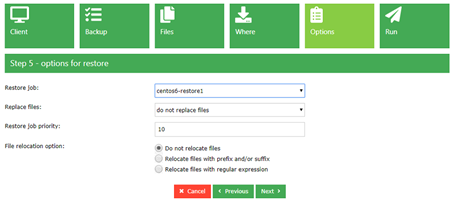
选择备份任务
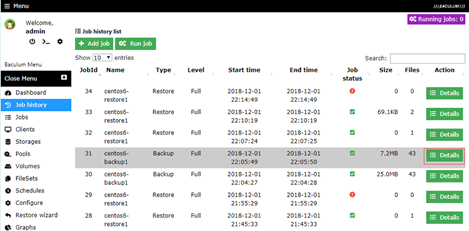
选择restore

选择需要还原的文件
选择还原位置(默认为restore任务中配置的还原位置)
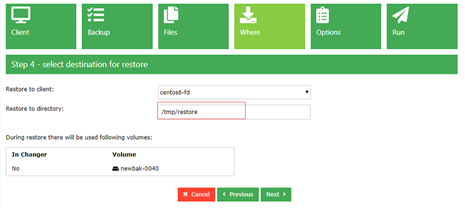
选择restore job
3.Bacula Client安装配置的更多相关文章
- Oracle Instant Client 安装配置
一.下载 下载地址:http://www.oracle.com/technetwork/database/features/instant-client/index-097480.html 这是Ora ...
- ubuntu 12.04 nfs-server/client安装配置
由于opennebula的共享存储的方式需要nfs,为了opennebula 3.8在ubuntu 12.04上搭建做铺垫,先介绍下nfs server和client端的安装和配置. 1. nfs ...
- zabbix client安装配置执行
1 创建zabbix 用户 groupadd zabbix; useradd -g zabbix zabbix; passwd zabbix; 两次输入password 2 下载获得zabbix的包, ...
- 开源网络备份软件 bacula 的安装、配置和运行
安装bacula 1 bacula的几种网络备份拓扑 前面文章介绍了bacula有5个组成部分,在实际的应用中,没有必要将5个部分分别放在不同的服务器上,它们之间的某些部分是可以合并的,常见的bacu ...
- CentOS7安装配置Bacula yum方法
参考: https://www.baidu.com/link?url=o2QIy2YZWjsJPAFJuYFhrH3nPvtyRkSe-o5Q_FqFZ5E1EMOsIOmGeKm0HAonwHOw8 ...
- 2.Bacula Server端安装配置
1. Bacula Server端安装配置 1.1. Bacula Server端安装 1.1.1. 安装bacula依赖包 For Centos6: yum install -y mysql ...
- PL/SQL Developer 和 Instant Client客户端安装配置
一. 准备工作 1. 点击此下载 PL/SQL Developer 2. 点击此下载 Instant Client 二. 配置Instant Client 1. 新建 %安装目录%\network\ ...
- vSphere Web Client使用指南之安装配置
vSphere Web Client使用指南之安装配置 vSphere Web Client是为忙碌的管理员提供的一款通用的.基于浏览器的VMware管理工具,能够监控并管理VMware基础设施.在摆 ...
- 安装配置oracle11gR2、client、plsql developer及学习
本文是一个目录,以后会持续更新 1,安装oracle11gR2 https://www.cnblogs.com/suterfo/p/10659208.html 2,安装oracle client及配置 ...
随机推荐
- [转]Maven项目读取src.main.resources下的文件
要取编译后的路径,而不是你看到的src/main/resources的路径.如下: URL url = MyTest.class.getClassLoader().getResource(" ...
- 解决报错Fatal error in launcher
换电脑重装python,打算安装第三方库的时候出现错误: Fatal error in launcher 然而在网上搜到的大多数是解决 —— Fatal error in launcher: Unab ...
- ffmpeg 编译集成libfdk-aac
目录 1. 编译libfdk-aac 2. 编译ffmpeg 1. 编译libfdk-aac 下载源码:$ git clone https://github.com/mstorsjo/fdk-aac. ...
- 剑指offer难题代码
重建二叉树 题目描述 输入某二叉树的前序遍历和中序遍历的结果,前重建出该二叉树.假设输入的前序遍历和中序遍历的结果中都不含重复的数字.假如输入前序遍历序列{1,2,4,7,3,5,6,8}和中序遍历序 ...
- PJzhang:ms17-010永恒之蓝漏洞在windows 2008R2中的复现
猫宁!!! 参考: https://www.anquanke.com/post/id/86245 https://xz.aliyun.com/t/2536 https://www.cnblogs.co ...
- Awvs–网络漏洞扫描工具
Awvs漏洞扫描自动化 在WEB安全方面,安全侧使用Acunetix_Web_Vulnerability_Scanner_11.xWEB漏洞扫描工具定期手工对m站和www站进行全站漏洞扫描. 为了防止 ...
- 2019-10-20 李宗盛 spss作业
SPSS: 1.有关SPSS数据字典的说法,正确的是 A.SPSS数据集的数据字典可以复制到其他数据集中 B.SPSS数据集的数据字典是不能复制的 C.SPSS的数据字典可以通过“复制”和“粘贴”在不 ...
- Guava源码阅读-base-Enums
package com.google.common.base; guava源码中对这个类的方法介绍只有一句话: Utility methods for working with {@link Enum ...
- PTA(Basic Level)1020.月饼
月饼是中国人在中秋佳节时吃的一种传统食品,不同地区有许多不同风味的月饼.现给定所有种类月饼的库存量.总售价.以及市场的最大需求量,请你计算可以获得的最大收益是多少. 注意:销售时允许取出一部分库存.样 ...
- PTA(Advanced Level)1050.String Subtraction
Given two strings S1 and S2, S=S1−S2 is defined to be the remaining string after taking all the char ...