
C# 填充无效,无法被移除
1.本文采用微软的
RijndaelManaged
- Assemblies:
- mscorlib.dll, netstandard.dll, System.Security.Cryptography.Algorithms.dll
访问的托管的版本Rijndael算法。 此类不能被继承。
实现加密解密,
查看代码:
using System;

using System.IO;

using System.Security.Cryptography;

namespace RijndaelManaged_Example

{

    class RijndaelExample

    {

        public static void Main()

        {

            try

            {

                string original = "Here is some data to encrypt!";

                // Create a new instance of the RijndaelManaged

                // class.  This generates a new key and initialization

                // vector (IV).

                using (RijndaelManaged myRijndael = new RijndaelManaged())

                {

                    myRijndael.GenerateKey();

                    myRijndael.GenerateIV();

                    // Encrypt the string to an array of bytes.

                    byte[] encrypted = EncryptStringToBytes(original, myRijndael.Key, myRijndael.IV);

                    // Decrypt the bytes to a string.

                    string roundtrip = DecryptStringFromBytes(encrypted, myRijndael.Key, myRijndael.IV);

                    //Display the original data and the decrypted data.

                    Console.WriteLine("Original:   {0}", original);

                    Console.WriteLine("Round Trip: {0}", roundtrip);

                }

            }

            catch (Exception e)

            {

                Console.WriteLine("Error: {0}", e.Message);

            }

        }

        static byte[] EncryptStringToBytes(string plainText, byte[] Key, byte[] IV)

        {

            // Check arguments.

            if (plainText == null || plainText.Length <= )

                throw new ArgumentNullException("plainText");

            if (Key == null || Key.Length <= )

                throw new ArgumentNullException("Key");

            if (IV == null || IV.Length <= )

                throw new ArgumentNullException("IV");

            byte[] encrypted;

            // Create an RijndaelManaged object

            // with the specified key and IV.

            using (RijndaelManaged rijAlg = new RijndaelManaged())

            {

                rijAlg.Key = Key;

                rijAlg.IV = IV;

                // Create an encryptor to perform the stream transform.

                ICryptoTransform encryptor = rijAlg.CreateEncryptor(rijAlg.Key, rijAlg.IV);

                // Create the streams used for encryption.

                using (MemoryStream msEncrypt = new MemoryStream())

                {

                    using (CryptoStream csEncrypt = new CryptoStream(msEncrypt, encryptor, CryptoStreamMode.Write))

                    {

                        using (StreamWriter swEncrypt = new StreamWriter(csEncrypt))

                        {

                            //Write all data to the stream.

                            swEncrypt.Write(plainText);

                        }

                        encrypted = msEncrypt.ToArray();

                    }

                }

            }

            // Return the encrypted bytes from the memory stream.

            return encrypted;

        }

        static string DecryptStringFromBytes(byte[] cipherText, byte[] Key, byte[] IV)

        {

            // Check arguments.

            if (cipherText == null || cipherText.Length <= )

                throw new ArgumentNullException("cipherText");

            if (Key == null || Key.Length <= )

                throw new ArgumentNullException("Key");

            if (IV == null || IV.Length <= )

                throw new ArgumentNullException("IV");

            // Declare the string used to hold

            // the decrypted text.

            string plaintext = null;

            // Create an RijndaelManaged object

            // with the specified key and IV.

            using (RijndaelManaged rijAlg = new RijndaelManaged())

            {

                rijAlg.Key = Key;

                rijAlg.IV = IV;

                // Create a decryptor to perform the stream transform.

                ICryptoTransform decryptor = rijAlg.CreateDecryptor(rijAlg.Key, rijAlg.IV);

                // Create the streams used for decryption.

                using (MemoryStream msDecrypt = new MemoryStream(cipherText))

                {

                    using (CryptoStream csDecrypt = new CryptoStream(msDecrypt, decryptor, CryptoStreamMode.Read))

                    {

                        using (StreamReader srDecrypt = new StreamReader(csDecrypt))

                        {

                            // Read the decrypted bytes from the decrypting stream

                            // and place them in a string.

                            plaintext = srDecrypt.ReadToEnd();

                        }

                    }

                }

            }

            return plaintext;

        }

    }

}
这个加密乃 微软官方案例。毛的问题
下面这个是错误的代码
       [Fact(DisplayName ="")]

        public void stat()

        {

            string original = "Here is some data to encrypt!";

            // Create a new instance of the RijndaelManaged

            // class.  This generates a new key and initialization

            // vector (IV).

            using (RijndaelManaged myRijndael = new RijndaelManaged())

            {

                myRijndael.GenerateKey();

                myRijndael.GenerateIV();

                // Encrypt the string to an array of bytes.

                byte[] encrypted = EncryptStringToBytes(original, myRijndael.Key, myRijndael.IV);

                myRijndael.GenerateKey();

                myRijndael.GenerateIV();

                // Decrypt the bytes to a string.

                string roundtrip = DecryptStringFromBytes(encrypted, myRijndael.Key, myRijndael.IV);

                //Display the original data and the decrypted data.

                Console.WriteLine("Original:   {0}", original);

                Console.WriteLine("Round Trip: {0}", roundtrip);

            }

        }

        /// <summary>

        ///

        /// </summary>

        /// <param name="plainText"></param>

        /// <param name="Key"></param>

        /// <param name="IV"></param>

        /// <returns></returns>

        static byte[] EncryptStringToBytes(string plainText, byte[] Key, byte[] IV)

        {

            // Check arguments.

            if (plainText == null || plainText.Length <= )

                throw new ArgumentNullException("plainText");

            if (Key == null || Key.Length <= )

                throw new ArgumentNullException("Key");

            if (IV == null || IV.Length <= )

                throw new ArgumentNullException("IV");

            byte[] encrypted;

            // Create an RijndaelManaged object

            // with the specified key and IV.

            using (RijndaelManaged rijAlg = new RijndaelManaged())

            {

                rijAlg.Key = Key;

                rijAlg.IV = IV;

                // Create an encryptor to perform the stream transform.

                ICryptoTransform encryptor = rijAlg.CreateEncryptor(rijAlg.Key, rijAlg.IV);

                // Create the streams used for encryption.

                using (MemoryStream msEncrypt = new MemoryStream())

                {

                    using (CryptoStream csEncrypt = new CryptoStream(msEncrypt, encryptor, CryptoStreamMode.Write))

                    {

                        using (StreamWriter swEncrypt = new StreamWriter(csEncrypt))

                        {

                            //Write all data to the stream.

                            swEncrypt.Write(plainText);

                        }

                        encrypted = msEncrypt.ToArray();

                    }

                }

            }

            // Return the encrypted bytes from the memory stream.

            return encrypted;

        }

        /// <summary>

        ///

        /// </summary>

        /// <param name="cipherText"></param>

        /// <param name="Key"></param>

        /// <param name="IV"></param>

        /// <returns></returns>

        static string DecryptStringFromBytes(byte[] cipherText, byte[] Key, byte[] IV)

        {

            // Check arguments.

            if (cipherText == null || cipherText.Length <= )

                throw new ArgumentNullException("cipherText");

            if (Key == null || Key.Length <= )

                throw new ArgumentNullException("Key");

            if (IV == null || IV.Length <= )

                throw new ArgumentNullException("IV");

            // Declare the string used to hold

            // the decrypted text.

            string plaintext = null;

            // Create an RijndaelManaged object

            // with the specified key and IV.

            using (RijndaelManaged rijAlg = new RijndaelManaged())

            {

                rijAlg.Key = Key;

                rijAlg.IV = IV;

                // Create a decryptor to perform the stream transform.

                ICryptoTransform decryptor = rijAlg.CreateDecryptor(rijAlg.Key, rijAlg.IV);

                // Create the streams used for decryption.

                using (MemoryStream msDecrypt = new MemoryStream(cipherText))

                {

                    using (CryptoStream csDecrypt = new CryptoStream(msDecrypt, decryptor, CryptoStreamMode.Read))

                    {

                        using (StreamReader srDecrypt = new StreamReader(csDecrypt))

                        {

                            // Read the decrypted bytes from the decrypting stream

                            // and place them in a string.

                            plaintext = srDecrypt.ReadToEnd();

                        }

                    }

                }

            }

            return plaintext;

        }
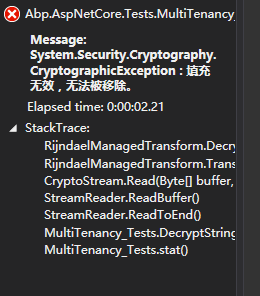
我把唯一改动测试的地方做了个标记。因为加密前随机的key 跟解密后的key 不一致,所以导致了这个错误
防止踩坑,以及知道这个玩意的原理。

C# 填充无效,无法被移除的更多相关文章
- .net 加密错误:填充无效,无法移除
今天用System.Security.Cryptography加密.使用了AesManaged,报错:填充无效,无法移除.分析是解密失败,密文损坏,或者KEY,IV不正确. using (AesMan ...
- 解决解密时出现"要解密的数据的长度无效" 或 "填充无效无法被移除" 的错误
1.首先排除数据库中读取加密后的字段是否被强制截断. 2.AES加密后的byte[]首先应用base64( Convert.ToBase64String)编码一次,若直接用utf8的话会报上述错误,若 ...
- 微信小程序加密解密 C# 以及 填充无效,无法被移除错误的解决方案 Padding is invalid and cannot be removed
解密加密源码 using System; using System.Security.Cryptography; using System.Text; namespace Wechat { publi ...
- C# .net 填充无效,无法被移除 微信小程序解密失败的解决办法
微信小程序获取用户信息诸如unionId的时候需要解密,如果遇到偶然的解密失败(填充无效,无法被移除),原因很有可能是session_key错误, 也是就你用作解密的session_key并不是微信用 ...
- ThinkPHP 自动验证与自动填充无效可能的原因(转)
自动验证与自动填充是在使用ThinkPHP时经常用到的功能,但偶尔会遇到自动验证与自动填充无效的情况,本文就ThinkPHP 自动验证与自动填充无效可能的原因做一些分析. create() Think ...
- ThinkPHP 自动验证与自动填充无效可能的原因
原文链接:http://www.5idev.com/p-thinkphp_validate_auto_Invalid.shtml 自动验证与自动填充是在使用ThinkPHP时经常用到的功能,但偶尔会遇 ...
- http2协议翻译(转)
超文本传输协议版本 2 IETF HTTP2草案(draft-ietf-httpbis-http2-13) 摘要 本规范描述了一种优化的超文本传输协议(HTTP).HTTP/2通过引进报头字段压缩以及 ...
- GDI编程
图形设备接口(GDI)是一个可执行程序,它接受Windows应用程序的绘图请求(表现为GDI函数调用),并将它们传给相应的设备驱动程序,完成特定于硬件的输出,象打印机输出和屏幕输出.GDI负责Wind ...
- WPS客户端更新日志留着备用
WPS Office (10.1.0.7520)==========================================新增功能列表------------WPS文字1 拼写检查:新增“中 ...
随机推荐
- 阶段5 3.微服务项目【学成在线】_day02 CMS前端开发_11-webpack研究-npm和cnpm安装配置
node.js安装完成后,就自动安装了webpack. npm -v:查看npm安装的版本 当前安装目录默认的包 在node.js的目录下创建两个文件夹 这样路径就被修改成功了 cnpm npm in ...
- Java NIO学习笔记八 Pipe
Java NIO Pipe Java NIO管道是两个线程之间的单向数据连接.Pipe 具有源信道和接受通道.您将数据写入sink通道.然后可以从源通道读取该数据. 这是一个原理的Pipe流程图: J ...
- EasyNetQ使用(四)【Request与Response,Send与Receive】
EasyNetQ也支持Request/Response这种方式的消息模式.这种方式很容易在client/Server应用中执行,客户端发送一个请求到服务器,服务器然后处理请求后返回一个响应.和传统的R ...
- Flutter Swiper制作轮播效果
1.引入flutter_swiper插件 flutter最强大的siwiper, 多种布局方式,无限轮播,Android和IOS双端适配. Flutter_swiper的GitHub地址:https: ...
- Jpeglib读取jpg文件
整理自: http://hi.baidu.com/lewutian/item/e8eed42664ee61122a0f1c89 http://blog.csdn.net/mcgrady_tracy/a ...
- 最新 米哈游java校招面经 (含整理过的面试题大全)
从6月到10月,经过4个月努力和坚持,自己有幸拿到了网易雷火.京东.去哪儿.米哈游等10家互联网公司的校招Offer,因为某些自身原因最终选择了米哈游.6.7月主要是做系统复习.项目复盘.LeetCo ...
- python解析jSON文件
一.jSON文件 http://baike.baidu.com/link?url=wYeeLnhpXX-Tt8AoBRSNPh2P7Z2YHyK2tdD1tbBOQMfJIpA-YNHMOg2ZN6a ...
- XSSFWorkbook对象 进行zip打包时 用write资源流自动关闭处理办法
XSSFWorkbook对象的write方法内会将传入的资源流自动关闭 导致下载excel失败 错误代码 OutputStream out = response.getOutputStream(); ...
- 【AtCoder】AGC004
AGC004 A - Divide a Cuboid 看哪一维是偶数,答案是0,否则是三个数两两组合相乘中最小的那个 #include <bits/stdc++.h> #define fi ...
- 1.5JdbcTmeplates、Jpa、Mybatis、beatlsql、Druid的使用
Spring boot 连接数据库整合 -- create table `account`DROP TABLE `account` IF EXISTSCREATE TABLE `account` ( ...