
dev gridview表格按钮
固定列的位置

添加按钮控件位置,使用buttonEdit

添加按钮

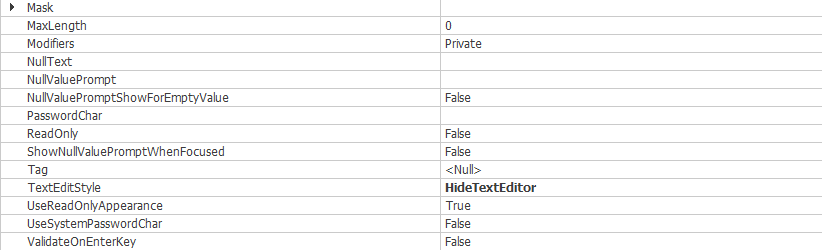
按钮属性设置

按钮设置后的效果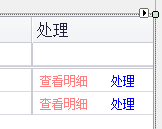
//注册按钮事件

this.ribtndata.ButtonClick += new DevExpress.XtraEditors.Controls.ButtonPressedEventHandler(ribtndata_Click);
private void ribtndata_Click(object sender, DevExpress.XtraEditors.Controls.ButtonPressedEventArgs e)
{
if (e.Button.Index == 0)
{
//方法
}
if (e.Button.Index == 1)
{
//方法
}
}
动态生成按钮
private RepositoryItemButtonEdit m_HandleBtn = new RepositoryItemButtonEdit();
for (int i = ; i < str.Count(); i++)

            {

                btn.Buttons[].Kind = ButtonPredefines.Glyph;//初始的是有一个按钮

                btn.Buttons[].Caption = str[];

                btn.Buttons[].Appearance.Options.UseForeColor = true;

                btn.Buttons[].Appearance.ForeColor = Color.Black;

                if (i > )

                {

                    btn.Buttons.Add(new DevExpress.XtraEditors.Controls.EditorButton(DevExpress.XtraEditors.Controls.ButtonPredefines.Glyph

                   , str[i], -, true, true, false, DevExpress.XtraEditors.ImageLocation.MiddleCenter, null

                   , new DevExpress.Utils.KeyShortcut(System.Windows.Forms.Keys.None)

                   , new DevExpress.Utils.SerializableAppearanceObject() { ForeColor = Color.Blue, Options = { UseBorderColor = true } }

                   , "", null, null, true));

                }

            //    btn.Buttons.AddRange(new DevExpress.XtraEditors.Controls.EditorButton[] {

            //new DevExpress.XtraEditors.Controls.EditorButton(DevExpress.XtraEditors.Controls.ButtonPredefines.Glyph

            //    , "查看资料", -1, true, true, false, DevExpress.XtraEditors.ImageLocation.MiddleCenter, null

            //    , new DevExpress.Utils.KeyShortcut(System.Windows.Forms.Keys.None)

            //    , new DevExpress.Utils.SerializableAppearanceObject(), "", null, null, true),

            //new DevExpress.XtraEditors.Controls.EditorButton(DevExpress.XtraEditors.Controls.ButtonPredefines.Glyph

            //    , "处理", -1, true, true, false, DevExpress.XtraEditors.ImageLocation.MiddleCenter, null

            //    , new DevExpress.Utils.KeyShortcut(System.Windows.Forms.Keys.None)

            //    , new DevExpress.Utils.SerializableAppearanceObject(), "", null, null, true)});

            }

            btn.ButtonsStyle = BorderStyles.Default;

            btn.TextEditStyle = TextEditStyles.HideTextEditor;
dev gridview表格按钮的更多相关文章
- Dev gridView中设置自适应列宽和日期显示格式、金额的显示格式
在Dev GridView控件中,数据库中表数据日期都是长日期格式(yyyy-MM-dd HH:mm:ss),但显示在控件变成短日期格式(yyyy-MM-dd),金额显示要显示精确的数值, 比如80. ...
- dev gridview指定单元格cell获取坐标
DevExpress.XtraGrid.Views.Grid.ViewInfo.GridViewInfo Info2 = gvQueryResult.GetViewInfo() as DevExpre ...
- Gridview表格控件
Gridview表格控件 效果图: 分析: 使用和ListvVew很像,都是经过适配器将数据绑定到控件上 具体步骤如下: 1.创建GridView控件,并指定列数 android:numColumns ...
- DevExpress 关于 GridView 表格编辑中 点击其他按钮里导致 值未取到处理
只需要给添加以下代码 在执行其他按钮前调 用一下 就可以了:主要是用来关闭编辑以及更新当前行编辑内容 this.gridControl1.FocusedView.CloseEditor(); this ...
- Dev GridView 属性说明
说明 Options OptionsBehavior 视图的行为选项 AllowIncrementalSearch 允许用户通过输入想得到的列值来定位行 AllowPartialRedrawOnS ...
- 关于gridview里加按钮事件的总结
1. onrowcommand="GridView1_RowCommand1" 在gridview申明时的属性里要有,然后找到闪电,双击 还有要把那个按钮行模板化,就是箭头里面的t ...
- DEV GridView嵌套
近来的DEV搞更多.试图寻找专业点的程序做,对这样一个小小的研究. 本篇是多么真实,现在的记录,可以通过点击这条线的子表的内容相关联的行中打开的列表.的影响,如下面的: 以下是实现过程: 1.设计器里 ...
- c#dev gridview 设置隔行换色等
1:禁止gridview编辑 2:隔行换色 介绍一些常用的gridcontrol设置. 1.设置隔行变色.首先设置显示隔行变色,步骤:OptionsView-->EnableAppearance ...
- 使用 Bolt 实现 GridView 表格控件
用 Bolt 实现了一个表格控件: 1. 提供 Insert,Remove,Get,Set 接口,可以为表格增删数据: 2. 通过 ItemClass, ItemSetDataFunc 属性来指定显 ...
随机推荐
- SDN上机第4次作业
1. 解压安装OpenDayLight控制器(本次实验统一使用Beryllium版本) 1)JDK的安装与环境配置 嗯,装这个东西还得先装JDK: 在线真人手把手教你安装jdk 输入sud ...
- 移动端——meta标签
meta标签主要辅助HTML结构层的.meta标签不管在互联网前端还是在移动端都起了很重要的作用. <meta http-equiv="Content-type" conte ...
- mongodb 安装配置及简单使用
步骤一: 下载网址:https://www.mongodb.com/download-center/community 根据自己的环境下载 步骤二: 安装过程只需要默认即可,需要注意的是连接工具“mo ...
- Rose的四种视图模型
用例视图 用例视图中包括了系统中的所有参与者.用例和用例图,必要时还可以在用例视图中添加顺序图.活动图等 逻辑视图 逻辑系统关注系统是如何实现用例中所描述的功能的,主要是对系统功能性需求提供支持,即为 ...
- hk clearing participant & Exchange Participant of SEHK
https://www.hkex.com.hk/-/media/HKEX-Market/Services/Clearing/Securities/Infrastructure/CCASS-3-Term ...
- Node.js express模块 http服务
var express = require('express'); var app = express(); app.get('/', function(req, res){ res.send('he ...
- 2018网特招新题writeup
沈永宁(周鸣振)这狗比,晚上才发现他隐姓埋名偷偷刷了分还刷到了第一名,不行我也刷...我刷刷刷
- Cgroup与LXC简介
原文地址: https://blog.51cto.com/speakingbaicai/1359825 一.Docker.LXC.Cgroup的结构关系 根据Docker布道师Jerome Petaz ...
- 【查看修复HDFS中丢失的块】org.apache.hadoop.hdfs.BlockMissingException: Could not obtain block: BP
首先得好看有多少损坏的文件,其中需要使用Hadoop的fsck命令: 以下是官方解释 用法: hadoop fsck //路径 以上将会展示该路径下所有受损的文件 最后用-delete 可以清除掉 ...
- Spring + MyBatis 框架下处理数据库异常
一.概述 使用JDBC API时,很多操作都要声明抛出java.sql.SQLException异常,通常情况下是要制定异常处理策略.而Spring的JDBC模块为我们提供了一套异常处理机制,这套异常 ...