
Gridview表格控件
Gridview表格控件
效果图:
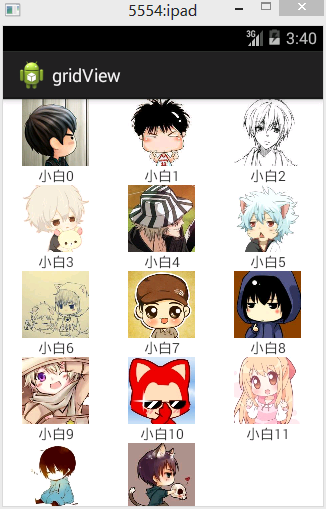
分析:

使用和ListvVew很像,都是经过适配器将数据绑定到控件上
具体步骤如下:
1、创建GridView控件,并指定列数
android:numColumns="3"
2、创建显示数据项的数据容器,是一个Lauout文件,里面一个ImageView,一个TextView
 上面是ImageView,“小白10”是TextView显示的
3、创建好数据,这里用List来实现
private List<HashMap<String, Object>> mData;
mData=new ArrayList<HashMap<String,Object>>();
然后是创建HashMap
HashMap<String, Object> map=new HashMap<String, Object>();
map.put("txt", "小白"+i);
map.put("image", images[i]);
mData.add(map);
4、创建数据适配器,并且将数据绑定到数据适配器
private SimpleAdapter adapter;
adapter=new SimpleAdapter(this, mData, R.layout.itemview1,new String[]{"txt","image"}, new int[]{R.id.textView1,R.id.iv_avator});
5、为GridView设置数据适配器
gridview.setAdapter(adapter);
代码:
fry.Activity01
 package fry;

 import java.util.ArrayList;

 import java.util.HashMap;

 import java.util.List;

 import java.util.Map;

 import com.example.gridView.R;

 import android.app.Activity;

 import android.os.Bundle;

 import android.widget.GridView;

 import android.widget.SimpleAdapter;

 public class Activity01 extends Activity{

     private List<HashMap<String, Object>> mData;

     private GridView gridview;

     private SimpleAdapter adapter;

     private int[] images=new int[]{

             R.drawable.image1,R.drawable.image2,R.drawable.image3,

             R.drawable.image5,R.drawable.image6,R.drawable.image7,

             R.drawable.image8,R.drawable.image9,R.drawable.image10,

             R.drawable.image11,R.drawable.image12,R.drawable.image13,

             R.drawable.image14,R.drawable.image4

     };

     @Override

     protected void onCreate(Bundle savedInstanceState) {

         // TODO Auto-generated method stub

         super.onCreate(savedInstanceState);

         setContentView(R.layout.activity01);

         gridview=(GridView) findViewById(R.id.gridView1);

         mData=new ArrayList<HashMap<String,Object>>();

         for(int i=0;i<images.length;i++){

             HashMap<String, Object> map=new HashMap<String, Object>();

             map.put("txt", "小白"+i);

             map.put("image", images[i]);

             mData.add(map);

         }

         adapter=new SimpleAdapter(this, mData, R.layout.itemview1,

                 new String[]{"txt","image"}, new int[]{R.id.textView1,R.id.iv_avator});

         gridview.setAdapter(adapter);

     }

 }
主界面
/gridView/res/layout/activity01.xml
 <?xml version="1.0" encoding="utf-8"?>

 <LinearLayout xmlns:android="http://schemas.android.com/apk/res/android"

     android:layout_width="match_parent"

     android:layout_height="match_parent"

     android:orientation="vertical" >

     <GridView

         android:id="@+id/gridView1"

         android:layout_width="match_parent"

         android:layout_height="match_parent"

         android:numColumns="3"

         ></GridView>

 </LinearLayout>
创建GridView控件
/gridView/res/layout/itemview1.xml
 <?xml version="1.0" encoding="utf-8"?>

 <LinearLayout xmlns:android="http://schemas.android.com/apk/res/android"

     android:layout_width="match_parent"

     android:layout_height="match_parent"

     android:gravity="center_horizontal"

     android:orientation="vertical" >

     <ImageView

         android:id="@+id/iv_avator"

         android:layout_width="wrap_content"

         android:layout_height="wrap_content"

         android:src="@drawable/image1" />

     <TextView

         android:id="@+id/textView1"

         android:layout_width="wrap_content"

         android:layout_height="wrap_content"

         android:text="小白"

         />

 </LinearLayout>
创建数据项容器
Gridview表格控件的更多相关文章
- 使用 Bolt 实现 GridView 表格控件
用 Bolt 实现了一个表格控件: 1. 提供 Insert,Remove,Get,Set 接口,可以为表格增删数据: 2. 通过 ItemClass, ItemSetDataFunc 属性来指定显 ...
- Android入门之GridView(表格控件)
GridView是一个表格控件,可以在每个单元格中显示自定义的View或者字符串.在这里我们要实现一个图标下方有文字的效果. 1.首先我们应自定义布局文件image_text.xml.代码如下: &l ...
- 深入浅出ExtJS 第三章 表格控件
3.1 表格的特性简介 >.Ext中的表格功能:包括排序/缓存/拖动/隐藏某一列/自动显示行号/列汇总/单元格编辑等实用功能; >.表格由类Ext.grid.GridPanel定义,继承自 ...
- 动态生成表格呈现还是将表格直接绑定gridview等控件呈现的开发方式选择依据
动态生成表格呈现还是将表格直接绑定gridview等控件呈现的开发方式选择依据:由存储过程决定,如果编写的存储过程可以生成需要呈现的表格则直接绑定,否则要动态生成表格
- C# DatrgridView表格控件的一些用法
public class useDatrgrivView { string conn = null; string sqlComm = null; DataSet das = null; DataGr ...
- 在GridControl表格控件中实现多层级主从表数据的展示
在一些应用场景中,我们需要实现多层级的数据表格显示,如常规的二级主从表数据展示,甚至也有多个层级展示的需求,那么我们如何通过DevExpress的GridControl控表格件实现这种业务需求呢?本篇 ...
- 如何在web中实现类似excel的表格控件
Execl功能非常强大,内置的很多函数或公式可以大大提高对数据的加工处理能力.那么在web中有没有类似的控件呢?经过一番搜寻,发现handsontable具备了基本的excel功能支持公式,同时能对数 ...
- 最好的Angular2表格控件
现在市面上有大量的JavaScript数据表格控件,包括开源的第三方的和自产自销的.可以说Wijmo的Flexgrid是目前适应Angular 2的最好的表格控件. Angular 2数据表格基本要求 ...
- 类型“GridView”的控件“GridView1”必须放在具有 runat=server 的窗体标记内。
错误的写法: if (this.GridView1.Rows.Count > 0) { string style = @"<style& ...
随机推荐
- python练习--1、简易登录接口
function:用于实现简单的用户登录接口. description:用户信息存储于字典中,增加用户需手动写入代码中.最多可以尝试登录9次,首次使用会先在程序目录下创建锁文件.若在用户栏输入quit ...
- mySQL用代码添加表格内容 删除数据方法
通过代码对表格内容操作: 1.添加数据insert into Info values('p009','张三',1,'n001','2016-8-30 12:9:8') ; 给特定的列添加数据inser ...
- 从XMLHttpRequest中获取请求的URL
在编写Ajax通用错误处理程序时,经常需要记录发生错误的XMLHttpRequest的请求URL.但查询文档,并未找到从XMLHttpRequest中获取请求URL的方法. 在javascript - ...
- c# ado.net eftity framework 返回多表查询结果
public static IQueryable GetWeiXinTuWenList() { using (var Model = new Model.WeiXinEntities()) { var ...
- JavaScript编程题(一)
使用Javascript脚板输出如图所示的效果页面: 使用document.write()输出水平线 使用循环控制每个水平线的长度 答案:<!doctype html> <html ...
- YTBro Video 2016-07-30 Sat
明日天气:多云转阴,32~24度 运动向 健身 20中极致疯狂的俯卧撑,新手请勿尝试 跑酷 大神放大招,招招见血,不信你看 赛事 2016年世界室内田径锦标赛 男子4×400接力决赛 台球 RP集中爆 ...
- HDU_1711_初识KMP算法
Number Sequence Time Limit: 10000/5000 MS (Java/Others) Memory Limit: 32768/32768 K (Java/Others) ...
- What is the difference between PKCS#5 padding and PKCS#7 padding
The difference between the PKCS#5 and PKCS#7 padding mechanisms is the block size; PKCS#5 padding is ...
- 分享接口管理平台 eoLinker AMS 线上专业版V3.0,只为更好的体验,了解一下?
不知不觉中,eoLinker AMS从2016年上线至今已经三个年头,按照一年一个大版本的迭代计划,我们终于迎来了eoLinker AMS 专业版3.0. AMS产品也从最初专注于API文档管理,成长 ...
- 【VIP视频网站项目二】搭建爱奇艺优酷腾讯视频官网首页轮播图效果及实现原理分析
这个是实现的效果,基本上轮播效果和主流网站的一致,但是我也在上面优化了一些效果, 可以在线预览效果:https://vip.52tech.tech/ 目前项目代码已经全部开源:项目地址:https:/ ...