
一百四十六:CMS系统之帖子按照发布时间和评论数量排序
按照不同选项进行排序
视图

@bp.route('/')
def index():
    board_id = request.args.get('board_id', type=int, default=None)
    banners = BannerModel.query.order_by(BannerModel.priority.desc()).limit(4)  # 只取4条
    boards = BoardModel.query.all()
    sort = request.args.get('sort', type=int, default=1)  # 排序方式:精华帖子、点赞最多、评论最多
    page = request.args.get(get_page_parameter(), type=int, default=1)
    start = (page - 1) * config.PER_PAGE
    end = start + config.PER_PAGE
    if sort == 1:  # 默认时间倒序
        query_obj = PostModel.query.order_by(PostModel.create_time.desc())
    elif sort == 2:  # 加精时间倒序
        query_obj = db.session.query(PostModel).outerjoin(HighlightPostModel).order_by(
            HighlightPostModel.create_time.desc(),  PostModel.create_time.desc())
    elif sort == 3:  # todo 点赞数量倒序
        query_obj = PostModel.query.order_by(PostModel.create_time.desc())
    elif sort == 4:  # 评论数量倒序
        query_obj = db.session.query(PostModel).outerjoin(CommentModel).group_by(
            PostModel.id).order_by(func.count(CommentModel.id).desc(), PostModel.create_time.desc())
    if board_id:
        query_obj = query_obj.filter_by(board_id=board_id)
        posts = query_obj.slice(start, end)
        total = query_obj.count()
    else:
        posts = query_obj.slice(start, end)
        total = PostModel.query.count()
    # bs_version: bootstrap版本
    pagination = Pagination(bs_version=3, page=page, total=total)
    context = {'banners': banners, 'boards': boards, 'posts': posts, 'pagination': pagination,
               'current_board': board_id,  # 把board_id传给前端用于渲染选中事件
               'current_sort': sort}  # 把sort传给前端用于渲染选中事件
    return render_template('front/front_index.html', **context)
前端

{% extends 'front/front_base.html' %}
{% from "common/_macros.html" import static %}

{% block title %}
    首页
{% endblock %}

{% block head %}
    <link rel="stylesheet" href="{{ static('front/css/front_index.css') }}">
{% endblock %}

{% block body %}
    <div class="lg-container">

        <!-- 轮播图 -->
        <div id="carousel-example-generic" class="carousel slide index-banner" data-ride="carousel">
          <!-- 指示器,轮播图下方的圆圈,需与轮播图数量一致 -->
          <ol class="carousel-indicators">
            <li data-target="#carousel-example-generic" data-slide-to="0" class="active"></li>
            <li data-target="#carousel-example-generic" data-slide-to="1"></li>
            <li data-target="#carousel-example-generic" data-slide-to="2"></li>
            <li data-target="#carousel-example-generic" data-slide-to="3"></li>
          </ol>
          <!-- 轮播图 这里的图片是在百度复制的轮播图链接-->
          <div class="carousel-inner" role="listbox">
              {% for banner in banners %}
                {% if loop.first %}
                    <div class="item active">
                {% else %}
                    <div class="item">
                {% endif %}
                <a href="{{ banner.link_url }}"><img src="{{ banner.image_url }}" alt="{{ banner.name }}"></a>
                </div>
              {% endfor %}
          </div>
          <!-- 左右切换的控制按钮 -->
          <a class="left carousel-control" href="#carousel-example-generic" role="button" data-slide="prev">
            <span class="glyphicon glyphicon-chevron-left" aria-hidden="true"></span>
            <span class="sr-only">Previous</span>
          </a>
          <a class="right carousel-control" href="#carousel-example-generic" role="button" data-slide="next">
            <span class="glyphicon glyphicon-chevron-right" aria-hidden="true"></span>
            <span class="sr-only">Next</span>
          </a>
        </div>
        <div class="post-group">
            <ul class="post-group-head">
                {#默认排序按发布时间,2:精华帖子、3:点赞最多、4:评论最多#}
                {% if current_sort == 1 %}
                    <li class="active"><a href="/">最新</a></li>
                {% else %}
                    <li><a href="/">最新</a></li>
                {% endif %}
                {% if current_sort == 2 %}
                    <li class="active"><a href="{{ url_for('front.index', sort=2) }}">精华帖子</a></li>
                {% else %}
                    <li><a href="{{ url_for('front.index', sort=2) }}">精华帖子</a></li>
                {% endif %}
                {% if current_sort == 3 %}
                    <li class="active"><a href="{{ url_for('front.index', sort=3) }}">点赞最多</a></li>
                {% else %}
                    <li><a href="{{ url_for('front.index', sort=3) }}">点赞最多</a></li>
                {% endif %}
                {% if current_sort == 4 %}
                    <li class="active"><a href="{{ url_for('front.index', sort=4) }}">评论最多</a></li>
                {% else %}
                    <li><a href="{{ url_for('front.index', sort=4) }}">评论最多</a></li>
                {% endif %}
            </ul>
            <ul class="post-list-group">
                {% for post in posts %}
                    <li>
                        <div class="author-avatar-group">
                            <img src="{{ post.author.avatar or static('common/images/logo.png') }}" alt="">
                        </div>
                        <div class="posst-info-group">
                            <a href="{{ url_for('front.post_detail', post_id=post.id) }}" class="post-title">{{ post.title }}</a>
                            {% if post.highlight %}
                                <span class="label label-danger">精华帖</span>
                            {% endif %}
                            <p class="post-info">
                                <span>作者: {{ post.author.username }}</span>
                                <span>发表时间: {{ post.create_time }}</span>
                                <span>评论: 0</span>
                                <span>阅读: 0</span>
                            </p>
                        </div>
                    </li>
                {% endfor %}
            </ul>
            <div class="text-center">
                {{ pagination.links }}
            </div>
        </div>
    </div>
    <div class="sm-container">
        <div style="padding-bottom: 10px;">
            <a href="{{ url_for('front.apost') }}" class="btn btn-warning btn-block">发布帖子</a>
        </div>
        <div class="list-group">
        {% if current_board %}
            <a href="/" class="list-group-item">所有板块</a>
        {% else %}
            <a href="/" class="list-group-item active">所有板块</a>
        {% endif %}
        {% for board in boards %}
            {% if board.id == current_board %}
                <a href="{{ url_for('front.index', board_id=board.id) }}" class="list-group-item active">{{ board.name }}</a>
            {% else %}
                <a href="{{ url_for('front.index', board_id=board.id) }}" class="list-group-item">{{ board.name }}</a>
            {% endif %}
        {% endfor %}
        </div>
    </div>
{% endblock %}
效果

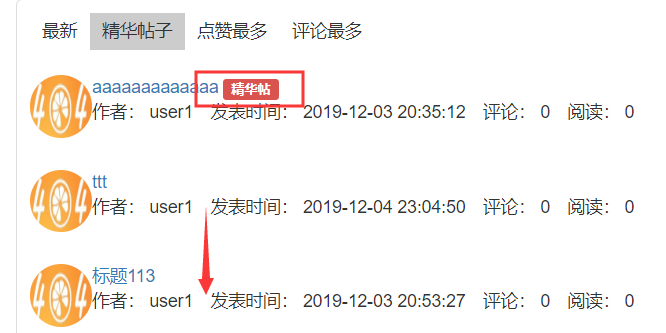
根据板块+选项排序
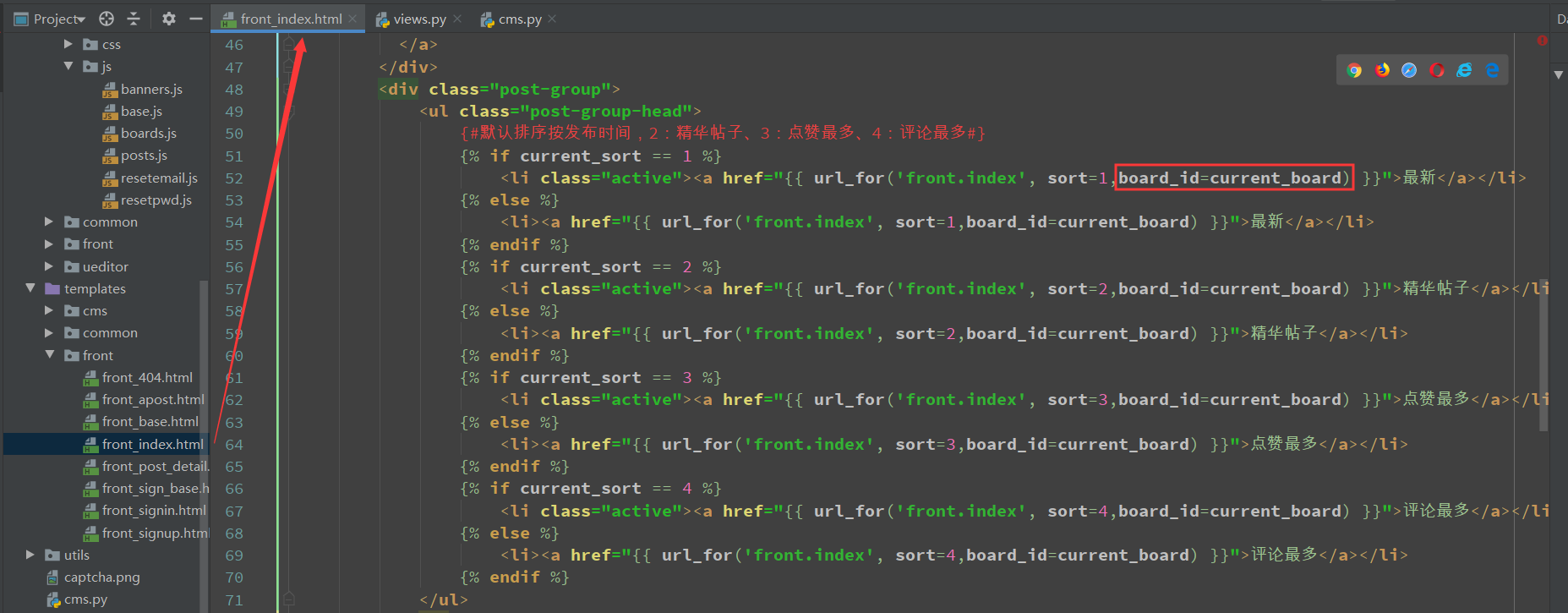
{% extends 'front/front_base.html' %}
{% from "common/_macros.html" import static %}

{% block title %}
    首页
{% endblock %}

{% block head %}
    <link rel="stylesheet" href="{{ static('front/css/front_index.css') }}">
{% endblock %}

{% block body %}
    <div class="lg-container">

        <!-- 轮播图 -->
        <div id="carousel-example-generic" class="carousel slide index-banner" data-ride="carousel">
          <!-- 指示器,轮播图下方的圆圈,需与轮播图数量一致 -->
          <ol class="carousel-indicators">
            <li data-target="#carousel-example-generic" data-slide-to="0" class="active"></li>
            <li data-target="#carousel-example-generic" data-slide-to="1"></li>
            <li data-target="#carousel-example-generic" data-slide-to="2"></li>
            <li data-target="#carousel-example-generic" data-slide-to="3"></li>
          </ol>
          <!-- 轮播图 这里的图片是在百度复制的轮播图链接-->
          <div class="carousel-inner" role="listbox">
              {% for banner in banners %}
                {% if loop.first %}
                    <div class="item active">
                {% else %}
                    <div class="item">
                {% endif %}
                <a href="{{ banner.link_url }}"><img src="{{ banner.image_url }}" alt="{{ banner.name }}"></a>
                </div>
              {% endfor %}
          </div>
          <!-- 左右切换的控制按钮 -->
          <a class="left carousel-control" href="#carousel-example-generic" role="button" data-slide="prev">
            <span class="glyphicon glyphicon-chevron-left" aria-hidden="true"></span>
            <span class="sr-only">Previous</span>
          </a>
          <a class="right carousel-control" href="#carousel-example-generic" role="button" data-slide="next">
            <span class="glyphicon glyphicon-chevron-right" aria-hidden="true"></span>
            <span class="sr-only">Next</span>
          </a>
        </div>
        <div class="post-group">
            <ul class="post-group-head">
                {#默认排序按发布时间,2:精华帖子、3:点赞最多、4:评论最多#}
                {% if current_sort == 1 %}
                    <li class="active"><a href="{{ url_for('front.index', sort=1,board_id=current_board) }}">最新</a></li>
                {% else %}
                    <li><a href="{{ url_for('front.index', sort=1,board_id=current_board) }}">最新</a></li>
                {% endif %}
                {% if current_sort == 2 %}
                    <li class="active"><a href="{{ url_for('front.index', sort=2,board_id=current_board) }}">精华帖子</a></li>
                {% else %}
                    <li><a href="{{ url_for('front.index', sort=2,board_id=current_board) }}">精华帖子</a></li>
                {% endif %}
                {% if current_sort == 3 %}
                    <li class="active"><a href="{{ url_for('front.index', sort=3,board_id=current_board) }}">点赞最多</a></li>
                {% else %}
                    <li><a href="{{ url_for('front.index', sort=3,board_id=current_board) }}">点赞最多</a></li>
                {% endif %}
                {% if current_sort == 4 %}
                    <li class="active"><a href="{{ url_for('front.index', sort=4,board_id=current_board) }}">评论最多</a></li>
                {% else %}
                    <li><a href="{{ url_for('front.index', sort=4,board_id=current_board) }}">评论最多</a></li>
                {% endif %}
            </ul>
            <ul class="post-list-group">
                {% for post in posts %}
                    <li>
                        <div class="author-avatar-group">
                            <img src="{{ post.author.avatar or static('common/images/logo.png') }}" alt="">
                        </div>
                        <div class="posst-info-group">
                            <a href="{{ url_for('front.post_detail', post_id=post.id) }}" class="post-title">{{ post.title }}</a>
                            {% if post.highlight %}
                                <span class="label label-danger">精华帖</span>
                            {% endif %}
                            <p class="post-info">
                                <span>作者: {{ post.author.username }}</span>
                                <span>发表时间: {{ post.create_time }}</span>
                                <span>评论: 0</span>
                                <span>阅读: 0</span>
                            </p>
                        </div>
                    </li>
                {% endfor %}
            </ul>
            <div class="text-center">
                {{ pagination.links }}
            </div>
        </div>
    </div>
    <div class="sm-container">
        <div style="padding-bottom: 10px;">
            <a href="{{ url_for('front.apost') }}" class="btn btn-warning btn-block">发布帖子</a>
        </div>
        <div class="list-group">
        {% if current_board %}
            <a href="/" class="list-group-item">所有板块</a>
        {% else %}
            <a href="/" class="list-group-item active">所有板块</a>
        {% endif %}
        {% for board in boards %}
            {% if board.id == current_board %}
                <a href="{{ url_for('front.index', board_id=board.id) }}" class="list-group-item active">{{ board.name }}</a>
            {% else %}
                <a href="{{ url_for('front.index', board_id=board.id) }}" class="list-group-item">{{ board.name }}</a>
            {% endif %}
        {% endfor %}
        </div>
    </div>
{% endblock %}

效果


一百四十六:CMS系统之帖子按照发布时间和评论数量排序的更多相关文章
- Flask实战第65天:帖子按照发布时间和评论数量等排序
排序,我们需要在前端传递参数, 编辑front_index.html 编辑front.views.py from apps.models import HighlightPostModel from ...
- 一百四十:CMS系统之使用flask-paginate实现分页功能
官方文档:https://pythonhosted.org/Flask-paginate/ 安装:pip install flask-paginate 在没有分页的情况下,默认会加载所有内容 在con ...
- [转]PostgreSQL教程(十六):系统视图详解
这篇文章主要介绍了PostgreSQL教程(十六):系统视图详解,本文讲解了pg_tables.pg_indexes.pg_views.pg_user.pg_roles.pg_rules.pg_set ...
- 第三百四十六节,Python分布式爬虫打造搜索引擎Scrapy精讲—Requests请求和Response响应介绍
第三百四十六节,Python分布式爬虫打造搜索引擎Scrapy精讲—Requests请求和Response响应介绍 Requests请求 Requests请求就是我们在爬虫文件写的Requests() ...
- 一百四十五:CMS系统之帖子加精和取消加精
模型 class HighlightPostModel(db.Model): """ 帖子加精信息 """ __tablename__ = ...
- 一百四十二:CMS系统之帖子详情页面布局
定义一个404页面 <!DOCTYPE html><html lang="en"><head> <meta charset="U ...
- 一百四十一:CMS系统之根据板块过滤显示帖子
视图,根据传过来的板块id查数据 @bp.route('/')def index(): board_id = request.args.get('board_id', type=int, defaul ...
- 一百一十:CMS系统之剩余菜单栏的页面和视图
增加所有剩余菜单的页面,并用视图渲染,方便后面调试权限控制 {% extends 'cms/cms_base.html' %} {% block title %}板块管理{% endblock %} ...
- Mac OS使用技巧之十六:系统失去响应怎么办?
再好的系统,再快的本本,也会在执行时由于种种原因出现卡顿或者死机等失去响应的情况.Mac用户也会时不时碰到这样的情况,最常见的表现为鼠标变为七彩圆圈.通常等上一会儿系统会自己恢复.假设迟迟没有响应的话 ...
随机推荐
- Ajax 的简介与使用
一.什么是Ajax Ajax 的全称是 Asynchronous JavaScript and XML(即异步的 JavaScript 和 XML),是一种在无需重新加载整个网页的情况下,能够更新部分 ...
- python实现查找算法
搜索是在一个项目集合中找到一个特定项目的算法过程.搜索通常的答案是真的或假的,因为该项目是否存在. 搜索的几种常见方法:顺序查找.二分法查找.二叉树查找.哈希查找 线性查找线性查找就是从头找到尾,直到 ...
- 大数据之路week07--day01(HDFS学习,Java代码操作HDFS,将HDFS文件内容存入到Mysql)
一.HDFS概述 数据量越来越多,在一个操作系统管辖的范围存不下了,那么就分配到更多的操作系统管理的磁盘中,但是不方便管理和维护,因此迫切需要一种系统来管理多台机器上的文件,这就是分布式文件管理系统 ...
- super关键字小结(构造方法的执行是不是一定会创建对象?)
1.父类 public class Person { private String name = "李四"; private int age; public Person() { ...
- python - scrapy 爬虫框架 ( redis去重 )
1. 使用内置,并加以修改 ( 自定义 redis 存储的 keys ) settings 配置 # ############### scrapy redis连接 ################# ...
- selenium之python源码解读-WebDriverWait
一.显示等待 所谓显示等待,是针对某一个特定的元素设置等待时间,如果在规定的时间内找到了该元素,就执行相关的操作,如果在规定的时间内没有找到该元素,在抛出异常 PS:注意显示等待和隐身等待的区别,隐身 ...
- [GraphQL] Set variable and default value & alias
query($category:PetCategory=CAT, $status:PetStatus=AVAILABLE) { #availablePets is the alias availabl ...
- [AGC028B]Removing Blocks 概率与期望
考虑算每一个位置在所有情况的期望值乘以全排列似乎就是答案. 那么对于 $i$,如果要由 $j$ 来贡献的话就要满足 $j$ 在 $i....j-1$ 之前先拿. 而在拿 $j$ 时,先于 $i...j ...
- 节点(node)操作
一.节点的属性 节点值页面中的所有内容,包括标签.属性.文本 nodeType,节点类型:如果是标签,则是1:如果是属性.则是2:如果是文本,则是3 nodeName,节点名字:如果是标签,则是大写的 ...
- 下载安装tomcat 部署本地项目
原文地址:https://blog.csdn.net/weixin_40396459/article/details/81706543 下载地址:http://tomcat.apache.org 点击 ...