
简单消息监听容器--SimpleMessageListenerContainer
这个类非常强大,我们可以对他做很多设置,对于消费者的配置项,这个类都可以满足
监听队列(多个队列)、自动启动、自动声明功能
可以设置事务特性、事务管理器、事务属性、事务容量(并发)、是否开启事务、回滚消息等
可以设置消费者数量、最大最小数量、批量消费
设置消息确认和自动确认模式、是否重回队列、异常捕获handler函数
设置消费者标签生成策略、是否独占模式、消费者属性等
设置具体的转换器、消息转换器等
很多基于RabbitMQ的自制定化后端管控台在进行动态配置的时候,也是根据这一特性去实现的。
注意:SimpleMessageListenerContainer可以进行动态设置,比如在运行中的应用可以动态
修改其消费者数量的大小、接收消息的模式等
SimpleMessageListenerContainer为什么可以进行动态感知设置变更?
package com.dwz.spring;

import java.util.UUID;

import org.springframework.amqp.core.AcknowledgeMode;

import org.springframework.amqp.core.Binding;

import org.springframework.amqp.core.BindingBuilder;

import org.springframework.amqp.core.Message;

import org.springframework.amqp.core.Queue;

import org.springframework.amqp.core.TopicExchange;

import org.springframework.amqp.rabbit.connection.CachingConnectionFactory;

import org.springframework.amqp.rabbit.connection.ConnectionFactory;

import org.springframework.amqp.rabbit.core.RabbitAdmin;

import org.springframework.amqp.rabbit.core.RabbitTemplate;

import org.springframework.amqp.rabbit.listener.SimpleMessageListenerContainer;

import org.springframework.amqp.rabbit.listener.api.ChannelAwareMessageListener;

import org.springframework.amqp.support.ConsumerTagStrategy;

import org.springframework.context.annotation.Bean;

import org.springframework.context.annotation.ComponentScan;

import org.springframework.context.annotation.Configuration;

import com.rabbitmq.client.Channel;

@Configuration

@ComponentScan("com.dwz.spring.*")

public class RabbitMQConfig {

    @Bean

    public ConnectionFactory connectionFactory() {

        CachingConnectionFactory connectionFactory = new CachingConnectionFactory();

        connectionFactory.setAddresses("127.0.0.1:5672");

        connectionFactory.setVirtualHost("/vhost_dwz");

        connectionFactory.setUsername("root_dwz");

        connectionFactory.setPassword("123456");

        return connectionFactory;

    }

    @Bean

    public RabbitAdmin rabbitAdmin(ConnectionFactory connectionFactory) {

        RabbitAdmin rabbitAdmin = new RabbitAdmin(connectionFactory);

        System.err.println("RabbitAdmin启动了。。。");

        //设置启动spring容器时自动加载这个类(这个参数现在默认已经是true,可以不用设置)

        rabbitAdmin.setAutoStartup(true);

        return rabbitAdmin;

    }

    @Bean

    public RabbitTemplate rabbitTemplate(ConnectionFactory connectionFactory) {

        RabbitTemplate rabbitTemplate = new RabbitTemplate(connectionFactory);

        return rabbitTemplate;

    }

    /**

     *     针对消费者的配置

     * 1.设置交换机的类型

     * 2.将队列绑定到交换机

     * FanoutExchange:将消息分发到所有绑定的队列,无routingkey的概念

     * TopicExchange:多关键字匹配

     * HeadersExchange:通过添加属性key-value匹配

     * DirectExchange:按照routingkey分发到指定队列

     */

    @Bean

    public TopicExchange exchange001() {

        return new TopicExchange("topic001", true, false);

    }

    @Bean

    public Queue queue001() {

        return new Queue("queue001", true);//队列持久化

    }

    @Bean

    public Binding binding001() {

        return BindingBuilder.bind(queue001()).to(exchange001()).with("spring.*");

    }

    @Bean

    public TopicExchange exchange002() {

        return new TopicExchange("topic002", true, false);

    }

    @Bean

    public Queue queue002() {

        return new Queue("queue002", true);//队列持久化

    }

    @Bean

    public Binding binding002() {

        return BindingBuilder.bind(queue002()).to(exchange002()).with("rabbit.*");

    }

    @Bean

    public TopicExchange exchange003() {

        return new TopicExchange("topic003", true, false);

    }

    @Bean

    public Queue queue003() {

        return new Queue("queue003", true);//队列持久化

    }

    @Bean

    public Binding binding003() {

        return BindingBuilder.bind(queue003()).to(exchange003()).with("mq.*");

    }

    @Bean

    public Queue queue_image() {

        return new Queue("image_queue", true);//队列持久化

    }

    @Bean

    public Queue queue_pdf() {

        return new Queue("pdf_queue", true);//队列持久化

    }

    /*

     *     简单消息监听容器

     */

    @Bean

    public SimpleMessageListenerContainer messageContainer(ConnectionFactory connectionFactory) {

        SimpleMessageListenerContainer container = new SimpleMessageListenerContainer(connectionFactory);

        //同时监听多个队列

        container.setQueues(queue001(), queue002(), queue003(), queue_image(), queue_pdf());

        //设置当前的消费者数量

        container.setConcurrentConsumers(1);

        container.setMaxConcurrentConsumers(5);

        //设置是否重回队列

        container.setDefaultRequeueRejected(false);

        //设置自动签收

        container.setAcknowledgeMode(AcknowledgeMode.AUTO);

        //设置监听外露

        container.setExposeListenerChannel(true);

        //设置消费端标签策略

        container.setConsumerTagStrategy(new ConsumerTagStrategy() {

            @Override

            public String createConsumerTag(String queue) {

                return queue + "_" + UUID.randomUUID().toString();

            }

        });

        //设置消息监听

        container.setMessageListener(new ChannelAwareMessageListener() {

            @Override

            public void onMessage(Message message, Channel channel) throws Exception {

                String msg = new String(message.getBody(), "utf-8");

                System.out.println("-----------消费者:" + msg);

            }

        });

        return container;

    }

}
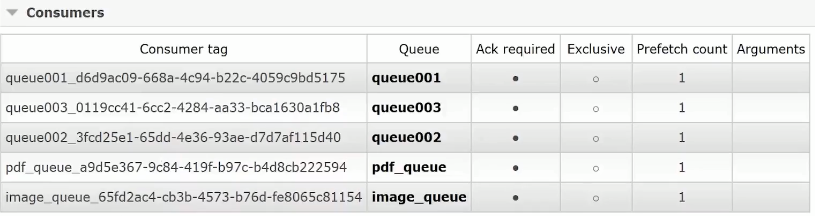
自定义消费端标签策略效果图:
简单消息监听容器--SimpleMessageListenerContainer的更多相关文章
- 多线程消息监听容器配置[ 消费者spring-kafka配置文件]
<?xml version="1.0" encoding="UTF-8"?> <beans xmlns="http://www.sp ...
- spring与activemq(三种消息监听方式)
1.3 消息监听器MessageListener 在Spring整合JMS的应用中我们在定义消息监听器的时候一共可以定义三种类型的消息监听器,分别是MessageListener.Sessio ...
- Java ActiveMQ 讲解(二)Spring ActiveMQ整合+注解消息监听
对于ActiveMQ消息的发送,原声的api操作繁琐,而且如果不进行二次封装,打开关闭会话以及各种创建操作也是够够的了.那么,Spring提供了一个很方便的去收发消息的框架,spring jms.整合 ...
- Spring整合ActiveMQ及多个Queue消息监听的配置
消息队列(MQ)越来越火,在java开发的项目也属于比较常见的技术,MQ的相关使用也成java开发人员必备的技能.笔者公司采用的MQ是ActiveMQ,且消息都是用的点对点的模式.本文记录了实 ...
- XMPP——Smack[2]会话、消息监听、字体表情和聊天窗口控制
连接之后,拿到了connection,通过它可以搞定会话 建立一个会话 MessageListener msgListener = new MessageListener() { public voi ...
- C# PC版微信消息监听自动回复
最近有个微商客户需要搞个 个人微信监听群消息关键字并实现自动回复功能, 因为他有很多群 很多买家咨询的话 一个个回复太麻烦, 客户要求 比如群里有人发 关键字 产品1 则自动回复产品1的相关描述 ...
- 使用jedis实现Redis消息队列(MQ)的发布(publish)和消息监听(subscribe)
前言: 本文基于jedis 2.9.0.jar.commons-pool2-2.4.2.jar以及json-20160810.jar 其中jedis连接池需要依赖commons-pool2包,json ...
- 聊天框Demo:DotNetCore+ActiveMQ+Mqttjs 实现前后台消息监听
网上查了查 ActiveMQ + .net core 的例子很少,自己做一个demo 作为记录,另外FineUI Core基础版要来了,出来后我会用FineUI再做一版,为知识星球的引流... 1.安 ...
- spring boot 监听容器启动
/** * 在容器启动的时候 加载没问完成的消息重发 * @author zhangyukun * */ @Component @Slf4j public class LoadMessageListe ...
随机推荐
- lua的数据类型
Lua 是动态(弱)类型的语言,它有一下几种数据结构: nil(空) nil 类型表示一种没有任何有效值,它只有一个值 -- nil,例如打印一个没有赋值的变量,便会输出一个 nil 值: print ...
- C#等比列放大缩小图片
public Bitmap ChangeImgSize(Image bit, double Multiple) { Bitmap newBitmap ...
- 如何解决windows 80端口被占用的情况
window下如果在安装某个软件或者启动tomcat时 会遇到80端口被占用的情况,通过命令 netstat -ano 查看端口被占用情况 找到占用80端口的进程ID,然后我们在任务管理器当中将这个进 ...
- warning LNK4076: 无效的增量状态文件“../×××.ilk”;正在非增量链接
VS编译警告:warning LNK4076: 无效的增量状态文件“../×××.ilk”;正在非增量链接 解决方法:删除程序提示的输出目录的×××.ilk,重新编译,即可
- 什么是IOC和什么是AOP,依赖注入(DI)和Ninject,Ninject
我们所需要的是,在一个类内部,不通过创建对象的实例而能够获得某个实现了公开接口的对象的引用.这种“需要”,就称为DI(依赖注入,Dependency Injection),和所谓的IoC(控制反转,I ...
- JS中数组与对象的遍历方法实例小结
一.数组的遍历: 首先定义一个数组 1 arr=['snow','bran','king','nightking']; 1.for循环,需要知道数组的长度; 2.foreach,没有返回值,可以不知道 ...
- 用vue写一个分页器代码
分页是项目中常会用到的,网上的插件也很多,但是有些功能太齐全反而不是必要的,所以抽时间自己写了一下(小白写代码,若发现问题还请及时赐教,感激不尽……) 如图,想要一个这样的页码: a. 上一页.下一页 ...
- 如何解决comctl32.dll文件丢失的问题?
有些Win7系统用户在电脑开机时,系统会出现提示找不到comctl32.dll文件的情况,遇到这个问题我们该怎么去解决呢?好系统重装助手下面就来告诉你方法. Win7系统开机提示找不到comctl32 ...
- K-MEANS算法及sklearn实现
K-MEANS算法 聚类概念: 1.无监督问题:我们手里没有标签 2.聚类:相似的东西分到一组 3.难点:如何评估,如何调参 4.要得到簇的个数,需要指定K值 5.质心:均值,即向量各维取平均即可 6 ...
- Scrapy爬取小说简单逻辑
Scrapy爬取小说简单逻辑 一 准备工作 1)安装Python 2)安装PIP 3)安装scrapy 4)安装pywin32 5)安装VCForPython27.exe ........... 具体 ...