
安装和使用 Elasticsearch(1.1.1)+marvel插件、Kibana插件
Elasticsearch是开源搜索平台的新成员,实时数据分析的神器,发展迅猛,基于 Lucene、RESTful、分布式、面向云计算设计、实时搜索、全文搜索、稳定、高可靠、可扩展、安装+使用方便,介绍都说的很好听,好不好用拿出来遛一遛。
做了个简单测试,在两台完全一样的虚拟机上,2000万条左右数据,Elasticsearch 插入数据速度比 MongoDB 慢很多(可以忍受),但是搜索/查询速度快10倍以上,这只是单机情况,多机集群情况下 Elasticsearch 表现更好一些。以下安装步骤在 Ubuntu Server 14.04 LTS 上完成。
安装 Elasticsearch
升级系统后安装 Oracle Java 7,既然 Elasticsearch 官方推荐使用 Oracle JDK 7 就不要尝试 JDK 8 和 OpenJDK 了:
$ sudo apt-get update

$ sudo apt-get upgrade

$ sudo apt-get install software-properties-common

$ sudo add-apt-repository ppa:webupd8team/java

$ sudo apt-get update

$ sudo apt-get install oracle-java7-installer
加入 Elasticsearch 官方源后安装 elasticsearch:
$ wget -O - http://packages.elasticsearch.org/GPG-KEY-elasticsearch | apt-key add -

$ sudo echo "deb http://packages.elasticsearch.org/elasticsearch/1.1/debian stable main" >> /etc/apt/sources.list

$ sudo apt-get update

$ sudo apt-get install elasticsearch
加入到系统启动文件并启动 elasticsearch 服务,用 curl 测试一下安装是否成功:
$ sudo update-rc.d elasticsearch defaults 95 1

$ sudo /etc/init.d/elasticsearch start

$ curl -X GET 'http://localhost:9200'

{

  "status" : 200,

  "name" : "Fer-de-Lance",

  "version" : {

    "number" : "1.1.1",

    "build_hash" : "f1585f096d3f3985e73456debdc1a0745f512bbc",

    "build_timestamp" : "2014-04-16T14:27:12Z",

    "build_snapshot" : false,

    "lucene_version" : "4.7"

  },

  "tagline" : "You Know, for Search"

}
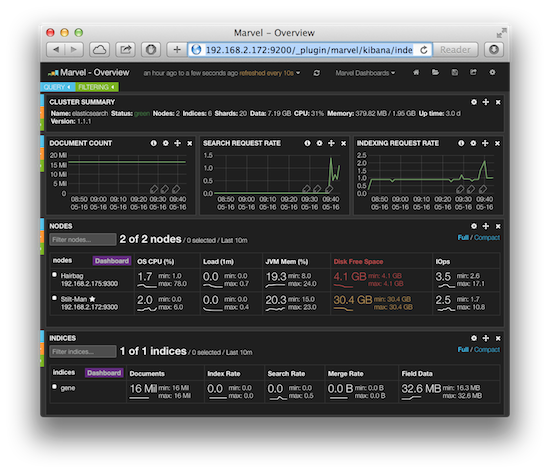
Elasticsearch 的集群和数据管理界面 Marvel 非常赞,可惜只对开发环境免费,如果这个工具也免费就无敌了,安装很简单,完成后重启服务访问 http://192.168.2.172:9200/_plugin/marvel/ 就可以看到界面:
$ sudo /usr/share/elasticsearch/bin/plugin -i elasticsearch/marvel/latest

$ sudo /etc/init.d/elasticsearch restart

 * Stopping Elasticsearch Server                                           [ OK ]

 * Starting Elasticsearch Server                                           [ OK ]
安装 Python 客户端驱动
和 MongoDB 一样,我们一般用程序和 Elasticsearch 交互,Elasticsearch 也支持多种语言的客户端驱动,这里仅安装 Python 驱动,其他语言可以参考官方文档。
$ sudo apt-get install python-pip

$ sudo pip install elasticsearch
写个简单程序把 gene_info.txt 的数据导入到 Elasticsearch:
#!/usr/bin/python

# -*- coding: UTF-8 -*-

import os, os.path, sys, re

import csv, time, string

from datetime import datetime

from elasticsearch import Elasticsearch

def import_to_db():

    data = csv.reader(open('gene_info.txt', 'rb'), delimiter='\t')

    data.next()

    es = Elasticsearch()

    for row in data:

        doc = {

            'tax_id': row[0],

            'GeneID': row[1],

            'Symbol': row[2],

            'LocusTag': row[3],

            'Synonyms': row[4],

            'dbXrefs': row[5],

            'chromosome': row[6],

            'map_location': row[7],

            'description': row[8],

            'type_of_gene': row[9],

            'Symbol_from_nomenclature_authority': row[10],

            'Full_name_from_nomenclature_authority': row[11],

            'Nomenclature_status': row[12],

            'Other_designations': row[13],

            'Modification_date': row[14]

        }

        res = es.index(index="gene", doc_type='gene_info', body=doc)

def main():

    import_to_db()

if __name__ == "__main__":

    main()
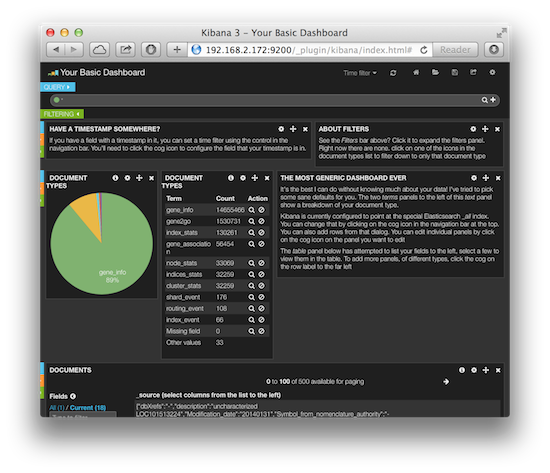
Kibana 是一个功能强大的数据显示客户端,通过插件方式和 Elasticsearch 集成在一起,安装很容易,下载解压就可以了,然后重启 Elasticsearch 服务访问 http://192.168.2.172:9200/_plugin/kibana/ 就能看到界面:
$ wget https://download.elasticsearch.org/kibana/kibana/kibana-3.0.1.tar.gz

$ tar zxvf kibana-3.0.1.tar.gz

$ sudo mv kibana-3.0.1 /usr/share/elasticsearch/plugins/_site

$ sudo /etc/init.d/elasticsearch restart
安装和使用 Elasticsearch(1.1.1)+marvel插件、Kibana插件的更多相关文章
- Centos 7安装和配置 ElasticSearch入门小白
实验环境: 操作系统:Centos 7.5 服务器ip:192.168.1.198 运行用户:root 网络环境:Internet 在企业生产环境有很多服务器的时候.很多业务模块的日志的时候运维人员需 ...
- CentOS7上安装配置破解Elasticsearch+Kibana 6.4.2-6.5.1全过程
最近正在学习服务器应用平台的搭建的相关知识.有幸从朋友与书上了解到Elastic套件的使用,我花了两天的时间把最新的套件部署在我的服务器上,中间踩了数不清的坑.我把整个过程都记录了下来与各位有需要的朋 ...
- 爬虫数据存储——安装docker和ElasticSearch(基于Centos7)
爬虫数据存储--安装docker和ElasticSearch(基于Centos7) 先决条件 操作系统要求 要安装Docker Engine-Community,您需要一个CentOS 7的维护版本. ...
- Docker下安装Elasticsearch、ik分词器、kibana
1:使用docker拉取Elasticsearch镜像 docker pull elasticsearch:7.12.0(不加版本号默认是最新版本) 2:查看是否成功下载镜像 docker image ...
- 【Elasticsearch全文搜索引擎实战】之Kibana搭建
1. Kibana介绍 Kibana是一个针对Elasticsearch的开源分析及可视化平台,用来搜索.查看交互存储在Elasticsearch索引中的数据.使用Kibana,可以通过各种图表进行高 ...
- ES 04 - 安装Kibana插件(6.6.0版本)
目录 1 Kibana是什么 2 安装并启动Kibana 2.1 准备安装包 2.2 修改配置文件 2.3 启动Kibana并验证 2.4 关闭Kibana服务 3 Kibana功能测试 3.1 关于 ...
- Windows下同一台机器上elasticsearch集群的配置以及elasticsearch-head插件的使用
ElasticSearch是一个基于Lucene的开源搜索服务器,现已经被越来越多的企业运用于项目当中,笔者为了学习es在自己机器上简单的搭建了一个es集群,此文权当记录. 1.我用到的压缩包 下载地 ...
- (1)安装elastic6.1.3及插件kibana,x-pack,essql,head,bigdesk,cerebro,ik
1.安装环境及程序版本 操作系统: centos6.7 jdk: 1.8.0_102 elastic: 1.6.3 kibana: 1.6.3 x-pack: 1.6.3 es-sql: 1.6.3 ...
- 利用kibana插件对Elasticsearch查询
利用kibana插件对Elasticsearch查询 Elasticsearch是功能非常强大的搜索引擎,使用它的目的就是为了快速的查询到需要的数据. 查询分类: 基本查询:使用Elasticsear ...
随机推荐
- redis rdb文件解析
http://www.ttlsa.com/python/redis-rdb-tools-analysis-of-reids-dump-file-and-memory-usage/ redis-rdb- ...
- SpringMVC将表单对象序列化成Json字符串提交,以List接收
出自:http://blog.csdn.net/m0_37595732/article/details/71440853 HTML <%@ page language="java&qu ...
- Spring boot + Gradle + Eclipse打war包发布总结
首先感谢两位博主的分享 http://lib.csdn.net/article/git/55444?knId=767 https://my.oschina.net/alexnine/blog/5406 ...
- SignalR web实时同步 消息推送 广播
源码:https://github.com/SignalR/SignalR demo:http://download.csdn.net/download/qq_21533697/9702791#com ...
- nextcloud 安装
nextcloud 优化 设置php.ini vim /etc/php/7.0/apache2/php.ini 添加以下代码: opcache.enable= opcache.enable_cli= ...
- 前端开发之CSS入门篇
一.CSS介绍和语法 二.CSS引入方式 三.基本选择器 四.高级选择器 五.伪类选择器 六.伪元素选择器 1️⃣ CSS介绍和语法 1. CSS的介绍 (1)为什么需要CSS? 使用css的目的就 ...
- 69. Sqrt(x) (Divide-and-Conquer)
Implement int sqrt(int x). Compute and return the square root of x. 注意: 计算平方的时候可能会溢出,所以mid要定义为long 另 ...
- 108.Convert Sorted Array to Binary Search Tree(Array; Divide-and-Conquer, dfs)
Given an array where elements are sorted in ascending order, convert it to a height balanced BST. 思路 ...
- 从顶端插入,滚动展示(Demo):
新闻滚动,从顶端插入: <!DOCTYPE html> <html> <head> <script src="/jquery/jquery-1.11 ...
- hibernate 反向生实体类 and 为什么老是多一个id
hibernate 反向生实体类 and 为什么老是多一个id 2017年04月01日 20:32:51 阅读数:548