
Android-显示意图和隐式意图
显示意图,一般情况下是用于,APP应用自身:组件(Activity,Service,...) 与 组件(Activity,Service,...) 的激活调用:
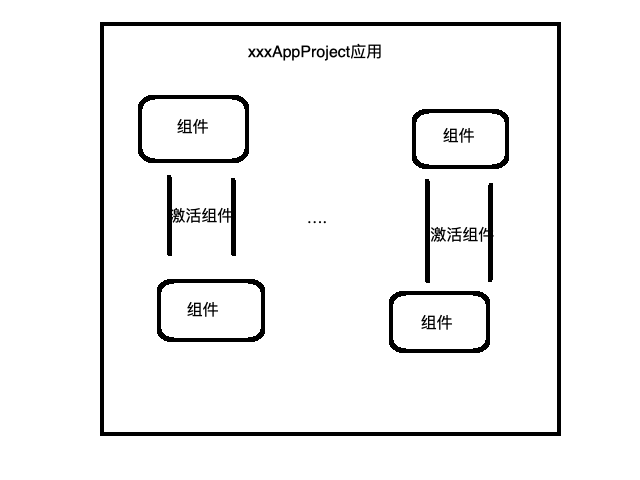
显示意图,是可以看得到,明确激活哪一个Activity
package liudeli.activity.intent;

import android.app.Activity;

import android.content.ComponentName;

import android.content.Intent;

import android.os.Bundle;

import android.view.View;

import liudeli.activity.R;

public class OneActivity extends Activity {

    @Override

    protected void onCreate(Bundle savedInstanceState) {

        super.onCreate(savedInstanceState);

        setContentView(R.layout.activity_one);

    }

    public void startTwoActivity(View view) {

        /**

         * 显示意图激活的三种方式

         */

        // 1.快捷方式激活

        // Intent intent = new Intent(this, TwoActivity.class);

        // 2.面向组件激活,老外很喜欢用这种方式激活

        /*Intent intent = new Intent();

        ComponentName componentName = new ComponentName(this, TwoActivity.class);

        intent.setComponent(componentName);*/

        // 3.设置Class方式激活

        /*Intent intent = new Intent();

        intent.setClass(this, TwoActivity.class);*/

        // 4.设置ClassName方式激活,传入完整包名+类名

        Intent intent = new Intent();

        intent.setClassName(this, "liudeli.activity.intent.TwoActivity");

        startActivity(intent);

    }

    @Override

    protected void onDestroy() {

        super.onDestroy();

    }

}
activity_one.xml:
<?xml version="1.0" encoding="utf-8"?>

<RelativeLayout

    xmlns:android="http://schemas.android.com/apk/res/android"

    android:layout_width="match_parent"

    android:layout_height="match_parent">

    <Button

        android:layout_width="wrap_content"

        android:layout_height="wrap_content"

        android:layout_centerInParent="true"

        android:text="激活"

        android:onClick="startTwoActivity"

        />

</RelativeLayout>
隐式意图,隐式意图一般情况下用于,两个应用程序的:组件(Activity,Service,...) 与 组件(Activity,Service,...) 的激活调用:
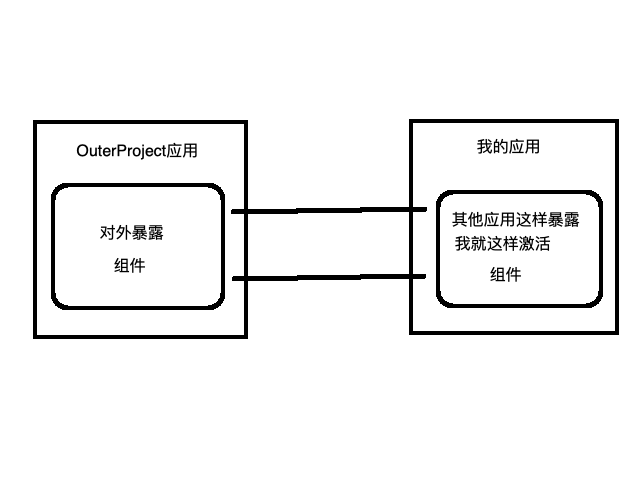
OuterProject应用的MainActivity需要对外暴露(在AndroidManifest.xml 文件中 对Activity 配置 Intent-filter):
必须要有动作标识:wo.shi.outer.project.main.activity.action
必须要有一个缺省:<category android:name="android.intent.category.LAUNCHER" />
    <activity android:name=".MainActivity">

            <intent-filter>

                <action android:name="wo.shi.outer.project.main.activity.action" />

                <category android:name="android.intent.category.DEFAULT" />

            </intent-filter>

        </activity>
我的应用的OneActivity去隐式意图激活,OuterProject应用的MainActivity
在这里为什么不需要设置:category android:name="android.intent.category.DEFAULT",因为在startActivity会自动添加
    /**

         * 隐士意图去激活 OuterProject应用的Activity

         *

        /*

            <intent-filter>

                <action android:name="wo.shi.outer.project.main.activity.action" />

                <category android:name="android.intent.category.DEFAULT" />

            </intent-filter>

         */

        Intent intent = new Intent();

        intent.setAction("wo.shi.outer.project.main.activity.action");

        intent.setPackage("liudeli.outer");

        // 在这里为什么不需要设置:category android:name="android.intent.category.DEFAULT",因为在startActivity会自动添加

        startActivity(intent);
OuterProject应用的MainActivity
Intent-filter 参数增加:
     <!--

            android:mimeType="aa/bb" 必须是 xxx/xxx 这种格式,否则安装应用的时候解析失败

            android:scheme="mydata" 不需要 mydata:, 但是在激活的那边需要加:

         -->

        <activity android:name=".MainActivity">

            <intent-filter>

                <action android:name="wo.shi.outer.project.main.activity.action" />

                <category android:name="android.intent.category.DEFAULT" />

                <data android:scheme="mydata" android:mimeType="aa/bb" />

            </intent-filter>

        </activity>
我的应用的OneActivity去隐式意图激活
/**
* 隐士意图去激活 OuterProject应用的Activity
*/
/*
<intent-filter> <action android:name="wo.shi.outer.project.main.activity.action" /> <category android:name="android.intent.category.DEFAULT" /> <data android:scheme="mydata" android:mimeType="aa/bb" /> </intent-filter>
*/
Intent intent = new Intent();
intent.setAction("wo.shi.outer.project.main.activity.action");
intent.setPackage("liudeli.outer"); // 注意⚠️:当有Data和Type的时候,这种方式不可用Android-显示意图和隐式意图的更多相关文章
- Android学习记录(7)—Intent中显示意图和隐式意图的用法
Intent(意图)主要是解决Android应用的各项组件之间的通讯. Intent负责对应用中一次操作的动作.动作涉及数据.附加数据进行描述,Android则根据此Intent的描述,负责找到对应的 ...
- Android 显示意图和隐式意图的区别
意图在android的应用开发中是很重要的,明白了意图的作用和使用后,对开发会有很大帮助.如果没有把意图搞懂,以后开发应用会感觉缺些什么. 意图的作用: 1.激活组件 ...
- 基础学习总结(八)--Intent中显示意图和隐式意图的用法
Intent(意图)主要是解决Android应用的各项组件之间的通讯.Intent负责对应用中一次操作的动作.动作涉及数据.附加数据进行描述,Android则根据此Intent的描述,负责找到对应的组 ...
- Android的显示意图和隐式意图总结
显示意图 简而言之: 通过指定特定Activity的包名和类名开启Activity 应用场景: 一般应用于本App内的activity间的跳转. XML配置信息: AndroidManifest.xm ...
- Android中显式意图和隐式意图的区别
1.显式意图 可以直接通过名称开启指定的目标组件: 通过构造方法Intent(Context packageContext,class<?>cls)来实现. button_1 = (But ...
- Activity组件:(一)通过显式意图和隐式意图来实现Activity间的跳转
一.通过显式意图来实现Activity间的跳转 显式意图是指在创建Intent对象时就指定接受者组件 /** * 下面是通过显式意图进行跳转,即明确写出要跳转到SecondActivity.class ...
- Activity组件(二):通过显式意图和隐式意图来跳转至第三方应用
一.显式意图来跳转到第三方应用 /** * 这个方法会在点击按钮的时候执行 * @param view */ public void skip2Browser(View view){ Log.d(TA ...
- android intent 隐式意图和显示意图(activity跳转)
android中的意图有显示意图和隐式意图两种, 显示意图要求必须知道被激活组件的包和class 隐式意图只需要知道跳转activity的动作和数据,就可以激活对应的组件 A 主activity B ...
- 无废话Android之smartimageview使用、android多线程下载、显式意图激活另外一个activity,检查网络是否可用定位到网络的位置、隐式意图激活另外一个activity、隐式意图的配置,自定义隐式意图、在不同activity之间数据传递(5)
1.smartimageview使用 <LinearLayout xmlns:android="http://schemas.android.com/apk/res/android&q ...
- Android学习笔记_17_Intent匹配规则(隐式意图)
Android基本的设计理念是鼓励减少组件间的耦合,因此Android提供了Intent (意图) ,Intent提供了一种通用的消息系统,它允许在你的应用程序与其它的应用程序间传递Intent来执行 ...
随机推荐
- CentOS7.6安装Redis
官网下载地址:https://redis.io/download 第一步:软件下载安装 进行安装目录:cd /opt/software (如果目录不存在,请先创建目录) 下载二进制包:wget htt ...
- 1、linux软件包管理
linux软件包管理分为两种:RPM包管理和源码包管理,其中RPM包管理又有两种方式:①RPM命令管理,②YUM在线命令管理. RPM包依赖关系: 1.树形依赖 2.环形依赖 (用一条命令同时装来解决 ...
- 「小程序JAVA实战」小程序我的个人信息页面开发(41)
转自:https://idig8.com/2018/09/05/xiaochengxujavashizhanxiaochengxuwodegerenxinxiyemiankaifa40/ 已经完成了登 ...
- a.call(b); call 方法
a.call(b); a.apply(b,[]) function class1() { this.name = function(){ alert("class1的方法name()&quo ...
- Git 联机版
简介: 之前研究了 Git 单机版 ( 单兵作战 ),今天来研究一下 Git 联机版 ( 团队协作 )! GitHub 是一个开源的代码托管平台,可以分享自己的代码到该平台上,让大家参与开发或供大家使 ...
- @manyToOne.@oneToMany
@ManyToOne注解的这端,是多端 1.在注释@ManyToOne(cascade=CascadeType.REFRESH,optional=true)中将属性optional设置为true,这可 ...
- avalon1.3的新特性预览
avalon1.2的性能优化风暴很快就告一段落,入职也快一个月了,许多乱七八糟的事也少了下来,估计未来一个月会有许多好东呈现给大家. 首先是一个性能检测工具.由于MVVM是将原本由人脑干的事,转到各种 ...
- SQL Compare数据库版本比较工具
Red Gate系列文章: Red Gate系列之一 SQL Compare 10.4.8.87 Edition 数据库比较工具 完全破解+使用教程 Red Gate系列之二 SQL Source C ...
- Java 8特性
1. Java8的新特性 1.1. Lambda表达式和函数式接口 最简单的Lambda表达式可以用逗号分隔的参数列表.->符号和功能语句块来表示.示例如下: Arrays.asList( &q ...
- json操作工具-LitJson
LitJSON是json生成与读取的操作工具,使用很方便并且网上还能找到源码.下面是使用LitJSON的例子: 一.生成json:实例化一个JsonData,然后按照List数组的方式向里面填. Js ...