
Python使用PDFMiner解析PDF
近期在做爬虫时有时会遇到网站只提供pdf的情况,这样就不能使用scrapy直接抓取页面内容了,只能通过解析PDF的方式处理,目前的解决方案大致只有pyPDF和PDFMiner。因为据说PDFMiner更适合文本的解析,而我需要解析的正是文本,因此最后选择使用PDFMiner(这也就意味着我对pyPDF一无所知了)。
首先说明的是解析PDF是非常蛋疼的事,即使是PDFMiner对于格式不工整的PDF解析效果也不怎么样,所以连PDFMiner的开发者都吐槽PDF is evil. 不过这些并不重要。官方文档在此:http://www.unixuser.org/~euske/python/pdfminer/index.html
一.安装:
1.首先下载源文件包 http://pypi.python.org/pypi/pdfminer/,解压,然后命令行安装即可:python setup.py install
2.安装完成后使用该命令行测试:pdf2txt.py samples/simple1.pdf,如果显示以下内容则表示安装成功:
Hello World Hello World H e l l o W o r l d H e l l o W o r l d
3.如果要使用中日韩文字则需要先编译再安装:
# make cmap
python tools/conv_cmap.py pdfminer/cmap Adobe-CNS1 cmaprsrc/cid2code_Adobe_CNS1.txtreading 'cmaprsrc/cid2code_Adobe_CNS1.txt'...writing 'CNS1_H.py'......(this may take several minutes)
# python setup.py install
二.使用
由于解析PDF是一件非常耗时和内存的工作,因此PDFMiner使用了一种称作lazy parsing的策略,只在需要的时候才去解析,以减少时间和内存的使用。要解析PDF至少需要两个类:PDFParser 和 PDFDocument,PDFParser 从文件中提取数据,PDFDocument保存数据。另外还需要PDFPageInterpreter去处理页面内容,PDFDevice将其转换为我们所需要的。PDFResourceManager用于保存共享内容例如字体或图片。
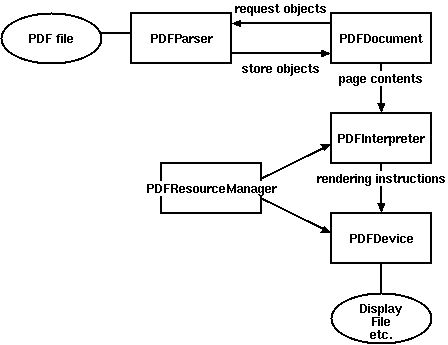
Figure 1. Relationships between PDFMiner classes
比较重要的是Layout,主要包括以下这些组件:
LTPage
Represents an entire page. May contain child objects like LTTextBox, LTFigure, LTImage, LTRect, LTCurve and LTLine.
LTTextBox
Represents a group of text chunks that can be contained in a rectangular area. Note that this box is created by geometric analysis and does not necessarily represents a logical boundary of the text. It contains a list of LTTextLine objects. get_text() method returns the text content.
LTTextLine
Contains a list of LTChar objects that represent a single text line. The characters are aligned either horizontaly or vertically, depending on the text's writing mode. get_text() method returns the text content.
LTChar
LTAnno
Represent an actual letter in the text as a Unicode string. Note that, while a LTChar object has actual boundaries, LTAnno objects does not, as these are "virtual" characters, inserted by a layout analyzer according to the relationship between two characters (e.g. a space).
LTFigure
Represents an area used by PDF Form objects. PDF Forms can be used to present figures or pictures by embedding yet another PDF document within a page. Note that LTFigure objects can appear recursively.
LTImage
Represents an image object. Embedded images can be in JPEG or other formats, but currently PDFMiner does not pay much attention to graphical objects.
LTLine
Represents a single straight line. Could be used for separating text or figures.
LTRect
Represents a rectangle. Could be used for framing another pictures or figures.
LTCurve
Represents a generic Bezier curve.
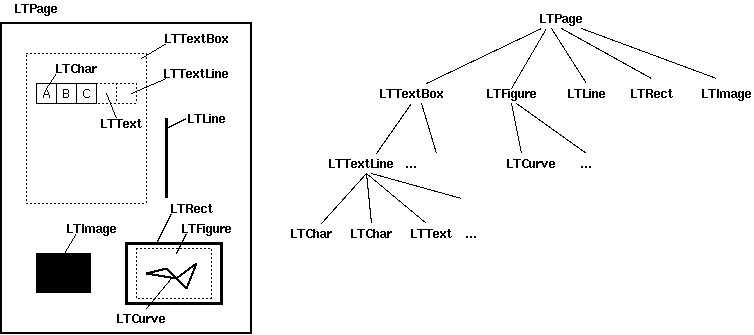
Figure 2. Layout objects and its tree structure
官方文档给了几个Demo但是都过于简略,虽然给了一个详细一些的Demo,但链接地址是旧的现在已经失效,不过最终还是找到了新的地址:http://denis.papathanasiou.org/posts/2010.08.04.post.html
这个Demo就比较详细了,源码如下:
 #!/usr/bin/python

 import sys

 import os

 from binascii import b2a_hex

 ###

 ### pdf-miner requirements

 ###

 from pdfminer.pdfparser import PDFParser

 from pdfminer.pdfdocument import PDFDocument, PDFNoOutlines

 from pdfminer.pdfpage import PDFPage

 from pdfminer.pdfinterp import PDFResourceManager, PDFPageInterpreter

 from pdfminer.converter import PDFPageAggregator

 from pdfminer.layout import LAParams, LTTextBox, LTTextLine, LTFigure, LTImage, LTChar

 def with_pdf (pdf_doc, fn, pdf_pwd, *args):

     """Open the pdf document, and apply the function, returning the results"""

     result = None

     try:

         # open the pdf file

         fp = open(pdf_doc, 'rb')

         # create a parser object associated with the file object

         parser = PDFParser(fp)

         # create a PDFDocument object that stores the document structure

         doc = PDFDocument(parser, pdf_pwd)

         # connect the parser and document objects

         parser.set_document(doc)

         # supply the password for initialization

         if doc.is_extractable:

             # apply the function and return the result

             result = fn(doc, *args)

         # close the pdf file

         fp.close()

     except IOError:

         # the file doesn't exist or similar problem

         pass

     return result

 ###

 ### Table of Contents

 ###

 def _parse_toc (doc):

     """With an open PDFDocument object, get the table of contents (toc) data

     [this is a higher-order function to be passed to with_pdf()]"""

     toc = []

     try:

         outlines = doc.get_outlines()

         for (level,title,dest,a,se) in outlines:

             toc.append( (level, title) )

     except PDFNoOutlines:

         pass

     return toc

 def get_toc (pdf_doc, pdf_pwd=''):

     """Return the table of contents (toc), if any, for this pdf file"""

     return with_pdf(pdf_doc, _parse_toc, pdf_pwd)

 ###

 ### Extracting Images

 ###

 def write_file (folder, filename, filedata, flags='w'):

     """Write the file data to the folder and filename combination

     (flags: 'w' for write text, 'wb' for write binary, use 'a' instead of 'w' for append)"""

     result = False

     if os.path.isdir(folder):

         try:

             file_obj = open(os.path.join(folder, filename), flags)

             file_obj.write(filedata)

             file_obj.close()

             result = True

         except IOError:

             pass

     return result

 def determine_image_type (stream_first_4_bytes):

     """Find out the image file type based on the magic number comparison of the first 4 (or 2) bytes"""

     file_type = None

     bytes_as_hex = b2a_hex(stream_first_4_bytes)

     if bytes_as_hex.startswith('ffd8'):

         file_type = '.jpeg'

     elif bytes_as_hex == '89504e47':

         file_type = '.png'

     elif bytes_as_hex == '':

         file_type = '.gif'

     elif bytes_as_hex.startswith('424d'):

         file_type = '.bmp'

     return file_type

 def save_image (lt_image, page_number, images_folder):

     """Try to save the image data from this LTImage object, and return the file name, if successful"""

     result = None

     if lt_image.stream:

         file_stream = lt_image.stream.get_rawdata()

         if file_stream:

             file_ext = determine_image_type(file_stream[0:4])

             if file_ext:

                 file_name = ''.join([str(page_number), '_', lt_image.name, file_ext])

                 if write_file(images_folder, file_name, file_stream, flags='wb'):

                     result = file_name

     return result

 ###

 ### Extracting Text

 ###

 def to_bytestring (s, enc='utf-8'):

     """Convert the given unicode string to a bytestring, using the standard encoding,

     unless it's already a bytestring"""

     if s:

         if isinstance(s, str):

             return s

         else:

             return s.encode(enc)

 def update_page_text_hash (h, lt_obj, pct=0.2):

     """Use the bbox x0,x1 values within pct% to produce lists of associated text within the hash"""

     x0 = lt_obj.bbox[0]

     x1 = lt_obj.bbox[2]

     key_found = False

     for k, v in h.items():

         hash_x0 = k[0]

         if x0 >= (hash_x0 * (1.0-pct)) and (hash_x0 * (1.0+pct)) >= x0:

             hash_x1 = k[1]

             if x1 >= (hash_x1 * (1.0-pct)) and (hash_x1 * (1.0+pct)) >= x1:

                 # the text inside this LT* object was positioned at the same

                 # width as a prior series of text, so it belongs together

                 key_found = True

                 v.append(to_bytestring(lt_obj.get_text()))

                 h[k] = v

     if not key_found:

         # the text, based on width, is a new series,

         # so it gets its own series (entry in the hash)

         h[(x0,x1)] = [to_bytestring(lt_obj.get_text())]

     return h

 def parse_lt_objs (lt_objs, page_number, images_folder, text=[]):

     """Iterate through the list of LT* objects and capture the text or image data contained in each"""

     text_content = []

     page_text = {} # k=(x0, x1) of the bbox, v=list of text strings within that bbox width (physical column)

     for lt_obj in lt_objs:

         if isinstance(lt_obj, LTTextBox) or isinstance(lt_obj, LTTextLine):

             # text, so arrange is logically based on its column width

             page_text = update_page_text_hash(page_text, lt_obj)

         elif isinstance(lt_obj, LTImage):

             # an image, so save it to the designated folder, and note its place in the text

             saved_file = save_image(lt_obj, page_number, images_folder)

             if saved_file:

                 # use html style <img /> tag to mark the position of the image within the text

                 text_content.append('<img src="'+os.path.join(images_folder, saved_file)+'" />')

             else:

                 print >> sys.stderr, "error saving image on page", page_number, lt_obj.__repr__

         elif isinstance(lt_obj, LTFigure):

             # LTFigure objects are containers for other LT* objects, so recurse through the children

             text_content.append(parse_lt_objs(lt_obj, page_number, images_folder, text_content))

     for k, v in sorted([(key,value) for (key,value) in page_text.items()]):

         # sort the page_text hash by the keys (x0,x1 values of the bbox),

         # which produces a top-down, left-to-right sequence of related columns

         text_content.append(''.join(v))

     return '\n'.join(text_content)

 ###

 ### Processing Pages

 ###

 def _parse_pages (doc, images_folder):

     """With an open PDFDocument object, get the pages and parse each one

     [this is a higher-order function to be passed to with_pdf()]"""

     rsrcmgr = PDFResourceManager()

     laparams = LAParams()

     device = PDFPageAggregator(rsrcmgr, laparams=laparams)

     interpreter = PDFPageInterpreter(rsrcmgr, device)

     text_content = []

     for i, page in enumerate(PDFPage.create_pages(doc)):

         interpreter.process_page(page)

         # receive the LTPage object for this page

         layout = device.get_result()

         # layout is an LTPage object which may contain child objects like LTTextBox, LTFigure, LTImage, etc.

         text_content.append(parse_lt_objs(layout, (i+1), images_folder))

     return text_content

 def get_pages (pdf_doc, pdf_pwd='', images_folder='/tmp'):

     """Process each of the pages in this pdf file and return a list of strings representing the text found in each page"""

     return with_pdf(pdf_doc, _parse_pages, pdf_pwd, *tuple([images_folder]))

 a = open('a.txt','a')

 for i in get_pages('/home/jamespei/nova.pdf'):

     a.write(i)

 a.close()
这段代码重点在于第128行,可以看到PDFMiner是一种基于坐标来解析的框架,PDF中能解析的组件全都包括上下左右边缘的坐标,如x0 = lt_obj.bbox[0]就是lt_obj元素的左边缘的坐标,同理x1则为右边缘。以上代码的意思就是把所有x0且x1的坐标相差在20%以内的元素分成一组,这样就实现了从PDF文件中定向抽取内容。
---------------------------补充-------------------------
有一个需要注意的地方,在解析有些PDF的时候会报这样的异常:pdfminer.pdfdocument.PDFEncryptionError: Unknown algorithm: param={'CF': {'StdCF': {'Length': 16, 'CFM': /AESV2, 'AuthEvent': /DocOpen}}, 'O': '\xe4\xe74\xb86/\xa8)\xa6x\xe6\xa3/U\xdf\x0fWR\x9cPh\xac\xae\x88B\x06_\xb0\x93@\x9f\x8d', 'Filter': /Standard, 'P': -1340, 'Length': 128, 'R': 4, 'U': '|UTX#f\xc9V\x18\x87z\x10\xcb\xf5{\xa7\x00\x00\x00\x00\x00\x00\x00\x00\x00\x00\x00\x00\x00\x00\x00\x00', 'V': 4, 'StmF': /StdCF, 'StrF': /StdCF}
从字面意思来看是因为这个PDF是一个加密的PDF,所以无法解析 ,但是如果直接打开PDF却是可以的并没有要求输密码什么的,原因是这个PDF虽然是加过密的,但密码是空,所以就出现了这样的问题。
解决这个的问题的办法是通过qpdf命令来解密文件(要确保已经安装了qpdf),要想在python中调用该命令只需使用call即可:
 from subprocess import call

 call('qpdf --password=%s --decrypt %s %s' %('', file_path, new_file_path), shell=True)
其中参数file_path是要解密的PDF的路径,new_file_path是解密后的PDF文件路径,然后使用解密后的文件去做解析就OK了
Python使用PDFMiner解析PDF的更多相关文章
- Python解析PDF三法
span{line-height:2em} --> 最近做调研想知道一些NZ当地的旅游信息,于是在NZ留学的友人自高奋勇地帮我去各个加油站拿了一堆旅游小册子,扫描了发给我. 但是他扫描出的高清图 ...
- pdfminer实现pdf布局分析 python (pdfminer realize layout analysis with PDF python)
使用pdfminer实现pdf文件的布局分析 python 参考资料: https://github.com/euske/pdfminer https://stackoverflow.com/ques ...
- Python3.x:PDFMiner3k在线、本地解析pdf
Python3.x:PDFMiner3k在线.本地解析pdf 安装 pip install pdfminer3k 示例一:在线解析pdf ''' Demo:pdf2htmlex解析pdf Dateti ...
- python3使用pdfminer3k解析pdf文件
安装pdfminer模块 pip3 install pdfminer3k 代码如下 #!/usr/bin/env python # coding:utf8 # author:Z time:2018/7 ...
- 【转】Python 深入浅出 - PyPDF2 处理 PDF 文件
实际应用中,可能会涉及处理 pdf 文件,PyPDF2 就是这样一个库,使用它可以轻松的处理 pdf 文件,它提供了读,割,合并,文件转换等多种操作. 文档地址:http://pythonhosted ...
- 用python写网路爬虫 PDF高清完整版免费下载 Python基础教程免费电子书 python入门书籍免费下载
<用python写网路爬虫PDF免费下载>PDF书籍下载 内容简介 作为一种便捷地收集网上信息并从中抽取出可用信息的方式,网络爬虫技术变得越来越有用.使用Python这样的简单编程语言,你 ...
- python学习(解析python官网会议安排)
在学习python的过程中,做练习,解析https://www.python.org/events/python-events/ HTML文件,输出Python官网发布的会议时间.名称和地点. 对ht ...
- WPF解析PDF为图片
偶遇需要解析PDF文件为单张图,此做, http://git.oschina.net/jiailiuyan/OfficeDecoder using System; using System.Colle ...
- Apache-Tika解析PDF文档
通常在使用爬虫时,爬取到网上的文章都是各式各样的格式处理起来比较麻烦,这里我们使用Apache-Tika来处理PDF格式的文章,如下: package com.mengyao.tika.app; im ...
随机推荐
- JAVA基础——类和对象
java类与对象学习笔记 一.成员变量和局部变量 (1)定义 1.成员变量 在类中定义,用来描述对象将要有什么.(默认的成员变量值为0) 2.局部变量 在类的方法中定义,在方法中临时保存数据. 演示示 ...
- 一个简单的python选课系统
下面介绍一下自己写的python程序,主要是的知识点为sys.os.json.pickle的模块应用,python程序包的的使用,以及关于类的使用. 下面是我的程序目录: bin是存放一些执行文件co ...
- js加强版图片轮播
<!DOCTYPE html PUBLIC "-//W3C//DTD XHTML 1.0 Transitional//EN" "http://www.w3.org/ ...
- JavaScript深入之从原型到原型链(本文转载)
JavaScript深入之从原型到原型链(本文转载) https://github.com/mqyqingfeng/Blog.原文地址 构造函数创建对象 我们先使用构造函数创建一个对象: functi ...
- MyBatis源码解析【2】构建项目
有了之前的准备,今天就要开始构建学习使用的项目了.废话不多说.开始吧. 首先我用IDEA构建了一个空的maven项目,然后加入了Mybatis的依赖. <dependencies> < ...
- 使用three.js实现机器人手臂的运动效果
Three.js 是一款运行在浏览器中的 3D 引擎,你可以用它创建各种三维场景,包括了摄影机.光影.材质等各种对象.你可以在它的主页上看到许多精彩的演示.不过,这款引擎目前还处在比较不成熟的开发阶段 ...
- Jenkins+Git配置
Jenkins+Git配置 一.GitHub上配置 前提:Jenkins能正常打开 将本地文件上传到GitHub上:进入终端 cd Documents cd project git clone htt ...
- C实现dos图文菜单程序实例
前言 公司一台服务器是novell环境,文件管理是基于dos6.22的,客户端启动需要一个图文菜单. 实现 编程环境:汉化版TC2.0 菜单基本功能:显示提示项.显示dbf中的行情信息. ...
- Jenkins集成源码静态分析工具
1.static code analysis插件说明 Jenkins提供了插件"static code analysis",该插件搜集不同的分析结果,并集合显示出来. 实际上,我们 ...
- MySQL-FAQ
1.ERROR 1130: Host 'xxx' is not allowed to connect to this MySQL server远程连接mysql服务器报上述错误.解决方法:1.改表法. ...