
iOS自定义弹出视图
p.p1 { margin: 0.0px 0.0px 0.0px 0.0px; font: 14.0px Menlo; color: #78492a }
p.p2 { margin: 0.0px 0.0px 0.0px 0.0px; font: 14.0px Menlo; color: #000000; min-height: 16.0px }
p.p3 { margin: 0.0px 0.0px 0.0px 0.0px; font: 14.0px Menlo; color: #d12f1b }
p.p4 { margin: 0.0px 0.0px 0.0px 0.0px; font: 14.0px Menlo; color: #4f8187 }
p.p5 { margin: 0.0px 0.0px 0.0px 0.0px; font: 14.0px Menlo; color: #ba2da2 }
p.p6 { margin: 0.0px 0.0px 0.0px 0.0px; font: 14.0px Menlo; color: #000000 }
p.p7 { margin: 0.0px 0.0px 0.0px 0.0px; font: 14.0px Menlo; color: #703daa }
p.p8 { margin: 0.0px 0.0px 0.0px 0.0px; font: 14.0px Menlo; color: #3e1e81 }
p.p9 { margin: 0.0px 0.0px 0.0px 0.0px; font: 14.0px Menlo; color: #008400 }
p.p10 { margin: 0.0px 0.0px 0.0px 0.0px; font: 14.0px Menlo; color: #272ad8 }
span.s1 { }
span.s2 { color: #272ad8 }
span.s3 { color: #78492a }
span.s4 { color: #ba2da2 }
span.s5 { color: #000000 }
span.s6 { color: #703daa }
span.s7 { color: #3e1e81 }
span.s8 { color: #31595d }
span.s9 { color: #d12f1b }
span.s10 { font: 14.0px "PingFang SC"; color: #d12f1b }
span.s11 { color: #4f8187 }
span.s12 { font: 14.0px "PingFang SC" }
里面的坐标可能有问题 可以自己修改
#define kSelfBackgroundColor [UIColor colorWithRed:0 green:0 blue:0 alpha:0.5f];
#import "HBActionSheet.h"
@interface HBActionSheet ()
@property (nonatomic, strong) UIView *btnBgView;
@property (nonatomic, strong) UIButton *selectedBtn;
@end
@implementation HBActionSheet
- (instancetype)initWithFrame:(CGRect)frame
{
self = [super initWithFrame:frame];
if (self) {
self.frame = [UIScreen mainScreen].bounds;
UIView *view = [[UIView alloc]initWithFrame:CGRectMake(0, 0, [UIScreen mainScreen].bounds.size.width, 368 - 64)];
view.backgroundColor = kSelfBackgroundColor;
[self addSubview:view];
UITapGestureRecognizer *tap = [[UITapGestureRecognizer alloc]initWithTarget:self action:@selector(hiddenActionSheet:)];
[view addGestureRecognizer:tap];
[self loadingUI];
}
return self;
}
- (void) loadingUI{
CGSize size = [[UIScreen mainScreen] bounds].size;
UILabel *titleLabel = [[UILabel alloc]initWithFrame:CGRectMake(0, 0, size.width, 45)];
titleLabel.text = @"支付方式";
titleLabel.textAlignment = NSTextAlignmentCenter;
titleLabel.backgroundColor = [UIColor redColor];
titleLabel.font = [UIFont systemFontOfSize:16];
[self.btnBgView addSubview:titleLabel];
UIButton *cancelBtn = [UIButton buttonWithType:UIButtonTypeCustom];
cancelBtn.frame = CGRectMake(size.width - 25 - 15, 11, 24, 24);
[cancelBtn setImage:[UIImage imageNamed:@"close"] forState:UIControlStateNormal];
[cancelBtn addTarget:self action:@selector(hiddenActionSheet) forControlEvents:UIControlEventTouchUpInside];
[self.btnBgView addSubview:cancelBtn];
UILabel *priceLabel = [[UILabel alloc]initWithFrame:CGRectMake(0, CGRectGetMaxY(titleLabel.frame), size.width, 70)];
priceLabel.backgroundColor = [UIColor whiteColor];
priceLabel.text = @"共¥30.00";
priceLabel.textAlignment = NSTextAlignmentCenter;
priceLabel.font = [UIFont systemFontOfSize:24];
[self.btnBgView addSubview:priceLabel];
NSMutableAttributedString *attributedString = [[NSMutableAttributedString alloc]initWithString:priceLabel.text];
[attributedString addAttribute:NSForegroundColorAttributeName
value:[UIColor grayColor]
range:NSMakeRange(0, 1)];
[attributedString addAttribute:NSFontAttributeName
value:[UIFont systemFontOfSize:16]
range:NSMakeRange(0, 1)];
priceLabel.attributedText = attributedString;
NSArray *titleArray = [[NSArray alloc]initWithObjects:@"余额",@"支付宝支付",@"微信支付",@"App Pay", nil];
for (int j = 0; j < 4; j++) {
UILabel *payStyleLabel = [[UILabel alloc]initWithFrame:CGRectMake(0, CGRectGetMaxY(priceLabel.frame) + j*50 , size.width, 50)];
payStyleLabel.text = [NSString stringWithFormat:@" %@",titleArray[j]];
payStyleLabel.font = [UIFont systemFontOfSize:16];
payStyleLabel.userInteractionEnabled = YES;
[self.btnBgView addSubview:payStyleLabel];
UIImageView *imageView = [[UIImageView alloc]initWithFrame:CGRectMake(15, 15, 20, 20)];
imageView.backgroundColor = [UIColor redColor];
[payStyleLabel addSubview:imageView];
UIButton *payBtn = [UIButton buttonWithType:UIButtonTypeCustom];
payBtn.frame = CGRectMake(size.width - 24 - 15, 13, 24, 24);
payBtn.tag = j + 1;
[payBtn setImage:[UIImage imageNamed:@"selectNo"] forState:UIControlStateNormal];
[payBtn setImage:[UIImage imageNamed:@"selectNo"] forState: UIControlStateHighlighted];
[payBtn setImage:[UIImage imageNamed:@"selectYes"] forState:UIControlStateSelected];
[payBtn setImage:[UIImage imageNamed:@"selectYes"]forState:UIControlStateSelected | UIControlStateHighlighted];
[payBtn addTarget:self action:@selector(selectPayStyle:) forControlEvents:UIControlEventTouchUpInside];
[payStyleLabel addSubview:payBtn];
}
UIButton *confirmPayBtn = [UIButton buttonWithType:UIButtonTypeCustom];
confirmPayBtn.backgroundColor = [UIColor greenColor];
[confirmPayBtn addTarget:self action:@selector(confirmPay) forControlEvents:UIControlEventTouchUpInside];
[confirmPayBtn setTitle:@"确认支付" forState:UIControlStateNormal];
confirmPayBtn.titleLabel.font = [UIFont systemFontOfSize:18];
confirmPayBtn.frame = CGRectMake(0, self.btnBgView.frame.size.height - 49, size.width, 49);
[self.btnBgView addSubview:confirmPayBtn];
// 显示
[UIView animateWithDuration:0.3 animations:^{
CGRect frame = self.btnBgView.frame;
frame.origin.y = size.height - frame.size.height - 64;
self.btnBgView.frame = frame;
}];
}
- (void)confirmPay{
}
- (void)selectPayStyle:(UIButton *)btn{
if (btn != self.selectedBtn) {
self.selectedBtn.selected = NO;
btn.selected = YES;
self.selectedBtn = btn;
}else{
self.selectedBtn.selected = YES;
}
}
- (void)hiddenActionSheet{
[UIView animateWithDuration:0.3 animations:^{
CGRect frame = self.btnBgView.frame;
frame.origin.y = [UIScreen mainScreen].bounds.size.height;
self.btnBgView.frame = frame;
} completion:^(BOOL finished) {
[self removeFromSuperview];
}];
}
- (void)hiddenActionSheet:(UITapGestureRecognizer *)tap{
if ([tap.view isKindOfClass:[UIButton class]] || [tap.view isKindOfClass:[UILabel class]] || [tap.view isKindOfClass:[UIImageView class]]) {
return;
}
[UIView animateWithDuration:0.3 animations:^{
CGRect frame = self.btnBgView.frame;
frame.origin.y = [UIScreen mainScreen].bounds.size.height;
self.btnBgView.frame = frame;
} completion:^(BOOL finished) {
[self removeFromSuperview];
}];
}
- (UIView *)btnBgView{
if (!_btnBgView) {
CGSize size = [[UIScreen mainScreen] bounds].size;
_btnBgView = [[UIView alloc]init];
_btnBgView.backgroundColor = [UIColor colorWithRed:223.0f/255.0f green:226.0f/255.f blue:236.0f/255.0f alpha:1];
_btnBgView.frame = CGRectMake(0, size.height - 368 - 64, size.width ,size.height - 368);
[self addSubview:_btnBgView];
}
return _btnBgView;
}
@end
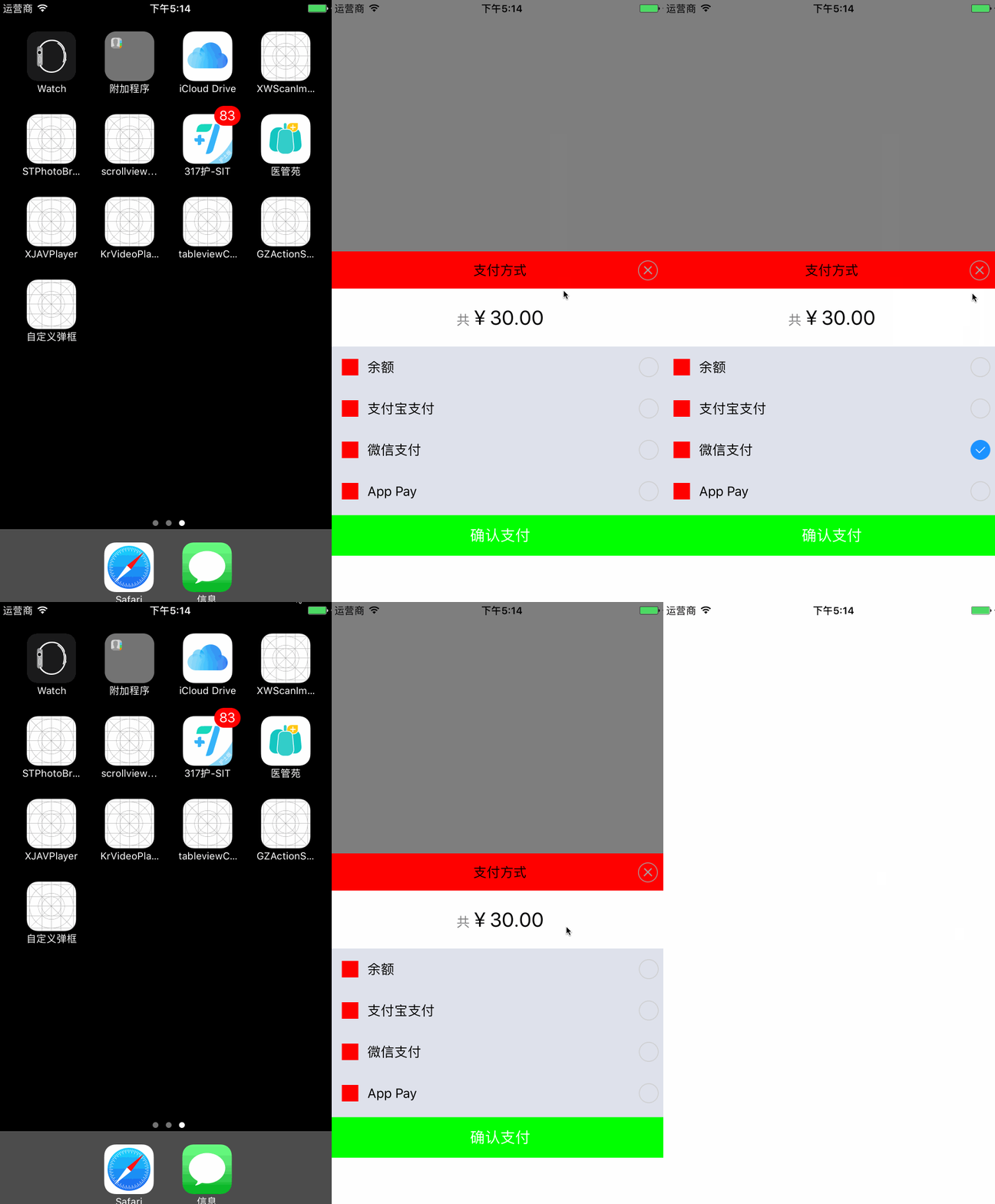
效果图:
iOS自定义弹出视图的更多相关文章
- iOS自定义弹出视图、收音机APP、图片涂鸦、加载刷新、文件缓存等源码
iOS精选源码 一款优秀的 聆听夜空FM 源码 zhPopupController 简单快捷弹出自定义视图 WHStoryMaker搭建美图(贴纸,涂鸦,文字,滤镜) iOS cell高度自适应 有加 ...
- iOS 仿看了吗应用、指南针测网速等常用工具、自定义弹出视图框架、图片裁剪、内容扩展等源码
iOS精选源码 扩展内容的cell - folding-cell 一个近乎完整的可识别中国身份证信息的Demo 可自动快速... JPImageresizerView 仿微信的图片裁剪 带年月和至今以 ...
- iOS实现自定义的弹出视图(popView)
前段时间,在项目中有个需求是支付完成后,弹出红包,实现这么一个发红包的功能.做了最后,实现的效果大致如下: 一.使用方法 整个ViewController的代码大致如下 // // SecondVi ...
- IOS弹出视图 LewPopupViewController
LewPopupViewController是一款IOS弹出视图软件.iOS 下的弹出视图.支持iPhone/iPad. 软件截图 使用方法 弹出视图 1 2 3 4 5 PopupView *vie ...
- iOS模态弹出半透明视图控制器
项目中需要实现点击按钮出现的视图全屏覆盖,呈半透明状态可以看到下面的视图? 解决方案: 绕了很多弯路原来可以使用模态弹出一个视图控制器 在iOS8之后只需要设置一个最新的属性 SecondViewCo ...
- js自定义弹出框
js自定义弹出框: 代码如下 <html> <head><title>自定义弹出对话框</title> <style type ="te ...
- android自定义弹出框样式实现
前言: 做项目时,感觉Android自带的弹出框样式比较丑,很多应用都是自己做的弹出框,这里也试着自己做了一个. 废话不说先上图片: 实现机制 1.先自定义一个弹出框的样式 2.自己实现CustomD ...
- CSS3/jQuery自定义弹出窗口
简单演示一下,精简了演示效果和css样式文件,更利于在项目中的实际应用 引入style.css index.js <!DOCTYPE HTML PUBLIC "-//W3C//DT ...
- react native仿微信性别选择-自定义弹出框
简述 要实现微信性别选择需要使用两部分的技术: 第一.是自定义弹出框: 第二.单选框控件使用: 效果 实现 一.配置弹出框 弹出框用的是:react-native-popup-dialog(Git地址 ...
随机推荐
- Java匿名内部类使用与示例
首先说为什么有匿名类 两个原因(产生的使命) 1.简化代码编写 某种情况下,类只需要扩展一个方法,没必要为了一个方法单独去写一个子类,然后然后调用子类,此时需要匿名类 2.在不同的包内的类内调用类的p ...
- 【解决问题】解决python安装模块时UnicodeDecodeError
安装模块时,出现报错: UnicodeDecodeError: 'ascii' codec can't decode byte 0xcb in position 68: ordinal not in ...
- mysql分页查询优化
由于MySql的分页机制:并不是跳过 offset 行,而是取 offset + N 行,然后返回放弃前 offset 行,返回N 行, 所以当 offset 特别大的时候,效率就非常的低下,要么控制 ...
- 《分布式Java应用之基础与实践》读书笔记三
对于大型分布式Java应用与SOA,我们可以从以下几个方面来分析: 为什么需要SOA SOA是什么 eBay的SOA平台 可实现SOA的方法 为什么需要SOA 第一个现象是系统多元化带来的问题,可 ...
- static class - 静态类
通常一个普通类不允许声明为静态的,只有一个内部类才可以.这时这个声明为静态的内部类可以直接作为一个普通类来使用,而不需实例一个外部类. 如下代码所示: 1 public class StaticCls ...
- 全球移动互联网大会gmic 2017为什么值得参加?
长城会CEO郝义认为,"科学产业化将会推动科学复兴,"而本次GMIC 北京 2017也将首次引入了高规格科学家闭门峰会,专门设置G-Summit全球科学创新峰会,以"科学 ...
- 画地为Mask,随心所欲的高效遮罩组件[Unity]
在上一篇博文"扔掉遮罩,更好的圆形Image组件"中,笔者改变Image的顶点数据,使得Image呈圆形显示,避免了Mask的使用,从而节省Drawcall消耗,提高渲染效率了.这 ...
- OA办公系统,一个沉淀企业文化的容器
资源是会枯竭的,唯有文化才会生生不息.一切工业产品都是人类智慧创造的.随着公司规模的扩大,企业中两大根本"人和规则"面临诸多挑战,OA办公系统是一个全员使用的办公软件产品,员工可通 ...
- IOS的控制器
控制器简单来说,就是用来做界面跳转的,类似于 Android 的Intent 1.创建一个控制器 控制器的常见的创建方式 )通过storyboard创建 //直接创建 NJViewController ...
- 接上一篇中记录Echarts进度环使用【不同状态不同进度环颜色及圈内文字】--采用单实例业务进行说明
接上一篇中记录Echarts进度环使用 此处处理不同状态下不同进度环颜色及圈内文字等的相关处理,采用实际案例源码说明 -----------------偶是华丽丽分割线---------------- ...