
利用cocostudio库函数 实现左右滑动的背包栏UI (cocos2d-x 2.2.0)
.h
#ifndef __COMMON_COMPONENTS__

#define __COMMON_COMPONENTS__

#include "cocos2d.h"

#include "cocos-ext.h"

USING_NS_CC;

USING_NS_CC_EXT;

#define ROOT_BACK_WIDTH        380        //background width

#define ROOT_BACK_HEIGHT    450        //background height

#define LAYOUT_WIDTH        360        //each page width

#define LAYOUT_HEIGHT        360        //each page height

#define PAGE_SUM_NUM        6        //total page num

#define EACH_PAGE_NUM        9        //each page grid num

class CCommonComponents : public cocos2d::extension::UILayer

{

public:

    CCommonComponents(void);

    ~CCommonComponents(void);

    virtual bool init();

    CREATE_FUNC(CCommonComponents);

public:

    UIImageView* createHorizontalGrid( int pageNum = PAGE_SUM_NUM );

    void tagMenuTest( CCObject* pSender );

    void refreshGrid();

    void pageViewEvent(CCObject *pSender, PageViewEventType type);

    void buttonTidyCallback( CCObject* pSender );

public:

    UIImageView*        m_pImgEffect[PAGE_SUM_NUM];                    //effect of selected

    UIButton*            m_pBtnAllGrid[PAGE_SUM_NUM][EACH_PAGE_NUM];    //total num of grid

    UIImageView*        m_pBtnTextureChild[PAGE_SUM_NUM][EACH_PAGE_NUM]; //each icon in gird

    UIImageView*        m_pImgLight[PAGE_SUM_NUM];                    //the current page where the lights

    int                    m_IntCurPage;                                //record the current page number

};

#endif //__COMMON_COMPONENTS__
.cpp
#include "CommonComponents.h"

CCommonComponents::CCommonComponents(void) :

     m_IntCurPage()

{

    memset(m_pImgEffect, , sizeof(m_pImgEffect));

    memset(m_pBtnAllGrid, , sizeof(m_pBtnAllGrid));

    memset(m_pBtnTextureChild, , sizeof(m_pBtnTextureChild));

    memset(m_pImgLight, , sizeof(m_pImgLight));

}

CCommonComponents::~CCommonComponents(void)

{

}

bool CCommonComponents::init()

{

    bool bRet = false;

    do

    {

        CC_BREAK_IF( !UILayer::init() );

        bRet = true;

    } while ();

    return bRet;

}

UIImageView* CCommonComponents::createHorizontalGrid( int pageNum )

{

    CCSize winSize = CCDirector::sharedDirector()->getWinSize();

    UIImageView* imgBack = UIImageView::create();

    imgBack->setTexture("frame.png");

    imgBack->setScale9Enable(true);

    imgBack->setScale9Size(CCSizeMake(ROOT_BACK_WIDTH, ROOT_BACK_HEIGHT));

    UIPageView* pageView = UIPageView::create();

    pageView->setTouchEnable(true);

    pageView->setSize(CCSizeMake(LAYOUT_WIDTH, LAYOUT_HEIGHT));

    pageView->setAnchorPoint(ccp(0.5f, 0.5f));

    for (int i = ; i < pageNum; ++i)

    {

        UIPanel* layout = UIPanel::create();

        layout->setSize(CCSizeMake(LAYOUT_WIDTH, LAYOUT_HEIGHT));

        UIImageView* imageView = UIImageView::create();

        imageView->setTouchEnable(true);

        imageView->setScale9Enable(true);

        imageView->setTexture("pic_frame1.png");

        imageView->setScale9Size(CCSizeMake(LAYOUT_WIDTH, LAYOUT_HEIGHT));

        imageView->setPosition(ccp(layout->getRect().size.width / , layout->getRect().size.height / ));

        layout->addChild(imageView);

        m_pImgEffect[i] = UIImageView::create();

        m_pImgEffect[i]->setVisible(false);

        m_pImgEffect[i]->setTexture("frame_pressed.png");

        layout->addChild(m_pImgEffect[i]);

        m_pImgLight[i] = UIImageView::create();

        if(  == i )

        {

            m_pImgLight[i]->setTexture("green.png");

        }

        else

        {

            m_pImgLight[i]->setTexture("red.png");

        }

        m_pImgLight[i]->setPosition(ccp(- + i*, -));

        for(int j=; j<; ++j)

        {

            m_pBtnAllGrid[i][j] = UIButton::create();

            m_pBtnAllGrid[i][j]->setTouchEnable(true);

            m_pBtnAllGrid[i][j]->setTextures("frame.png", "frame.png", "frame.png");

            m_pBtnAllGrid[i][j]->setPosition(ccp( m_pBtnAllGrid[i][j]->getContentSize().width/+ j%*m_pBtnAllGrid[i][j]->getContentSize().width*1.2 + ,

                layout->getSize().height-m_pBtnAllGrid[i][j]->getContentSize().height/-m_pBtnAllGrid[i][j]->getContentSize().height*(j/)/0.85 - ));

            layout->addChild(m_pBtnAllGrid[i][j]);

            m_pBtnAllGrid[i][j]->setWidgetTag(i*+j);

            m_pBtnAllGrid[i][j]->addReleaseEvent(this, coco_releaseselector(CCommonComponents::tagMenuTest));

            m_pBtnTextureChild[i][j] = UIImageView::create();

            m_pBtnTextureChild[i][j]->setTexture("frame.png");

            m_pBtnAllGrid[i][j]->addChild(m_pBtnTextureChild[i][j]);

        }

        pageView->addPage(layout);

        imgBack->addChild(m_pImgLight[i]);

    }

    pageView->addEventListener(this, pagevieweventselector(CCommonComponents::pageViewEvent));

    imgBack->addChild(pageView);

    pageView->setPosition(ccp(, ));

    UIButton* button = UIButton::create();

    button->setTouchEnable(true);

    button->setTextures("pic_button_1.png","pic_button_2.png","pic_button_3.png");

    button->addReleaseEvent(this, coco_releaseselector(CCommonComponents::buttonTidyCallback));

    imgBack->addChild(button);

    button->setPosition(ccp(, -));

    UILabel* labBtnFont = UILabel::create();

    labBtnFont->setText("TIDY");

    labBtnFont->setFontSize();

    button->addChild(labBtnFont);

    refreshGrid();                //temporary test

    return imgBack;

}

void CCommonComponents::tagMenuTest( CCObject* pSender )

{

    UIButton* curImgClick = dynamic_cast<UIButton*>(pSender);

    int curTag = curImgClick->getWidgetTag();

    CCLOG("curTag = %d ; [%f, %f]", curTag, curImgClick->getPosition().x, curImgClick->getPosition().y);

    m_pImgEffect[m_IntCurPage]->setPosition(curImgClick->getPosition());

    m_pImgEffect[m_IntCurPage]->setVisible(true);

}

void CCommonComponents::refreshGrid()

{

    for(int i= ; i<; ++i)

    {

        for (int j = ; j<EACH_PAGE_NUM; ++j)

        {

            if( i*EACH_PAGE_NUM+j <=  )

            m_pBtnTextureChild[i][j]->setTexture("CloseNormal.png");

        }

    }

}

void CCommonComponents::pageViewEvent(CCObject *pSender, PageViewEventType type)

{

    switch (type)

    {

    case PAGEVIEW_EVENT_TURNING:

        {

            UIPageView* pageView = dynamic_cast<UIPageView*>(pSender);

            CCLog(" m_IntCurPage = %d",pageView->getPage());

            if(m_IntCurPage != pageView->getPage())

            {

                m_IntCurPage = pageView->getPage();

                for(int i=; i<PAGE_SUM_NUM; ++i)

                {

                    m_pImgEffect[i]->setVisible(false);

                    if(i == m_IntCurPage)

                    {

                        m_pImgLight[i]->setTexture("green.png");

                    }

                    else

                    {

                        m_pImgLight[i]->setTexture("red.png");

                    }

                }

            }

        }

        break;

    default:

        break;

    }

}

void CCommonComponents::buttonTidyCallback( CCObject* pSender )

{

    CCLog("running buttonCallback function");

}
使用方式:
CCommonComponents* pageLayer =  CCommonComponents::create();

    this->addChild(pageLayer);
显示效果:
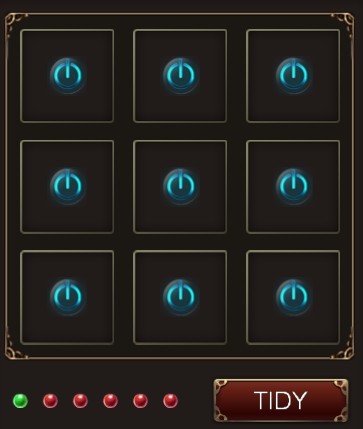
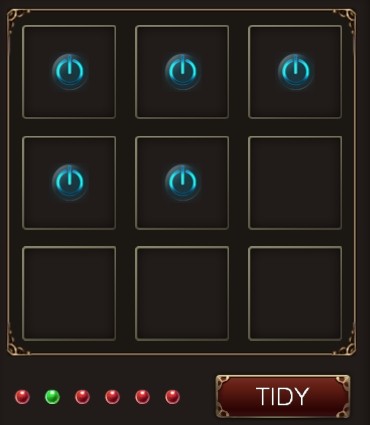
这只是一个小的例子代码,实现方式是依赖 cocostudio 库函数,没有好,只有比较好。
欢迎来访并指教 QQ:316948714, 期待一样热爱技术的你!!!
利用cocostudio库函数 实现左右滑动的背包栏UI (cocos2d-x 2.2.0)的更多相关文章
- CocoStudio教程三:认识并利用CocoStudio的果实 运行2.2.1版本
原文:CocoStudio教程三:认识并利用CocoStudio的果实 原文用的老版,用2.21搞起来好像有些问题,然后自己摸索了下,有的都是乱找的方法,只求能运行... 1,原文的CCJsonRea ...
- Ubuntu/Windows下利用“HIDAPI”库函数实现与Hid类USB设备通信
一.背景: 最近在做的一个项目需要使用USB传递数据,对USB理解不是很深,USB的系统驱动编写则更是天方 夜谭,因此将设备配置成HID类设备成为了首选.其最大的好处在于,LINUX/Windows系 ...
- 利用selenium库自动执行滑动验证码模拟登陆
破解流程 #1.输入账号.密码,然后点击登陆 #2.点击按钮,弹出没有缺口的图 #3.针对没有缺口的图片进行截图 #4.点击滑动按钮,弹出有缺口的图 #5.针对有缺口的图片进行截图 #6.对比两张图片 ...
- 利用C库函数time()打印当前系统动态时间
引入日期和时间头文件 #include<time.h> 用time_t定义一个存储时间的变量获取时间(以秒为单位) time_t t; time (&t); //获取1970年以来 ...
- iOS 滑动隐藏导航栏-三种方式
/** 1隐藏导航栏-简单- */ self.navigationController.hidesBarsOnSwipe = YES; /** 2隐藏导航栏-不随tableView滑动消失效果 ...
- 利用CSS预处理技术实现项目换肤功能(less css + asp.net mvc4.0 bundle)
一.背景 在越来越重视用户体验的今天,换肤功能也慢慢被重视起来.一个web系统用户可以选择一个自己喜欢的系统主题,在用户眼里还是会多少加点分的.我们很开心的是easyui v1.3.4有自带defau ...
- Demon_背包系统(实现装备栏,背包栏,可以切换装备)
using UnityEngine; using System.Collections; public enum BoxType { Normal,//普通格子 Equip//装备栏格子 } publ ...
- React实现顶部固定滑动式导航栏(导航条下拉一定像素时显示原导航栏样式)
摘要 基于react的框架开发一个顶部固定滑动式的酷炫导航栏,当导航栏置顶时,导航栏沉浸在背景图片里:当鼠标滑动滚轮时,导航栏固定滑动并展示下拉样式. JS部分 相关技术栈:react.antd.re ...
- 利用CSS制作背景变色的横向导航栏
1.表单 页面如下: <html> <head> <title>注册表单页面</title> </head> <body> &l ...
随机推荐
- C基础--结构体
C语言,结构体语法: 1.定义结构体类型: struct 结构体名称 { 成员类型 成员名称1; 成员类型 成员名称2; ... }; 例:struct Date { int year ; int m ...
- Weblogic 启动报错:java.lang.NoClassDefFoundError
Weblogic 启动报错:java.lang.NoClassDefFoundError ####<2015-6-17 下午03时30分47秒 CST> <Error> &l ...
- 【Gym 100971J】Robots at Warehouse
题意 链接给你一个n*m的地图,'#'代表墙,‘.’代表可走的,1代表1号机器人,2代表2号机器人,机器人可以上下左右移动到非墙的位置,但不能走到另一个机器人身上.问能否交换1和2的位置. 分析 如果 ...
- BZOJ-1822 Frozen Nova 冷冻波 计(jie)算(xi)几何+二分+最大流判定+经典建图
这道逼题!感受到了数学对我的深深恶意(#‵′).... 1822: [JSOI2010]Frozen Nova 冷冻波 Time Limit: 10 Sec Memory Limit: 64 MB S ...
- javaScript基础练习题-下拉框制作(神奇的代码)
http://www.oschina.net/code/snippet_12_46548#66319 http://www.codeproject.com/Tips/890021/Advanced-C ...
- mybatis-spring从1.1升级到1.2所带来的dao层级的编写问题
我们公司的项目使用spring+mybatis组合.所以就必须得使用mybatis-spring了.所以此处就昨日mybatis-spring从1.1升级到1.2所带来的dao层级的编写问题,做了一个 ...
- IOS基础之 (十二) Block
一 定义 Block封装了一段代码,可以在任何时候执行. Block可以作为函数参数或者函数的返回值,而其本身又可以带输入参数或返回值. 二 使用 1. 定义函数指针,然后在实现. #import & ...
- JDK,JRE,JVM区别与联系(ZZ)
http://www.cnblogs.com/hencehong/p/3252166.html 我们开发的实际情况是:我们利用JDK(调用JAVA API)开发了属于我们自己的JAVA程序后,通过JD ...
- RecyclerView的使用方法
1.添加.jar包 File -> Project-Structure -> 左下角 “app” -> Dependencies -> 右上角“+” -> File de ...
- find只查当前目录 和 -exec和xargs区别
1.find默认查找当前目录和子目录,通过maxdepth限制只查当前目录: find . -maxdepth 1 -type f -name "*.php" 2. find . ...