
44.Android之Shape设置虚线、圆角和渐变学习
Shape在Android中设定各种形状,今天记录下,由于比较简单直接贴代码。
Shape子属性简单说明一下:
gradient -- 对应颜色渐变。 startcolor、endcolor就不多说了。 android:angle是指从哪个角度开始变.
solid -- 填充。
stroke -- 描边。
corners -- 圆角。
padding -- 定义内容离边界的距离。 与android:padding_left、android:padding_right这些是一个道理.
activity_main.xml
 <LinearLayout xmlns:android="http://schemas.android.com/apk/res/android"

     xmlns:tools="http://schemas.android.com/tools"

     android:layout_width="match_parent"

     android:layout_height="match_parent"

     android:background="#fff"

     android:orientation="vertical" >

     <RelativeLayout

         android:layout_width="fill_parent"

         android:layout_height="45dip"

         android:background="@drawable/title_back">

         <TextView

             android:layout_width="wrap_content"

             android:layout_height="wrap_content"

             android:textSize="20sp"

             android:textColor="#000"

             android:layout_centerInParent="true"

             android:text="线条样式"/>

     </RelativeLayout>

     <TextView

          android:layout_width="wrap_content"

          android:layout_height="wrap_content"

          android:textSize="16sp"

          android:textColor="#333"

          android:layout_marginLeft="10dp"

          android:layout_marginTop="10dp"

          android:layout_marginBottom="5dp"

          android:layout_centerInParent="true"

          android:text="虚线样式1"/>

     <!-- 虚线1 -->

        <LinearLayout

         android:layout_width="fill_parent"

         android:layout_height="2dp"

         android:background="@drawable/dotted_line"

         android:layout_marginLeft="10dp"

         android:layout_marginRight="10dp"/>

     <TextView

          android:layout_width="wrap_content"

          android:layout_height="wrap_content"

          android:textSize="16sp"

          android:textColor="#333"

          android:layout_marginLeft="10dp"

          android:layout_marginTop="10dp"

          android:layout_marginBottom="5dp"

          android:layout_centerInParent="true"

          android:text="虚线样式2"/>

     <!-- 虚线2 -->

        <LinearLayout

         android:layout_width="fill_parent"

         android:layout_height="2dp"

         android:background="@drawable/dotted_line_2"

         android:layout_marginLeft="10dp"

         android:layout_marginRight="10dp"/>

     <!-- 实线圆角框 -->

        <LinearLayout

         android:layout_width="fill_parent"

         android:layout_height="45dp"

         android:background="@drawable/rect_gray"

         android:gravity="center"

         android:layout_marginTop="5dp"

         android:layout_marginLeft="10dp"

         android:layout_marginRight="10dp">

         <TextView

              android:layout_width="wrap_content"

              android:layout_height="wrap_content"

              android:textSize="17sp"

              android:textColor="#333"

              android:text="实线圆角框"/>

     </LinearLayout>

     <!-- 虚线圆角框 -->

        <LinearLayout

         android:layout_width="fill_parent"

         android:layout_height="45dp"

         android:background="@drawable/rect_gray_2"

         android:gravity="center"

         android:layout_marginTop="5dp"

         android:layout_marginLeft="10dp"

         android:layout_marginRight="10dp">

         <TextView

              android:layout_width="wrap_content"

              android:layout_height="wrap_content"

              android:textSize="17sp"

              android:textColor="#333"

              android:text="虚线圆角框"/>

     </LinearLayout>

     <!-- 漸變圆角框 -->

        <LinearLayout

         android:layout_width="fill_parent"

         android:layout_height="45dp"

         android:background="@drawable/rect_gray_3"

         android:gravity="center"

         android:layout_marginTop="5dp"

         android:layout_marginLeft="10dp"

         android:layout_marginRight="10dp">

         <TextView

              android:layout_width="wrap_content"

              android:layout_height="wrap_content"

              android:textSize="17sp"

              android:textColor="#fff"

              android:text="漸變+部分圆角框"/>

     </LinearLayout>

        <LinearLayout

         android:layout_width="fill_parent"

         android:layout_height="45dp"

         style="@style/list_item_top"

         android:gravity="center"

         android:layout_marginTop="5dp"

         android:layout_marginLeft="10dp"

         android:layout_marginRight="10dp">

         <TextView

              android:layout_width="wrap_content"

              android:layout_height="wrap_content"

              android:textSize="17sp"

              android:textColor="#333"

              android:text="部分圆角框+点击效果"/>

     </LinearLayout>

        <LinearLayout

         android:layout_width="fill_parent"

         android:layout_height="45dp"

         style="@style/list_item_middle"

         android:gravity="center"

         android:layout_marginTop="5dp"

         android:layout_marginLeft="10dp"

         android:layout_marginRight="10dp">

         <TextView

              android:layout_width="wrap_content"

              android:layout_height="wrap_content"

              android:textSize="17sp"

              android:textColor="#333"

              android:text="部分圆角框+点击效果"/>

     </LinearLayout>

        <LinearLayout

         android:layout_width="fill_parent"

         android:layout_height="45dp"

         style="@style/list_item_bottom"

         android:gravity="center"

         android:layout_marginTop="5dp"

         android:layout_marginLeft="10dp"

         android:layout_marginRight="10dp">

         <TextView

              android:layout_width="wrap_content"

              android:layout_height="wrap_content"

              android:textSize="17sp"

              android:textColor="#333"

              android:text="部分圆角框+点击效果"/>

     </LinearLayout>

 </LinearLayout>
styles.xml文件一些添加:
 <resources>

     <!--

         Base application theme, dependent on API level. This theme is replaced

         by AppBaseTheme from res/values-vXX/styles.xml on newer devices.

     -->

     <style name="AppBaseTheme" parent="android:Theme.Light">

         <!--

             Theme customizations available in newer API levels can go in

             res/values-vXX/styles.xml, while customizations related to

             backward-compatibility can go here.

         -->

     </style>

     <!-- Application theme. -->

     <style name="AppTheme" parent="AppBaseTheme">

         <!-- All customizations that are NOT specific to a particular API-level can go here. -->

     </style>

      <style name="list_item_top">

         <item name="android:clickable">true</item>

         <item name="android:focusable">true</item>

         <item name="android:paddingTop">10dip</item>

         <item name="android:paddingBottom">10dip</item>

         <item name="android:paddingLeft">10dip</item>

         <item name="android:paddingRight">10dip</item>

         <item name="android:gravity">center_vertical</item>

         <item name="android:background">@drawable/background_view_rounded_top</item>

     </style>

     <style name="list_item_middle">

         <item name="android:clickable">true</item>

         <item name="android:paddingTop">10dip</item>

         <item name="android:paddingBottom">10dip</item>

         <item name="android:paddingLeft">10dip</item>

         <item name="android:paddingRight">10dip</item>

         <item name="android:gravity">center_vertical</item>

         <item name="android:background">@drawable/background_view_rounded_middle</item>

     </style>

     <style name="list_item_bottom">

         <item name="android:clickable">true</item>

         <item name="android:paddingTop">10dip</item>

         <item name="android:paddingBottom">10dip</item>

         <item name="android:paddingLeft">10dip</item>

         <item name="android:paddingRight">10dip</item>

         <item name="android:gravity">center_vertical</item>

         <item name="android:background">@drawable/background_view_rounded_bottom</item>

     </style>

     <style name="list_item_single">

         <item name="android:clickable">true</item>

         <item name="android:paddingTop">10dip</item>

         <item name="android:paddingBottom">10dip</item>

         <item name="android:paddingLeft">10dip</item>

         <item name="android:paddingRight">10dip</item>

         <item name="android:gravity">center_vertical</item>

         <item name="android:background">@drawable/background_view_rounded_single</item>

     </style>

 </resources>
color.xml:
 <?xml version="1.0" encoding="utf-8"?>

 <resources>

     <!-- LIST BORDER COLOR -->

     <color name="rounded_container_border">#ffb7babb</color>

     <!-- ITEM BACKGROUND COLOR - STATE - DEFAULT -->

     <color name="base_start_color_default">#FFFFFF</color>

     <color name="base_end_color_default">#FFFFFF</color>

     <!-- ITEM BACKGROUND COLOR - STATE - PRESSED -->

     <color name="base_start_color_pressed">#fffcfcfc</color>

     <color name="base_end_color_pressed">#ffd7d7d7</color>

     <!-- ITEM TEXT COLORS - STATES - PRESSED AND DEFAULT -->

     <color name="text_color_default">#000000</color>

     <color name="text_color_pressed">#ffffff</color>

 </resources>
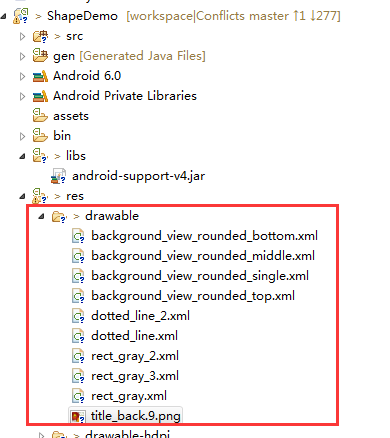
加入drawable资源文件,如图:
具体代码如下:
1.background_view_rounded_bottom.xml
 <?xml version="1.0" encoding="UTF-8"?>

 <inset xmlns:android="http://schemas.android.com/apk/res/android"

     android:insetLeft="1.0px"

     android:insetRight="1.0px" >

     <selector>

         <item android:state_pressed="true">

             <shape>

                 <gradient

                     android:angle="270.0"

                     android:endColor="@color/base_end_color_pressed"

                     android:startColor="@color/base_start_color_pressed" />

                 <corners

                     android:bottomLeftRadius="10.0dip"

                     android:bottomRightRadius="10.0dip"

                     android:radius="2.0dip"

                     android:topLeftRadius="0.0dip"

                     android:topRightRadius="0.0dip" />

                 <stroke

                     android:width="1dp"

                     android:color="#eededede" />

             </shape>

         </item>

         <item>

             <shape>

                 <gradient

                     android:angle="270.0"

                     android:endColor="@color/base_end_color_default"

                     android:startColor="@color/base_start_color_default" />

                 <corners

                     android:bottomLeftRadius="11.0dip"

                     android:bottomRightRadius="11.0dip"

                     android:radius="2.0dip"

                     android:topLeftRadius="0.0dip"

                     android:topRightRadius="0.0dip" />

                 <stroke

                     android:width="1dp"

                     android:color="#eededede" />

             </shape>

         </item>

     </selector>

 </inset>
2.background_view_rounded_middle.xml
 <?xml version="1.0" encoding="UTF-8"?>

 <inset xmlns:android="http://schemas.android.com/apk/res/android"

     android:insetBottom="0.0px"

     android:insetLeft="1.0px"

     android:insetRight="1.0px" >

     <selector>

         <item android:state_pressed="true">

             <shape>

                 <gradient

                     android:angle="270.0"

                     android:endColor="@color/base_end_color_pressed"

                     android:startColor="@color/base_start_color_pressed" />

                 <corners android:radius="0.0dip" />

                 <stroke

                     android:width="1dp"

                     android:color="#eededede" />

             </shape>

         </item>

         <item>

             <shape>

                 <gradient

                     android:angle="270.0"

                     android:endColor="@color/base_end_color_default"

                     android:startColor="@color/base_start_color_default" />

                 <corners android:radius="0.0dip" />

                 <stroke

                     android:width="1dp"

                     android:color="#eededede" />

             </shape>

         </item>

     </selector>

 </inset>
3.background_view_rounded_single.xml
 <?xml version="1.0" encoding="UTF-8"?>

 <inset xmlns:android="http://schemas.android.com/apk/res/android"

     android:insetBottom="1.0px"

     android:insetLeft="1.0px"

     android:insetRight="1.0px"

     android:insetTop="0.0px" >

     <selector>

         <item android:state_pressed="true">

             <shape>

                 <gradient

                     android:angle="270.0"

                     android:endColor="@color/base_end_color_pressed"

                     android:startColor="@color/base_start_color_pressed" />

                 <corners android:radius="11.0dip" />

             </shape>

         </item>

         <item>

             <shape>

                 <stroke

                     android:width="1.0px"

                     android:color="@color/rounded_container_border" />

                 <gradient

                     android:angle="270.0"

                     android:endColor="@color/base_end_color_default"

                     android:startColor="@color/base_start_color_default" />

                 <corners android:radius="10.0dip" />

             </shape>

         </item>

     </selector>

 </inset>
4.background_view_rounded_top.xml
 <?xml version="1.0" encoding="UTF-8"?>

 <inset xmlns:android="http://schemas.android.com/apk/res/android"

     android:insetLeft="1.0px"

     android:insetRight="1.0px" >

     <selector>

         <item android:state_pressed="true">

             <shape>

                 <gradient

                     android:angle="270.0"

                     android:endColor="@color/base_end_color_pressed"

                     android:startColor="@color/base_start_color_pressed" />

                 <corners

                     android:bottomLeftRadius="0.0dip"

                     android:bottomRightRadius="0.0dip"

                     android:radius="2.0dip"

                     android:topLeftRadius="10.0dip"

                     android:topRightRadius="10.0dip" />

                 <stroke

                     android:width="1dp"

                     android:color="#eededede" />

             </shape>

         </item>

         <item>

             <shape>

                 <gradient

                     android:angle="270.0"

                     android:endColor="@color/base_end_color_default"

                     android:startColor="@color/base_start_color_default" />

                 <corners

                     android:bottomLeftRadius="0.0dip"

                     android:bottomRightRadius="0.0dip"

                     android:radius="2.0dip"

                     android:topLeftRadius="11.0dip"

                     android:topRightRadius="11.0dip" />

                 <stroke

                     android:width="1dp"

                     android:color="#eededede" />

             </shape>

         </item>

     </selector>

 </inset>
5.dotted_line_2.xml
 <?xml version="1.0" encoding="utf-8"?>

 <shape xmlns:android="http://schemas.android.com/apk/res/android"

     android:shape="line" >

     <!--显示一条虚线,破折线的宽度为dashWith,破折线之间的空隙的宽度为dashGap,当dashGap=0dp时,为实线 -->

     <stroke

         android:dashGap="7dp"

         android:dashWidth="3dp"

         android:width="1dp"

         android:color="#63a219" />

     <!-- 虚线的高度 -->

     <size android:height="1dp" />

 </shape>
6.dotted_line.xml
 <?xml version="1.0" encoding="utf-8"?>

 <shape xmlns:android="http://schemas.android.com/apk/res/android"

     android:shape="line" >

     <!--显示一条虚线,破折线的宽度为dashWith,破折线之间的空隙的宽度为dashGap,当dashGap=0dp时,为实线 -->

     <stroke

         android:dashGap="3dp"

         android:dashWidth="6dp"

         android:width="1dp"

         android:color="#63a219" />

     <!-- 虚线的高度 -->

     <size android:height="1dp" />

 </shape>
7.rect_gray_2.xml
 <?xml version="1.0" encoding="utf-8"?>

 <shape xmlns:android="http://schemas.android.com/apk/res/android"

     android:shape="rectangle">

     <!-- 填充颜色 -->

     <solid android:color="#FFFFFF"></solid>

     <!-- 线的宽度,颜色灰色 -->

     <stroke android:width="1dp" android:color="#63a219" android:dashGap="3dp" android:dashWidth="6dp"></stroke>

     <!-- 矩形的圆角半径 -->

     <corners android:radius="10dp" />

 </shape>
8.rect_gray_3.xml
 <shape xmlns:android="http://schemas.android.com/apk/res/android"

     android:shape="rectangle">

     <!--分別對應上面左圆角的半径,上面右圆角的半径,下面左圆角的半径,下面右圆角的半径-->

     <corners

           android:topLeftRadius="0dp"

           android:topRightRadius="7dp"

           android:bottomLeftRadius="0dp"

           android:bottomRightRadius="7dp"/>

     <!--設置漸變-->

     <gradient android:startColor="#9cff00"

           android:endColor="#197600"

           android:angle="270"/>

     <stroke

         android:width="1dp"

         android:color="#63a219" />

 </shape>
9.rect_gray.xml
<?xml version="1.0" encoding="utf-8"?>

<shape xmlns:android="http://schemas.android.com/apk/res/android"

    android:shape="rectangle">

    <!-- 填充颜色 -->

    <solid android:color="#FFFFFF"></solid>

    <!-- 线的宽度,颜色灰色 -->

    <stroke android:width="1dp" android:color="#63a219"></stroke>

    <!-- 矩形的圆角半径 -->

    <corners android:radius="10dp" />

</shape>
10.title_back.9.png

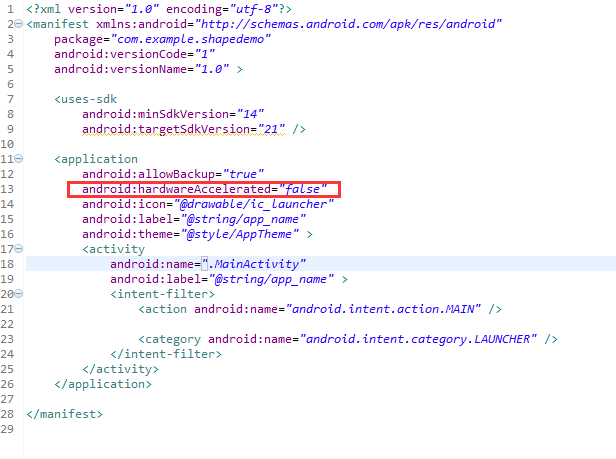
运行我们发现虚线1和虚线2没有看到虚线效果,这是因为从android3.0开始安卓关闭了硬件加速功能,所以就不能显示了,解决方法在 AndroidManifest.xml,或者是在activity中把硬件加速的功能关掉就可以了。我采用第一种方法改下AndroidMainfest.xml, 设置下android:hardwareAccelerated="false",如图:
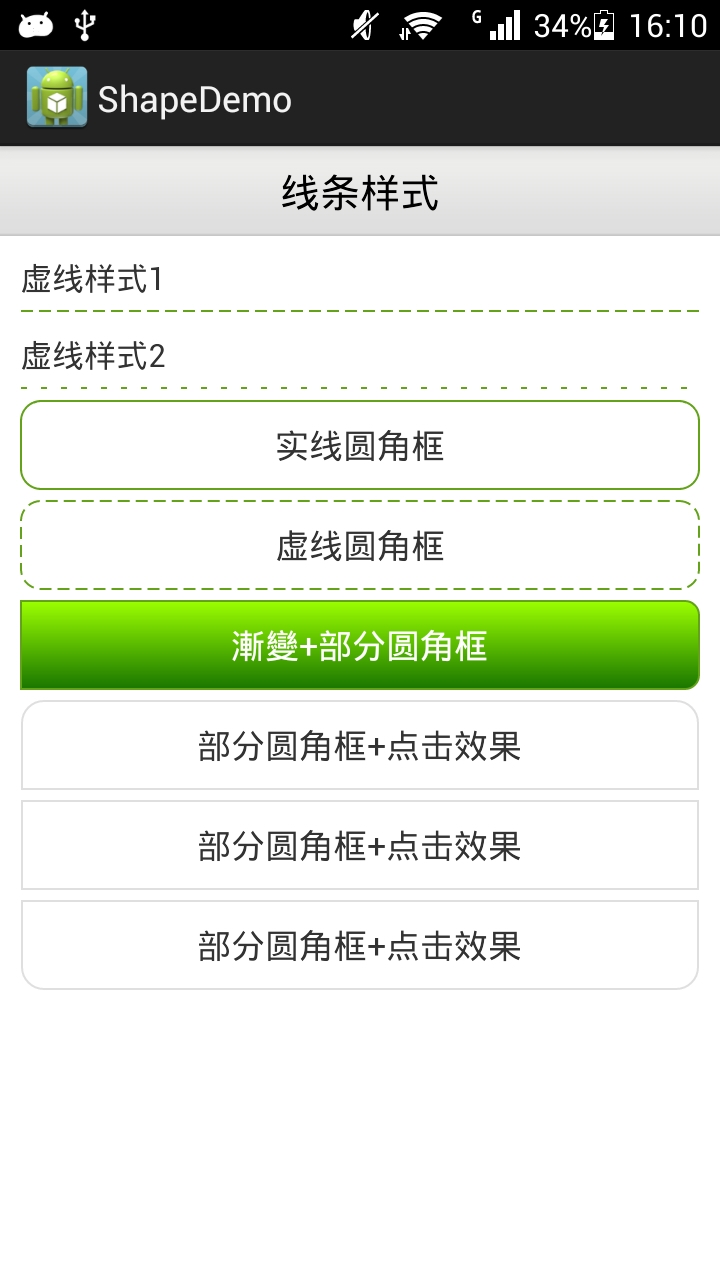
最后运行效果:
44.Android之Shape设置虚线、圆角和渐变学习的更多相关文章
- Android 中shape的使用(圆角矩形)
一.在res/drawable文件夹下创建一个名为gradient_box的xml文件: <?xml version="1.0" encoding="utf-8&q ...
- android 通过shape设置圆形按钮
Android中常常使用shape来定义控件的一些显示属性来美化UI: shape的常用属性有: (1)solid:填充,设置填充的颜色: (2)stroke:描边,设置边界的宽度.颜色等: (3)c ...
- android用shape画虚线,怎么也不显示
一直以为android的shape能画直线.虚线.矩形,圆形等.画直线也就算了.用一个view设一下高度和颜色,就能够出来一条直线了.所以说这个对我来说常常不用,圆形是能够,看看我应用里的消息提 ...
- 【Android使用Shape绘制虚线,在4.0以上的手机显示实线】解决方式
问题描写叙述: 用下面代码绘制虚线: <span style="font-family:Comic Sans MS;font-size:18px;"><? xml ...
- Android中使用shape实现EditText圆角
之前看到手机上的百度editText控件是圆角的就尝试做了一下,看了看相关的文章. 因为代码少,看看就知道了.所以下面我就直接贴上代码供大家参考,有其他的好方法记得分享哦~ 整个代码不涉及JAVA代码 ...
- 【转】Android设置虚线、圆角、渐变
Android虚线圆角渐变 有图又真相,先上图再说. 点击效果: 设置虚线: <?xml version="1.0" encoding="utf-8" ...
- Android设置虚线、圆角、渐变
有图又真相,先上图再说. 点击效果: 设置虚线: <?xml version="1.0" encoding="utf-8"?> <shape ...
- Android GradientDrawable(shape标签定义) 静态使用和动态使用(圆角,渐变实现)
Android GradientDrawable使用优势: 1. 快速实现一些基本图形(线,矩形,圆,椭圆,圆环) 2. 快速实现一些圆角,渐变,阴影等效果 3. 代替图片设置为View的背景 4. ...
- Android Shape自定义纯色圆角按钮
版权声明:分享技术,传播快乐.如果本博客对你有帮助,请在我的博客首页为我打赏吧! 在Android开发中,为响应美化应用中控件的效果,使用Shape定义图形效果,可以解决图片过多的问题. 首先看一下效 ...
随机推荐
- POJ 1984 Navigation Nightmare
并查集,给n个点和m条边,每条边有方向和长度,再给q个询问,第i个询问查询两个点之间在Ti时刻时的曼哈顿距离(能连通则输出曼哈顿距离,否则输出-1) 这题跟Corporative Network 有点 ...
- 配置 AEM CQ6 (author + publish + apache dispatcher + ubuntu )
AEM CQ系列是Adobe下的企业内容管理系统,现在已知的一些企业比如 Deloitte,Ford Racing,这里就不多做基本的介绍了,明白的看! 今天在Docker配置一下author i ...
- java 14 -10 Calendar类以及练习
Calendar:它为特定瞬间与一组诸如 YEAR.MONTH.DAY_OF_MONTH.HOUR 等 日历字段之间的转换提供了一些方法, 并为操作日历字段(例如获得下星期的日期)提供了一些方法. 1 ...
- 转: 最值得阅读学习的 10 个 C 语言开源项目代码
from: http://www.iteye.com/news/29665 1. Webbench Webbench是一个在linux下使用的非常简单的网站压测工具.它使用fork()模拟多个客户端同 ...
- ref关键字的作用
ref关键字使参数按引用传递.其效果是,当控制权传递回调用方法时,在方法中对参数所做的任何更改都将反映在该变量中. 就是说,在调用方法的参数中使用ref关键字可以使得变量能够改变. ref和out都是 ...
- 使用PDO进行sql的预处理和操作结果集
- javascript从url中获取请求参数
function getUrlParam(name) { var reg = new RegExp("(^|&)" + name + "=([^&]*)( ...
- U3D Debug.log的问题
今天在测试有yield有关的问题时,发现Debug.log()是异步输出机制.不一定会在调用后立即执行. 在C++有类似问题:std::cout 也不一定会立即输出,加上"\n"或 ...
- 小程序基础09:视图层之WXML
1.WXML WXML是框架设计的一套标签语言,结合基础组件,事件系统,可以构建出页面的结构. 用以下的例子来看看WXML有什么能力: 1.1数据绑定 <view>{{age}}</ ...
- ZooKeeper学习第四期---构建ZooKeeper应用
一.配置服务 配置服务是分布式应用所需要的基本服务之一,它使集群中的机器可以共享配置信息中那些公共的部分.简单地说,ZooKeeper可以作为一个具有高可用性的配置存储器,允许分布式应用的参与者检索和 ...