
How ADB works
**ADB (Android Debug Bridge): How it works? **
2012.2.6 early draft
Tetsuyuki Kobayashi
What is ADB?
- If you are an Android builder, you have used
adb logcat,adb shell. - Even if you only use DDMS in Eclipse, adb is working under the hood.
- Using adb, you can connect emulator or actual target device.
- "adb kill-server"? what does it mean?
How to connect?

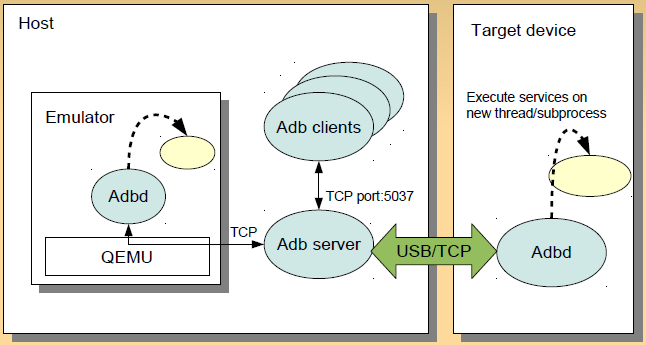
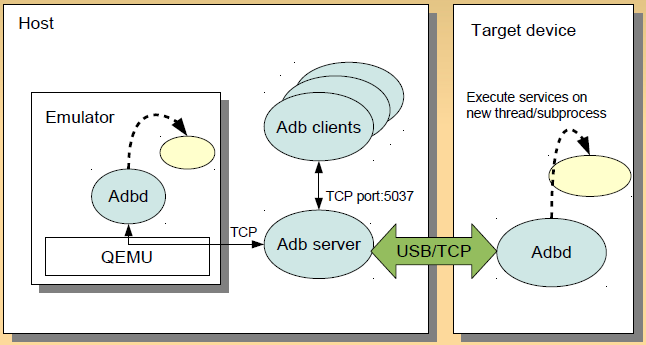
2 roles of ADB
- Providing "Transport"
- communication path between host and target device.
- USE or TCP: but clients don't have to aware.
- Providing "Services"
- executing something on the target devices through the transport.
adb shellfor executing commandadb push/pullfor file transfer
- executing something on the target devices through the transport.
3 elements of ADB
- adb clients
- executable with subcommand
adb shell,adb logcat: the end point of host side
- adb server
- running on host on back-ground
- act as proxy between adb clients and adbd
- adb daemon (adbd)
- running on target device
- started by init, if die, restarted by init again.
When does adb server start?
- Explicitly
adb start-server- It starts adb server as back-ground process.
- Usually it does automatically on demand. You don't have to do
adb start-server. - When you want to restart adb server, do
adb kill-server. - Actually, adb clients and adb server shares same executable
adb start-serverequalsadb fork-server server &
ADB internal
- Source code
- How to get ADB logs
- Sequence chart
- Simple ruby script to connect adb server
- Command details
- Secure mode
- Add USB Vendor ID
- Switching transport mode
Source code
- system/core/adb in Android source tree
- From this directory adb and adbd are built
- Don't confuse
- comman files between adb and adbd
- adb.c, fdevent.c, transort.c transport_local.c, transport_usb.c, service.c, sockets.c, util.c
- files only for adbd
- backup_service.c, file_sync_service.c, jdwp_service.c, framebuffer_service.c, remount_services.c, usb_linux_clients.c, log_service.c
- files only for adb
- console.c, adb_clients.c, file_sync_client.c, usb_vendors.c, get_my_path_{linux, darwin, windows, freebsd}.c, usb_{linux, macos, libusb, windows}.c
#if ADB_HOST

    / * code for adb */

#else

    /* code for adbd */

#endif
How to get ADB logs
- For adb clients and adb server, set environment variable ADB_TRACE
- For adbd, set system property
persist.adb.trace_mask.
Sequence chart
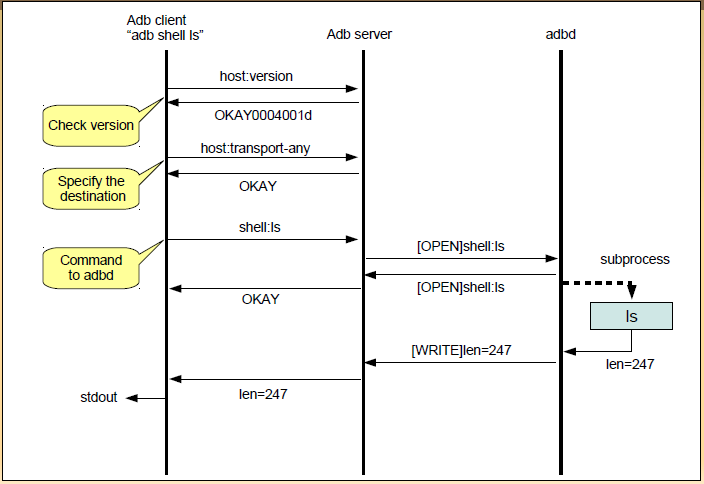
Simple ruby script to connect to adb server
require 'socket'

def error_exit

    puts "Error"

    exit 1

end

def send_to_adb(s, msg)

    s.printf("%04x%s", msg.length, msg)

end

def check_okay(s)

    (s.read(4) == "OKAY")

end

def check_version(s)

    (s.read(12) == "OKAY004001d")

end

hostname = 'localhost'

port = 5037

s = TCPSocket.open(hostname, port)

send_to_adb(s, "host:version")

error_exit if ! check_version(s)

s.close

s = TCPSocket.open(hostname, port)

send_to_adb(s, "host:transport-any")

error_exit if ! check_okay(s)

send_to_adb(s, "shell:ls")

error_exit if ! check_okay(s)

while line = s.gets

    puts line.chop

end

s.close
change "shell:ls" as you like.
Command details
- adb logcat
- adb install/uninstall
- adb reboot
- screen capture from DDMS
Secure mode
- Android smart phone products have adbd. Usually it runs on secure mode. (secure = 1)
- if secure == 1, change adbd as SHELL user(= not privileged), else it keeps running as root user
- In secure mode, all serivces invoked by adbd ran as SHELL user. Some causes "permission denied".
How secure mode decided
- Running on emulator -> secure = 0
- System property "ro.secure" == 1 -> secure = 1
- if "ro.debuggable" == 1, you can restart adb unsecure by "adb root"
- All Android phone products are shipped in "ro.secure" = 1, "ro.debuggable" = 0.
- See adb.c: adb_main
Add USB Vendor ID
- When connecting USB device, adb checks USB Vendor ID
- Many USB Vendor IDs are hard coded in adb.(But not enough)
- To add USB Vendor ID, make "$HOME/.adnroid/adb_usb.ini" and write one ID in one line.
- See usb_vendors.c
Switching transport mode
Switching USB mode to TCP mode
$ adb shell netcfg

lo      UP 127.0.0.1           255.0.0.0           0x00000049

eth0  UP 192.168.1.139   255.255.255.0   0x00001043

$ adb tcpip 5555

restarting in TCP mode port : 5555

$ adb devices

List of devices attached
disconnected from USB. Then restart adb server with specifying target IP address.
$ adb kill-server

$ ADBHOST=192.16.8.1.139 adb devices

* daemon not running. starting it now on port 5037 *

* daemon started successfully *

List of evices attached

emulator-5554 device
Switching transport mode (What happen inside?)
- See service.c restart_tcp_service
- property_set("service.adb.tcp.port", value);
- Note: before Android 4.0, this cause "permission denied" in secure mode and ignored silently!
- After that, exit(1);
- init restarts adbd.
- "service.adb.tcp.port" is checked in adb.c adb_main
Tips
- adb emu
- adb backup/restore
- Joke commands
- Modify emulatro to allow any server socket
adb emu
- You can send a single command to emulator console easily
- send only, can not receive.
- For emulator console: http://developer.android.com/guide/developing/devices/emulator.html
- Simple example. "adb emu window scale 0.5" after starting emulator.
adb backup/restore
- New in Android 4.0
- You can backup/restore installed applications with their saved status.
Joke commands
- adb shell
- same as "adb shell" except "hell" color
- Just try.
- adb lolcat
- same as "adb logcat"
Modify emulator to allow any server socket

All server sockets in Android emulator accepts only from localhost.
If you feel inconvenient in this restriction, apply the patch in next page.
Patch to allow any server socket(for experience)
diff --git a/slirp-android/socket.c b/slirp-android/socket.c

index 439590a..ed16d5a 100644

--- a/slirp-android/socket.c

+++ b/slirp-android/socket.c

@@ -650,7 +650,7 @@ solisten(u_int port, u_int32_t laddr, u_int lport, int

flags)

so->so_laddr_ip = laddr; /* Ditto */

so->so_haddr_port = port;

- s = socket_loopback_server( port, SOCKET_STREAM );

+ s = socket_inaddr_any_server( port, SOCKET_STREAM );

if (s < 0)

return NULL;

diff --git a/sockets.c b/sockets.c

index 1063339..55b5d57 100644

--- a/sockets.c

+++ b/sockets.c

@@ -1337,6 +1337,11 @@ socket_in_client( SockAddress* to, SocketType type )

return socket_connect_client( s, to );

}

+int

+socket_inaddr_any_server( int port, SocketType type )

+{

+ return socket_in_server( INADDR_ANY, port, type );

+}

int

socket_loopback_server( int port, SocketType type )
Advanced Topics
- adb in Android device
- Port adbd to other than Android
adb in Android device
- Usually, adb is running on the host side, such as Linux, MacOS and Windows
- In Android 4.0 there is /system/bin/adb in Android file system
- What for is this?
Connect its own adbd by adb
- Restart adbd in TCP mode
- Then type "adb devices"
- It can connect its own adbd by local loop back
Connect other Android device by adb on Android
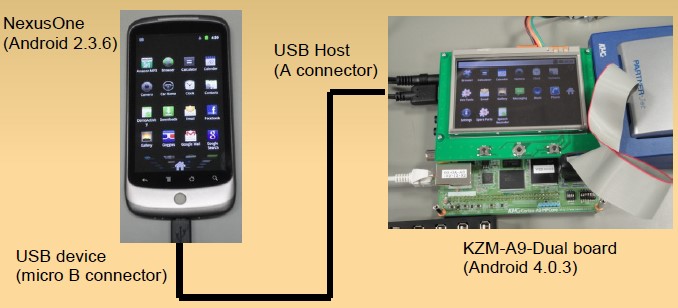
At the serial console on KZM-A9-Dual board
# adb devices

* daemon not running. starting it now on port 5038 *

* daemon started successfully *

List of devices attached

HT015P803242 device

#
It worked!
You can do "adb shell", "adb logcat", too.
Even you can install application from the board to NexusOne by "adb install foo.apk".
Port adbd to other than Android
- Quick hack!
- Consider dependency for better porting.
Quick hack!
- /sbin/adbd is statically linked executable.
- Just copy this file to ARM Ubuntu 11.10 just for experience (using Android patched kernel)
- Somehow, it worked without any recompilation
- sudo chmod 666 /dev/android_adb*
- make symbolic link /bin/sh to /system/bin/sh
- adbd runs in secure mode
- It worked "adb shell", "adb push/pull"
Consider dependency for better porting
- Some service requires other android commands
- adb install/uninstall, adb bugreport
- framebuffer service invokes /system/in/screeencap
- Adbd uses Android property system
- At the binary experiment, all property_get returns default values.
- That's why adbd ran in secure mode.
- At the binary experiment, all property_get returns default values.
- Switching adbd mode assumed that init restarts adbd process.
How ADB works的更多相关文章
- Android adb 命令使用总结
adb原理 参考文档 How ADB works http://www.cnblogs.com/ifantastic/p/5186362.html http://blog.csdn.ne ...
- Android Debug Bridge
Android Debug Bridge Introduction Android Debug Bridge (adb) is a versatile command line tool th ...
- Remove openjdk in Ubuntu/Configure jdk and running adb in 64-bit Ubuntu
sudo apt-get autoremove openjdk-7-jre sudo apt-get purge openjdk* java -version No openjdk available ...
- 一月份实现Adb小程序
As Brian said: According to a post on xda-developers, you can enable ADB over WiFi from the device w ...
- 转 Android adb root权限
永久root带文件 因为开发需要,我经常会用到adb这个工具(Android Debug Bridge),我们都知道adb shell默认是没有root权限的,修改系统文件就很不方便了,adb pus ...
- adb概览及协议參考
原文:https://github.com/android/platform_system_core/blob/master/adb/OVERVIEW.TXT) Implementation note ...
- adb概览及协议参考
原文:https://github.com/android/platform_system_core/blob/master/adb/OVERVIEW.TXT) Implementation note ...
- Android KitCat 4.4.2 ADB 官方所支持的所有Services格式翻译
在之前的文章中有转帖网上同行制作的ADB协议表格<<adb概览及协议参考>>,但不够详尽,所以这里自己另外基于Android 4.4.2的技术文档重新做一次翻译. HOST S ...
- 在调试安卓系统的时候需要这个 ”adb disable-verity“
在调试设备的时候.想要对文件进行读写 于是使用adb remount 出现提示. 请使用 ”adb disable-verity“ 于是使用adb disable-verity 的命令. 得到如下 ...
随机推荐
- paip.提升效率--僵尸代码的迷思
paip.提升效率--僵尸代码的迷思 僵尸代码是指你的代码库里被注释掉的那部分代码, 很少去使用它,就像僵尸一样, 看雷kill-the-zombies-in-your-code ========== ...
- iOS开发之静态库(一)—— 基本概念
在项目开发过程中,经常出现优秀代码重用现象,又或者提供给第三方功能模块却又不想让其看到源代码,这些时候,通常的做法是将代码封装成库或者框架,这些在Windows编程或Linux编程中非常容易实现的过程 ...
- tab切换的两种方法
方法一.主要使用了传递参数的思想,把循环变量不能使用转换了一下<!DOCTYPE html><html lang="en"><head> < ...
- Python之Django【基础篇】
Python的WEB框架有Django.Tornado.Flask 等多种,Django相较与其他WEB框架其优势为:大而全,框架本身集成了ORM.模型绑定.模板引擎.缓存.Session等诸多功能. ...
- UIBarButtonItem-添加自定义Left或者Right按钮
为UINavigationController添加UINavigationItem,我们可以这样写: 1.添加返回导航按钮backBarButtonItem 1.用系统自带的返回按钮 UIBa ...
- Initializing a collection
Before Java 1.7, only this one is permitted: ArrayList<String> a = new ArrayList<String> ...
- nodejs express 框架解密3-中间件模块
本文档是基于express 3.4.6 的 在上篇中我们提到了中间件,这篇主要解释这个模块,middleware.js 为: var utils = require('./utils'); /** * ...
- Python的列表推导式
1.列表推导式书写形式: [表达式 for 变量 in 列表] 或者 [表达式 for 变量 in 列表 if 条件] 2.举例说明: #!/usr/bin/python # -*- codi ...
- Python: 测试函数是否被调用
# helper class defined elsewhere class CallLogger(object): def __init__(self, meth): self.meth = met ...
- Unity中Mesh分解与边缘高亮加上深度检测
一个比较简单的需求,不过遇到些坑,记录下. 房间有多个模型,每个模型可能多个SubMesh,点击后,需要能具体到是那个SubMesh,并且在这个SubMesh上显示边缘高光,以及能个性这单个SubMe ...