
机器重启 查看crontab执行历史记录crontab没有执行
Sep 17 19:01:01 d run-parts(/etc/cron.hourly)[8452]: finished 0anacron
Sep 17 19:10:01 d CROND[9059]: (root) CMD (cd /root/tools/trunk/plugins/personas; python sync_db.py &> /dev/null)
Sep 17 19:10:01 d CROND[9060]: (root) CMD (/usr/lib64/sa/sa1 1 1)
Sep 17 19:20:01 d CROND[9736]: (root) CMD (/usr/lib64/sa/sa1 1 1)
Sep 17 19:20:01 d CROND[9737]: (root) CMD (cd /root/tools/trunk/plugins/personas; python sync_db.py &> /dev/null)
Sep 17 19:30:01 d CROND[10411]: (root) CMD (/usr/lib64/sa/sa1 1 1)
Sep 17 19:30:01 d CROND[10412]: (root) CMD (cd /root/tools/trunk/plugins/personas; python sync_db.py &> /dev/null)
Sep 17 19:32:10 d crontab[10571]: (root) LIST (root)
Sep 17 19:40:01 d CROND[11086]: (root) CMD (cd /root/tools/trunk/plugins/personas; python sync_db.py &> /dev/null)
Sep 17 19:40:01 d CROND[11087]: (root) CMD (/usr/lib64/sa/sa1 1 1)
Sep 17 19:50:01 d CROND[11762]: (root) CMD (/usr/lib64/sa/sa1 1 1)
Sep 17 19:50:01 d CROND[11763]: (root) CMD (cd /root/tools/trunk/plugins/personas; python sync_db.py &> /dev/null)
Sep 20 12:40:02 d crontab[582]: (root) LIST (root)
Sep 20 13:36:43 d crontab[4633]: (root) LIST (root)
Sep 20 14:46:11 d crontab[9954]: (root) LIST (root)
[root@d log]# tail -100 /var/log/cron
CentOS下查看crontab执行历史记录 - Jerry.Kwan - 博客园 https://www.cnblogs.com/Jerryshome/archive/2012/02/16/2353537.html
在crontab中添加了定时任务,但发现没有得到期望的结果,因而怀疑是crontab没有执行相应的任务,但怎么定位crontab是否执行呢?
这就需要查看crontab的执行历史记录,具体位置如下:
cd /var/log
tail -100 cron
在cron文件中即可查阅已经操作过的相关定时任务。
查看定时脚本目录
[root@d log]# ll -as /var/spool/
total 52
4 drwxr-xr-x. 13 root root 4096 Sep 14 23:24 .
4 drwxr-xr-x. 23 root root 4096 Sep 14 23:23 ..
4 drwxr-x--x 2 root abrt 4096 Apr 27 22:53 abrt
4 drwx------. 2 abrt abrt 4096 Apr 27 22:53 abrt-upload
4 drwxr-xr-x. 2 root root 4096 Apr 11 09:48 anacron
4 drwx------. 3 root root 4096 Apr 11 08:13 at
4 drwx------. 2 root root 4096 Apr 11 09:48 cron
4 drwx--x---. 3 root lp 4096 Apr 11 13:03 cups
4 drwxr-xr-x. 2 root root 4096 Apr 11 12:59 lpd
4 drwxrwxr-x. 2 root mail 4096 Apr 11 12:59 mail
4 drwxr-xr-x. 2 root root 4096 Apr 13 20:53 plymouth
4 drwxr-xr-x. 16 root root 4096 Nov 21 2014 postfix
4 drwxrwxrwt 2 root root 4096 Jan 18 2017 samba
[root@d log]# ll -as /var/spool/cron/
total 12
4 drwx------. 2 root root 4096 Apr 11 09:48 .
4 drwxr-xr-x. 13 root root 4096 Sep 14 23:24 ..
4 -rw------- 1 root root 398 Jun 7 09:05 root
[root@d log]# cat /var/spool/cron/root
# create by root at 2017/10/20
*/10 * * * * cd /root/tools/trunk/plugins/personas; python sync_db.py &> /dev/null
# create by root at 2017/10/27
00 02 * * * cd /root/tools/trunk/plugins/personas; python sync_db_full.py &> /dev/null
[root@d log]#
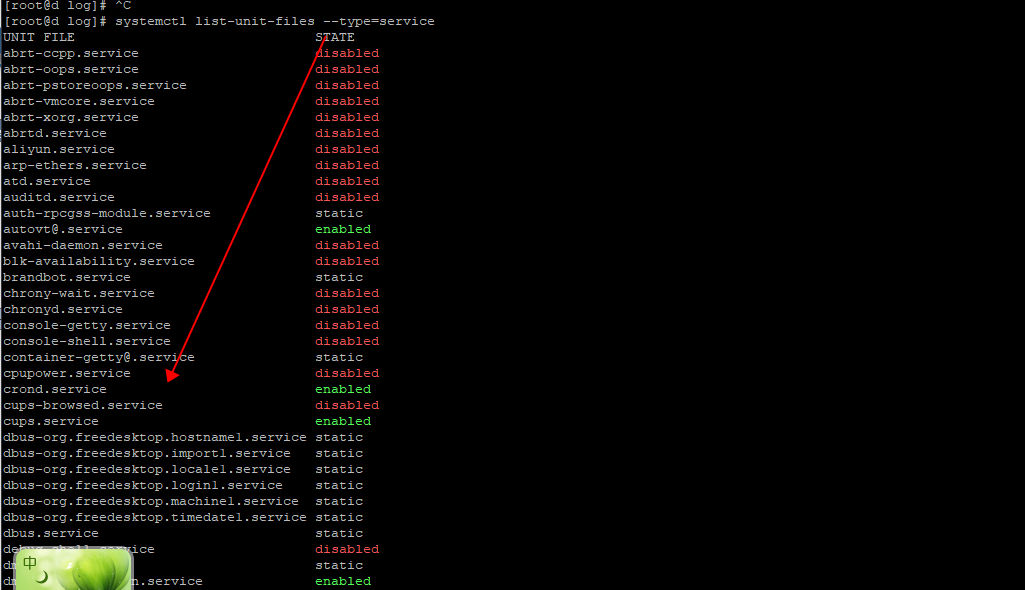
[root@d log]# systemctl list-unit-files --type=service > tmpDEL
[root@d log]# cat tmpDEL
UNIT FILE STATE
abrt-ccpp.service disabled
abrt-oops.service disabled
abrt-pstoreoops.service disabled
abrt-vmcore.service disabled
abrt-xorg.service disabled
abrtd.service disabled
aliyun.service disabled
arp-ethers.service disabled
atd.service disabled
auditd.service disabled
auth-rpcgss-module.service static
autovt@.service enabled
avahi-daemon.service disabled
blk-availability.service disabled
brandbot.service static
chrony-wait.service disabled
chronyd.service disabled
console-getty.service disabled
console-shell.service disabled
container-getty@.service static
cpupower.service disabled
crond.service enabled
cups-browsed.service disabled
cups.service enabled
dbus-org.freedesktop.hostname1.service static
dbus-org.freedesktop.import1.service static
dbus-org.freedesktop.locale1.service static
dbus-org.freedesktop.login1.service static
dbus-org.freedesktop.machine1.service static
dbus-org.freedesktop.timedate1.service static
dbus.service static
debug-shell.service disabled
dm-event.service static
dmraid-activation.service enabled
dnsmasq.service disabled
dracut-cmdline.service static
dracut-initqueue.service static
dracut-mount.service static
dracut-pre-mount.service static
dracut-pre-pivot.service static
dracut-pre-trigger.service static
dracut-pre-udev.service static
dracut-shutdown.service static
ebtables.service disabled
emergency.service static
firewalld.service disabled
fprintd.service static
fstrim.service static
getty@.service enabled
gssproxy.service disabled
halt-local.service static
initrd-cleanup.service static
initrd-parse-etc.service static
initrd-switch-root.service static
initrd-udevadm-cleanup-db.service static
irqbalance.service disabled
kdump.service disabled
kmod-static-nodes.service static
libstoragemgmt.service disabled
lvm2-lvmetad.service disabled
lvm2-lvmpolld.service disabled
lvm2-monitor.service enabled
lvm2-pvscan@.service static
mdmon@.service static
mdmonitor.service disabled
messagebus.service static
microcode.service enabled
NetworkManager-dispatcher.service disabled
NetworkManager-wait-online.service enabled
NetworkManager.service disabled
nfs-blkmap.service disabled
nfs-config.service static
nfs-idmap.service static
nfs-idmapd.service static
nfs-lock.service static
nfs-mountd.service static
nfs-rquotad.service disabled
nfs-secure.service static
nfs-server.service disabled
nfs-utils.service static
nfs.service disabled
nfslock.service static
nmb.service disabled
nscd.service enabled
ntpd.service enabled
ntpdate.service disabled
plymouth-halt.service disabled
plymouth-kexec.service disabled
plymouth-poweroff.service disabled
plymouth-quit-wait.service disabled
plymouth-quit.service disabled
plymouth-read-write.service disabled
plymouth-reboot.service disabled
plymouth-start.service disabled
plymouth-switch-root.service static
polkit.service static
postfix.service disabled
psacct.service disabled
quotaon.service static
rc-local.service static
rdisc.service disabled
rdma-load-modules@.service static
rdma-ndd.service static
rdma.service disabled
redis-sentinel.service disabled
redis.service disabled
rescue.service static
rhel-autorelabel-mark.service enabled
rhel-autorelabel.service enabled
rhel-configure.service enabled
rhel-dmesg.service enabled
rhel-domainname.service enabled
rhel-import-state.service enabled
rhel-loadmodules.service enabled
rhel-readonly.service enabled
rngd.service disabled
rpc-gssd.service static
rpc-rquotad.service disabled
rpc-statd-notify.service static
rpc-statd.service static
rpcbind.service disabled
rpcgssd.service static
rpcidmapd.service static
rsyncd.service disabled
rsyncd@.service static
rsyslog.service enabled
serial-getty@.service disabled
smartd.service disabled
smb.service disabled
sshd-keygen.service static
sshd.service enabled
sshd@.service static
svnserve.service disabled
sysstat.service enabled
systemd-ask-password-console.service static
systemd-ask-password-plymouth.service static
systemd-ask-password-wall.service static
systemd-backlight@.service static
systemd-binfmt.service static
systemd-bootchart.service disabled
systemd-firstboot.service static
systemd-fsck-root.service static
systemd-fsck@.service static
systemd-halt.service static
systemd-hibernate-resume@.service static
systemd-hibernate.service static
systemd-hostnamed.service static
systemd-hwdb-update.service static
systemd-hybrid-sleep.service static
systemd-importd.service static
systemd-initctl.service static
systemd-journal-catalog-update.service static
systemd-journal-flush.service static
systemd-journald.service static
systemd-kexec.service static
systemd-localed.service static
systemd-logind.service static
systemd-machine-id-commit.service static
systemd-machined.service static
systemd-modules-load.service static
systemd-nspawn@.service disabled
systemd-poweroff.service static
systemd-quotacheck.service static
systemd-random-seed.service static
systemd-readahead-collect.service enabled
systemd-readahead-done.service indirect
systemd-readahead-drop.service enabled
systemd-readahead-replay.service enabled
systemd-reboot.service static
systemd-remount-fs.service static
systemd-rfkill@.service static
systemd-shutdownd.service static
systemd-suspend.service static
systemd-sysctl.service static
systemd-timedated.service static
systemd-tmpfiles-clean.service static
systemd-tmpfiles-setup-dev.service static
systemd-tmpfiles-setup.service static
systemd-udev-settle.service static
systemd-udev-trigger.service static
systemd-udevd.service static
systemd-update-done.service static
systemd-update-utmp-runlevel.service static
systemd-update-utmp.service static
systemd-user-sessions.service static
systemd-vconsole-setup.service static
tcsd.service disabled
teamd@.service static
tuned.service disabled
usb_modeswitch@.service static
wpa_supplicant.service disabled
191 unit files listed.
【开机启动 != 启动成功】
[root@d log]# service crond status
Redirecting to /bin/systemctl status crond.service
● crond.service - Command Scheduler
Loaded: loaded (/usr/lib/systemd/system/crond.service; enabled; vendor preset: enabled)
Active: failed (Result: signal) since Mon 2018-09-17 19:55:43 CST; 2 days ago
Main PID: 562 (code=killed, signal=KILL)
Sep 17 19:30:01 d crond[10409]: pam_limits(crond:session): invalid line 'soft nofile 95535' - skipped
Sep 17 19:30:01 d crond[10409]: pam_limits(crond:session): invalid line 'hard nofile 95535' - skipped
Sep 17 19:40:01 d crond[11085]: pam_limits(crond:session): invalid line 'soft nofile 95535' - skipped
Sep 17 19:40:01 d crond[11085]: pam_limits(crond:session): invalid line 'hard nofile 95535' - skipped
Sep 17 19:40:01 d crond[11084]: pam_limits(crond:session): invalid line 'soft nofile 95535' - skipped
Sep 17 19:40:01 d crond[11084]: pam_limits(crond:session): invalid line 'hard nofile 95535' - skipped
Sep 17 19:50:01 d crond[11760]: pam_limits(crond:session): invalid line 'soft nofile 95535' - skipped
Sep 17 19:50:01 d crond[11760]: pam_limits(crond:session): invalid line 'hard nofile 95535' - skipped
Sep 17 19:50:01 d crond[11761]: pam_limits(crond:session): invalid line 'soft nofile 95535' - skipped
Sep 17 19:50:01 d crond[11761]: pam_limits(crond:session): invalid line 'hard nofile 95535' - skipped
[root@d log]#
原因为最大文件数配置错误
/etc/security/limits.conf
启动crond和检测状态
[root@d ~]# service crond status -l
Redirecting to /bin/systemctl status -l crond.service
● crond.service - Command Scheduler
Loaded: loaded (/usr/lib/systemd/system/crond.service; enabled; vendor preset: enabled)
Active: failed (Result: exit-code) since Thu 2018-09-20 15:43:30 CST; 2min 14s ago
Process: 14736 ExecStart=/usr/sbin/crond -n $CRONDARGS (code=exited, status=1/FAILURE)
Main PID: 14736 (code=exited, status=1/FAILURE)
Sep 20 15:43:30 d systemd[1]: Started Command Scheduler.
Sep 20 15:43:30 d systemd[1]: Starting Command Scheduler...
Sep 20 15:43:30 d crond[14736]: crond: can't lock /var/run/crond.pid, otherpid may be 12554: Resource temporarily unavailable
Sep 20 15:43:30 d systemd[1]: crond.service: main process exited, code=exited, status=1/FAILURE
Sep 20 15:43:30 d systemd[1]: Unit crond.service entered failed state.
Sep 20 15:43:30 d systemd[1]: crond.service failed.
[root@d ~]# service crond start
Redirecting to /bin/systemctl start crond.service
[root@d ~]# service crond status -l
Redirecting to /bin/systemctl status -l crond.service
● crond.service - Command Scheduler
Loaded: loaded (/usr/lib/systemd/system/crond.service; enabled; vendor preset: enabled)
Active: active (running) since Thu 2018-09-20 15:46:01 CST; 7s ago
Main PID: 15049 (crond)
CGroup: /system.slice/crond.service
└─15049 /usr/sbin/crond -n
Sep 20 15:46:01 d systemd[1]: Started Command Scheduler.
Sep 20 15:46:01 d systemd[1]: Starting Command Scheduler...
Sep 20 15:46:01 d crond[15049]: (CRON) INFO (RANDOM_DELAY will be scaled with factor 80% if used.)
Sep 20 15:46:01 d crond[15049]: (CRON) INFO (running with inotify support)
Sep 20 15:46:01 d crond[15049]: (CRON) INFO (@reboot jobs will be run at computer's startup.)
[root@d ~]#
机器重启 查看crontab执行历史记录crontab没有执行的更多相关文章
- linux重启查看日志及历史记录 查询原因
linux重启查看日志及历史记录 查询原因 linux系统文件通常在/var/log中下面是对下面常出现的文件进行解释 /var/log/message ----------------------- ...
- linux定时执行任务crontab命令用法
linux系统的定时任务是由 cron (crond) 这个系统服务来控制的.Linux 系统上面原本就有非常多的计划性工作,因此这个系统服务是默认启动的.另外, 由于使用者自己也可以设置计划任务,所 ...
- Debian的定时执行命令Crontab
转载:http://i.592.net/?post=276 Debian的定时执行命令Crontab,这个相当于Windows的计划任务 想要让Debian定时执行命令就得靠crontab了! ...
- 使用crontab,让linux定时执行shell脚本
阅读目录 1. cron服务[Ubuntu环境] 2. crontab用法 3. 编辑crontab文件 4. 流程举例 5. 几个例子 Linux中,周期执行的任务一般由cron这个守护进程来处理. ...
- Linux crontab定时器设置(定期执行java程序)(转)
Crontab 语法 Crontab语法一个crontab文件用五个段来定义:天,日期和时间,和一个要定期执行的命令代码. * * * * * command to be execut ...
- ubuntu中执行定时任务crontab
今天研究了下ubuntu里的crontab内置指令.这是设置定时执行脚本任务的指令,我先测试了下最基础的执行. 第一次使用crontab 时,会出现 no crontab for root - usi ...
- 【Linux】使用crontab,让linux定时执行shell脚本
阅读目录 1. cron服务[Ubuntu环境] 2. crontab用法 3. vim编辑crontab文件 4.Cron各项描述 5.例子解释 Linux中,周期执行的任务一般由cron这个守护进 ...
- linux 定时执行任务 crontab
欲编写定时任务访问网页和打开图片 原来写法为 #!/bin/bash #可以执行 echoecho "Hello" > dir/file.txt #不可以执行 xdg-ope ...
- centos7 crontab 定时执行python任务不执行的原因及解决办法
1.问题描述 在用crontab设置定时任务时,发现py脚本在crontab中报错,显示import某些包找不到,但是手动直接运行py脚本,完全正常. 01 05 * * * ./get_topi ...
随机推荐
- TensorFlow学习笔记4——变量共享
因为最近在研究生成对抗网络GAN,在读别人的代码时发现了 with tf.variable_scope(self.name_scope_conv, reuse = reuse): 这样一条语句,查阅官 ...
- 【转载】Highcharts使用指南
另附几个较好的图形组件库: 基于HTML5的开源画图组件:http://www.ichartjs.com/gettingstarted/ 图表Echarts: http://echarts.baidu ...
- Redis_发布订阅(基础)
目录 前言 生产者和消费者 发布和订阅 Java实现 注意 前言 随着业务复杂, 业务的项目依赖关系增强, 使用消息队列帮助系统降低耦合度.发布订阅(pub/sub)是一种消息通信模式,主要目的是解除 ...
- RabbitMQ基础概念
转至:http://blog.csdn.net/whycold/article/details/41119807 RabbitMQ简介 AMQP,即Advanced Message Queuing P ...
- HNU 13411 Reverse a Road II(最大流+BFS)经典
Reverse a Road II Time Limit: 10000ms, Special Time Limit:25000ms, Memory Limit:65536KB Total submit ...
- Vue 组件3 作用域插槽
作用域插槽是一种特殊类型的插槽,用作使用一个(能够传递数据到)可重用模板替换已渲染元素. 在子组件中,只需将数据传递到插槽,就像你将props传递给组件一样: <div class=" ...
- FD_CLOEXEC用法及原因_转
转自:使用FD_CLOEXEC实现close-on-exec,关闭子进程无用文件描述符 我们经常会碰到需要fork子进程的情况,而且子进程很可能会继续exec新的程序.这就不得不提到子进程中无用文件描 ...
- socket心跳检测
一.什么是心跳检测 判断对方(设备,进程或其它网元)是否正常动行,一般采用定时发送简单的通讯包,如果在指定时间段内未收到对方响应,则判断对方已经当掉.用于检测TCP的异常断开. 基本原因是服务器端不能 ...
- E - Leading and Trailing 求n^k得前三位数字以及后三位数字,保证一定至少存在六位。
/** 题目:E - Leading and Trailing 链接:https://vjudge.net/contest/154246#problem/E 题意:求n^k得前三位数字以及后三位数字, ...
- 开源码应用之Eclipse篇
开写这篇的时候,恰逢Eclpse Mars(4.5)正式公布,最终由日蚀变登火星了,也离我開始基于Eclipse开发产品已经过去10年,这10年间,经历了Eclipse由私有核心框架到拥抱OSGi, ...