
Oracle EBS使用adpatch工具打patch过程【Z】
从Metalink下载补丁
登陆到Metalink(https://support.oracle.com),Oracle内部用户可以使用ARU来下载。
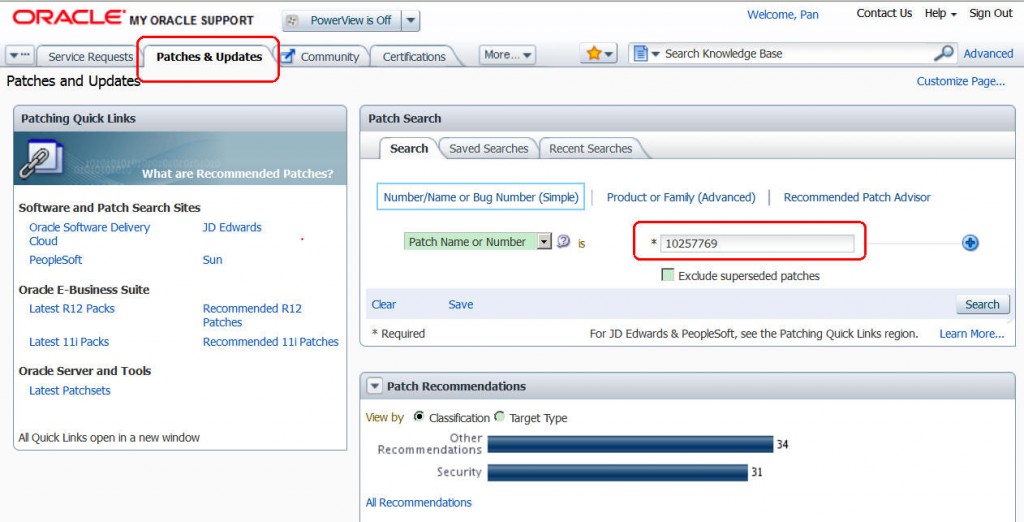
点击Patches & Updates 页签,在"Patch Search"区,输入你的Patch号,Search,
找到你的Patch之后,特别注意,需要仔细查看Patch的Release,Platform/Language...以及阅读Read Me信息(看是否有需要关联下载的Patch)
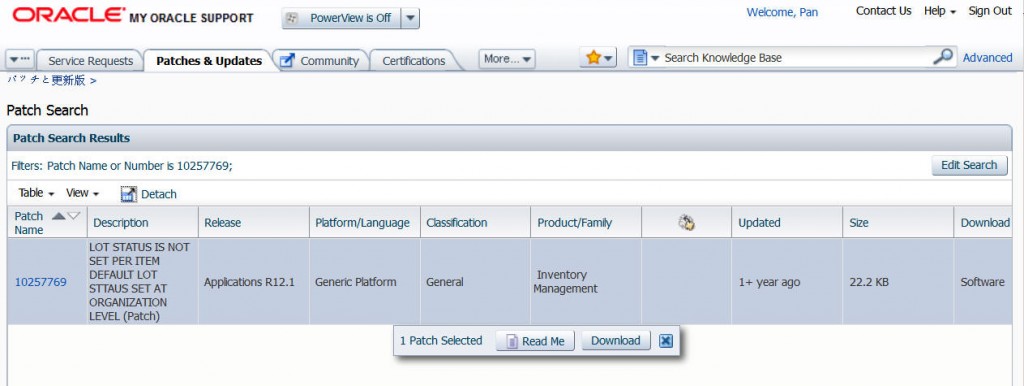
然后下载Patch到本机,

上传&解压
打patch前,最好备份可能会被覆盖的文件。仔细阅读Readme文件。
上传patch文件到服务器端的Patch目录下,然后使用unzip命令解压,eg.
[oracle@bej301441 patches]$ unzip p10257769_R12.INV.B_R12_GENERIC.zip
Archive: p10257769_R12.INV.B_R12_GENERIC.zip
inflating: 10257769/README.html
inflating: 10257769/u10257769.drv
inflating: 10257769/f10257769.ldt
inflating: 10257769/inv/patch/115/sql/INVVLTPB.pls
inflating: 10257769/marker1.txt
inflating: 10257769/b10257769.ldt
inflating: 10257769/README.txt
inflating: 10257769/patch_metadata.xml
inflating: 10257769/ad/patch/115/manualsteps/ad_apply_patch.xml
[oracle@bej301441 patches]$
解压后会生成一个patch目录,进入patch目录
[oracle@bej301441 patches]$ cd 10257769/
[oracle@bej301441 10257769]$ ls
ad f10257769.ldt marker1.txt README.html u10257769.drv
b10257769.ldt inv patch_metadata.xml README.txt
[oracle@bej301441 10257769]$
u<patchnum>.drv文件是用于adpatch工具的drvier文件(Unified driver file),告诉adpatch需要拷贝哪些文件,需要产生哪些数据库对象...
使用adpatch来打patch(完整的日志)
adpatch实际上是位于$AD_TOP/bin目录下的打patch工具,adpatch会对比补丁文件和系统原文件的版本,如果补丁文件的版本比系统里原有的文件版本还低,那么adpatch是不会复制patch文件到系统中去的。
对于本例,这里使用hotpatch选项,hotpatch一般用于小的patch,对于大点的patch推荐使用Maintenance选项。
关于patch的选项,有很多,具体可以参见:Patch Application Utilities中“AutoPatch Options”部分。
[oracle@bej301441 10257769]$ adpatch driver=u10257769.drv options=hotpatch
Copyright (c) 2002 Oracle Corporation
Redwood Shores, California, USA
Oracle Applications AutoPatch
Version 12.0.0
NOTE: You may not use this utility for custom development
unless you have written permission from Oracle Corporation.
Attention: AutoPatch no longer checks for unapplied pre-requisite patches.
You must use OAM Patch Wizard for this feature. Alternatively, you can
review the README for pre-requisite information.
Your default directory is '/u01/oracle/mc3yd213/apps/apps_st/appl'.
Is this the correct APPL_TOP [Yes] ? yes (需要你确实当前目录为APPL_TOP)
AutoPatch records your AutoPatch session in a text file
you specify. Enter your AutoPatch log file name or press [Return]
to accept the default file name shown in brackets.
Filename [adpatch.log] : 10257769_EN_adpatch.log(指定adpatch输出日志的名字,一般放在$APPL_TOP/admin/<SID>/log下,默认名为adpatch.log,不过最好改成补丁编号+语言.log)
Options = "hotpatch".
Patch Driver File = "u10257769.drv".
You can be notified by email if a failure occurs.
Do you wish to activate this feature [No] ? no (邮件服务)
Please enter the batchsize [1000] :
Please enter the name of the Oracle Applications System that this
APPL_TOP belongs to.
The Applications System name must be unique across all Oracle
Applications Systems at your site, must be from 1 to 30 characters
long, may only contain alphanumeric and underscore characters,
and must start with a letter.
Sample Applications System names are: "prod", "test", "demo" and
"Development_2".
Applications System Name [mc3yd213] : mc3yd213 *
NOTE: If you do not currently have certain types of files installed
in this APPL_TOP, you may not be able to perform certain tasks.
Example 1: If you don't have files used for installing or upgrading
the database installed in this area, you cannot install or upgrade
the database from this APPL_TOP.
Example 2: If you don't have forms files installed in this area, you cannot
generate them or run them from this APPL_TOP.
Example 3: If you don't have concurrent program files installed in this area,
you cannot relink concurrent programs or generate reports from this APPL_TOP.
Do you currently have files used for installing or upgrading the database
installed in this APPL_TOP [YES] ? YES *
Do you currently have Java and HTML files for HTML-based functionality
installed in this APPL_TOP [YES] ? YES *
Do you currently have Oracle Applications forms files installed
in this APPL_TOP [YES] ? YES *
Do you currently have concurrent program files installed
in this APPL_TOP [YES] ? YES *
Please enter the name Oracle Applications will use to identify this APPL_TOP.
The APPL_TOP name you select must be unique within an Oracle Applications
System, must be from 1 to 30 characters long, may only contain
alphanumeric and underscore characters, and must start with a letter.
Sample APPL_TOP Names are: "prod_all", "demo3_forms2", and "forms1".
APPL_TOP Name [bej301441] : bej301441 *
You are about to apply a patch to the installation of Oracle Applications
in your ORACLE database 'mc3yd213'
using ORACLE executables in '/u01/oracle/mc3yd213/apps/tech_st/10.1.2'.
Is this the correct database [Yes] ? yes
AutoPatch needs the password for your 'SYSTEM' ORACLE schema
in order to determine your installation configuration.
Enter the password for your 'SYSTEM' ORACLE schema: (输入数据库system用户的密码)
The ORACLE username specified below for Application Object Library
uniquely identifies your existing product group: APPLSYS
Enter the ORACLE password of Application Object Library [APPS] :(输入apps的密码)
===========
AutoPatch is verifying your username/password.
The status of various features in this run of AutoPatch is:
<-Feature version in->
Feature Active? APPLTOP Data model Flags
------------------------------ ------- -------- ----------- -----------
CHECKFILE Yes 1 1 Y N N Y N Y
PREREQ Yes 6 6 Y N N Y N Y
CONCURRENT_SESSIONS No 2 2 Y Y N Y Y N
PATCH_TIMING Yes 2 2 Y N N Y N Y
PATCH_HIST_IN_DB Yes 6 6 Y N N Y N Y
SCHEMA_SWAP Yes 1 1 Y N N Y Y Y
JAVA_WORKER Yes 1 1 Y N N Y N Y
CODELEVEL Yes 1 1 Y N N Y N Y
Identifier for the current session is 548205
Reading product information from file...
Reading language and territory information from file...
Reading language information from applUS.txt ...
AutoPatch warning:
Product Data File
/u01/oracle/mc3yd213/apps/apps_st/appl/admin/zfaprod.txt
does not exist for product "zfa".
This product is registered in the database but the
above file does not exist in APPL_TOP. The product
will be ignored without error.
AutoPatch warning:
Product Data File
/u01/oracle/mc3yd213/apps/apps_st/appl/admin/zsaprod.txt
does not exist for product "zsa".
This product is registered in the database but the
above file does not exist in APPL_TOP. The product
will be ignored without error.
AutoPatch warning:
Product Data File
/u01/oracle/mc3yd213/apps/apps_st/appl/admin/jtsprod.txt
does not exist for product "jts".
This product is registered in the database but the
above file does not exist in APPL_TOP. The product
will be ignored without error.
Reading database to see what industry is currently installed.
Reading FND_LANGUAGES to see what is currently installed.
Currently, the following language is installed:
Code Language Status
---- --------------------------------------- ---------
US American English Base
Your base language will be AMERICAN.
Setting up module information.
Reading database for information about the modules.
Saving module information.
Reading database for information about the products.
Reading database for information about how products depend on each other.
Reading topfile.txt ...
Saving product information.
AD code level : [B.3]
Not checking the system maintenance mode.
Trying to obtain a lock...
Attempting to instantiate the current-view snapshot...
Was already instantiated. So no instantiation done this time.
**************** S T A R T O F U P L O A D ****************
Start date: Wed Jul 04 2012 02:53:24
0 "left over" javaupdates.txt files uploaded to DB: Wed Jul 04 2012 02:53:24
0 patches uploaded from the ADPSV format patch history files: Wed Jul 04 2012 02:53:24
Uploading information about files copied during the previous runs ...
0 "left over" filescopied_<session_id>.txt files uploaded to DB: Wed Jul 04 2012 02:53:24
****************** E N D O F U P L O A D ******************
End date: Wed Jul 04 2012 02:53:24
Enter the directory where your Oracle Applications patch has been unloaded
The default directory is [/u02/patches/10257769] :
检查patch是否打成功
Select * from ad_applied_patches where patch_name like '%10257769%';
如果有返回记录说明Patch已经成功打上了。
adpatch的日志文件
打完adpatch之后,在$APPL_TOP/admin/<SID>/log目录下,会生成adpatch的日志文件,默认名为adpatch.log(可以在打patch的过程中,重新指定名称),这个日志记录整个adpatch执行过程中的所有信息,如果打patch报错或者失败,可以查看这个文件。
补充:关于Oracle EBS Patch的类型
Standalone/Oneoff patches : This is used to define patch created to fix single/particular problem.
Mini Pack : This is group of oneoff patches for a particular product like INV, GL, AP and named like 11i.GL.E ( means this group of patches contain fix for 11i GL product (General Ledger till time E is released ) This is cummutative which means it will include 11i.GL.A, 11i.GL.B ….11iGL.D till 11i.GL.E earlier in 10.7 it used to called as patchset.
Family Pack : Group of mini packs in one family buldeled together is called as family pack. they are usually named as11i_PF.Few example of falilies are SCM ( 11i.SCM_PF.G ),ATG ( 11i.ATG_PF.H )_PF indicate Product Family Pack
Maintenance Pack : Group of family pack together is called as maintenance pack. So if you say your Verison is 11.5.10 then its maintenance pack 10 ( 3rd digit is maintenance pack )
Reference:
Patch Application Utilities - http://docs.oracle.com/cd/E18727_01/doc.121/e12148/T531058T531062.htm
How To Apply Patches in E-Business Suite - http://blog.csdn.net/pan_tian/article/details/7514903
Oracle PATCHING : adpatch , Maintenance Mode - http://onlineappsdba.com/index.php/2008/01/23/patching/
转载请注明出处:http://blog.csdn.net/pan_tian/article/details/7715942
Oracle EBS使用adpatch工具打patch过程【Z】的更多相关文章
- Oracle EBS使用adpatch工具打patch过程(hotpatch mode)
目录(?)[-] 从Metalink下载补丁 上传解压 使用adpatch来打patch完整的日志 检查patch是否打成功 adpatch的日志文件 补充关于Oracle EBS Patch的类型 ...
- oracle ebs 12.20 安装成功其过程失败日记及总结(1)
由于公司业务须要,须要安装oracle ebs进行 form 开发,所以就開始了痛苦oracle ebs安装之过程.刚開始是在vm中win2003 server 中安装ebs,,不知是我自已的水平太差 ...
- Oracle EBS 如何月结、对账[Z]
在Oracle系统处理月结业务时,需要遵循一定的操作顺序.这些业务,牵涉到相应的模块,包括:应付模块.采购模块.库存模块.应收模块.薪资模块.固定资产和总帐模块等 在Oracle系统中,总帐模块处于财 ...
- Oracle EBS DBA常用SQL - 安装/补丁【Z】
Oracle EBS DBA常用SQL - 安装/补丁 检查应用补丁有没有安装:select bug_number,last_update_date from ad_bugs where bug_nu ...
- Oracle EBS Model Function Technical
♡.Oracle EBS(ERP)Oracle 是公司名字,这个我估计大家都知道.EBS是E-Business Suite的缩写,简单的说,就是Oracle做的一个企业级的信息化软件或者系统,里面包含 ...
- Oracle EBS Patch Demo
Oracle EBS APP & DB 打补丁过程简述l例子: 打 Patch# 11843100:R12.CAC.B 打PATCH之前先查询一下是否已经有了这个PATCH. SELECT ...
- Oracle EBS数据定义移植工具:Xdf(XML Object Description File)
转载自:http://www.orapub.cn/posts/3296.html Oracle EBS二次开发中,往往会创建很多数据库对象,如表.同义词.视图等,这些数据库对象是二次开发配置管理内容很 ...
- Oracle EBS R12 (12.1.3) Installation Linux(64 bit)
Oracle EBS R12 (12.1.3) Installation Linux(64 bit) Contents Objective. 3 1 Download & Unzip. 3 D ...
- Oracle EBS Form 发布到Server端的注意事项
前段时间在本地XP系统上测试了一些整合javabean的Form例子,想着发布到服务器段去看看能否运行正常,一开始以为会和本地XP系统一样,部署到相关的目录下进行一些配置就可以了,但实际过程却和想象的 ...
随机推荐
- VS2010中更改项目名称(转载)
一.修改解决方案的名称:直接选择解决方案,右键重命名即可.
- Android通过HTTP POST带參訪问asp.net网页
在看了网络上非常多视频关于android通过HTTP POST或者GET方式訪问网页并获取数据的方法. 自己也copy了一份来測试.并通过C#.NET搭建了一个简单的后台,但发现传參时,依照网上的方式 ...
- CCTF-PWN1&&PWN3
CCTF-PWN1&&PWN3 PWN1比较有意思,在得到输入的数据后使用shutdown将标准输入,标准输出和标准错误关闭了读写功能的读.也就是不能进行交互了,要保证一次输入就能拿到 ...
- 浅谈web前端就业的学习路线
初级前端 主要学习三个部分:HTML,CSS,JavaScript 一.html + css部分: 这部分特别简单,到网上搜资料,书籍视频非常多.css中盒子模型,流动,block,inline,层叠 ...
- asp.net 跨页面传值常用方法
常用方法有以下: 1.queryString 2.form-post控件传递 3.cookie 4.application 5.session querystring: http://website. ...
- Android中view的事件
view:top.left.right.bottom,相对于parent的位置参数,获取通过get*()来获取.width=right-left.height=bottom-top.x=left+tr ...
- Foundation 框架
1.框架是有许多类,函数,方法,文档按照一定的逻辑组织起来的集合 2. Foundation框架是所有框架的基础 3.术语cocoa指的是foundation框架和appication kit框架 4 ...
- IDEA工具配置以及常用快捷键
1.修改JVM参数 (IntelliJ IDEA 10.0.1包含以上版本不需要设置)修改idea.exe.vmoptions配置文件调整以下内容:-Xms256m-Xmx384m-XX:MaxPer ...
- 几种画直线的方法-孙鑫C++笔记
// HDC画直线 CPoint m_ptOrigin ; void CDrawView::OnLButtonDown(UINT nFlags, CPoint point) { m_ptOrigin ...
- 利用js闭包获取索引号
以tab选项卡效果为例: 网页中的选项卡效果