
[Javascript] Task queue & Event loop.
Javascript with Chorme v8 engine works like this :
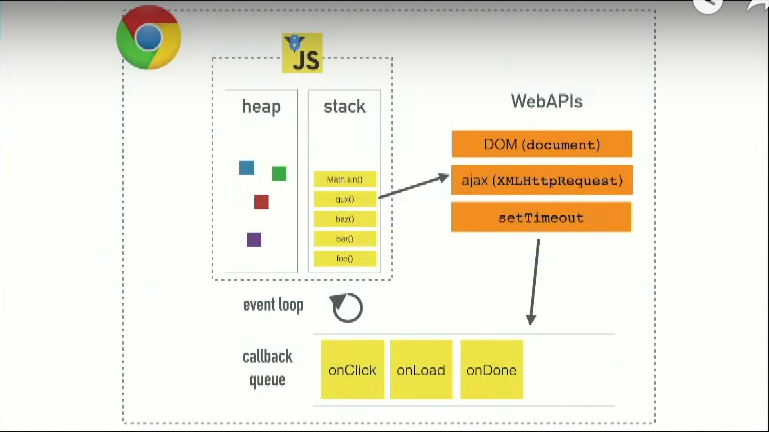
For Chorme engine, v8, it has call stack.
And all the async opreations functions are stay in webapis. So everytime you call 'setTimeout()' or http call, it will always call webapis.

So, in the picture,
we call the main() function, and push into the call stack;
then console.log("Hi"); put into call stack and finish then poped up from the call stack;
third, setTimeout() function run into the call stack, then it call webapis with callback function, so push into webapis. And setTimeout() popup from the call stack.
fourth, console.log('JSC'); push into the call stack and poped up.
Finally main() finished and poped up:

So what left here is just webapis have a callback function, waiting 5 second, when the time out, it was push to the task queue, NOT to the call stack.

Now the 'Event loop' come in, what event loop does is: it check whether there is any task in the call stack.... if yes, finish those functions in the calll stack first. If not, then event loop checks the task queue then push the callback from the task queue to call stack.
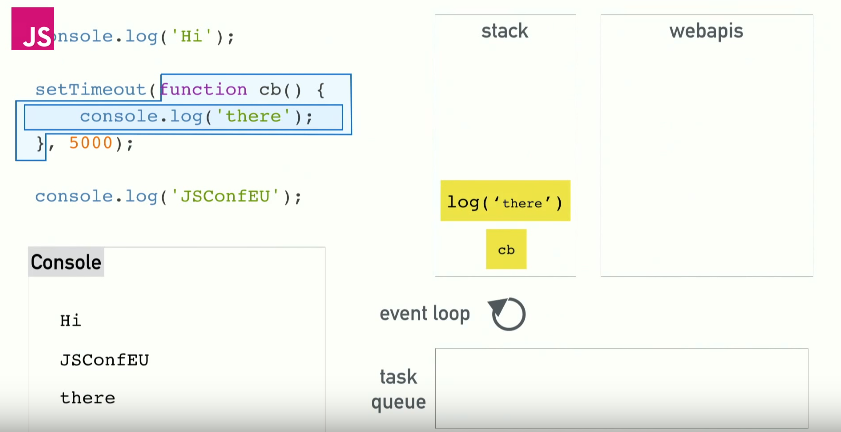
Then console.log() function run and poped up from the call stack.
-----------------------------------------
You might have met the problem that you run setTimeout(fn(), 0); it wait no time, but the fn() come at last:
function one(){

  console.log("One");

}

function two(){

  console.log("Two");

}

function delay(){

  console.log("Delay");

}

one();

setTimeout(delay, 0);

two();

/*

"One"

"Two"

"Delay"

*/
That is because, setTimeout is webapis, so the callback function delay() will be pushed into the 'task queue'. It will wait all the functions in 'call stack' finish, then even loop will check the task queue and push the callback to the call stack. So the "Delay" console log out at the bottom.
Link: https://www.youtube.com/watch?v=8aGhZQkoFbQ
[Javascript] Task queue & Event loop.的更多相关文章
- JavaScript事件循环(Event Loop)机制
JavaScript 是单线程单并发语言 什么是单线程 主程序只有一个线程,即同一时间片断内其只能执行单个任务. 为什么选择单线程? JavaScript的主要用途是与用户互动,以及操作DOM.这决定 ...
- 详解JavaScript中的Event Loop(事件循环)机制
前言 我们都知道,javascript从诞生之日起就是一门单线程的非阻塞的脚本语言.这是由其最初的用途来决定的:与浏览器交互. 单线程意味着,javascript代码在执行的任何时候,都只有一个主线程 ...
- JavaScript 事件循环 — event loop
引言 相信所有学过 JavaScript 都知道它是一门单线程的语言,这也就意味着 JS 无法进行多线程编程,但是 JS 当中却有着无处不在的异步概念 .在初期许多人会把异步理解成类似多线程的编程模式 ...
- 一文梳理JavaScript 事件循环(Event Loop)
事件循环(Event Loop),是每个JS开发者都会接触到的概念,但是刚接触时可能会存在各种疑惑. 众所周知,JS是单线程的,即同一时间只能运行一个任务.一般情况下这不会引发问题,但是如果我们有一个 ...
- 从Javascript单线程谈Event Loop
假如面试回答js的运行机制时,你可能说出这么一段话:"Javascript的事件分同步任务和异步任务,遇到同步任务就放在执行栈中执行,而碰到异步任务就放到任务队列之中,等到执行栈执行完毕之后 ...
- 深入理解Javascript单线程谈Event Loop
假如面试回答js的运行机制时,你可能说出这么一段话:"Javascript的事件分同步任务和异步任务,遇到同步任务就放在执行栈中执行,而碰到异步任务就放到任务队列之中,等到执行栈执行完毕之后 ...
- JavaScript 运行机制 (Event Loop)
单线程就意味着,所有任务需要排队,前一个任务结束,才会执行后一个任务.如果前一个任务耗时很长,后一个任务就不得不一直等着. 所有任务可以分成两种,一种是同步任务(synchronous),另一种是异步 ...
- Javascript之Event Loop
先看段代码: console.log(1); setTimeout(function () { console.log(2); new Promise(function (resolve, rejec ...
- JavaScript 运行机制详解:Event Loop
参考地址:http://www.ruanyifeng.com/blog/2014/10/event-loop.html 一.为什么JavaScript是单线程? JavaScript语言的一大特点就是 ...
随机推荐
- FZU 1686 神龙的难题(DLX反复覆盖)
FZU 1686 神龙的难题 pid=1686" target="_blank" style="">题目链接 题意:中文题 思路:每个1看成列, ...
- MySQL数据库的双向加密方式
如果你正在运行使用MySQL的Web应用程序,那么你把密码或者其他敏感信息保存在应用程序里的机会就很大.保护这些数据免受或者窥探者的获取 是一个令人关注的重要问题,因为您既不能让未经授权的人员使用或者 ...
- Android(java)学习笔记262:JNI之工具快速开发步骤
下面通过一个案例说明一下,利用工具jni快速开发步骤 1.新建一个Android工程,命名为"03_对int数组加1",如下: 2. 在MainActivity.java中对add ...
- C编程风格.
C语言编程风格. 关于编程风格,不同书上有不同规范,不同公司都有自己的一套定义.根据自己的编程习惯做个简要说明. 1.变量定义 在定义变量时,前缀使用变量的类型,之后使用表现变量用途的英文单词或单词缩 ...
- 服务 IntentService 前台服务 定时后台服务
Activity public class MainActivity extends ListActivity { private int intentNumber = 0; @Ove ...
- tomcat启动报错总结
错误一 webapps\ROOT does not exist or is not a readable directory 错误原因:在tomcat的server.xml的context中配置了不存 ...
- 使用pcs api往免费的百度网盘上传下载文件
百度个人云盘空间大,完全免费,而且提供了pcs api供调用操作文件,在平时的项目里往里面保存一些文件是很实用的. 环境准备: 开通读写网盘的权限及获取access_token:http://blog ...
- HTML&CSS基础学习笔记1.20-DIV标签2
<span>标签 标签div把文档分割为独立的.不同的部分,而在HTML中,<span>标签则被用来组合文档中的行内元素. 看个实例: <!DOCTYPE html> ...
- Android学习笔记--Handler用法总结
不错的例子:http://www.cnblogs.com/menlsh/archive/2013/06/07/3125341.html 转自:一叶知秋的博客 http://blog.sina.com. ...
- javascript中的一些基本方法收藏
W3C DOM 什么是DOM,DOM其实就是把一个HTML或者XML等符合W3C标准的文档内容模拟成一个JAVA对象,这样才能给JAVA或者JS来操作.下面是JS中模拟出的内置DOM对象documen ...