
HTML5 中canvas支持触摸屏的签名面板
1.前言
最近实在是太忙了,从国庆之后的辞职,在慢慢的找工作,到今天在现在的这家公司上班大半个月了,太多的心酸泪无以言表,面试过程中,见到的坑货公司是一家又一家,好几家公司自己都只是上一天班就走了,其中有第一天上班就加班到10点的,有一家公司在体育西路那边,太远,第一天回家挤公交也是太累,以前上班都是走路上班的,自己确实不适合挤公交,还有的公司面试的时候和你说什么大数据,性能优化什么的,进公司一看,他们就是用的最简单的三层,没有什么设计模式,总之太多心酸,幸运的是现在这家公司还不错,找工作就是要宁缺毋滥。
2.canvcas标签
canvas基础教程:<canvas> 标签定义图形,比如图表和其他图像。HTML5 的 canvas 元素使用 JavaScript 在网页上绘制图像。甚至可以在 canvas 上创建并操作动画,这不是使用画笔和油彩所能够实现的。跨所有 web 浏览器的完整 HTML5 支持还没有完成,但在新兴的支持中,canvas 已经可以在几乎所有现代浏览器上良好运行。canvas 拥有多种绘制路径、矩形、圆形、字符以及添加图像的方法。来公司一个月了主要也是学习为主,我是做后台开发,以前也没有用过Oracle数据库,这一个月也主要是学习H5的一些新特新,还有就是css3.0,在就是Oracle在服务器上面的安装部署,一些数据导入导出,数据备份啥的,前端的东西都比较差,现在也是一个学习的机会,就当好好学习了。
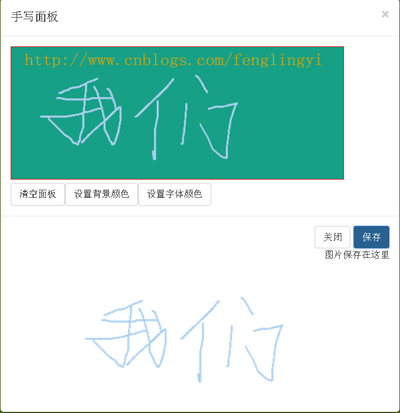
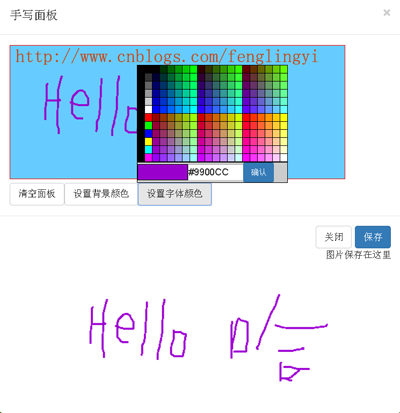
3.手写签名面板
公司做的是自动化办公OA系统,一些审核的地方需要加入一些手写签名的功能,刚开始做这个也是没有思路,在网上也找了一下资料,后来发现H5有这个canvcas新标签,感到格外是欣喜。于是拿过来试一下,还真可以。
4.页面代码
@{

    Layout = null;

}

<!DOCTYPE html>

<html>

<head>

    <meta name="viewport" content="width=device-width" />

    <title>Testpage</title>

    <script src="~/Assets/jquery-2.1.1.js"></script>

    <script src="~/Assets/bootstrap/bootstrap.js"></script>

    <link href="~/Assets/bootstrap/bootstrap.css" rel="stylesheet" />

    <script src="~/Scripts/WritingPad.js"></script>

    <script src="~/Assets/jq-signature.js"></script>

</head>

<body style="background-color:#b6ff00">

    <button class="btn btn-primary" type="button" style="position:relative">点击我</button>

</body>

</html>

<script>

    $(function () {

        $(".btn,.btn-primary").click(function () {

            var wp = new WritingPad();

            //wp.init();

        });

    });

</script>
5.脚本代码一
/**

 * 功能:签名canvas面板初始化,为WritingPad.js手写面板js服务。

 * 作者:黄金锋 (549387177@qq.com)

 * 日期:2015-11-15  15:51:01

 * 版本:version 1.0

 */

(function (window, document, $) {

    'use strict';

  // Get a regular interval for drawing to the screen

  window.requestAnimFrame = (function (callback) {

    return window.requestAnimationFrame ||

      window.webkitRequestAnimationFrame ||

      window.mozRequestAnimationFrame ||

      window.oRequestAnimationFrame ||

      window.msRequestAnimaitonFrame ||

      function (callback) {

        window.setTimeout(callback, 1000/60);

      };

  })();

  /*

  * Plugin Constructor

  */

  var pluginName = 'jqSignature',

      defaults = {

        lineColor: '#222222',

        lineWidth: 1,

        border: '1px dashed #CCFF99',

        background: '#FFFFFF',

        width: 500,

        height: 200,

        autoFit: false

      },

      canvasFixture = '<canvas></canvas>';

  function Signature(element, options) {

    // DOM elements/objects

    this.element = element;

    this.$element = $(this.element);

    this.canvas = false;

    this.$canvas = false;

    this.ctx = false;

    // Drawing state

    this.drawing = false;

    this.currentPos = {

      x: 0,

      y: 0

    };

    this.lastPos = this.currentPos;

    // Determine plugin settings

    this._data = this.$element.data();

    this.settings = $.extend({}, defaults, options, this._data);

    // Initialize the plugin

    this.init();

  }

  Signature.prototype = {

    // Initialize the signature canvas

    init: function() {

      // Set up the canvas

      this.$canvas = $(canvasFixture).appendTo(this.$element);

      this.$canvas.attr({

        width: this.settings.width,

        height: this.settings.height

      });

      this.$canvas.css({

        boxSizing: 'border-box',

        width: this.settings.width + 'px',

        height: this.settings.height + 'px',

        border: this.settings.border,

        background: this.settings.background,

        cursor: 'crosshair'

      });

      // Fit canvas to width of parent

      if (this.settings.autoFit === true) {

        this._resizeCanvas();

      }

      this.canvas = this.$canvas[0];

      this._resetCanvas();

      // Set up mouse events

      this.$canvas.on('mousedown touchstart', $.proxy(function(e) {

        this.drawing = true;

        this.lastPos = this.currentPos = this._getPosition(e);

      }, this));

      this.$canvas.on('mousemove touchmove', $.proxy(function(e) {

        this.currentPos = this._getPosition(e);

      }, this));

      this.$canvas.on('mouseup touchend', $.proxy(function(e) {

        this.drawing = false;

        // Trigger a change event

        var changedEvent = $.Event('jq.signature.changed');

        this.$element.trigger(changedEvent);

      }, this));

      // Prevent document scrolling when touching canvas

      $(document).on('touchstart touchmove touchend', $.proxy(function(e) {

        if (e.target === this.canvas) {

          e.preventDefault();

        }

      }, this));

      // Start drawing

      var that = this;

      (function drawLoop() {

        window.requestAnimFrame(drawLoop);

        that._renderCanvas();

      })();

    },

    // Clear the canvas

    clearCanvas: function() {

      this.canvas.width = this.canvas.width;

      this._resetCanvas();

    },

    // Get the content of the canvas as a base64 data URL

    getDataURL: function() {

      return this.canvas.toDataURL();

    },

    reLoadData: function () {

        this.$canvas.remove();

        this._data = this.$element.data();

        //for (var i in this.settings) {

        //    alert(i+":"+this.settings[i]);

        //}

        //this.settings = $.extend({}, defaults, this._data);

        this.init();

    },

    // Get the position of the mouse/touch

    _getPosition: function(event) {

      var xPos, yPos, rect;

      rect = this.canvas.getBoundingClientRect();

      event = event.originalEvent;

      // Touch event

      if (event.type.indexOf('touch') !== -1) { // event.constructor === TouchEvent

        xPos = event.touches[0].clientX - rect.left;

        yPos = event.touches[0].clientY - rect.top;

      }

      // Mouse event

      else {

        xPos = event.clientX - rect.left;

        yPos = event.clientY - rect.top;

      }

      return {

        x: xPos,

        y: yPos

      };

    },

    // Render the signature to the canvas

    _renderCanvas: function() {

      if (this.drawing) {

        this.ctx.moveTo(this.lastPos.x, this.lastPos.y);

        this.ctx.lineTo(this.currentPos.x, this.currentPos.y);

        this.ctx.stroke();

        this.lastPos = this.currentPos;

      }

    },

    // Reset the canvas context

    _resetCanvas: function() {

      this.ctx = this.canvas.getContext("2d");

      this.ctx.strokeStyle = this.settings.lineColor;

      this.ctx.lineWidth = this.settings.lineWidth;

    },

    // Resize the canvas element

    _resizeCanvas: function() {

      var width = this.$element.outerWidth();

      this.$canvas.attr('width', width);

      this.$canvas.css('width', width + 'px');

    }

  };

  /*

  * Plugin wrapper and initialization

  */

  $.fn[pluginName] = function ( options ) {

    var args = arguments;

    if (options === undefined || typeof options === 'object') {

      return this.each(function () {

        if (!$.data(this, 'plugin_' + pluginName)) {

          $.data(this, 'plugin_' + pluginName, new Signature( this, options ));

        }

      });

    }

    else if (typeof options === 'string' && options[0] !== '_' && options !== 'init') {

      var returns;

      this.each(function () {

        var instance = $.data(this, 'plugin_' + pluginName);

        if (instance instanceof Signature && typeof instance[options] === 'function') {

            var myArr=Array.prototype.slice.call( args, 1 );

            returns = instance[options].apply(instance, myArr);

        }

        if (options === 'destroy') {

          $.data(this, 'plugin_' + pluginName, null);

        }

        //if (options === 'reLoadData') {

        //    //this.$canvas.remove();

        //    $.data(this, 'plugin_' + pluginName, null);

        //    this._data = this.$element.data();

        //    this.settings = $.extend({}, defaults, options, this._data);

        //    this.init();

        //}

      });

      return returns !== undefined ? returns : this;

    }

  };

})(window, document, jQuery);
6.脚本代码二
/**
* 功能:使用该jQuery插件来制作在线签名或涂鸦板,用户绘制的东西可以用图片的形式保存下来。
* 作者:黄金锋 (549387177@qq.com)
* 日期:2015-11-16 13:51:01
* 版本:version 1.0
*/ var WritingPad = function () { var current = null; $(function () { initHtml(); initTable(); initSignature(); if ($(".modal")) {
$(".modal").modal("toggle");
} else {
alert("没用手写面板");
} $(document).on("click", "#myClose,.close", null, function () {
$('#mymodal').modal('hide');
$("#mymodal").remove(); }); $(document).on("click", "#mySave", null, function () { var myImg = $('#myImg').empty();
var dataUrl = $('.js-signature').jqSignature('getDataURL');
var img = $('<img>').attr('src', dataUrl);
$(myImg).append($('<p>').text("图片保存在这里"));
$(myImg).append(img); }); $(document).on("click", "#myEmpty", null, function () {
$('.js-signature').jqSignature('clearCanvas'); }); $(document).on("click", "#myBackColor", null, function () { $('#colorpanel').css('left', '95px').css('top', '45px').css("display", "block").fadeIn();
//$("canvas").css("background", "#EEEEEE");
$("#btnSave").data("sender", "#myBackColor");
}); $(document).on("click", "#myColor", null, function () {
$('#colorpanel').css('left', '205px').css('top', '45px').css("display", "block").fadeIn();
$("#btnSave").data("sender", "#myColor");
}); $(document).on("mouseover", "#myTable", null, function () { if ((event.srcElement.tagName == "TD") && (current != event.srcElement)) {
if (current != null) { current.style.backgroundColor = current._background }
event.srcElement._background = event.srcElement.style.backgroundColor;
//$("input[name=DisColor]").css("background-color", event.srcElement.style.backgroundColor);
//var color = event.srcElement.style.backgroundColor;
//var strArr = color.substring(4, color.length - 1).split(',');
//var num = showRGB(strArr);
//$("input[name=HexColor]").val(num);
current = event.srcElement;
} }); $(document).on("mouseout", "#myTable", null, function () { if (current != null) current.style.backgroundColor = current._background }); $(document).on("click", "#myTable", null, function () { if (event.srcElement.tagName == "TD") {
var color = event.srcElement._background;
if (color) {
$("input[name=DisColor]").css("background-color", color);
var strArr = color.substring(4, color.length - 1).split(',');
var num = showRGB(strArr);
$("input[name=HexColor]").val(num);
}
} }); $(document).on("click", "#btnSave", null, function () { $('#colorpanel').css("display", "none");
var typeData = $("#btnSave").data("sender");
var HexColor = $("input[name=HexColor]").val();
var data = $(".js-signature").data();
if (typeData == "#myColor") {
data["plugin_jqSignature"]["settings"]["lineColor"] = HexColor;
$('.js-signature').jqSignature('reLoadData');
}
if (typeData == "#myBackColor") { data["plugin_jqSignature"]["settings"]["background"] = HexColor;
$('.js-signature').jqSignature('reLoadData');
}
}); $("#mymodal").on('hide.bs.modal', function () {
$("#colorpanel").remove();
$("#mymodal").remove();
$("#myTable").remove();
}); }); function initHtml() { var html = '<div class="modal" id="mymodal">' +
'<div class="modal-dialog">' +
'<div class="modal-content">' +
'<div class="modal-header">' +
'<button type="button" class="close" data-dismiss="modal"><span aria-hidden="true">×</span><span class="sr-only">Close</span></button>' +
'<h4 class="modal-title">手写面板</h4>' +
'</div>' +
'<div class="modal-body">' +
'<div class="js-signature" id="mySignature">' +
'</div>' +
'<div>' +
'<button type="button" class="btn btn-default" id="myEmpty">清空面板</button>' +
'<button type="button" class="btn btn-default" id="myBackColor">设置背景颜色</button>' +
//'<div style="position:absolute;relative">' +
'<button type="button" class="btn btn-default" id="myColor">设置字体颜色</button>' +
'<div id="colorpanel" style="position:absolute;z-index:99;display:none"></div>' +
//'</div>'+
'</div>' +
'</div>' +
'<div class="modal-footer">' + '<button type="button" class="btn btn-default" id="myClose">关闭</button>' +
'<button type="button" class="btn btn-primary" id="mySave">保存</button>' +
'<div id="myImg">' +
'<div>' + '</div>' +
'</div>' +
'</div>' +
'</div>'; $('body').append(html);
} function initTable() {
var colorTable = "";
var ColorHex = new Array('00', '33', '66', '99', 'CC', 'FF');
var SpColorHex = new Array('FF0000', '00FF00', '0000FF', 'FFFF00', '00FFFF', 'FF00FF');
for (var i = 0; i < 2; i++)
{
for (var j = 0; j < 6; j++)
{
colorTable = colorTable + '<tr height=12>';
colorTable = colorTable + '<td width=11 style="background-color:#000000"></td>'; if (i == 0)
{
colorTable = colorTable + '<td width=11 style="background-color:#' + ColorHex[j] + ColorHex[j] + ColorHex[j] + '"></td>';
}
else
{
colorTable = colorTable + '<td width=11 style="background-color:#' + SpColorHex[j] + '"></td>';
} //colorTable = colorTable + '<td width=11 style="background-color:#000000"></td>'; for (var k = 0; k < 3; k++)
{
for (l = 0; l < 6; l++)
{
colorTable = colorTable + '<td width=11 style="background-color:#' + ColorHex[k + i * 3] + ColorHex[l] + ColorHex[j] + '"></td>';
}
}
colorTable = colorTable + '</tr>'; }
}
colorTable =
'<table border="1" id="myTable" cellspacing="0" cellpadding="0" style="border-collapse: collapse;cursor:pointer;" bordercolor="000000">'
+ colorTable + '</table>' +
'<table width=225 border="0" cellspacing="0" cellpadding="0" style="border:1px #000000 solid;border-collapse: collapse;background-color:#000000">' +
'<tr style="height:30px">' +
'<td colspan=21 bgcolor=#cccccc>' + '<table cellpadding="0" cellspacing="1" border="0" style="border-collapse: collapse">' +
'<tr>' +
'<td width="3"><input type="text" name="DisColor" size="6" disabled style="border:solid 1px #000000;background-color:#ffff00"></td>' +
'<td width="3"><input type="text" name="HexColor" size="7" style="border:inset 1px;font-family:Arial;" value="#000000"></td>' +
'<td width="3"><button type="button" class="btn btn-primary btn-sm" id="btnSave">确认</button></td>' +
'</tr>' +
'</table>' + '</td>' +
'</tr>' +
'</table>';
$("#colorpanel").append(colorTable);
} function initSignature() { if (window.requestAnimFrame) {
var signature = $("#mySignature");
signature.jqSignature({ width: 500, height: 200, border: '1px solid red', background: '#16A085', lineColor: '#ABCDEF', lineWidth: 2, autoFit: false });
//{ width: 600, height: 200, border: '1px solid red', background: '#16A085', lineColor: '#ABCDEF', lineWidth: 2, autoFit: true }
} else { alert("请加载jq-signature.js");
return;
}
} function showRGB(arr) {
hexcode = "#";
for (x = 0; x < 3; x++) {
var n = arr[x];
if (n == "") n = "0";
if (parseInt(n) != n)
return alert("RGB颜色值不是数字!");
if (n > 255)
return alert("RGB颜色数字必须在0-255之间!");
var c = "0123456789ABCDEF", b = "", a = n % 16;
b = c.substr(a, 1); a = (n - a) / 16;
hexcode += c.substr(a, 1) + b
}
return hexcode;
} function init() { } return {
init: function () {
init();
}
};
}
HTML5 中canvas支持触摸屏的签名面板的更多相关文章
- jSignature做手动签名,canvas支持触摸屏的签名涂鸦插件
整理的前面可以用的: <!doctype html> <html lang="en"> <head> <meta charset=&quo ...
- html5中不再支持的元素
html5中不再支持的元素:1.acronym(建议abbr) : 定义首字母缩写2.applet(建议object): 定义 applet3.basefont(使用css控制)4.big(使用css ...
- H5_0009:关于HTML5中Canvas的宽、高设置问题
关于HTML5中Canvas的宽.高设置问题 Canvas元素默认宽 300px, 高 150px, 设置其宽高可以使用如下方法(不会被拉伸): 方法一: <canvas widt ...
- html5中canvas的使用 获取鼠标点击页面上某点的RGB
1.html5中的canvas在IE9中可以跑起来.在IE8则跑不起来,这时候就需要一些东西了. 我推荐这种方法,这样显得代码不乱. <!--[if lt IE9]> <script ...
- HTML5中Canvas概述
一.HTML5 Canvas历史 Canvas的概念最初是由苹果公司提出的,用于在Mac OS X WebKit中创建控制板部件(dashboard widget).在Canvas出现之前,开发人员若 ...
- HTML5中canvas介绍
1.什么是Canvas canvas 是 HTML5 提供的一个用于展示绘图效果的标签 canvas 提供了一个空白的图形区域,可以使用特定的JavaScript API来绘画图形(canvas 2D ...
- html5中Canvas为什么要用getContext('2d')
HTML DOM getContext() 方法 HTML DOM Canvas 对象 定义和用法 getContext() 方法返回一个用于在画布上绘图的环境. 语法 Canvas.getConte ...
- 在html5中不支持<table>的cellpadding 和 cellspacing ; 2) 如何用css实现 cellpadding, cellspacing ; 3) tr , th 是 有 border, 没有 padding 的.
1.初始: <!DOCTYPE html> <html lang="en"> <head> <meta charset="UTF ...
- html5中audio支持音频格式
HTML5 Audio标签能够支持wav, mp3, ogg, acc, webm等格式,但有个很重要的音乐文件格式midi(扩展名mid)却在各大浏览器中都没有内置的支持.不是所有的浏览器都支持MP ...
随机推荐
- nginx 与 lua 开发环境搭建
首先下载最新版的 相关软件 的安装文件. nginx: http://nginx.org/en/download.html LuaJIT: http://luajit.org/download.htm ...
- 算法(二)之遗传算法(SGA)
算法(二)之遗传算法(SGA) 遗传算法(Genetic Algorithm)又叫基因进化算法或进化算法,是模拟达尔文的遗传选择和自然淘汰的生物进化过程的计算模型,属于启发式搜索算法一种. 下面通过下 ...
- centos7 新手基本命令
1. yum update 安装系统后,更新yum到最新版本 提示错误 :cannot find a valid baseurl for repo: base/7/x86_64 解决:修改/etc/s ...
- mac下 home-brew安装及php,nginx环境安装及配置
Homebrew官网 http://brew.sh/index_zh-cn.html Homebrew是神马 linux系统有个让人蛋疼的通病,软件包依赖,好在当前主流的两大发行版本都自带了解决方案, ...
- jsp中的四种对象作用域
page:当前页面,也就是只要挑到别的页面就失效了,可以近似理解为java的this对象 request:一次会话,简单的理解就是一次请求范围内有效,例如如果通过forward方式跳转,则forwar ...
- scau 8633 回文划分
8633 回文划分 时间限制:1000MS 内存限制:1000K 题型: 编程题 语言: 无限制 Description 我们说一个字符串是回文串,那么意味着这个串从两边读起来的字母都是一样的. ...
- 给Azure 虚机的硬盘扩充容量[转]
接到用户的需求,需要给Azure 上虚机的硬盘扩充空间,网上找到下面的资源,做个备忘: https://github.com/azure-contrib/WindowsAzureDiskResizer
- [转]ActionScript 3.0入门:Hello World、文件读写、数据存储(SharedObject)、与JS互调
本文转自:http://www.cnblogs.com/artwl/p/3396330.html 近期项目中可能要用到Flash存取数据,并与JS互调,所以就看了一下ActionScript 3.0, ...
- NOIP2010提高组 关押罪犯 -SilverN
(洛谷P1525) 题目描述 S 城现有两座监狱,一共关押着N 名罪犯,编号分别为1~N.他们之间的关系自然也极不和谐.很多罪犯之间甚至积怨已久,如果客观条件具备则随时可能爆发冲突.我们用“怨气值”( ...
- cri-o 创建非infra容器
1.// cri-o/server/container.go // CreateContainer creates a new container in specified PodSandbox fu ...