
pgbouncer+pg(fdw)+pg(datanode)分表方案
pgbouncer+pg(fdw)+pg(datanode)分表方案
(环境RHEL6.5,PG9.4.5,pgbouncer1.5.4,libevent2.0.22)
方案架构图如下:
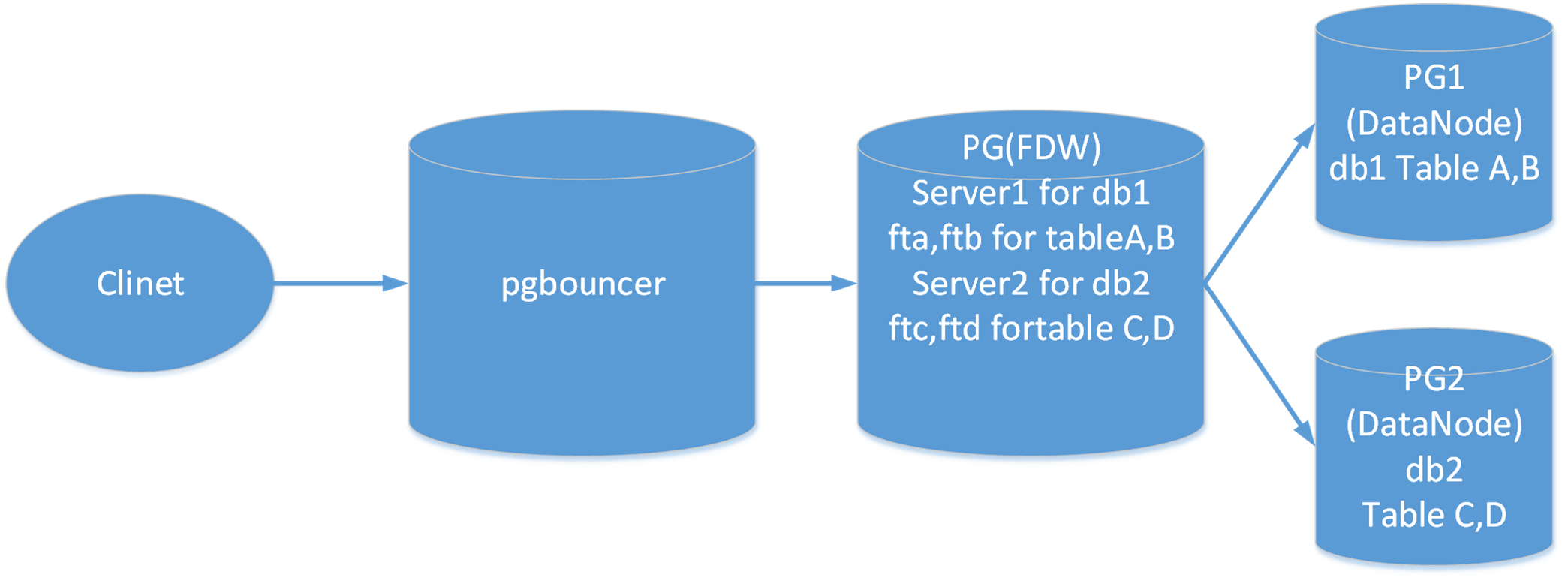
pgbouncer+pg(fdw)+pg(datanode)分表方案架构图
(pgbouncer,PG(FDW)所在的机器为192.168.0.106,PG1所在的机器为192.168.0.108,PG2所在的机器为192.168.0.109)
在192.168.0.106,192.168.0.108,192.168.0.109三台机器上安装并配置PG9.4.5
1 从http://www.postgresql.org/ftp/source/v9.4.5/下载PG9.4.5到Linux的/opt/soft_bak/目录
1.1安装PG所需要的依赖软件包
yum -y install readline-devel zlib zlib-devel openssl openssl-devel gcc make flex bison
1.2解压并安装PG9.4.5
tar zxvf postgresql-9.4.5.tar.gz
cd postgresql-9.4.5
./configure
gmake world
gmake install-world
1.3 更改pgsql文件夹的所属主
chown –R postgres /usr/local/pgsql/
su - postgres
1.4 在/usr/local/pgsql/目录下创建data目录
mkdir data
1.5 初始化PG数据库集群
cd /usr/local/pgsql/bin
./initdb –D ../data
1.6 修改PG的配置文件
修改postgresql.conf
listen_addresses = '*'
port = 5432
在pg_hba.conf文件中添加如下语句
host all all 192.168.0.0/24 trust
1.7启动PG数据库
cd /usr/local/pgsql/bin
./pg_ctl –D ../data start
2在192.168.0.106上安装及配置libevent
2.1从http://libevent.org/下载稳定版本的libevent(libevent-2.0.22-stable.tar.gz)到Linux的/opt/soft_bak/目录下
2.2 解压并安装libevent
tar zxvf libevent-2.0.22-stable.tar.gz
cd /opt/soft_bak/libevent-2.0.22-stable
./configure –prefix=/home/postgres/libevent
make
make install
2.3 在/etc/profile文件中加入如下命令并保存
export LD_LIBRARY_PATH=/home/postgres/libevent/lib:$LD_LIBRARY_PATH
2.4使更改的profile生效
source /etc/profile
3 在192.168.0.106上安装并配置pgbouncer
3.1 从http://pgfoundry.org/projects/pgbouncer下载 pgbouncer(pgbouncer-1.5.4.tar.gz) 到Linux的/opt/soft_bak/目录下
3.2 解压并安装pgbouncer
tar zxvf pgbouncer-1.5.4.tar.gz
cd /opt/soft_bak/pgbouncer-1.5.4
./configure --prefix= /home/postgres/pgbouncer --with- libevent= /home/postgres/libevent
make
make install
3.3配置pgbouncer
在/home/postgres/pgbouncer/目录下创建pgbouncer目录config(postgres用户)
mkdir config
3.4复制pgbouncer配置文件及用户列表文件到/home/postgres/pgbouncer/config
cp /home/postgres/pgbouncer/share/doc/pgbouncer/pgbouncer.ini userlist.txt /home/postgres/pgbouncer/config
3.5配置pgbouncer.ini文件
[databases]
bouncerdb = host=127.0.0.1 port=5432 dbname=bouncerdb user=postgres password=postgres
[pgbouncer]
logfile = /home/postgres/pgbouncer/pgbouncer.log
pidfile = /home/postgres/pgbouncer/pgbouncer.pid
listen_addr = *
listen_port = 1999
auth_type = trust
auth_file = /home/postgres/pgbouncer/config/userlist.txt
admin_users = postgres
stats_users = postgres
pool_mode = transaction
server_reset_query = DISCARD ALL
max_client_conn = 100
default_pool_size = 20
3.6配置用户密码文件userlist.txt
"postgres" "postgres"
4 使用pgbouncer
在pgbouncer pg(fdw)创建bouncerdb,用于连接
create database bouncerdb;
在pgbouncer.ini中配置连接 数据库为bouncerdb
4.1启动pgbouncer
[postgres@rhel65 bin]$ ./pgbouncer -d /home/postgres/pgbouncer/config/pgbouncer.ini
2015-11-18 15:35:13.609 2014 LOG File descriptor limit: 1024 (H:4096), max_client_conn: 100, max fds possible: 130
2015-11-18 15:35:13.610 2014 LOG Stale pidfile, removing
[root@rhel65 config]# ps -ef|grep pgbouncer
postgres 2016 1 0 15:35 ? 00:00:00 ./pgbouncer -d /home/postgres/pgbouncer/config/pgbouncer.ini
root 2020 1221 0 15:37 pts/1 00:00:00 grep pgbouncer
[root@rhel65 config]#
4.2使用pgbouncer连接
[postgres@rhel65 bin]$ ./psql -h 127.0.0.1 -p 1999 pgbouncer
psql (9.4.5, server 1.5.4/bouncer)
Type "help" for help.
pgbouncer=# show help;
NOTICE: Console usage
DETAIL:
SHOW HELP|CONFIG|DATABASES|POOLS|CLIENTS|SERVERS|VERSION
SHOW STATS|FDS|SOCKETS|ACTIVE_SOCKETS|LISTS|MEM
SHOW DNS_HOSTS|DNS_ZONES
SET key = arg
RELOAD
PAUSE [<db>]
RESUME [<db>]
KILL <db>
SUSPEND
SHUTDOWN
SHOW
[postgres@rhel65 bin]$ ./psql -h 127.0.0.1 -p 1999 -U postgres -d bouncerdb
psql (9.4.5)
Type "help" for help.
bouncerdb=#
4.3在数据库192.168.0.108的PG数据库上创建数据库db108并创建测试表schema_db108.user_info108
postgres=# create database db108;
CREATE DATABASE
postgres=# \c db108
You are now connected to database "db108" as user "postgres".
db108=# create schema schema_db108;
CREATE SCHEMA
db108=# create table schema_db108.user_info108(userid int,name text,crt_time timestamp without time zone);
CREATE TABLE
4.4在数据库192.168.0.109的PG数据库上创建数据库db109并创建测试表schema_db109.user_info109
-bash-4.2$ ./psql
psql (9.4.5)
Type "help" for help.
postgres=# create database db109;
CREATE DATABASE
postgres=# \c db109
You are now connected to database "db109" as user "postgres".
db109=# create schema schema_db109;
CREATE SCHEMA
db109=# create table schema_db109.user_info109(userid int,name text,crt_time timestamp without time zone);
CREATE TABLE
db109=#
4.5在192.168.0.106的数据库bouncerdb上创建postgres_fdw
[postgres@rhel65 bin]$ ./psql -h 127.0.0.1 -p 1999 -U postgres -d bouncerdb
psql (9.4.5)
Type "help" for help.
bouncerdb=# create extension postgres_fdw;
CREATE EXTENSION
4.6在192.168.0.106上为192.168.0.108的db108数据库创建外部服务器s108
bouncerdb=# CREATE SERVER s108 FOREIGN DATA WRAPPER postgres_fdw;
CREATE SERVER
bouncerdb=# select * from pg_foreign_server;
srvname | srvowner | srvfdw | srvtype | srvversion | srvacl | srvoptions
---------+----------+--------+---------+------------+--------+------------
s108 | 10 | 16388 | | | |
(1 row)
bouncerdb=# alter server s108 options ( add hostaddr '192.168.0.108', add port '5432', add dbname 'db108');
ALTER SERVER
4.7为用户授权
bouncerdb=# grant usage on foreign server s108 to postgres;
GRANT
bouncerdb=# select * from pg_foreign_server ;
srvname | srvowner | srvfdw | srvtype | srvversion | srvacl | srvoptions
---------+----------+--------+---------+------------+-----------------------+-------------------------------------------------
s108 | 10 | 16388 | | | {postgres=U/postgres} | {hostaddr=192.168.0.108,port=5432,dbname=db108}
(1 row)
4.8为外部服务器s108创建用户映射
bouncerdb=# create user mapping for postgres server s108 options(user 'postgres',password 'postgres');
CREATE USER MAPPING
4.9为108的数据库db108中的表schema_db108.user_info108(userid int,name text,crt_time timestamp without time zone)创建外部表
bouncerdb=# create foreign table ft_user_info108(userid int,name text,crt_time timestamp without time zone)
server s108 options(schema_name 'schema_db108',table_name 'user_info108');
CREATE FOREIGN TABLE
4.10通过外部表向表中插入数据;
bouncerdb=# insert into ft_user_info108 (userid,name,crt_time)
bouncerdb-# select generate_series(1,100000),'abcdef',clock_timestamp();
INSERT 0 100000
bouncerdb=# select * from ft_user_info108 limit 5;
userid | name | crt_time
--------+--------+----------------------------
1 | abcdef | 2015-11-18 17:08:52.489583
2 | abcdef | 2015-11-18 17:08:52.491158
3 | abcdef | 2015-11-18 17:08:52.491548
4 | abcdef | 2015-11-18 17:08:52.491899
5 | abcdef | 2015-11-18 17:08:52.492339
(5 rows)
4.11在108的db108数据库中查看数据:
db108=# select * from schema_db108.user_info108 limit 5 ;
userid | name | crt_time
--------+--------+----------------------------
1 | abcdef | 2015-11-18 17:08:52.489583
2 | abcdef | 2015-11-18 17:08:52.491158
3 | abcdef | 2015-11-18 17:08:52.491548
4 | abcdef | 2015-11-18 17:08:52.491899
5 | abcdef | 2015-11-18 17:08:52.492339
(5 rows)
5.1在192.168.0.106上为192.168.0.109的数据库db109创建外部服务器s109
bouncerdb=# CREATE SERVER s109 FOREIGN DATA WRAPPER postgres_fdw;
CREATE SERVER
bouncerdb=# select * from pg_foreign_server;
srvname | srvowner | srvfdw | srvtype | srvversion | srvacl | srvoptions
---------+----------+--------+---------+------------+-----------------------+-------------------------------------------------
s108 | 10 | 16388 | | | {postgres=U/postgres} | {hostaddr=192.168.0.108,port=5432,dbname=db108}
s109 | 10 | 16388 | | | |
(2 rows)
bouncerdb=# alter server s109 options ( add hostaddr '192.168.0.109', add port '5432', add dbname 'db109');
ALTER SERVER
5.2为用户授权
bouncerdb=# grant usage on foreign server s109 to postgres;
GRANT
bouncerdb=# select * from pg_foreign_server ;
srvname | srvowner | srvfdw | srvtype | srvversion | srvacl | srvoptions
---------+----------+--------+---------+------------+-----------------------+-------------------------------------------------
s108 | 10 | 16388 | | | {postgres=U/postgres} | {hostaddr=192.168.0.108,port=5432,dbname=db108}
s109 | 10 | 16388 | | | {postgres=U/postgres} | {hostaddr=192.168.0.109,port=5432,dbname=db109}
(2 rows)
5.3创建用户映射
bouncerdb=# create user mapping for postgres server s109 options(user 'postgres',password 'postgres');
CREATE USER MAPPING
5.4为109的数据库db109中的表schema_db109.user_info109(userid int,name text,crt_time timestamp without time zone)创建外部表
bouncerdb=# create foreign table ft_user_info109(userid int,name text,crt_time timestamp without time zone)
server s109 options(schema_name 'schema_db109',table_name 'user_info109');
CREATE FOREIGN TABLE
5.5通过外部表向表中插入数据;
bouncerdb=# insert into ft_user_info109 (userid,name,crt_time)
select generate_series(1,100000),'abcdef',clock_timestamp();
INSERT 0 100000
bouncerdb=# select * from ft_user_info109 limit 5;
userid | name | crt_time
--------+--------+----------------------------
1 | abcdef | 2015-11-18 17:18:06.431162
2 | abcdef | 2015-11-18 17:18:06.43275
3 | abcdef | 2015-11-18 17:18:06.43334
4 | abcdef | 2015-11-18 17:18:06.433895
5 | abcdef | 2015-11-18 17:18:06.434497
(5 rows)
5.6在192.168.0.109的db109中查看数据:
db109=# select * from schema_db109.user_info109 limit 5;
userid | name | crt_time
--------+--------+----------------------------
1 | abcdef | 2015-11-18 17:18:06.431162
2 | abcdef | 2015-11-18 17:18:06.43275
3 | abcdef | 2015-11-18 17:18:06.43334
4 | abcdef | 2015-11-18 17:18:06.433895
5 | abcdef | 2015-11-18 17:18:06.434497
(5 rows)
pgbouncer+pg(fdw)+pg(datanode)分表方案的更多相关文章
- 重磅来袭,使用CRL实现大数据分库分表方案
关于分库分表方案详细介绍 http://blog.csdn.net/bluishglc/article/details/7696085 这里就不作详细描述了 分库分表方案基本脱离不了这个结构,受制于实 ...
- Mysql分库分表方案
Mysql分库分表方案 1.为什么要分表: 当一张表的数据达到几千万时,你查询一次所花的时间会变多,如果有联合查询的话,我想有可能会死在那儿了.分表的目的就在于此,减小数据库的负担,缩短查询时间. m ...
- 【分库、分表】MySQL分库分表方案
一.Mysql分库分表方案 1.为什么要分表: 当一张表的数据达到几千万时,你查询一次所花的时间会变多,如果有联合查询的话,我想有可能会死在那儿了.分表的目的就在于此,减小数据库的负担,缩短查询时间. ...
- Mysql 之分库分表方案
Mysql分库分表方案 为什么要分表 当一张表的数据达到几千万时,你查询一次所花的时间会变多,如果有联合查询的话,我想有可能会死在那儿了.分表的目的就在于此,减小数据库的负担,缩短查询时间. mysq ...
- MySQL 分库分表方案,总结的非常好!
前言 公司最近在搞服务分离,数据切分方面的东西,因为单张包裹表的数据量实在是太大,并且还在以每天60W的量增长. 之前了解过数据库的分库分表,读过几篇博文,但就只知道个模糊概念, 而且现在回想起来什么 ...
- 基于Mysql数据库亿级数据下的分库分表方案
移动互联网时代,海量的用户数据每天都在产生,基于用户使用数据的用户行为分析等这样的分析,都需要依靠数据都统计和分析,当数据量小时,问题没有暴露出来,数据库方面的优化显得不太重要,一旦数据量越来越大时, ...
- MySQL主从(MySQL proxy Lua读写分离设置,一主多从同步配置,分库分表方案)
Mysql Proxy Lua读写分离设置 一.读写分离说明 读写分离(Read/Write Splitting),基本的原理是让主数据库处理事务性增.改.删操作(INSERT.UPDATE.DELE ...
- Mysql 分库分表方案
0 引言 当一张表的数据达到几千万时,你查询一次所花的时间会变多,如果有联合查询的话,我想有可能会死在那儿了.分表的目的就在于此,减小数据库的负担,缩短查询时间. mysql中有一种机制是表锁定和行锁 ...
- mysql 数据库 分表后 怎么进行分页查询?Mysql分库分表方案?
Mysql分库分表方案 1.为什么要分表: 当一张表的数据达到几千万时,你查询一次所花的时间会变多,如果有联合查询的话,我想有可能会死在那儿了.分表的目的就在于此,减小数据库的负担,缩短查询时间. m ...
随机推荐
- 利用EXCEL表实现网页数据采集到MYSQL数据库
先复制页面表格数据到EXCEL中,比如 2012-1-4 52.7 52.7 49 48.83 190007 9506968 2012-1-5 48.86 49.79 45.72 45.6 62325 ...
- Linux下使用inode删除文件
Linux 下有时候某些文件无法使用 rm 直接删除, 比如该文件的文件名含有终端不能正确显示的字符.# ls -litotal 0441511 -rw-r--r-- 1 root root 0 Ap ...
- ORACLE的安装与网页版创建表空间的简单操作以及PLsql的简单操作
1.oracle的安装: 安装简单易学,在这里不做解释.下载看装包后耐心等待,注意安装目录不要有中文字符,尽量按照指定目录进行安装.安装完成后会占用有大约5g的内存. 如果要卸载oracle,需要用其 ...
- js 程序出发事件
<html> <head><title>Test</title></head> <body> <div id='divTe ...
- EBS 资源路径
/data03/DEV4/comn/java/cmcc/upload cd $OA_HTML /data03/DEV4/comn/html 日志 $IAS_ORACLE_HOME/Apache/Js ...
- java ReentrantReadWriteLock
// read and write lock is mutual exclusion lock //Listing 7-3. Using ReadWriteLock to Satisfy a Dict ...
- css 鼠标移动到按钮图片改变;图片换层;鼠标放上透明度改变直到隐藏;
css 鼠标移动到按钮图片改变: 方法一: <style> .pp a { width:575px; height:157px; background:url(1.jpg);/*图片地址* ...
- FW docker使用问题总结,解决国内不能访问gcr.io的问题
docker使用问题总结 解决国内不能访问gcr.io的问题 国内可以通过https://dashboard.daocloud.io来下载. 比如?gcr.io/google_containers/p ...
- Oracle客户端显示乱码解决
1.查找当前服务器的字符集: 2.使用查询得到的结果集,设置本地local字符集:(不要照抄图片)
- input[type=checkbox]
一个问题,今天用jquery-1.11.3.min.js时遇到的关于input复选框的问题. 类似于以下代码: <ul class="demo"> <li> ...